Zavedení
The Ottlite Executive Desk Lamp is designed to enhance your workspace with versatile lighting and convenient features. With an adjustable arm, 3 color temperatures, and 5 brightness settings, this lamp provides optimal illumination for any task. OttLite technology helps reduce glare and eyestrain, allowing for extended comfortable use. Additionally, a built-in 2.1A USB port offers a convenient charging solution for your devices, keeping them within easy reach.
Důležité bezpečnostní informace
- Před použitím si přečtěte všechny pokynyamp.
- Nepoužívejte lamp s poškozeným kabelem nebo zástrčkou.
- Nechte si lamp mimo dosah vody nebo jiných kapalin.
- Nepokoušejte se rozebírat nebo opravovat lamp sami. Veškerý servis svěřte kvalifikovanému servisnímu personálu.
- Používejte pouze napájecí adaptér dodaný s lamp.
- Odpojte lamp ze zásuvky před čištěním.
Obsah balení
Zaškrtněte prosím políčko u následujících položek:
- Ottlite Executive Desk Lamp Jednotka
- Napájecí adaptér
- Uživatelská příručka (tento dokument)
Konec produktuview
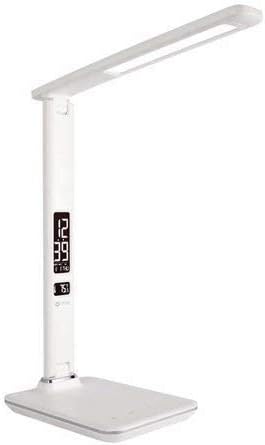
This image shows the Ottlite Executive Desk Lamp in white, featuring a sleek design with an adjustable arm and a rectangular LED light panel. The base includes a digital display showing time and temperature, along with touch controls.
The Ottlite Executive Desk Lamp features a sturdy base, an adjustable arm, and a rotatable lamp head. The base integrates a digital display for time, date, and temperature, along with touch-sensitive controls for light adjustments and other functions. A USB charging port is located on the side or back of the base.
Nastavení
- Opatrně vyjměte lamp a všechny součásti z obalu.
- Umístěte lamp na stabilním rovném povrchu.
- Connect the power adapter cable to the power input port on the back of the lamp báze.
- Zapojte napájecí adaptér do standardní elektrické zásuvky.
- The digital display should illuminate, and the lamp je nyní připraven k použití.
Návod k obsluze
Zapnutí/vypnutí
- Chcete-li otočit lamp on or off, gently touch the Moc icon on the touch control panel located on the base.
Nastavení jasu
- S lamp on, repeatedly touch the Jas icon (often represented by a sun or light bulb symbol) to cycle through the 5 available brightness levels.
Změna teploty barev
- To change the light's color temperature (e.g., warm white, natural daylight, cool white), touch the Režim or Teplota barev icon. The lamp offers 3 distinct color temperature settings.
Using the 2.1A USB Charging Port
- Locate the USB charging port on the side or back of the lamp báze.
- Plug your device's USB charging cable into this port.
- The 2.1A output provides fast charging for compatible smartphones, tablets, and other USB-powered devices.
Setting Time, Date, and Temperature Display
The digital display on the lamp base shows time, date, and ambient temperature. To set these:
- Stiskněte a podržte MODE button (often labeled 'M') on the control panel until the time display starts flashing.
- Použijte UP a DOLŮ buttons (often labeled '+' and '-') to adjust the hour.
- Stiskněte MODE znovu pro přechod na minuty a poté upravte pomocí NAHORU/DOLŮ.
- Pokračujte v stisknutí MODE procházet nastavení roku, měsíce a dne a upravovat každé z nich pomocí NAHORU/DOLŮ.
- After setting the date, you may be able to switch between 12-hour and 24-hour format, and Celsius/Fahrenheit for temperature, using the NAHORU/DOLŮ buttons when the respective setting is flashing.
- Stiskněte MODE one last time or wait a few seconds for the settings to save.
Nastavení alarmu
Pokud vaše lamp model includes an alarm function:
- Stiskněte tlačítko MODE button repeatedly until the alarm icon (often a bell) appears on the display.
- Stiskněte a podržte MODE dokud nezačne blikat čas budíku.
- Použití NAHORU/DOLŮ to set the desired alarm hour and then minutes.
- Stiskněte MODE potvrdit.
- Chcete-li aktivovat nebo deaktivovat budík, stiskněte tlačítko UP button when the alarm time is displayed (not flashing). An alarm icon will appear/disappear to indicate status.
Údržba
- Ujistěte se, že lamp je před čištěním odpojená.
- Otřete lamp surfaces with a soft, dry cloth.
- Nepoužívejte abrazivní čisticí prostředky, vosky ani rozpouštědla, protože by mohly poškodit povrchovou úpravu.
- LED světelný zdroj je integrovaný a nelze jej vyměnit uživatelem.
Odstraňování problémů
| Problém | Možná příčina | Řešení |
|---|---|---|
| Lamp nezapne. | Napájecí adaptér není správně připojen nebo ze zásuvky není žádné napájení. | Ujistěte se, že je napájecí adaptér bezpečně zapojený doamp a funkční elektrickou zásuvku. Vyzkoušejte zásuvku s jiným zařízením. |
| Digitální displej je prázdný nebo bliká. | Problém s napájením nebo vnitřní závada. | Check power connection. Unplug and re-plug the lamp. If issue persists, contact customer support. |
| Nabíjecí port USB nefunguje. | Device not compatible, cable faulty, or lamp není napájen. | Ujistěte se, že lamp is powered on. Try a different USB cable and another device. Verify device requires 2.1A charging. |
| Cannot set time/date. | Nesprávné pořadí tlačítek. | Refer to the 'Setting Time, Date, and Temperature Display' section and follow the steps carefully. Ensure you are pressing and holding the MODE button correctly. |
Specifikace
| Funkce | Detail |
|---|---|
| Značka | OttLite |
| Číslo modelu | 799366629696 |
| Lamp Typ | Stůl Lamp |
| Typ světelného zdroje | LED |
| Nastavení jasu | 5 úrovní |
| Nastavení teploty barev | 3 režimů |
| Nabíjecí port USB | 2.1A Výstup |
| Kontrolní metoda | Dotek |
| Zdroj napájení | Elektrický kabel |
| Materiál | Plast, kov |
| Hmotnost položky | 3.04 libry |
| Rozměry balení | 17.6 x 8.3 x 6.8 palce |
Záruka a podpora
For warranty information and customer support, please refer to the warranty card included with your product or visit the official OttLite webUschovejte si účtenku jako doklad o koupi pro případné reklamace.


