Zavedení
Welcome to your new VTech ES1610A-T Twin Bluetooth Mobile Connect Digital Cordless Phone. This manual provides essential information for setting up, operating, and maintaining your device. Please read these instructions carefully to ensure proper use and to take full advantage of your phone's features.
Nastavení
Rozbalení a počáteční nastavení
Before using your phone, ensure all components are present and correctly connected.
- Connect the power adapter to the base unit and a wall outlet.
- Připojte telefonní kabel k základní jednotce a do telefonní zásuvky ve zdi.
- Insert the rechargeable batteries into each handset, observing polarity.
- Place each handset on its respective charging cradle to charge for at least 16 hours before first use.

Image: The power adapter with a UK plug and two telephone line cords with clear RJ11 connectors. This image illustrates the essential cables required for setting up the VTech ES1610A-T phone system.
Návod k obsluze
Základní funkce telefonu
Your VTech ES1610A-T phone offers a range of features for convenient communication.
- Uskutečňování a přijímání hovorů: Use the keypad to dial numbers. Press the talk button to answer incoming calls.
- Sluchátko, hlasitý odposlech: Activate the high-quality speakerphone for hands-free conversations.
- Přepojení hovoru: Transfer calls between handsets.
- Interkom: Communicate directly between handsets.
- 3-Way Conference Calls: Conduct conference calls with two external parties.
- Adresář telefonního seznamu: Store up to 20 names and numbers for quick dialing.
- ID volajícího: View the last 10 incoming caller numbers.
- Ringer Melodies: Choose from 10 ringer melodies (5 polyphonic and 5 standard).
- Vyhledávač stránek/telefonů: Use the base unit to locate misplaced handsets.
- Funkce alarmu: Set alarms directly from the handset.
- Bluetooth Mobile Connect: Pair your mobile phone to make and receive mobile calls through your cordless handset.
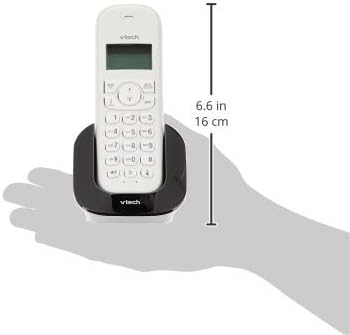
Image: A white VTech cordless handset resting in its black charging cradle, with a measurement indicating a height of 6.6 inches (16 cm). This image provides a visual reference for the handset's size and design.
Údržba
Čištění a péče
- Povrchy telefonu čistěte měkkým hadříkemamp tkanina. Vyhněte se používání agresivních chemikálií nebo abrazivních čisticích prostředků.
- Do not immerse the phone or its components in water.
- Keep the charging contacts on the handset and base unit clean to ensure proper charging.
- Telefon skladujte na chladném a suchém místě mimo dosah přímého slunečního záření a extrémních teplot.
Informace o baterii
- The phone operates with 4x AAA rechargeable batteries. Use only the specified type of rechargeable batteries.
- Pokud telefon nebudete delší dobu používat, vyjměte baterie, abyste zabránili jejich vytečení.
- Použité baterie zlikvidujte v souladu s místními předpisy.
Odstraňování problémů
If you encounter issues with your VTech ES1610A-T phone, refer to the following common solutions:
| Problém | Řešení |
|---|---|
| Žádný oznamovací tón | Ensure the telephone line cord is securely connected to both the base unit and the wall jack. Check if the power adapter is connected and the base unit is powered on. |
| Sluchátko se nenabíjí | Verify the handset is correctly seated in the charging cradle. Clean the charging contacts on both the handset and cradle. Ensure the power adapter is connected. |
| Špatná kvalita hovoru nebo omezený dosah | Move closer to the base unit. Avoid placing the base unit near large metal objects, other electronic devices, or thick walls that may interfere with the signal. |
| Cannot pair Bluetooth mobile phone | Ensure your mobile phone's Bluetooth is enabled and discoverable. Follow the pairing instructions in the phone's menu. Make sure the mobile phone is within range of the VTech base unit. |
Specifikace
- Číslo modelu: ES1610-2A BK
- Značka: VTech
- Barva: Černý
- Materiál: Plast
- Typ telefonu: Bezdrátový
- Zdroj napájení: Elektrický kabel
- Typ vytáčecího telefonu: Jedna klávesnice
- Typ systému odpovědí: Digitální
- Kompatibilní zařízení: Mobile Phones (Bluetooth)
- Možnost konferenčního hovoru: 3-cestný
- Víceřádkový provoz: Provoz na jedné lince
- Talk Range: Digital enhanced clarity 300m (outdoor)*
- Radiation Mode: Ultra-low Radiation Mode**
- Zobrazit: Large character and backlit LCD display
- Kapacita telefonního seznamu: 20 jmen a čísel
- Paměť ID volajícího: 10 caller numbers
- Ringer Melodies: 10 (5 polyphonic and 5 standard)
- Baterie: 4x AAA rechargeable batteries (per handset)
*Actual range may vary depending on environmental conditions.
**Ultra-low Radiation Mode operates with the lowest radiation when the handset is placed on the base unit.
Záruka a podpora
For warranty information and technical support, please refer to the warranty card included with your product or visit the official VTech webwebu. Uschovejte si účtenku jako doklad o koupi.


