1. Konec produktuview
The Boytone BT-38SM is a versatile multi-audio system designed to bring your music to life from various sources. It features a classic turntable for vinyl records, an AM/FM radio, a CD player, and a cassette player. With 2 built-in stereo speakers, it offers a complete audio experience. Additionally, it supports recording from vinyl, radio, and cassette directly to MP3 format via its SD slot and USB port, and includes an AUX input for external devices.

Figure 1.1: Boytone BT-38SM Multi-Audio System. This image displays the complete unit with its turntable, control panel, and integrated speakers.
2. Důležité bezpečnostní informace
Před použitím tohoto výrobku si pečlivě přečtěte všechny bezpečnostní a provozní pokyny. Uschovejte si tyto pokyny pro budoucí použití.
- Zdroj napájení: Tento výrobek používejte pouze s typem zdroje napájení uvedeným na štítku s označením.
- Větrání: Zajistěte dostatečné větrání. Neblokujte žádné větrací otvory.
- Voda a vlhkost: Nepoužívejte tento výrobek v blízkosti vody nebo v nadměrně vlhkém prostředí.
- Teplo: Keep the product away from heat sources such as radiators, heat registers, stoves, or other appliances that produce heat.
- Čištění: Před čištěním odpojte tento výrobek ze zásuvky. K čištění použijte suchý hadřík.
- Servis: Nepokoušejte se tento výrobek opravit sami. Veškerý servis svěřte kvalifikovanému servisnímu personálu.
- Vstup objektu a kapaliny: Nikdy nestrkejte do tohoto výrobku otvory jakéhokoli druhu, protože by se mohly dotknout nebezpečného objemutage body nebo zkratované části, které by mohly způsobit požár nebo úraz elektrickým proudem. Nikdy na výrobek nelijte žádnou tekutinu.
3. Obsah balení
Zkontrolujte prosím, zda jsou ve vašem balení obsaženy všechny níže uvedené položky:
- Boytone BT-38SM Multi-Audio System
- Napájecí adaptér/kabel
- Dálkové ovládání
- Uživatelská příručka
- 45 RPM Adapter (for turntable)
4. Součásti a ovládací prvky produktu
4.1 Sekce gramofonu

Figure 4.1: Turntable Components. This image highlights the key parts of the turntable, including the tone arm, stylus, and speed selector.
- Přepravní šroub: Secures the turntable platter during transport. Loosen before use.
- 33/45/78 RPM Fixator: Speed selector for different record types.
- Tone Arm Raise Lever: Zvedá a spouští raménko přenosky.
- Tone Arm Placement: Rest for the tone arm when not in use.
- Raménko tónu: Drží kazetu a stylus.
- Stylus: Jehla, která čte drážky desky.
4.2 Ovládací prvky na předním panelu

Figure 4.2: Front Control Panel. This image shows the various buttons, knobs, and display on the front of the unit.
- Funkční knoflík: Selects between Turntable, CD, Cassette, Radio, Bluetooth, USB/SD, and AUX modes.
- Volume/Standby Knob: Controls volume and powers the unit on/off.
- Knoflík ladění: Upravuje rádiovou frekvenci.
- Displej: Zobrazuje aktuální režim, číslo skladby, rádiovou frekvenci atd.
- Play/Pause, Stop, Skip Buttons: Control playback for CD, USB/SD, and Cassette.
- Tlačítko nahrávání: Zahájí nahrávání na USB/SD.
- Zásobník na CD: For inserting compact discs.
- Kazetový pult: For inserting audio cassettes.
- USB port: Pro USB flash disky.
- Slot pro SD kartu: Pro paměťové karty SD.
- Jack AUX IN: 3.5mm vstup pro externí audio zařízení.
- Sluchátkový jack: 3.5mm výstup pro soukromý poslech.
5. Počáteční nastavení
5.1 Vybalení a umístění
- Opatrně vyjměte jednotku z obalu.
- Place the unit on a flat, stable surface away from direct sunlight, heat sources, and excessive dust or moisture.
- Remove any protective films or packing materials from the unit, especially from the turntable platter and stylus.
- Loosen the transit screw located on the turntable deck (if present) to free the platter.
5.2 Připojení napájení
- Ujistěte se, že je vypínač jednotky v poloze VYPNUTO.
- Connect the power cord to the AC IN jack on the back of the unit.
- Plug the other end of the power cord into a standard AC wall outlet (120V/60Hz or as specified).
6. Návod k obsluze
6.1 Obecná obsluha
- Turn the Volume/Standby knob clockwise to power on the unit. The display will light up.
- Rotate the Function knob to select your desired audio source (e.g., PHONO, CD, TAPE, RADIO, BT, USB/SD, AUX).
- Adjust the Volume/Standby knob to control the listening volume.
6.2 Ovládání gramofonu (režim PHONO)
- Select PHONO mode using the Function knob.
- Umístěte desku na talíř gramofonu.
- Select the appropriate speed (33, 45, or 78 RPM) using the speed selector. Use the 45 RPM adapter for singles.
- Lift the tone arm using the tone arm raise lever.
- Carefully move the tone arm over the desired starting track of the record.
- Gently lower the tone arm using the lever. The stylus will make contact with the record, and playback will begin.
- To stop playback, lift the tone arm, return it to its rest, and lower the lever.
6.3 Ovládání CD přehrávače (režim CD)
- Select CD mode using the Function knob.
- Press the EJECT button (if present) or gently push the CD tray to open it.
- Vložte CD do mechaniky potištěnou stranou nahoru.
- Gently push the CD tray to close it. The unit will read the disc.
- Stisknutím tlačítka PLAY/PAUSE spustíte nebo pozastavíte přehrávání.
- Mezi skladbami se můžete pohybovat pomocí tlačítek SKIP.
- Stisknutím tlačítka STOP ukončíte přehrávání.
6.4 Cassette Player Operation (TAPE Mode)
- Select TAPE mode using the Function knob.
- Vložte kazetu do kazetového magnetofonu.
- Stisknutím tlačítka PLAY spustíte přehrávání.
- Pro navigaci na pásku použijte tlačítka FAST FORWARD a REWIND.
- Press the STOP/EJECT button to stop playback and eject the tape.
6.5 AM/FM Radio Operation (RADIO Mode)
- Select RADIO mode using the Function knob.
- Rotate the Tuning knob to manually tune to your desired radio station.
- Extend the FM antenna (if applicable) for better reception.
6.6 Bluetooth Connection (BT Mode)
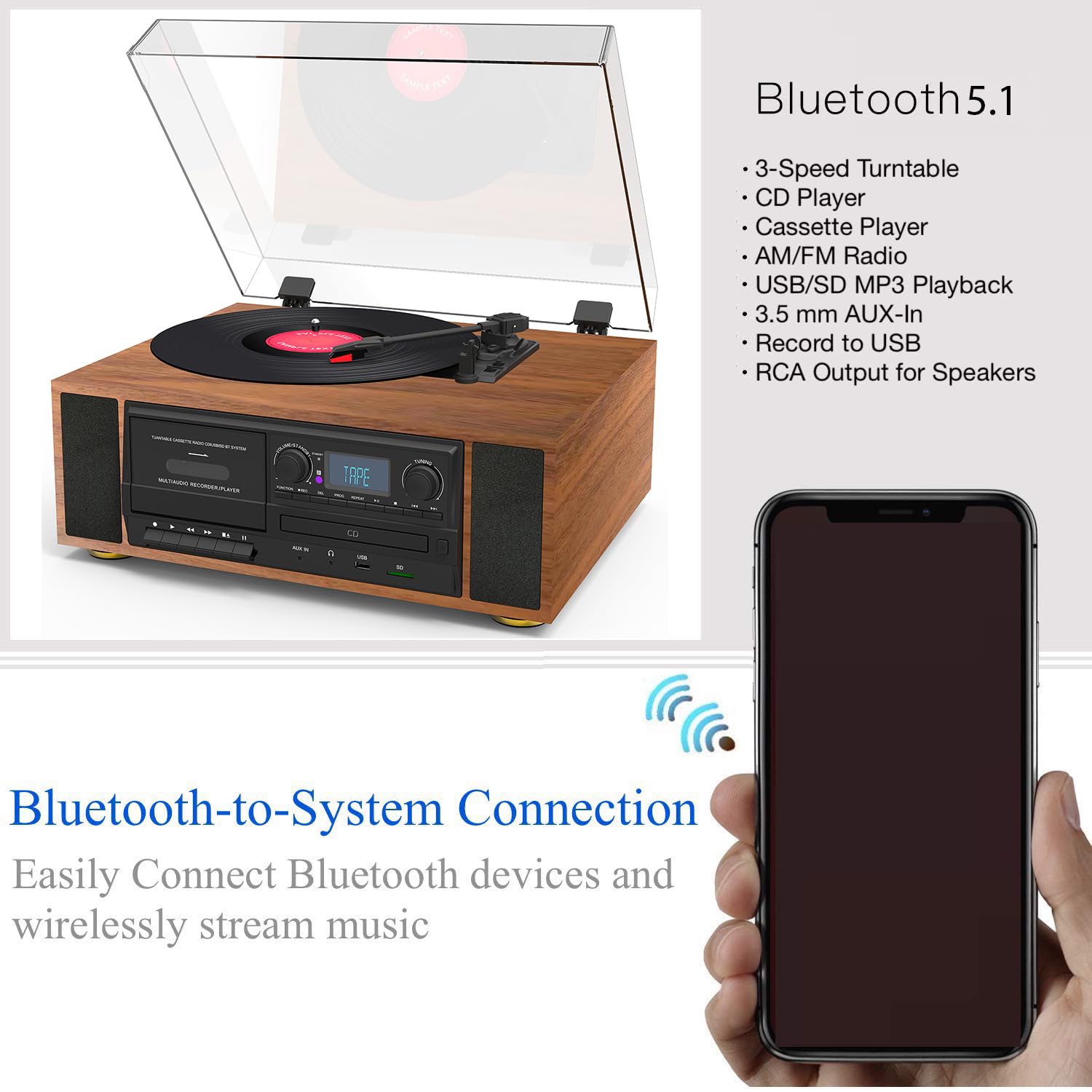
Figure 6.1: Bluetooth Connectivity. This image illustrates the wireless connection between the Boytone BT-38SM and a Bluetooth-enabled device.
- Select BT mode using the Function knob. The display will show "BT" or "PAIRING" and an indicator will flash, indicating it's ready to pair.
- On your Bluetooth-enabled device (e.g., smartphone, tablet), turn on Bluetooth and search for available devices.
- Select "Boytone BT-38SM" (or similar name) from the list of devices.
- Once connected, the indicator will stop flashing, and you can play audio from your device through the BT-38SM.
6.7 USB/SD Playback (USB/SD Mode)
- Vložte USB flash disk do USB portu nebo SD kartu do slotu pro SD kartu.
- Select USB/SD mode using the Function knob. The unit will automatically detect and begin playing compatible audio file(např. MP3).
- Use the PLAY/PAUSE, STOP, and SKIP buttons to control playback.
6.8 Recording to MP3 (USB/SD)
The BT-38SM allows you to record audio from Vinyl, Radio, or Cassette directly to MP3 filena USB flash disku nebo SD kartě.
- Insert a USB flash drive or SD card into the respective slot.
- Select the desired source for recording (PHONO, RADIO, or TAPE) using the Function knob.
- Start playback of the source (e.g., start playing a record, tune to a radio station, or play a cassette).
- Press the RECORD button. The display will indicate that recording has started.
- To stop recording, press the RECORD button again or the STOP button. The recorded file will be saved to your USB/SD device.
6.9 AUX Input (AUX Mode)
- Připojte externí audio zařízení (např. chytrý telefon, MP3 přehrávač) do konektoru AUX IN pomocí 3.5mm audio kabelu (není součástí balení).
- Select AUX mode using the Function knob.
- Play audio from your external device. The sound will be output through the BT-38SM's speakers.
7. Údržba a péče
- Čištění jednotky: K otření vnější strany jednotky použijte měkký, suchý hadřík. Nepoužívejte abrazivní čisticí prostředky, vosky ani rozpouštědla.
- Čištění stylusu: Gently brush the stylus from back to front with a soft brush to remove dust. Do not touch the stylus with your fingers.
- Péče o záznamy: Keep records clean and free of dust. Store them vertically in their sleeves.
- Péče o CD/kazety: Handle CDs by their edges. Keep cassettes in their cases when not in use.
- Protiprachový kryt: Keep the dust cover closed when the unit is not in use to protect the turntable.
8. Řešení problémů
If you experience problems with your unit, please check the following points before contacting support.
| Problém | Možná příčina | Řešení |
|---|---|---|
| Žádná síla | Power cord not connected; Power outlet not active; Unit not turned on. | Ensure power cord is securely plugged in; Test outlet with another device; Turn the Volume/Standby knob clockwise. |
| Žádný zvuk | Volume too low; Incorrect function mode selected; Headphones connected. | Increase volume; Select the correct function mode (e.g., PHONO, CD); Disconnect headphones. |
| Gramofon se neotáčí ani nepřehrává | Transit screw not loosened; Incorrect speed selected; Stylus damaged. | Loosen the transit screw; Select correct RPM; Inspect stylus for damage, replace if necessary. |
| Bluetooth se nepřipojuje | Unit not in BT mode; Device too far; Device already connected to another unit. | Select BT mode; Move device closer to the unit; Disconnect device from other Bluetooth connections and try again. |
| Špatný příjem rádia | Antenna not extended; Interference. | Extend and adjust the FM antenna; Move unit away from other electronic devices. |
9. Specifikace
| Funkce | Detail |
|---|---|
| Značka | Boytone |
| Název modelu | BT-38SM |
| Rozměry produktu | 43.18 x 35.56 x 22.86 cm |
| Hmotnost položky | 7.26 kg (16 liber) |
| Kompatibilní zařízení | Reproduktor |
| Speciální funkce | Vestavěný reproduktor, přenosný |
| Velikost zobrazení na stojící obrazovce | 4 palce |
| svtage | 120 voltů (AC) |
| Zdroj napájení | Elektrický kabel |
| Odstup signálu od šumu (dB) | 60 dB |
| Typ konektoru | Bluetooth, USB |
| Materiál | Plast |
10. Záruka a zákaznická podpora
Boytone products are designed and manufactured to the highest quality standards. For warranty information or technical support, please refer to the warranty card included with your product or visit the official Boytone website. Please have your model number (BT-38SM) and purchase date ready when contacting support.


