Zavedení
The XGIMI Shutter 3D Glasses are designed to deliver an immersive 3D viewing experience when paired with compatible DLP-LINK projectors. These lightweight glasses offer high light transmittance and a high refresh rate for clear, smooth 3D images, ensuring comfort even during extended use.
Klíčové vlastnosti:
- Delivers a true 3D experience.
- Supports Bluetooth signal.
- Cool appearance, light design, comfortable to wear without dizziness.
- High-speed response.
- Auto Power-off function for energy efficiency.
- Low-power self-detected function with LED flash for low battery prompt.
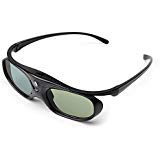
Image: XGIMI Shutter 3D Glasses, showcasinjejich elegantní design.
Nastavení
Kompatibilita
These 3D glasses are designed for use with projectors that support active 3D glasses and DLP-LINK technology. The 3D effect is only available when the source content is in a 3D format.
- Kompatibilní zařízení: 3D DLP-LINK Projectors (e.g., XGIMI Horizon, Horizon Pro, Elfin, H2, MOGO2 PRO, MoGo 3 Pro, MoGo 4, Halo+).
- Nekompatibilní zařízení: Ordinary TVs, Ordinary Projectors (without active 3D DLP-LINK support).
Connecting to a 3D Source (e.g., Blu-ray Player)
To enjoy 3D movies, you will need a 3D Blu-ray disc and a 3D-capable Blu-ray player. Ensure your projector and Blu-ray player are connected using HDMI 2.0 cables for optimal performance.
- Connect your 3D-capable Blu-ray player to your DLP-LINK projector using an HDMI 2.0 cable.
- Insert a 3D Blu-ray disc into the Blu-ray player.
- On your projector, select the correct HDMI input corresponding to your Blu-ray player.
- Once the 3D content starts playing, the screen may appear split (side-by-side or top-and-bottom).
- Access your projector's 3D settings (usually found under 'Image' or 'Display' settings).
- Select the appropriate 3D mode: 'Frame Packing' for Blu-ray discs, 'Side-by-Side' if the screen is split horizontally, or 'Top-and-Bottom' if the screen is split vertically.
Poznámka: Always turn off 3D mode on the projector when not watching 3D content or switching to 2D content to avoid display issues.
Obtaining 3D Content
In addition to Blu-ray discs, some streaming applications may offer 3D content. For example, the Vudu app (available in the United States) provides a selection of 3D movies. Ensure your streaming device (e.g., Fire TV Stick) is compatible and supports 3D playback.
Video: Demonstration of DLP Link 3D Glasses in use, showing the immersive experience.
Video: Guide on how to watch 3D movies with AWOL VISION 3D glasses, including connection and settings.
Operating the 3D Glasses
Power On/Off and Eye Switching
The 3D glasses feature a single button located in the middle of the frame for control:
- Zapnutí: Press the button once to turn on the glasses.
- Switch Left/Right Eye: Press the button again to switch the synchronization between the left and right eyes. This is useful if the 3D effect appears inverted.
- Vypnout: Press and hold the button for 3 seconds to turn off the glasses.
Nabíjení a životnost baterie
The glasses are equipped with a built-in Lithium Ion battery. A 2-3 hour charge provides up to 30 hours of continuous use. A low battery LED will flash to prompt the user when the battery is low.
Optimální Viewing Vzdálenost
For the best 3D viewing experience, maintain an optimal viewing distance of 2-5 meters from the projection screen.
Údržba
To ensure the longevity and optimal performance of your XGIMI Shutter 3D Glasses, follow these maintenance guidelines:
- Čištění: Use the provided cloth wipe or a soft, lint-free cloth to gently clean the lenses. Avoid abrasive materials or harsh chemicals.
- Skladování: Pokud brýle nepoužíváte, uchovávejte je v ochranném pouzdře, abyste zabránili poškrábání a poškození.
- Nabíjení: Charge the glasses fully before extended periods of non-use to maintain battery health.
- Zacházení: Handle the glasses with care. Avoid dropping them or applying excessive force, especially to the arms, as they can be fragile.
Odstraňování problémů
If you encounter issues with your 3D glasses, consider the following:
- No 3D Effect: Ensure your content is in a 3D format and your projector is set to the correct 3D mode (Frame Packing, Side-by-Side, or Top-and-Bottom). Verify that your projector supports active 3D glasses.
- Inverted 3D Effect: Press the button on the glasses once to switch the left/right eye synchronization.
- Glasses Not Turning On: Check the battery level. If the low battery LED is flashing, charge the glasses.
- Rozmazaný nebo nejasný obraz: Ensure the glasses are clean and that the projector's focus is correctly adjusted. Verify you are within the optimal viewing distance (2-5 meters).
Specifikace
| Funkce | Detail |
|---|---|
| Rozměry balení | 6.69 x 2.83 x 2.24 palce |
| Hmotnost položky | 3.2 unce |
| Výrobce | XGIMI |
| Číslo modelu položky | xgimi 3D glasses |
| Baterie | Jsou vyžadovány 1 lithium-iontové baterie (součástí balení) |
| Datum první dostupnosti | 1. srpna 2018 |
Záruka a podpora
For warranty information or technical support, please refer to the documentation included with your purchase or visit the official XGIMI webUschovejte si doklad o koupi pro případné reklamace.


