1. Úvod
The Azpen Dockall D101 is a versatile device combining a Qi wireless charging dock station, a Bluetooth speaker, and a phone stand. It is designed to enhance your audio experience while conveniently charging your compatible smartphones and tablets.
2. Co je v krabici
- 1 x DockAll Slim D101
- 1 x DC napájecí adaptér
- 1 x Uživatelská příručka

Image: Box contents including the DockAll D101 unit, DC power adapter, and user manual.
3. Konec produktuview
The Dockall D101 features an innovative design that integrates multiple functionalities into one device for home and office use. Key components include:
- Bezdrátová nabíjecí podložka Qi: Pro kompatibilní zařízení.
- Bluetooth reproduktor: For audio streaming.
- Nastavitelný stojan na telefon: Provides an upright viewúhel.
- Ovládací tlačítka: For power, volume, and playback.
- Slot microSD: Supports cards up to 64 GB.

Obrázek: Přední strana view of the Azpen Dockall D101 with a smartphone placed on the charging pad, illustrating wireless charging capability.
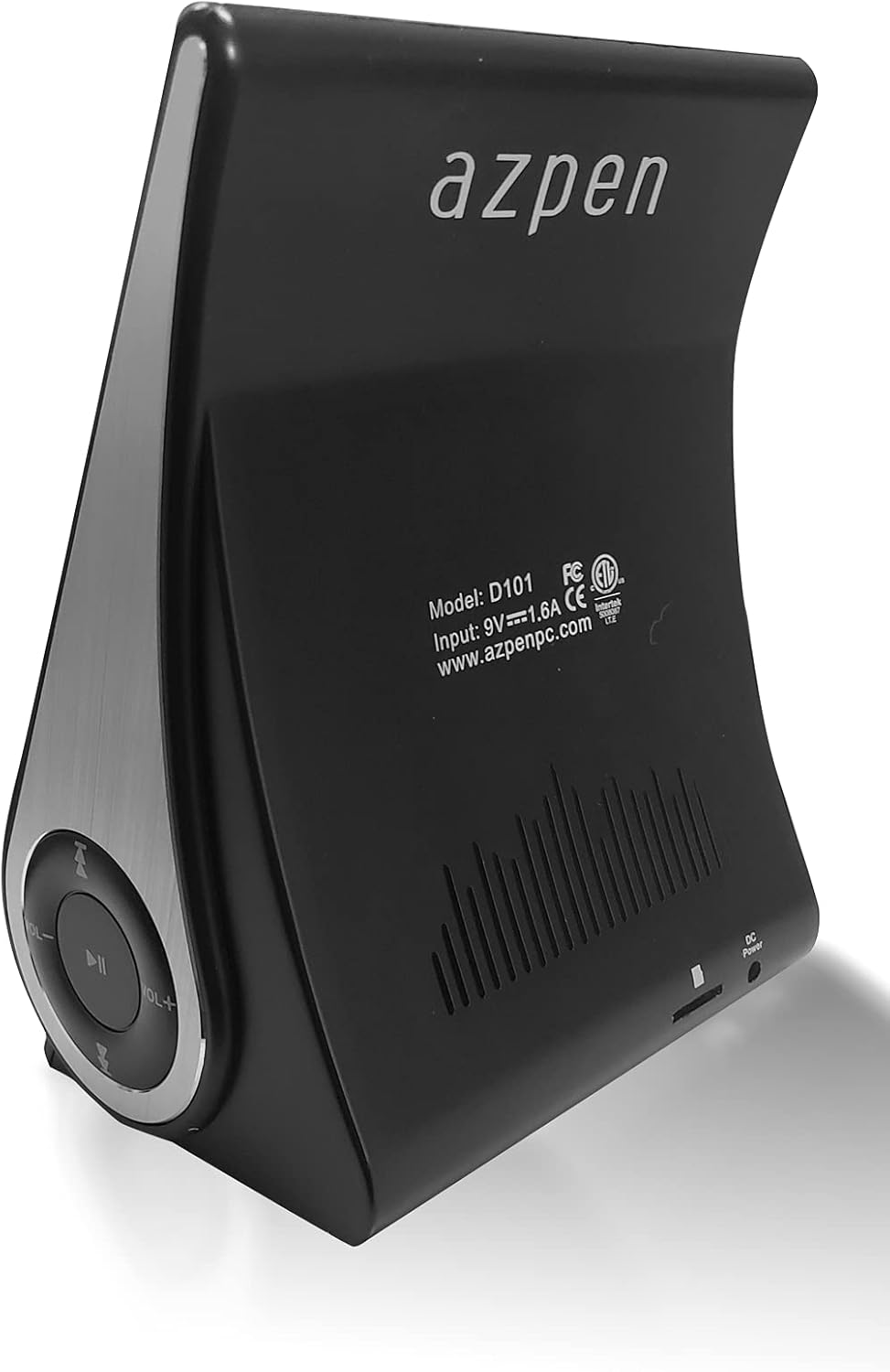
Obrázek: Zadní view of the Azpen Dockall D101, displaying the model number (D101), input specifications, and regulatory certifications.

Obrázek: Side profile of the Azpen Dockall D101, highlighting the circular control panel with volume, playback, and phone call buttons.
4. Nastavení
- Připojení napájení: Connect the provided DC Power Adapter to the "DC Power" port on the back of the Dockall D101. Plug the adapter into a standard wall outlet.
- Umístění: Place the Dockall D101 on a stable, flat surface.
- Adjust Phone Stand: Gently pull up the phone stand to your desired viewing angle. Ensure the stand is securely locked in place.
5. Návod k obsluze
5.1 Zapnutí/vypnutí
- To power on, press and hold the Power button (usually indicated by a circle with a vertical line) on the control panel until the device activates.
- Chcete-li zařízení vypnout, znovu stiskněte a podržte tlačítko napájení, dokud se nevypne.
Bezdrátové nabíjení 5.2 Qi
- Ensure the Dockall D101 is powered on.
- Place your Qi-compatible smartphone or tablet onto the charging pad on the adjustable stand.
- Adjust the position of your device until the solid blue light appears, indicating that wireless charging has begun.
- The Dockall D101 supports fast Qi wireless charging (10W).
- Note: Charging may not work through metal cases or excessively thick phone cases (e.g., OtterBox Defender).
5.3 Funkce Bluetooth reproduktoru
- Párování:
- Power on the Dockall D101.
- Aktivujte Bluetooth na svém smartphonu nebo audio zařízení.
- Hledat "Dockall D101" (or similar name) in your device's Bluetooth settings and select it to pair.
- Potvrzovací zvuk signalizuje úspěšné spárování.
- Přehrávání zvuku:
- Use the control buttons on the Dockall D101 to play/pause, skip tracks (forward/backward), and adjust volume.
- You can also control playback directly from your paired device.
- Hands-free volání:
- When a call comes in, press the Phone button (usually indicated by a phone icon) to answer.
- Speak into the built-in microphone on the Dockall D101.
- Press the Phone button again to end the call.

Image: A smartphone positioned on the Dockall D101 stand, displaying a music player interface, highlighting the device's audio capabilities.
Video: Overview of the Azpen DockAll Mini, demonstrating its features and functionality. While the video showcases a "Mini" model, the core operations for charging and Bluetooth are similar to the D101.
6. Údržba
- Čištění: Use a soft, dry cloth to clean the surface of the Dockall D101. Do not use liquid cleaners or aerosols.
- Skladování: Pokud zařízení delší dobu nepoužíváte, skladujte jej na chladném a suchém místě mimo dosah přímého slunečního záření.
- Zacházení: Zabraňte pádu zařízení na zem nebo jeho vystavení extrémním teplotám či vlhkosti.
7. Řešení problémů
| Problém | Možné řešení |
|---|---|
| Zařízení se nezapíná. | Ensure the DC Power Adapter is securely connected to both the device and a working power outlet. |
| Bezdrátové nabíjení nefunguje. |
|
| Bluetooth se nepřipojuje. |
|
| Špatná kvalita zvuku. |
|
8. Specifikace
- Název modelu: D101
- Typ reproduktoru: Bluetooth reproduktor
- Speciální vlastnosti: Wireless Charger, Upright View Angle, Bluetooth Speaker, 3-in-1 Hub
- Doporučená použití: Pro chytré telefony nebo tablety
- Kompatibilní zařízení: For iPhone 15/14/13/12/11, for Samsung Galaxy S24/S23/S22/S21/S20/S10
- Barva: Černý
- Hmotnost položky: 11.2 unce
- Je voděodolný: FALEŠNÝ
- Typ záruky: Omezený
- Počet položek: 1
- Způsob ovládání: Dotek
- Technologie bezdrátové komunikace: Bluetooth
- Velikost reproduktoru: 5 centimetrů
- Zdroj napájení: Napájení z baterie
- Typ zvukového ovladače: Dynamický ovladač
- UPC: 859592006828
- Výrobce: Azpen
- Rozměry produktu: 5.9 x 4.3 x 3.75 palce
- Maximální výstupní výkon reproduktoru: 5 wattů
- Technologie připojení: Bluetooth
- Režim výstupu zvuku: Mono
- Typ montáže: Dok

Image: Diagram showing the dimensions of the Azpen Dockall D101, with measurements in centimeters.
9. Záruka a podpora
The Azpen Dockall D101 comes with a Limited Warranty. For specific details regarding warranty coverage and to access customer support, please refer to the warranty information provided in the original packaging or visit the official Azpen webmísto.
For further assistance, you may also contact Azpen customer service directly.


