1. Úvod
This manual provides comprehensive instructions for the setup, operation, maintenance, and troubleshooting of your Xiaomi AI Translator. Please read this manual carefully before using the device to ensure optimal performance and longevity.

Obrázek 1: Xiaomi AI Translator device. This image shows the front of the translator, highlighting its minimalist design, central control buttons, and speaker grille at the bottom.
2. Vlastnosti produktu
- Podpora více jazyků: Translates between 14 languages, covering over 170 countries and districts. Supported languages include Chinese, English, Japanese, Korean, French, German, Spanish, Russian, Portuguese, Italian, Dutch, Danish, Finnish, and Swedish.
- Pokročilá technologie umělé inteligence: Utilizes Microsoft voice technology for natural language understanding and accurate mechanical translation, with self-correction capabilities.
- Versatile Assistant Functions: Beyond translation, it acts as a personal assistant for tasks such as music playback, weather updates, time checks, news broadcasts, calculator functions, voice reading, item explanations, story telling, exchange rate conversions, encryption, and relative salutations.
- Redukce šumu: Equipped with technology for clearer audio reception and more precise voice recognition in various environments.
- Přenosný design: Features a pocket-sized, lightweight (approximately 63g), and durable aluminum alloy body with a curved design.

Obrázek 2: Language coverage map. This image illustrates the global reach of the 14 supported languages, indicating the extensive usability of the translator across various regions.

Obrázek 3: AI Translator technology. This image highlights the core technologies, including Microsoft voice and translation services, that power the device's accurate translation capabilities.

Obrázek 4: Assistant functions. This image displays a range of additional features, demonstrating the device's utility beyond simple translation, acting as a comprehensive personal assistant.
3. Díly a ovládací prvky
Familiarize yourself with the various parts and controls of your Xiaomi AI Translator:
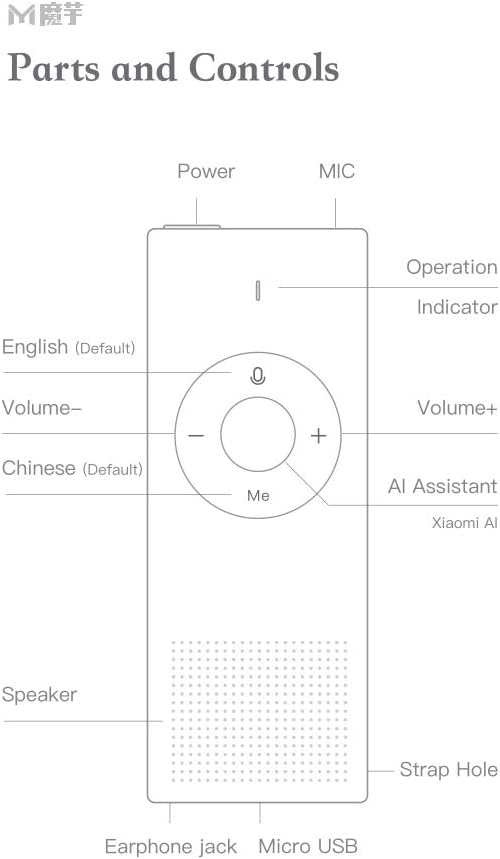
Obrázek 5: Parts and Controls. This diagram labels all external components and buttons of the Xiaomi AI Translator, essential for understanding its operation.
- Vypínač: Located at the top, used to turn the device on/off and for screen wake/sleep.
- MIKROFON (Mikrofon): Located at the top, for voice input.
- Provozní indikátor: Light indicator for device status.
- English (Default) Button: Press and hold to speak in English (or the currently selected left-side language).
- Tlačítko hlasitosti: Snižuje hlasitost.
- Chinese (Default) Button: Press and hold to speak in Chinese (or the currently selected right-side language).
- Tlačítko hlasitosti +: Zvyšuje hlasitost.
- AI Assistant (Xiaomi AI) Button: Activates the AI assistant for various functions.
- Reproduktor: Nachází se ve spodní části, pro zvukový výstup.
- Otvor pro popruh: For attaching a wrist strap or lanyard.
- Sluchátkový konektor: Pro připojení sluchátek.
- Micro USB port: Pro nabíjení zařízení.
4. Nastavení
4.1 Počáteční nabíjení
Before first use, fully charge the Xiaomi AI Translator. Connect the device to a power source using the provided Micro USB cable. The operation indicator will show charging status.
4.2 Zapnutí/vypnutí
- Zapnutí: Press and hold the Power button until the device powers on.
- Vypnutí: Stiskněte a podržte tlačítko napájení, dokud se nezobrazí výzva k vypnutí, poté potvrďte.
- Probuzení/uspání obrazovky: Briefly press the Power button to wake or put the screen to sleep.
4.3 Language Selection and Network Connection
Upon first power-on, you may be prompted to select your preferred interface language and connect to a Wi-Fi network. A stable internet connection is required for translation functions.
- Follow the on-screen instructions to select the device's operating language.
- Navigate to the Wi-Fi settings and connect to an available network.
- Ensure the device's firmware is up to date for optimal performance. Check for updates in the settings menu.
5. Návod k obsluze
5.1 Basic Translation
The Xiaomi AI Translator supports two-way translation between selected languages.
- Vyberte jazyky: On the device screen, select the two languages you wish to translate between. For example, set the left-side language to English and the right-side language to Chinese.
- Speak in Left-Side Language: Stiskněte a podržte Angličtina (výchozí) button (left button on the control panel) and speak clearly into the MIC. Release the button when you finish speaking. The device will translate and speak the text in the right-side language.
- Speak in Right-Side Language: Stiskněte a podržte Chinese (Default) button (right button on the control panel) and speak clearly into the MIC. Release the button when you finish speaking. The device will translate and speak the text in the left-side language.
5.2 Using the AI Assistant
Stiskněte tlačítko AI Assistant (Xiaomi AI) button (central button labeled "Me") to activate the AI assistant. You can then ask questions or issue commands for various functions:
- "Přehraj hudbu."
- "Jaké je dnes počasí?"
- "Tell me the time."
- "Read the news."
- "Open calculator."
- "Explain [item name]."
- "Tell me a story."
- "What's the exchange rate for USD to EUR?"
5.3 Nastavení hlasitosti
Použijte Hlasitost + a Hlasitost - tlačítky na ovládacím panelu pro nastavení hlasitosti přehrávání.
5.4 Scénáře použití
The Xiaomi AI Translator is designed for various situations:

Obrázek 6: Multiple usage purposes. This image illustrates diverse applications of the translator, from travel and business to academic use and daily interactions like ordering food or checking into a hotel.
6. Údržba
- Čištění: Zařízení otřete měkkým, suchým hadříkem. Nepoužívejte tekuté čisticí prostředky ani abrazivní materiály.
- Skladování: Překladač skladujte na chladném a suchém místě mimo dosah přímého slunečního záření a extrémních teplot.
- Péče o baterie: Chcete-li prodloužit životnost baterie, vyhněte se častému úplnému vybíjení zařízení. Pravidelně jej nabíjejte, i když jej delší dobu nepoužíváte.
- Aktualizace softwaru: Periodically check for and install software updates to ensure optimal performance, new features, and security enhancements.
7. Řešení problémů
| Problém | Možná příčina | Řešení |
|---|---|---|
| Zařízení se nezapne. | Slabá baterie nebo porucha zařízení. | Nabíjejte zařízení alespoň 30 minut. Pokud se stále nezapne, kontaktujte zákaznickou podporu. |
| Překlad je nepřesný nebo pomalý. | Poor internet connection, unclear speech, or outdated software. | Ensure a stable Wi-Fi connection. Speak clearly and at a moderate pace. Check for and install software updates. |
| Z reproduktoru není slyšet žádný zvuk. | Volume too low or speaker malfunction. | Increase the volume using the Volume + button. Ensure no headphones are connected if you expect sound from the speaker. |
| Zařízení se zasekne nebo přestane reagovat. | Softwarová chyba. | Perform a forced restart by pressing and holding the Power button for approximately 10-15 seconds until the device restarts. |
8. Specifikace
| Značka | XIAOMI |
| Model | Překladač AI |
| Číslo dílu | ART4847267255513BP |
| Typ produktu | Elektronika |
| Podporované jazyky | 14 (Chinese, English, Japanese, Korean, French, German, Spanish, Russian, Portuguese, Italian, Dutch, Danish, Finnish, Swedish) |
| Hmotnost | Přibližně 63 g (2.22 oz) |
| Rozměry (D x Š x V) | Přibližně 150 mm x 40 mm x 10 mm (5.91 palce x 1.57 palce x 0.39 palce) |
| Konektivita | Wi-Fi (for translation), Micro USB (for charging) |
| Materiál | Aluminum Alloy Cover |

Obrázek 7: Portable design and dimensions. This image demonstrates the compact size of the translator, fitting easily into a pocket, and provides key physical specifications.
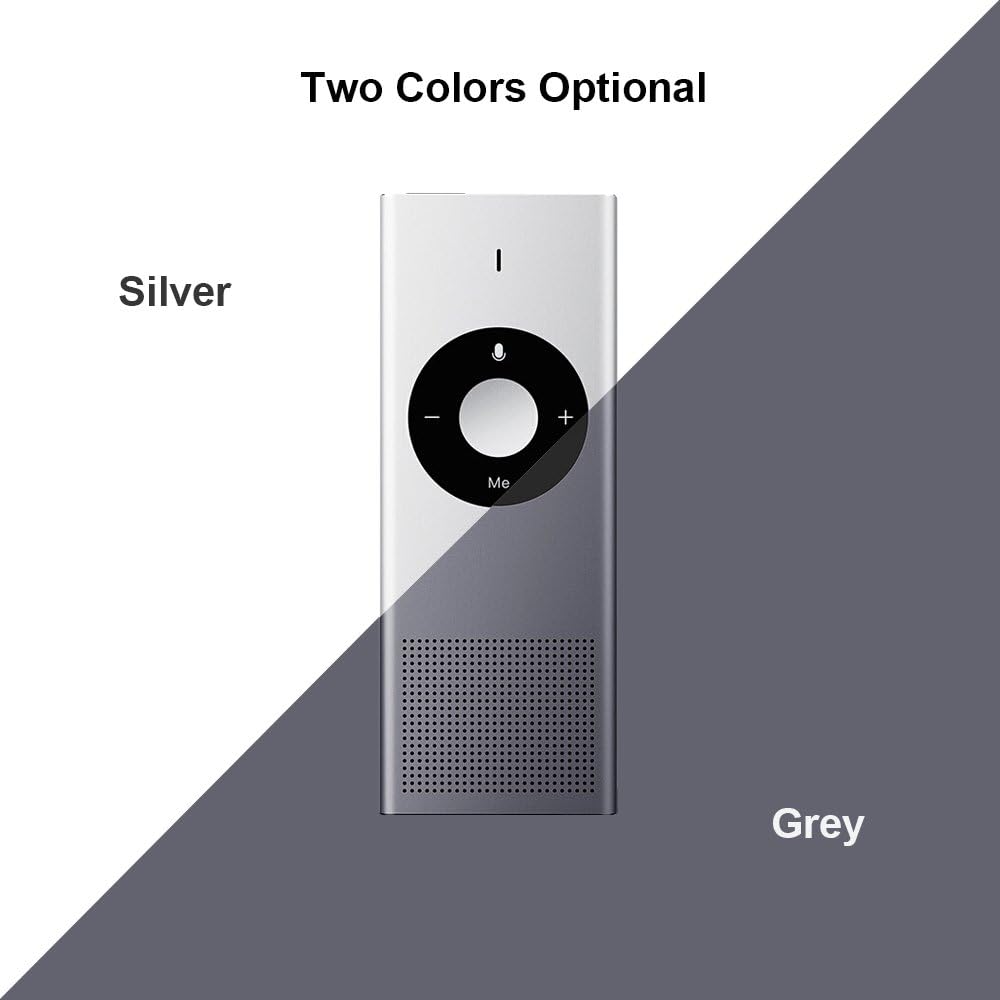
Obrázek 8: Available colors. This image displays the two color options for the Xiaomi AI Translator: Silver and Grey.
9. Záruka a podpora
Pro informace o záruce, technickou podporu nebo servisní dotazy se prosím obraťte na oficiální stránky Xiaomi. webnebo se obraťte na místního autorizovaného prodejce. Uschovejte si účtenku jako doklad o koupi pro případ reklamace.
Výrobce: Xiaomi
ASIN: B07FX88LFZ
Available for purchase since: 20. srpna 2018