1. Úvod
This manual provides detailed instructions for the setup, operation, and maintenance of your CAME TOP432EV remote control. The CAME TOP432EV is designed for controlling compatible gate openers, garage door systems, and other access control devices. It features a durable design and a reliable operating range.
Included with your remote control are the necessary batteries, ensuring it is ready for initial setup upon arrival.

Obrázek 1.1: Úhlové view of the CAME TOP432EV remote control, showcasing its two primary buttons and the CAME logo at the bottom.
2. Nastavení a programování
2.1 Instalace baterie
The CAME TOP432EV remote control comes with a pre-installed battery. If replacement is needed, follow these steps:
- Najděte kryt prostoru pro baterie na zadní straně dálkového ovladače.
- Using a small screwdriver or coin, carefully pry open the cover.
- Remove the old battery and insert a new CR2032 type battery, ensuring the positive (+) side faces upwards.
- Nasaďte zpět kryt přihrádky na baterie a ujistěte se, že bezpečně zacvakne na místo.
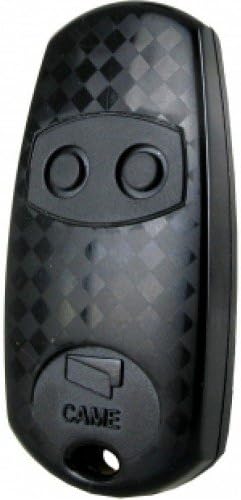
Obrázek 2.1: Přímá fronta view of the CAME TOP432EV remote control, highlighting the two circular buttons and the CAME branding.
2.2 Programování dálkového ovládání
Programming the CAME TOP432EV typically involves cloning from an existing remote or programming directly to the receiver unit. Consult your receiver's manual for specific programming modes. A common cloning procedure is as follows:
- Vymazat existující kódy (pokud je to nutné): On the new remote, press and hold both buttons simultaneously until the LED flashes rapidly, then release. This clears any pre-existing codes.
- Vstup do výukového režimu: Press and hold the button on the new remote that you wish to program. The LED will light up steadily.
- Klon z původního dálkového ovladače: While still holding the button on the new remote, bring the original, working remote close to it (typically back-to-back or side-by-side). Press and hold the corresponding button on the original remote.
- Potvrzení: The LED on the new remote should flash rapidly, then turn solid, indicating successful code transfer. Release both buttons.
- Test: Test the newly programmed button with your device. If it does not work, repeat the steps or refer to your receiver's specific programming instructions.
For direct programming to a receiver, activate the receiver's learning mode (often by pressing a button on the receiver itself), then press the desired button on the CAME TOP432EV remote. The receiver will typically provide visual or audible confirmation.

Obrázek 2.2: Detailní záběr view of the CAME TOP432EV remote control's buttons, illustrating their placement for programming and operation.
3. Návod k obsluze
Once programmed, operating your CAME TOP432EV remote control is straightforward:
- Aktivace: Press the programmed button corresponding to the desired function (e.g., open gate, close garage door).
- Rozsah: The remote control has an operational range of up to 150 meters under optimal conditions. Ensure there are no significant obstructions between the remote and the receiver for best performance.
- Kontrolka: LED dioda na dálkovém ovladači se rozsvítí po stisknutí tlačítka, což signalizuje, že je vysílán signál.
4. Údržba
4.1 Výměna baterie
If the remote's operational range decreases significantly or the LED indicator light becomes dim or fails to illuminate, it is likely time to replace the battery. Refer to Section 2.1 for battery installation instructions.
4.2 Čištění
To clean the remote control, use a soft, dry cloth. Avoid using abrasive cleaners, solvents, or excessive moisture, as these can damage the device's electronics and casing.
4.3 Skladování
Store the remote control in a dry place, away from extreme temperatures and direct sunlight. Avoid placing heavy objects on the remote to prevent damage to the buttons or internal components.
5. Řešení problémů
Běžné problémy a jejich možná řešení naleznete v tabulce níže:
| Problém | Možná příčina | Řešení |
|---|---|---|
| Remote not working / No response | Vybitá nebo vybitá baterie Nesprávné naprogramování Dálkové ovládání je mimo dosah | Replace battery (CR2032) Reprogram the remote (Section 2.2) Přesuňte se blíže k přijímači |
| Short operational range | Slabá baterie Obstructions between remote and receiver Rušení | Replace battery (CR2032) Zajistěte jasný výhled Check for other radio frequency devices |
| LED indikátor nesvítí | Vybitá baterie Vnitřní chyba | Replace battery (CR2032) Pokud problém přetrvává, kontaktujte zákaznickou podporu |
6. Specifikace
- Značka: PŘIŠEL
- Model: TOP432EV
- Barva: Černý
- Speciální funkce: Ergonomický design
- Maximální počet podporovaných zařízení: 1 (per button, typically two buttons available)
- Kompatibilní zařízení: Gate openers, garage door systems, and other CAME-compatible access control systems. (Note: While product data may list 'Television', this model is primarily designed for gate/garage systems.)
- Provozní rozsah: Up to 150 meters (under optimal conditions)
- Typ baterie: CR2032 (součástí balení)
7. Záruka a podpora
Your CAME TOP432EV remote control is covered by a standard manufacturer's warranty against defects in materials and workmanship. Please retain your proof of purchase for warranty claims.
For technical assistance, troubleshooting beyond this manual, or warranty inquiries, please contact the retailer or authorized CAME service center where the product was purchased. Provide your model number (TOP432EV) and a detailed description of the issue to facilitate support.


