1. Konec produktuview
The Teletek CA62 is a sophisticated 12-zone control panel designed for security systems in homes, medium-sized commercial premises, and offices. It offers robust security management through various external control devices, including the compact and user-friendly LED62 keypad.
The system is expandable and supports up to 12 zones (5 on-board + 1 keypad zone), allowing for comprehensive coverage. It features a built-in digital communicator and supports common communication protocols like Contact ID and SIA for central monitoring. The CA62 control panel is designed for professional hard-wired installation and operates on AC power with battery backup for continuous protection.
2. System Components and Setup
The Teletek CA62 system includes the main control panel, an LED62 keypad, a plastic housing box, and a power supply transformer. A 12V / 7Ah battery is required but not included and must be sourced separately to ensure uninterrupted operation during power outages.

Obrázek 2.1: Externí view of the Teletek CA62 control panel casing. This white, rectangular enclosure protects the internal components of the alarm system.
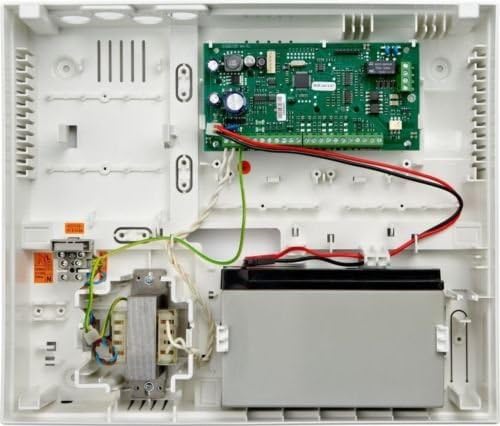
Obrázek 2.2: Vnitřní view of the Teletek CA62 control panel. This image shows the main circuit board, wiring connections, transformer, and the designated space for the backup battery.
2.1. Pokyny pro instalaci
The CA62 system is designed for professional hard-wired installation. Ensure all wiring is done according to local electrical codes and manufacturer specifications. The system supports up to 4 devices connected to its bus. Proper balancing resistors are required for zone connections (1/2 balancing resistors; doubling zone connection).
Připojení napájení: Connect the 230V/17 VAC / 17 VA mains transformer to the control panel. Install a 12V / 7Ah battery in the designated compartment for backup power. The power output is 13.8 V / 1A, protected by a resettable fuse.
Připojení klávesnice: Connect the LED62 keypad to the control panel. The keypad can be located up to 500 meters from the panel.
Zapojení zón: Wire your security zones (e.g., door contacts, motion sensors) to the appropriate terminals on the control panel. The system supports up to 12 zones.
3. Návod k obsluze
The LED62 keypad provides an easy and comfortable interface for operating your security system. Security management can also be achieved via an LCD keypad (optional), a proximity cards reader (optional), a pulse switch, or remote programming software.

Obrázek 3.1: Close-up of the Teletek LED62 keypad's display and top function buttons. The display shows system status and zone indicators (1-12), along with arming mode indicators (A, B).

Obrázek 3.2: Plný view of the Teletek LED62 keypad with the numeric pad revealed. This shows all buttons for system control, including quick arming shortcuts and dedicated emergency buttons.
3.1. Keypad Features
- Tlačítka zkratek: For quick arming of the system.
- Nouzová tlačítka: Three dedicated buttons for sending FIRE, MEDICAL, and PANIC alarm messages to a central monitoring station.
- LED indikace: Provides clear status updates for the system, individual zones, and current arming modes.
- Režim programování: A guide is available within the programming mode to assist with system configuration.
- Tamper přepínač: Bi-directional TAMPER switch for enhanced security.
3.2. Základní operace
- Aktivace systému: Enter your user code or use the quick arming shortcut buttons (e.g., 'A' or 'B' buttons for specific partitions/modes). The LED indicators will confirm the armed status.
- Deaktivace systému: Enter your user code when prompted. The system status LEDs will change to indicate disarmed status.
- Sending Emergency Signals: In an emergency, press and hold the dedicated FIRE, MEDICAL, or PANIC buttons for a few seconds to send an immediate alarm to the monitoring station.
- Kontrola stavu systému: Observe the LED indicators on the keypad for zone status (open/closed), system armed/disarmed status, and any fault conditions.
The system supports 20 user codes, 4 manager codes, and 1 engineer code. It maintains a memory of 256 events with data and time stamps.
4. Údržba
Regular maintenance ensures the optimal performance and longevity of your Teletek security system.
- Kontrola baterie: Periodically check the 12V / 7Ah backup battery. While the system operates on AC power, the battery provides crucial power during outages. Replace the battery as needed, typically every 3-5 years, or if the system indicates a low battery fault.
- Čištění: Gently wipe the keypad and control panel casinměkkým, suchým hadříkem. Nepoužívejte abrazivní čisticí prostředky ani rozpouštědla.
- Testování systému: Conduct periodic tests of your alarm system, including all zones and emergency buttons, to ensure they are functioning correctly. Inform your monitoring station before conducting tests to avoid false alarms.
- Kontrola elektroinstalace: For professional installations, it is recommended to have a qualified technician inspect wiring connections periodically to ensure they remain secure and free from damage.
5. Řešení problémů
If you encounter issues with your Teletek security system, consider the following basic troubleshooting steps:
- Bez napájení: Check the main AC power supply and ensure the transformer is properly connected. Verify the backup battery is installed and charged.
- Klávesnice nereaguje: Ensure the keypad is securely connected to the control panel. Check for any visible damage to the keypad or its cable.
- Zone Faults: If a zone indicates a fault, check the associated sensor (e.g., door/window contact, motion detector) to ensure it is closed or clear. Inspect the wiring for that zone for any breaks or loose connections.
- Falešné poplachy: Review recent events in the system's memory (256 events stored with data and time) to identify patterns. Ensure sensors are properly installed and not triggered by environmental factors or pets.
For complex issues or if the problem persists, it is recommended to contact a qualified security system technician or Teletek customer support for assistance.
6. Specifikace
| Funkce | Detail |
|---|---|
| Číslo modelu | CA62 |
| Výrobce | Teletek |
| Počet zón | Up to 12 (5 on board + 1 keypad zone) |
| Zone Balancing | 1/2 balancing resistors; doubling zone connection |
| Počet výstupů | 3 low current + 1 high current |
| Počet kódů | 20 users, 4 manager, 1 engineer |
| Memory of Events | 256 events with data and time |
| Digitální komunikátor | Built-in, TBR-21 approved |
| Komunikační protokoly | Contact ID, SIA |
| Programování | By keypad, ProSTE Software (Optional) |
| Sběrnicová zařízení | Up to 4 devices connected to the system bus |
| Síťový transformátor | 230V/17 VAC / 17 VA |
| Baterie (není součástí dodávky) | 12 V / 7 Ah |
| Výkon | 13.8 V / 1A, Resettable fuse protected |
| Aktuální spotřeba | 100 mA (Control Panel) |
| Operating Temperature (Control Panel) | 0 °C / +40 °C |
| Bydlení | ABS plastic box |
| Dimensions (Control Panel) | 335 x 290 x 105 mm |
| Keypad Power Supply (LED62) | 12 V DC from the panel |
| Keypad Current Consumption (LED62) | 50-150 mA |
| Keypad Operating Temperature (LED62) | -5 °C / +40 °C |
| Keypad Storage Temperature (LED62) | -20 °C / +60 °C |
| Keypad Distance to Panel (LED62) | Až 500 m |
| Zdroj napájení | AC Power with Battery Backup |
| Kompatibilní zařízení | Smartphone (via optional software/modules) |
| Technologie připojení | Kabelové |
| Typ instalace | Professional hard-wired |
| Typ upozornění | Motion & Entry & Fire & Medical & Panic |
| svtage | 12 voltů |
| Kontrolní metoda | Dotyková klávesnice |
| Zahrnuté komponenty | Control panel CA62, LED keypad LED62, Plastic box, Power supply transformer |
| Datum první dostupnosti | 17. června 2018 |
| UPC | 702188347457 |
7. Záruka a podpora
For specific warranty information regarding your Teletek Security Alarm System, please refer to the documentation provided at the time of purchase or contact Teletek directly. Warranty terms and conditions are typically provided by the manufacturer.
For technical support, installation assistance, or any questions regarding the operation of your CA62 control panel or LED62 keypad, please reach out to Teletek customer support or your authorized installer. Professional assistance is recommended for complex system configurations or troubleshooting.


