1. Úvod
The NETGEAR GS116PP Unmanaged Power over Ethernet (PoE) Switch is designed for desktop or rackmount installations. It features 16 Gigabit Ethernet ports, including 16 PoE+ ports with a total power budget of 183 watts. This switch offers simple plug-and-play functionality without requiring software installation or complex configuration, making it suitable for various networking environments.
2. Obsah balení
Ověřte, zda váš balíček obsahuje následující položky:
- 16-port Gigabit Ethernet PoE+ Unmanaged Switch (GS116PP)
- Power adapter (External 200W)
- Průvodce rychlou instalací
- Sada pro montáž do racku
- Sada pro montáž na stěnu
3. Fyzický overview
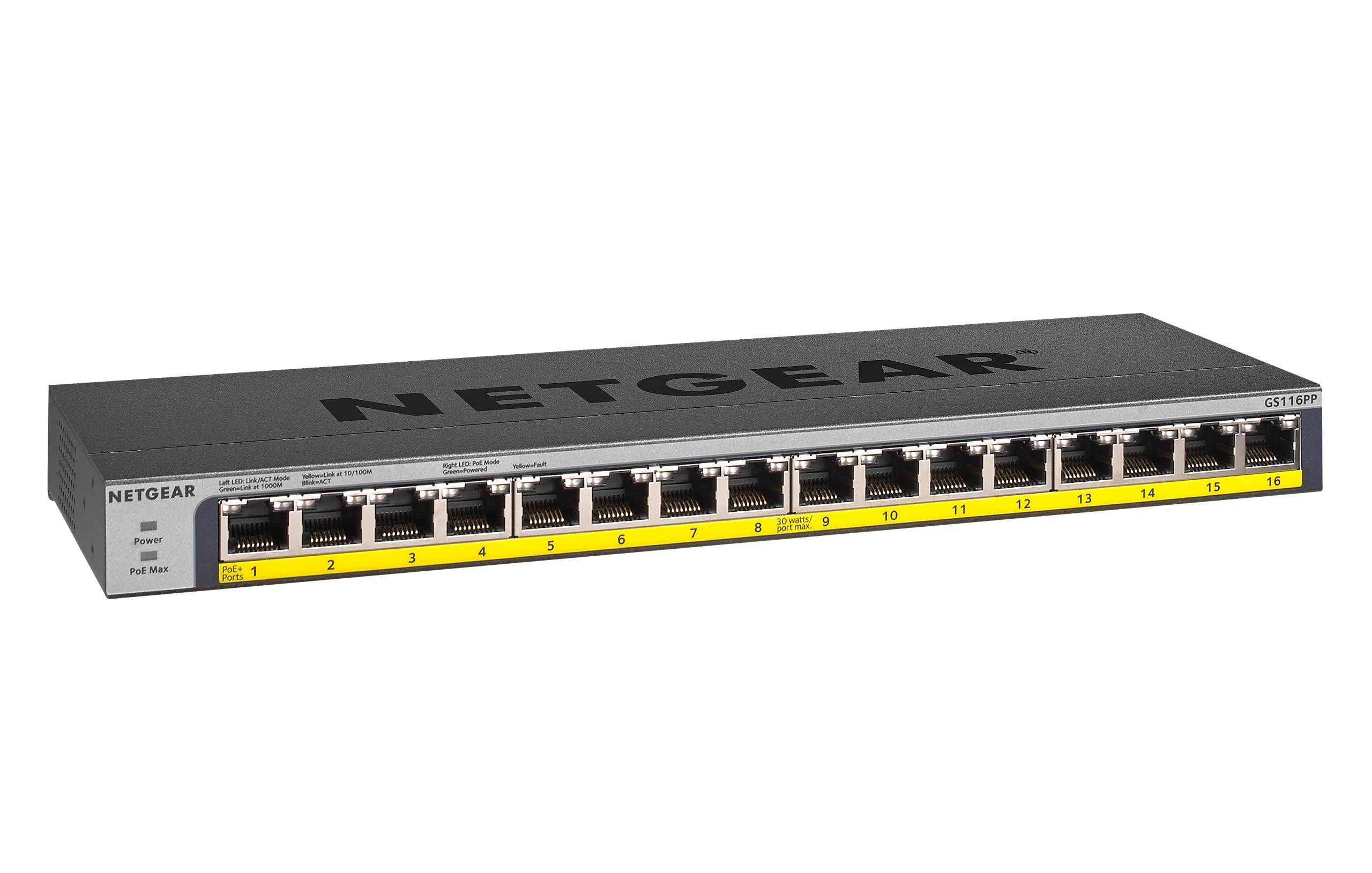
Obrázek 1: Přední view of the NETGEAR GS116PP Switch.

Obrázek 2: Close-up of the front panel with 16 Gigabit Ethernet PoE+ ports.

Obrázek 3: Zadní view of the NETGEAR GS116PP Switch, showing the power input and ventilation.

Obrázek 4: Dimensions of the NETGEAR GS116PP Switch (11.3"L x 4"W x 1.1"H).
4. Nastavení
4.1 Vybalení a umístění
Carefully remove the switch and all accessories from the packaging. The GS116PP supports desktop, wall-mount, or rack-mount placement. Ensure adequate ventilation around the device and avoid placing it near heat sources or in enclosed spaces.
4.2 Připojení napájení
- Connect the provided external 200W power adapter to the power input port on the rear of the switch.
- Plug the power adapter into a standard electrical outlet. The power LED on the front panel will illuminate, indicating the switch is powered on.
4.3 Síťové připojení
The GS116PP is an unmanaged switch, offering simple plug-and-play connectivity. No software installation or configuration is required.
- Connect your network router or main network device to any of the 16 Gigabit Ethernet ports on the switch using a standard Ethernet cable.
- Connect your network devices (computers, IP cameras, VoIP phones, wireless access points, etc.) to the remaining ports.
- For PoE-powered devices, simply connect them to any of the 16 PoE+ ports. The switch will automatically detect and provide power to compatible devices.
1 video: Konecview of Power over Ethernet (PoE) switching concepts and applications.
5. Ovládání přepínače
5.1 Základní obsluha
The NETGEAR GS116PP operates as a standard unmanaged network switch. It automatically detects the speed and duplex mode of connected devices and adjusts accordingly. Data is forwarded efficiently between connected devices at Gigabit speeds.
5.2 Funkce napájení přes Ethernet (PoE+)
All 16 ports on the GS116PP support PoE+ (802.3at) and standard PoE (802.3af). This allows you to power compatible devices directly through the Ethernet cable, eliminating the need for separate power adapters and simplifying cable management.
- Celkový rozpočet na energii: The switch provides a total power budget of 183W across all 16 PoE+ ports.
- Per-Port Power: Each PoE+ port can deliver up to 30W of power to a connected device.
- Automatická detekce: The switch automatically detects if a connected device is PoE-compatible and supplies the necessary power. Non-PoE devices can also be connected safely, as the switch will not supply power to them.
2 video: A brief demonstration of the NETGEAR 16-Port Gigabit Ethernet Unmanaged PoE Switch (GS116PP) and its PoE capabilities.
6. Vlastnosti
- 16 portů Gigabit Ethernet: Provides high-speed wired connections for all your network devices.
- 16 PoE+ Ports with 183W Budget: Powers compatible devices like IP cameras, VoIP phones, and wireless access points directly through the Ethernet cable.
- Nastavení Plug-and-Play: No software to install or configuration needed for immediate use.
- Flexibilní možnosti montáže: Supports desktop, wall-mount, or rack-mount placement with included hardware.
- Energeticky úsporný design: Compliant with IEEE802.3az for reduced power consumption.
- Tichý provoz: Fanless design makes it ideal for noise-sensitive environments.
- Regionální kompatibilita: Made for use in U.S. & CA only.
7. Specifikace
| Funkce | Specifikace |
|---|---|
| Číslo modelu | GS116PP-100NAS |
| Počet portů | 16 porty Gigabit Ethernet |
| PoE+ porty | 16 (IEEE 802.3at/af) |
| Celkový rozpočet napájení PoE | 183W |
| Rychlost přenosu dat | 1 Gigabit za sekundu |
| Rozměry produktu (DxŠxV) | 11.3" x 4" x 1.1" (28.7 cm x 10.16 cm x 2.79 cm) |
| Hmotnost položky | 1.94 libry (0.88 kg) |
| Materiál pouzdra | Kov |
| svtage | 240 voltů |
| Provozní teplota | Až 54.4 °C (130 stupňů Fahrenheita) |
8. Údržba
To ensure optimal performance and longevity of your NETGEAR GS116PP switch, follow these maintenance guidelines:
- Udržujte v čistotě: Pravidelně čistěte vnější povrch spínače měkkým, suchým hadříkem. Nepoužívejte tekuté ani aerosolové čisticí prostředky.
- Zajistěte ventilaci: Do not block the ventilation openings on the switch. Proper airflow prevents overheating.
- Správa kabelů: Udržujte síťové kabely uspořádané a bez zauzlení nebo nadměrného ohybu, abyste zabránili degradaci signálu.
- Zapnutí a vypnutí (pokud je to nutné): If the switch or connected devices are experiencing issues, a simple power cycle (unplugging and replugging the power adapter) can often resolve minor problems.
9. Řešení problémů
If you encounter issues with your GS116PP switch, consider the following troubleshooting steps:
- Bez napájení:
- Ujistěte se, že je napájecí adaptér bezpečně připojen k přepínači i k funkční elektrické zásuvce.
- Check the power LED on the front panel; it should be illuminated.
- Bez síťového připojení:
- Verify that Ethernet cables are securely plugged into both the switch and the connected devices.
- Check the link/activity LEDs on the switch ports; they should be lit or blinking for active connections.
- Ensure your router or upstream network device is functioning correctly.
- Zařízení PoE se nezapíná:
- Confirm that the connected device is PoE-compatible (IEEE 802.3af or 802.3at).
- Check the PoE status LED for the specific port; it should indicate power delivery.
- Ensure the total power consumption of all connected PoE devices does not exceed the 183W budget. If the budget is exceeded, the switch may prioritize power to certain ports or disable power to others.
- Try connecting the PoE device to a different port.
- Pomalá rychlost sítě:
- Pro optimální výkon se ujistěte, že všechna připojená zařízení a kabely podporují gigabitový Ethernet.
- Check for faulty cables by testing with known good cables.
- Avoid network loops by ensuring cables are not connected in a way that creates a circular path.
10. Záruka a podpora
The NETGEAR GS116PP Switch comes with a Lifetime Limited Hardware Warranty. This includes Next Business Day Replacement for eligible hardware failures.
For technical assistance and support, NETGEAR offers 24/7 chat support with a NETGEAR expert. Please refer to the official NETGEAR website or the quick install guide for detailed support contact information and warranty terms.


