Zavedení
This manual provides detailed instructions for the Microsoft N9Z-00017 All-In-One Media Keyboard. This wireless keyboard features an integrated multi-touch trackpad, media hotkeys, and 128-bit AES encryption for secure data transmission. It is designed for use with Smart TVs, laptops, and desktop computers, offering a convenient and versatile input solution.
Please read this manual thoroughly before using your keyboard to ensure proper setup and operation.
Nastavení
1. Obsah balení
- Microsoft N9Z-00017 All-In-One Media Keyboard
- USB bezdrátový přijímač
- Baterie AA (předinstalované nebo součástí balení)
- Stručný průvodce (pokud je k dispozici)
2. Instalace baterie
The keyboard typically comes with AA batteries pre-installed or included. If not, follow these steps:
- Najděte kryt přihrádky na baterie na spodní straně klávesnice.
- Posuňte nebo zvedněte kryt pro otevření přihrádky.
- Insert the AA batteries, ensuring correct polarity (+ and -).
- Bezpečně zavřete kryt bateriového prostoru.
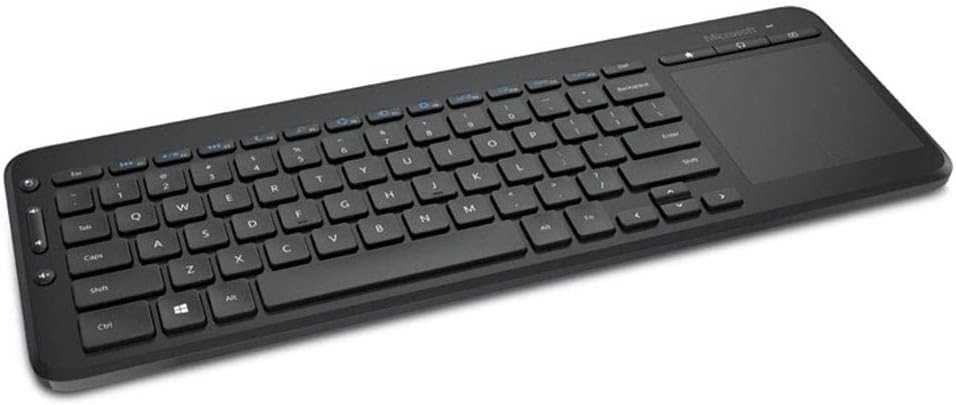
Image: The Microsoft All-In-One Media Keyboard, showing its compact design with an integrated touchpad on the right side. This image provides a general overview vzhledu produktu.
3. Připojení bezdrátového přijímače
- Locate the USB wireless receiver, usually stored in a compartment on the keyboard or included separately.
- Plug the USB wireless receiver into an available USB port on your computer or Smart TV.
- The operating system should automatically detect and install the necessary drivers. This process may take a few moments.
- Once installed, the keyboard should be ready for use.
Návod k obsluze
1. Základní funkce klávesnice
The keyboard functions like a standard QWERTY keyboard. This specific model features a Turkish Q layout. All standard alphanumeric keys, function keys (F1-F12), and modifier keys (Shift, Ctrl, Alt) are present.
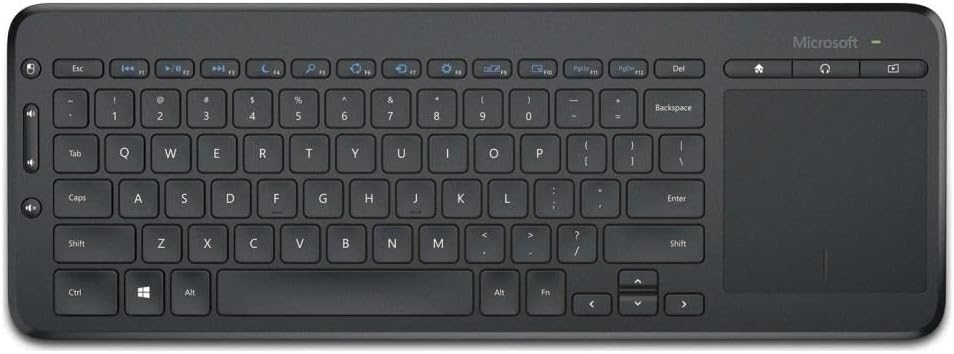
Obrázek: Pohled shora dolů view of the Microsoft All-In-One Media Keyboard, clearly displaying the Turkish Q keyboard layout and the integrated multi-touch trackpad.
2. Integrated Multi-Touch Trackpad
The large integrated trackpad supports multi-touch gestures, allowing for intuitive navigation.
- Klepnutí jedním prstem: Levé kliknutí.
- Klepnutí dvěma prsty: Klikněte pravým tlačítkem myši.
- Posouvání dvěma prsty: Posouvejte svisle nebo vodorovně.
- Stažením prstů přiblížíte: Zoom in or out (application dependent).
3. Media Hotkeys
Dedicated media hotkeys are located above the function keys for quick access to media controls and other common functions. These include volume control, mute, play/pause, and home screen access.
4. 128-bit AES Encryption
The keyboard utilizes 128-bit Advanced Encryption Standard (AES) technology to encrypt your keystrokes. This feature helps protect your personal and business information by securing the wireless communication between the keyboard and the receiver.
5. Kompatibilita zařízení
This keyboard is compatible with a range of devices, including:
- Smart Televisions
- Notebooky
- Stolní počítače
Ensure your device has an available USB port for the wireless receiver.
Údržba
1. Čištění klávesnice
- Disconnect the keyboard from its power source (remove batteries) before cleaning.
- Použijte měkký hadřík, který nepouští vlákna dampvodou nebo jemným čisticím roztokem.
- Nepoužívejte abrazivní čisticí prostředky, rozpouštědla ani aerosolové spreje přímo na klávesnici.
- Pro čištění mezi klávesami použijte stlačený vzduch k odstranění prachu a nečistot.
- Wipe the trackpad gently with a clean, dry cloth.
2. Výměna baterie
When the keyboard's performance degrades or the battery indicator (if present) signals low power, replace the batteries:
- Otevřete kryt baterie na spodní straně klávesnice.
- Vyjměte staré baterie AA.
- Insert new AA batteries, observing the correct polarity.
- Bezpečně uzavřete přihrádku na baterie.
- Staré baterie zlikvidujte v souladu s místními předpisy.
Odstraňování problémů
| Problém | Možná příčina | Řešení |
|---|---|---|
| Klávesnice nereaguje |
|
|
| Klávesy nefungují správně |
|
|
| Trackpad nereaguje |
|
|
Specifikace
- Značka: Microsoft
- Model: N9Z-00017
- Technologie připojení: Bezdrátový
- Rozložení klávesnice: Turecký Q
- Kompatibilní zařízení: Smart Television, Laptop, Desktop Computer
- Doporučené použití: Office, Home Entertainment
- Zabezpečení: Šifrování 128-bit AES
- Zdroj napájení: AA baterie
Záruka a podpora
For warranty information, technical support, or to register your product, please visit the official Microsoft support website. You can typically find detailed warranty terms and contact information for customer service there.
Oficiální podpora Microsoftu: support.microsoft.com
Uschovejte si prosím doklad o koupi pro uplatnění záruky.


