Zavedení
This manual provides essential information for the proper installation, operation, and maintenance of your Intel Xeon Silver 4116 Twelve-Core Skylake Processor. Please read this guide thoroughly before proceeding with any installation or configuration to ensure optimal performance and system stability.
Bezpečnostní informace
Při manipulaci s počítačovými komponenty vždy dodržujte následující bezpečnostní opatření:
- Ensure your system is powered off and unplugged from the electrical outlet before installation.
- Discharge static electricity by touching a grounded metal object or wearing an anti-static wrist strap.
- Handle the processor by its edges to avoid touching the gold contacts or the integrated heat spreader (IHS).
- Keep the processor in its protective packaging until ready for installation.
Nastavení a instalace
1. Kontroly před instalací
- Verify that your motherboard supports the Intel Xeon Silver 4116 processor and has an LGA 3647 socket. Consult your motherboard's manual for compatibility.
- Ensure you have a compatible CPU cooler designed for the LGA 3647 socket and appropriate thermal paste.
- Gather necessary tools, such as a Phillips head screwdriver.
2. Instalace procesoru
- Carefully open the CPU socket retention mechanism on the motherboard.
- Align the processor with the socket. The processor has specific notches that must align with the socket keys. Do not force the processor into the socket.
- Gently lower the processor into the socket.
- Close the socket retention mechanism to secure the processor.
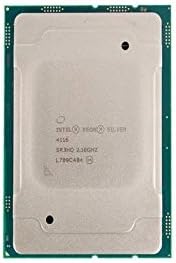
Obrázek: Nahoře view of the Intel Xeon Silver 4116 processor, showing the integrated heat spreader and Intel branding.

Obrázek: Vedle sebe view of the Intel Xeon Silver 4116 processor, displaying both the top (integrated heat spreader) and bottom (LGA 3647 contact array) surfaces.
3. Instalace chladiče procesoru
- Apply a thin, even layer of thermal paste to the center of the processor's integrated heat spreader (IHS). Refer to the thermal paste manufacturer's instructions for specific application methods.
- Chladič procesoru namontujte podle pokynů výrobce a zajistěte rovnoměrné rozložení tlaku.
- Připojte kabel ventilátoru chladiče CPU k určenému konektoru ventilátoru CPU na základní desce.
Návod k obsluze
1. Initial System Boot
- After completing hardware installation, connect all necessary peripherals and power cables.
- Power on your system. The system should initiate the boot process.
- Access the BIOS/UEFI setup utility (typically by pressing DEL, F2nebo F10 during startup, depending on your motherboard).
2. Konfigurace BIOSu/UEFI
- Verify that the BIOS/UEFI recognizes the Intel Xeon Silver 4116 processor correctly.
- Konfigurace nastavení paměti (např. XMP profiles) if applicable.
- Adjust fan speed curves for the CPU cooler to maintain optimal temperatures.
- Uložte změny a ukončete BIOS/UEFI.
3. Instalace ovladače
- Nainstalujte operační systém.
- Nainstalujte si nejnovější ovladače čipové sady pro základní desku, které jsou obvykle k dispozici od výrobce základní desky. webwebu. Tyto ovladače zajišťují správnou komunikaci mezi procesorem a ostatními systémovými komponentami.
Údržba
Regular maintenance helps ensure the longevity and stable operation of your processor and system.
- Čištění prachu: Pravidelně čistěte prach z chladiče a ventilátoru procesoru pomocí stlačeného vzduchu. Před čištěním se ujistěte, že je systém vypnutý a odpojený od sítě.
- Teplovodní pasta: If CPU temperatures become consistently high, consider reapplying thermal paste. This typically involves removing the CPU cooler, cleaning off old thermal paste from both the CPU and cooler base, and applying new thermal paste.
- Monitorování teploty: Use system monitoring software to keep track of CPU temperatures, especially under load, to prevent overheating.
Odstraňování problémů
Pokud narazíte na problémy, postupujte podle následujících běžných kroků pro řešení potíží:
- Žádné spuštění/žádný displej:
- Zkontrolujte všechna připojení napájení k základní desce a procesoru.
- Znovu nainstalujte procesor, paměť RAM a grafickou kartu.
- Zkontrolujte, zda nejsou ohnuté piny na procesoru nebo v patici (zacházejte s nimi s maximální opatrností).
- Nestabilita/pády systému:
- Ensure CPU temperatures are within acceptable limits.
- Spusťte diagnostické nástroje paměti a zkontrolujte integritu paměti RAM.
- Aktualizujte BIOS/UEFI základní desky na nejnovější verzi.
- Přehřívání:
- Ujistěte se, že chladič procesoru je správně nainstalován a má dobrý kontakt s procesorem.
- Check if the CPU fan is spinning correctly.
- Zajistěte dostatečné proudění vzduchu uvnitř skříně počítače.
For persistent issues, consult your motherboard's manual for specific diagnostic LED codes or beep codes.
Specifikace
| Funkce | Specifikace |
|---|---|
| Značka | Intel |
| Číslo modelu | SR3HQ |
| Výrobce CPU | Intel |
| Model CPU | Xeon Silver 4116 (Twelve-Core) |
| Rychlost CPU | 2.1 GHz |
| Zásuvka CPU | LGA 3647 |
| Mezipaměť L3 | 16.5 MB |
| Datum první dostupnosti | 19. května 2018 |
Informace o záruce
Intel processors typically come with a limited warranty. For detailed information regarding the warranty period, terms, and conditions for your Intel Xeon Silver 4116 processor, please refer to the official Intel webwebu nebo v dokumentaci dodané s vaším nákupem. Uschovejte si doklad o koupi pro případ reklamace.
Podpora
Pro další technickou pomoc, stažení ovladačů nebo další informace o produktu navštivte oficiální stránky podpory Intel. webmísto:
You may also consult your system integrator or motherboard manufacturer for system-specific support.


