Zavedení
This instruction manual provides detailed guidance for the safe and efficient use of your Lenco Xemio-768 Digital Media Player. Please read this manual thoroughly before operating the device and retain it for future reference.
The Lenco Xemio-768 is a versatile digital media player capable of playing MP3/MP4 files, displaying photos, reading e-books, and recording voice memos. It features Bluetooth connectivity for wireless audio and an expandable memory via Micro SD card.
Obsah balení
- Lenco Xemio-768 Digital Media Player
- USB kabel
- Sluchátka do uší
- 8GB Micro SD Card (pre-installed or included separately)
- Návod k použití (tento dokument)
Zařízení skončiloview
Familiarize yourself with the various parts and controls of your Xemio-768 player.
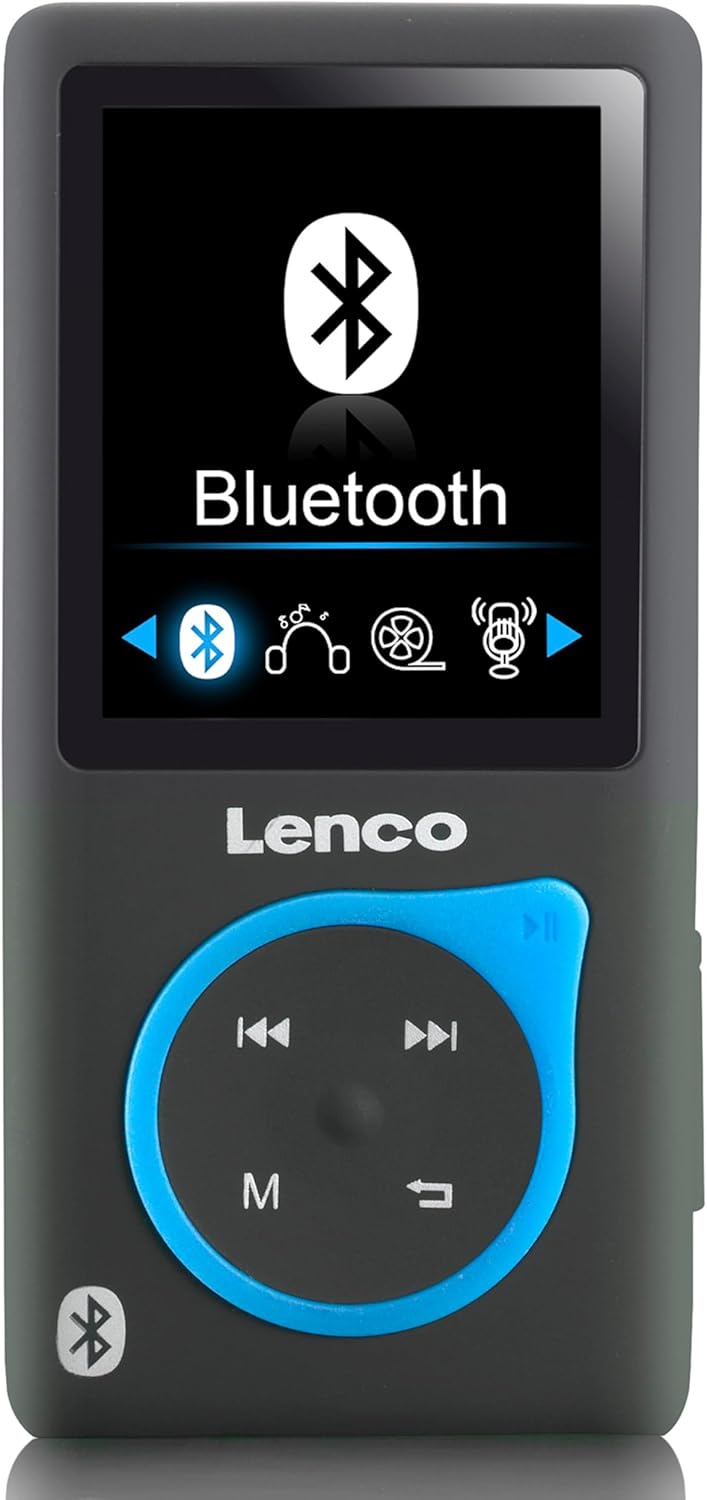
Obrázek 1: Přední view of the Lenco Xemio-768 Digital Media Player. The screen displays the Bluetooth menu option. Below the screen are the Lenco logo and a circular control pad with playback buttons (previous, next, play/pause) and a menu button (M). A Bluetooth symbol is also visible on the bottom left of the device.
Key Controls and Ports:
- 1.8palcový TFT LCD displej: Displays menus, media, and settings.
- Ovládací panel: Navigation and playback controls (Play/Pause, Next/Fast Forward, Previous/Rewind, Menu).
- Micro USB port: Pro nabíjení a přenos dat.
- Slot pro kartu Micro SD: For memory expansion (supports up to 32GB).
- 3.5 mm Headphone Jack: For wired headphone connection.
- Vestavěný mikrofon: For voice recording.
Nastavení
1. Nabíjení zařízení
- Connect the small end of the included USB cable to the Micro USB port on the player.
- Connect the larger end of the USB cable to a powered USB port on a computer or a USB wall adapter (not included).
- The battery indicator on the screen will show charging status. A full charge typically takes approximately 3 hours.
- Disconnect the USB cable once fully charged.
2. Vložení karty Micro SD (volitelné)
The player comes with an 8GB Micro SD card. If you wish to expand the storage, you can replace it with a card up to 32GB.
- Locate the Micro SD card slot on the side of the player.
- Gently insert the Micro SD card with the gold contacts facing down until it clicks into place.
- Chcete-li kartu vyjmout, jemně ji zatlačte, dokud nezaklapne, poté ji uvolněte a karta sama vyskočí.
3. Připojení sluchátek
- Wired Headphones: Plug the 3.5 mm jack of the included in-ear headphones (or your own compatible headphones) into the headphone port on the player.
- Bluetooth Headphones/Speakers: Refer to the "Bluetooth Connectivity" section under Operating for wireless connection instructions.
4. Přenos Files
- Připojte přehrávač k počítači pomocí kabelu USB.
- The player will appear as a removable disk drive on your computer.
- Drag and drop your desired music (MP3, WMA), videos (AMV, AVI), photos (JPG, BMP, GIF), or e-books (TXT) into the appropriate folders on the player's internal memory or Micro SD card.
- Jednou files are transferred, safely eject the removable disk from your computer before disconnecting the USB cable.
Návod k obsluze
Zapnutí/vypnutí
- To power on, press and hold the Power button (usually on the side) until the screen lights up.
- Chcete-li zařízení vypnout, stiskněte a podržte tlačítko Napájení, dokud se zařízení nevypne.
Navigace v nabídce
- Use the directional buttons on the control pad to navigate through menu options.
- Press the central button (often Play/Pause) to select an option.
- Press the 'M' (Menu) button to go back to the previous menu or to access context-sensitive options during playback.
Přehrávání hudby
- From the main menu, select "Music".
- Browse through your folders and files to find the desired track.
- Press the central button to play the selected track.
- Použijte Předchozí a Další tlačítka pro přeskakování skladeb.
- Press the central button again to pause/resume playback.
přehrávání videa
- From the main menu, select "Video".
- Přejděte na své video files (AMV, AVI format).
- Select a video to begin playback.
Fotografie Viewer
- From the main menu, select "Photos".
- Browse your image files (JPG, BMP, GIF format).
- Vyberte obrázek view to.
E-book Reader
- From the main menu, select "E-book".
- Navigate to your text files (TXT format).
- Vyberte a file otevřít a číst.
Hlasový záznam
- From the main menu, select "Recorder" or "Voice Memo".
- Select "Start Recording" to begin.
- Press the central button to stop recording.
- Recordings are saved and can be accessed from the "Recordings" menu.
Připojení Bluetooth
- Ensure your Bluetooth headphones or speaker are in pairing mode. Refer to their respective manuals for instructions.
- On the Xemio-768, navigate to the "Bluetooth" menu.
- Vyberte "Hledat Devices" or "Pair New Device".
- Once your device appears in the list, select it to initiate pairing.
- Pokud se zobrazí výzva, potvrďte párování na obou zařízeních.
- Once connected, audio will be routed wirelessly to your Bluetooth device.
Údržba
Čištění
- K čištění vnějšího povrchu zařízení použijte měkký, suchý hadřík, který nepouští vlákna.
- Nepoužívejte abrazivní čisticí prostředky, alkohol ani rozpouštědla, protože by mohly poškodit povrch.
- Zabraňte vniknutí vlhkosti do jakýchkoli otvorů.
Péče o baterie
- Chcete-li prodloužit životnost baterie, vyvarujte se častého úplného vybíjení.
- Zařízení pravidelně nabíjejte, i když jej delší dobu nepoužíváte.
- Přístroj skladujte na chladném a suchém místě mimo dosah přímého slunečního záření a extrémních teplot.
Odstraňování problémů
| Problém | Možná příčina | Řešení |
|---|---|---|
| Zařízení se nezapne. | Baterie je vybitá. | Nabijte zařízení pomocí dodaného kabelu USB. |
| Nelze se připojit přes Bluetooth. | Bluetooth device not in pairing mode; interference; device out of range. | Ensure your Bluetooth headphones/speaker are in pairing mode. Move closer to the player. Try restarting both devices. |
| Files are not recognized or played. | Nesprávný file formát; poškozený file; Micro SD card issue. | Zajistit files are in supported formats (MP3, WMA, AMV, AVI, JPG, BMP, GIF, TXT). Check if the Micro SD card is properly inserted or try another card. |
| Ze sluchátek není slyšet žádný zvuk. | Headphones not properly connected; volume too low; corrupted audio file. | Check headphone connection. Increase volume. Test with different headphones or audio files. |
Specifikace
- Model: Xemio-768
- Zobrazit: 1.8palcový TFT LCD
- Vnitřní paměť: 8 GB (via Micro SD card)
- Rozšiřitelná paměť: Až 32 GB (micro SD karta)
- Podporované zvukové formáty: MP3, WMA
- Podporované video formáty: AMV, AVI
- Podporované formáty obrázků: JPG, BMP, GIF
- Supported E-book Format: TXT
- Konektivita: Bluetooth, Micro USB
- Sluchátkový jack: 3.5 mm
- Typ baterie: Lithium Polymer
- Životnost baterie: Approximately 3 hours (playback)
- Rozměry: 0.09 x 4.15 x 8.5 cm
- Hmotnost: 28.5 g
Záruka a podpora
For warranty information and technical support, please refer to the warranty card included with your product or visit the official Lenco webUschovejte si doklad o koupi pro případné reklamace.


