1. Úvod a konecview
The Dio DiOCAMRI01 is an advanced 360° HD WiFi camera designed for indoor surveillance, offering comprehensive monitoring while prioritizing user privacy. This camera features a motorized lens, 1080p resolution, and infrared night vision, ensuring clear visuals day and night. Its unique geo-fencing capability automatically activates a privacy mode when you are home, retracting the lens to ensure your personal space remains private. The camera also includes motion and noise detection, two-way audio communication, and local recording options via a Micro SD card.
This manual provides essential information for the proper installation, operation, and maintenance of your DiOCAMRI01 camera.
2. Bezpečnostní informace
- Před použitím si pečlivě přečtěte všechny pokyny.
- Používejte pouze napájecí adaptér dodaný se zařízením.
- Do not expose the camera to water, moisture, or extreme temperatures.
- Neumísťujte kameru do blízkosti zdrojů tepla nebo na přímé sluneční světlo.
- Nepokoušejte se fotoaparát rozebírat ani opravovat sami. Veškerý servis svěřte kvalifikovanému personálu.
- Ensure the camera is securely mounted if using wall or ceiling installation.
3. Obsah balení
Ověřte, zda jsou v balení přítomny všechny komponenty:
- DiOCAMRI01 HD WiFi Camera
- Napájecí adaptér
- Mounting Kit (screws, wall plugs, mounting bracket)
- Uživatelská příručka (tento dokument)
4. Vlastnosti produktu
- Vzdálený dohled: Day and night vision (infrared night vision up to 10m).
- Wide-Angle Motorized Lens: Nabízí rotaci 360° horizontálně a 150° vertikálně pro komplexní pokrytí.
- Ochrana soukromí: Geo-fencing feature automatically puts the camera in standby mode and closes the lens when the owner is present. Manual standby mode is also available via the app.
- Motion and Noise Detection: Adjustable sensitivity with 3 levels. Sends direct notifications to your smartphone.
- Obousměrný zvuk: Built-in microphone and intercom function allow you to hear and speak through the camera.
- Místní nahrávání: Supports Micro SD card (up to 128GB, not included) for manual or automatic recording upon detection. Remote viewing of recordings is available via the smartphone app.
- Snadné nastavení: Quick and intuitive installation via the DiO Cam+ mobile application.
- Flexibilní montáž: Designed for discreet integration, can be mounted on a wall, ceiling, or placed on a shelf.
5. Nastavení
5.1 Počáteční nastavení
- Připojení napájení: Connect the camera to a power outlet using the provided power adapter. The camera will power on.
- Download DiO Cam+ App: Hledat "DiO Cam+" in your smartphone's app store (iOS or Android) and download the application.
- Registrace/Přihlášení: Otevřete aplikaci a postupujte podle pokynů na obrazovce k vytvoření účtu nebo se přihlaste, pokud jej již máte.
- Přidat fotoaparát: Within the DiO Cam+ app, select the option to add a new device. Follow the in-app wizard to connect your camera to your Wi-Fi network. This typically involves scanning a QR code on the camera or entering Wi-Fi credentials.
- Umístění: Position the camera in your desired location. It can be placed on a flat surface, or mounted on a wall or ceiling using the included mounting kit. Ensure the camera has a clear line of sight to the area you wish to monitor.
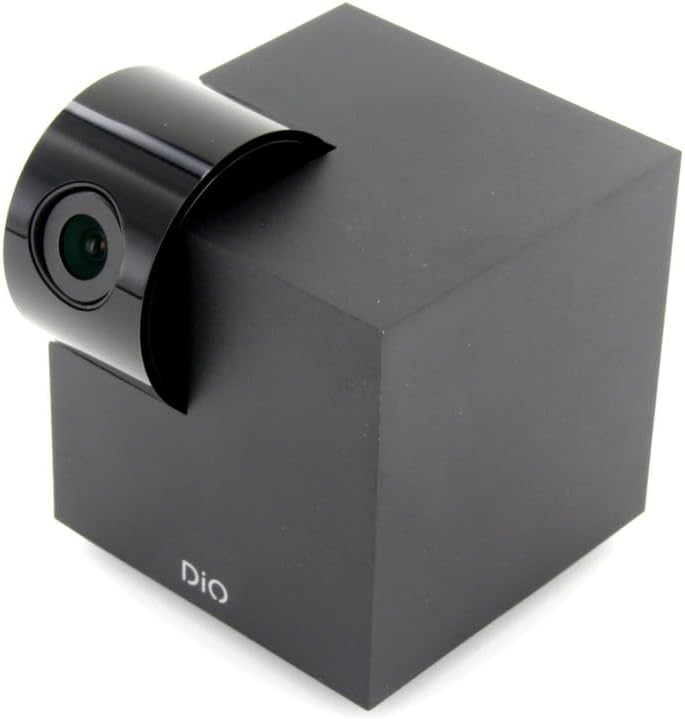
Figure 5.1: The DiOCAMRI01 camera in its standard upright position.

Figure 5.2: Camera placed on a shelf, demonstrating discreet integration.

Figure 5.3: Camera mounted on a ceiling for overhead surveillance.
5.2 Instalace karty Micro SD (volitelné)
To enable local video recording, insert a Micro SD card (up to 128GB, not included) into the designated slot on the camera. Ensure the camera is powered off before inserting or removing the card.
5.3 Sdílení přístupu k fotoaparátu
The DiO Cam+ app allows you to easily share access to your camera with family members or trusted friends. Navigate to the camera settings within the app and select the sharing option to invite others to view živý přenos a nahrávky.
6. Návod k obsluze
6.1 Živě View a dálkové ovládání
Once connected, open the DiO Cam+ app to access the live video feed from your camera. From the live view obrazovce, můžete:
- Upravit View Úhel: Use the on-screen controls to remotely rotate the camera lens up to 350° horizontally and 150° vertically to cover all corners of your room.
- Obousměrný zvuk: Tap the microphone icon to speak through the camera's speaker, and listen to audio from the camera's microphone.
- Take Snapshots/Record Video: Capture still images or start manual video recordings directly from the live view.

Figure 6.1: Camera interacting with the DiO Cam+ smartphone application.

Obrázek 6.2: Strana view of the camera, highlighting the rotating lens mechanism.
6.2 Privacy Features (Geo-Fencing and Manual Standby)
The DiOCAMRI01 camera offers advanced privacy protection:
- Geo-fencing: Configure geo-fencing in the app to automatically switch the camera to privacy mode when your smartphone enters a predefined home zone. In privacy mode, the camera lens will retract, ensuring no recording or live viewdochází.
- Manual Standby: You can manually activate or deactivate the camera's standby mode (privacy mode) at any time through the DiO Cam+ app.
- Scheduled Standby: Set a schedule within the app for the camera to automatically enter or exit standby mode at specific times.

Figure 6.3: Camera with lens retracted, indicating privacy mode.
6.3 Detekce pohybu a šumu
The camera can detect motion and noise within its field of view. When triggered, it will send a notification to your smartphone and can automatically begin recording to the Micro SD card.
- Nastavení citlivosti: Adjust the detection sensitivity (3 levels) in the app settings to minimize false alarms.
- Možnosti záznamu: Configure recording duration (1, 3, or 5 minutes per clip) or continuous recording if a Micro SD card is installed.
7. Údržba
- Čištění: Use a soft, dry cloth to clean the camera body and lens. Do not use liquid cleaners or abrasive materials.
- Aktualizace softwaru: Regularly check the DiO Cam+ app for firmware updates to ensure optimal performance and security. Follow the in-app instructions for any available updates.
- Správa karet Micro SD: Pravidelně znovuview and manage recordings on your Micro SD card. Format the card through the app if necessary to maintain performance.
8. Řešení problémů
- Fotoaparát offline: Ensure the camera is powered on and connected to your Wi-Fi network. Check your Wi-Fi router and internet connection. Try restarting the camera and your router.
- Nelze se připojit k aplikaci: Verify your Wi-Fi password. Ensure your smartphone is connected to a 2.4GHz Wi-Fi network during initial setup, as the camera may not support 5GHz networks.
- Špatná kvalita videa: Check your internet connection speed. Ensure the camera lens is clean and free from obstructions. Adjust camera placement for optimal lighting.
- Motion/Noise Detection Not Working: Check the sensitivity settings in the app. Ensure the detection zones are correctly configured.
- Žádné nahrávání na SD kartu: Ensure the Micro SD card is correctly inserted and formatted. Check if the card is full. The camera supports up to 128GB.
- Privacy Mode Not Activating: Verify that geo-fencing is enabled and configured correctly in the app, and that your smartphone's location services are active.
9. Specifikace
| Funkce | Specifikace |
|---|---|
| Číslo modelu | DIOCAM-RI01 |
| Typ montáže | Držák na zeď |
| Rozlišení záznamu videa | 1080p |
| Barva | Bílý |
| Počet položek | 1 |
| Zahrnuté komponenty | DiOCAMRI01 WiFi HD 360° Rotating 1080P 2MP Camera with Geo-Fencing |
| Technologie bezdrátové komunikace | Wi-Fi |
| Form Factor | Dome (Cube with rotating lens) |
| Efektivní rozlišení videa | 1080 |
| Viewúhel | 360 stupňů (horizontálně) |
| Rozsah nočního vidění | 10 metrů |
| Materiál | Kov |
| svtage | 5 voltů |
| Wattage | 5 wattů |
| Rozměry položky (D x Š x V) | 9.4 x 4.9 x 31.9 centimetrů |
| Výrobce | CHACON |
| Speciální funkce | Local Recording, Night Vision |
| Baterie jsou součástí dodávky | Žádný |
| Jsou vyžadovány baterie | Žádný |
| Doporučená použití | Detekce pohybu, noční vidění |
| Technologie připojení | Bezdrátový |
| Vnitřní/venkovní použití | Krytý |
| Kompatibilní zařízení | Smartphone |
| Zdroj napájení | Battery Powered (Note: Product specs indicate 'No batteries required', implying external power) |
| Protokol připojení | Wi-Fi |
| Typ ovladače | Android |
10. Záruka a podpora
For information regarding warranty coverage, technical support, or service, please refer to the official Dio webnebo se obraťte na prodejce. Uschovejte si doklad o koupi pro případ reklamace.
Výrobce: CHACON


