Zavedení
This manual provides essential information for the proper use and maintenance of your DualShock 4 Wireless Controller for PlayStation 4 V2. This special limited edition controller features a unique Sunset Orange color and offers familiar controls along with innovative features for an enhanced gaming experience.
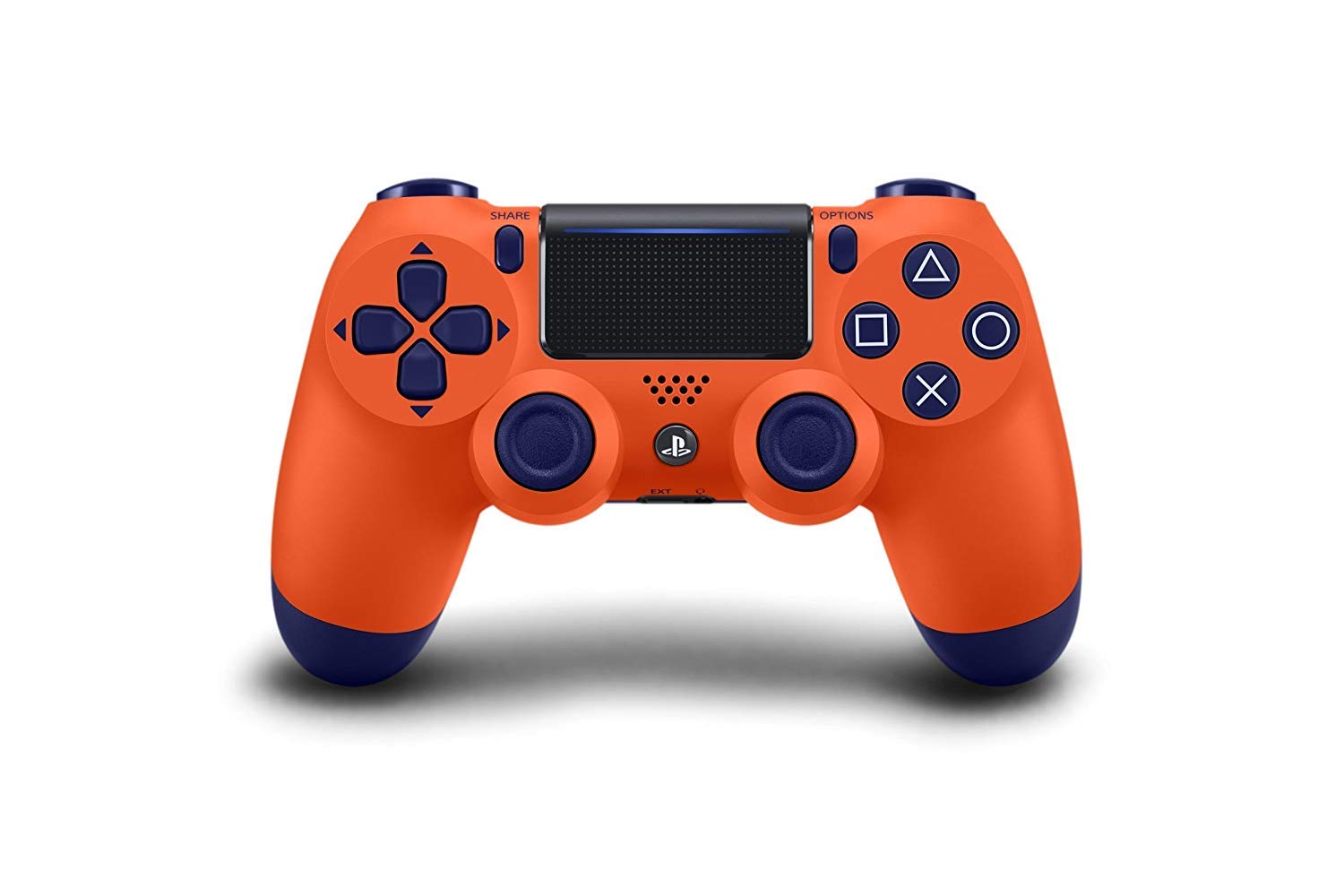
Obrázek 1: Přední strana view of the DualShock 4 Wireless Controller (Sunset Orange).
Nastavení
1. Počáteční párování a připojení
To use the controller for the first time, you must pair it with your PlayStation 4 system. Connect the controller to your PS4 system using the supplied USB cable. Once connected, press the PS button. The controller will turn on, and the light bar will glow. After the light bar glows, you can disconnect the USB cable and use the controller wirelessly.
2. Nabíjení regulátoru
The controller contains a built-in rechargeable lithium-ion battery. To charge the controller, connect it to your PS4 system using a USB cable while the system is turned on or in rest mode. The light bar will slowly blink orange while charging and turn off when charging is complete. You can also charge the controller using a compatible USB wall charger (sold separately).

Obrázek 2: Zpět view of the controller, highlighting the USB charging port.
Obsluha ovladače
The DualShock 4 controller features a range of buttons and functions designed for intuitive gameplay.
Klíčové komponenty a funkce:
- Analog Sticks (L3/R3): Used for precise movement and camera control. Pressing them down functions as L3 and R3 buttons.
- Směrová tlačítka (D-Pad): For menu navigation and specific in-game actions.
- Akční tlačítka (trojúhelník, kruh, kříž, čtverec): Primary input buttons for various in-game actions.
- Tlačítko SDÍLET: Allows you to share screenshots and video clips of your gameplay.
- Tlačítko MOŽNOSTI: Used to pause games, access in-game menus, and other options.
- Tlačítko PS: Turns on the PS4 system, displays the Home screen, and can be used to switch users or turn off the system.
- Touch Pad: A capacitive touch pad that can be used for navigation, gestures, and as an additional button (click).
- Světelná lišta: Changes color to indicate player number, character health, or other game-specific information.
- Tlačítka L1/R1: Ramenní knoflíky pro různé úkony.
- Spouštěče L2/R2: Analog triggers for precise control, often used for acceleration, braking, or shooting.
- Vestavěný reproduktor: Provides additional audio cues from the controller.
- Stereofonní konektor pro sluchátka: Connect a compatible headset for game audio and voice chat.

Obrázek 3: Úhlové view of the controller, highlighting the various buttons and the touchpad.
Údržba
Čištění:
To clean the controller, use a soft, dry cloth. Do not use chemical solvents or abrasive cleaners, as they may damage the surface or internal components. Avoid getting moisture into any openings.
Skladování:
Store the controller in a cool, dry place away from direct sunlight, extreme temperatures, and high humidity. When not in use for extended periods, ensure the controller is fully charged before storing to preserve battery life.
Péče o baterie:
The built-in battery is not user-replaceable. To maximize battery lifespan, avoid fully discharging the battery frequently. Charge the controller regularly, even if not in constant use.
Odstraňování problémů
Controller Not Connecting or Responding:
- Ensure the controller is charged. Connect it to the PS4 with a USB cable.
- Try re-pairing the controller by connecting it via USB and pressing the PS button.
- Resetujte ovladač: Locate the small reset button on the back of the controller, near the L2 shoulder button. Use a small, unfolded paper clip or similar tool to press and hold the button for 3-5 seconds. Then, reconnect the controller to the PS4 with a USB cable and press the PS button to re-pair.
- Ujistěte se, že v blízkosti není žádné silné bezdrátové rušení.
Problémy s nabíjením:
- Verify the USB cable is securely connected to both the controller and the PS4 system.
- Try a different USB cable or a different USB port on the PS4.
- Ensure the PS4 system is powered on or in rest mode (orange light on PS4).
Specifikace
| Funkce | Detail |
|---|---|
| Rozměry produktu | 3.15 x 8.19 x 7.09 palce |
| Hmotnost položky | 12.35 unce |
| Konektivita | Bluetooth, USB |
| Typ baterie | 1 Lithium Polymer battery (included, non-replaceable) |
| Výrobce | Sony |
| Model | DualShock 4 Wireless Controller V2 |
Záruka a podpora
For information regarding warranty coverage, technical support, or service for your DualShock 4 Wireless Controller, please refer to the official PlayStation support website or contact PlayStation customer service. Warranty terms and conditions may vary by region.
Oficiální podpora PlayStationu: www.playstation.com/support


