Zavedení
This manual provides essential information for the safe and efficient operation of your Behringer EUROPORT MPA200BT portable PA system. Please read these instructions thoroughly before using the device to ensure proper setup, usage, and maintenance. Retain this manual for future reference.
The Behringer EUROPORT MPA200BT is an all-in-one portable PA system designed for various applications, featuring 200 watts of power, Bluetooth connectivity for audio streaming, and a wireless microphone for vocal performances or presentations. Its battery operation allows for use in locations without direct power access.
Důležité bezpečnostní pokyny
Při používání elektrického zařízení vždy dodržujte tato základní bezpečnostní opatření:
- Před použitím výrobku si přečtěte všechny pokyny.
- Do not use this product near water or in wet environments.
- Čistěte pouze suchým hadříkem.
- Nezakrývejte žádné větrací otvory. Nainstalujte v souladu s pokyny výrobce.
- Neinstalujte v blízkosti zdrojů tepla, jako jsou radiátory, tepelné regulátory, kamna nebo jiná zařízení (včetně amplifikátory), které produkují teplo.
- Nepodceňujte bezpečnostní účel polarizované nebo uzemněné zástrčky. Polarizovaná zástrčka má dvě čepele, přičemž jedna je širší než druhá. Zástrčka zemnícího typu má dvě čepele a třetí zemnící kolík. Široká čepel nebo třetí hrot jsou určeny pro vaši bezpečnost. Pokud dodaná zástrčka nepasuje do vaší zásuvky, požádejte elektrikáře o výměnu zastaralé zásuvky.
- Chraňte napájecí kabel před šlapáním nebo přiskřípnutím, zejména u zástrček, zásuvek a v místě, kde vychází z přístroje.
- Používejte pouze nástavce/příslušenství určené výrobcem.
- Odpojte toto zařízení během bouřky s blesky nebo když se delší dobu nepoužívá.
- Veškeré opravy svěřte kvalifikovanému servisnímu personálu. Servis je nutný, pokud bylo zařízení jakýmkoli způsobem poškozeno, například je poškozen napájecí kabel nebo zástrčka, pokud do zařízení vnikla tekutina nebo do něj spadly předměty, zařízení bylo vystaveno dešti nebo vlhkosti, nefunguje normálně. , nebo byla vypuštěna.
Obsah balení
Upon unpacking your Behringer EUROPORT MPA200BT, please verify that all components are present and in good condition:
- Behringer EUROPORT MPA200BT Portable PA System
- Wireless Microphone (ULM300M)
- USB Receiver for Wireless Microphone (ULM300USB)
- Napájecí kabel
- Uživatelská příručka (tento dokument)

Image: The Behringer EUROPORT MPA200BT portable PA system shown with its accompanying wireless microphone.
Konec produktuview: Ovládací prvky a připojení
Familiarize yourself with the various controls and connection points on your MPA200BT unit.

Image: Rear panel of the MPA200BT, highlighting the main control interface, inputs, and outputs.

Obrázek: Podrobný view of the MPA200BT's control panel, including display, rotary encoder, and buttons.
Vlastnosti ovládacího panelu:
- Displej: Shows current settings, input levels, and Bluetooth status.
- Rotační kodér: Used to navigate menus and adjust parameters. Press to confirm selections.
- Tlačítko PROCES: Activates or deactivates sound processing effects.
- Tlačítko SETUP: Vstupuje do nabídky nastavení systému.
- Tlačítko EXIT: Ukončí aktuální menu nebo nastavení.
- Tlačítko ENTER: Potvrzuje výběry v rámci menu.
- Tlačítko Bluetooth: Zahájí režim párování Bluetooth.
Vstupní/výstupní připojení:
- INPUT 1 & 2 (XLR/TRS Combo Jacks): For connecting microphones or line-level instruments.
- WIRELESS SYSTEM (USB Port): For connecting the ULM300USB wireless microphone receiver.
- MP3 Input (3.5mm Stereo Jack): Pro připojení externích audio přehrávačů.
- MIX OUTPUT (XLR): For sending the mixed audio signal to another PA system or recording device.
- Vstup střídavého napájení: Pro připojení napájecího kabelu.
Nastavení
- Připojení napájení:
Connect the supplied power cable to the AC Power Inlet on the rear of the MPA200BT and then to a suitable power outlet. The unit can also operate on its internal battery.
- Počáteční zapnutí:
Press the power switch to turn on the unit. The display will illuminate.
- Umístění:
Place the MPA200BT on a stable, flat surface or mount it on a speaker stand (sold separately). Ensure proper ventilation around the unit.
- Připojovací vstupy:
- Drátové mikrofony/nástroje: Connect to INPUT 1 or INPUT 2 using XLR or 1/4" TRS cables.
- Externí audio přehrávače: Connect to the MP3 Input using a 3.5mm stereo cable.
Návod k obsluze
Bluetooth audio streamování

Image: The Bluetooth logo, representing wireless audio streaming capability.
- Ensure the MPA200BT is powered on.
- Stiskněte tlačítko Bluetooth button on the control panel. The Bluetooth icon on the display will flash, indicating pairing mode.
- On your smartphone or Bluetooth-enabled device, navigate to the Bluetooth settings and select "BEHRINGER MPA200BT" from the list of available devices.
- Once paired, the Bluetooth icon on the MPA200BT display will stop flashing and remain solid.
- You can now stream audio from your device to the MPA200BT. Adjust the volume using your device's controls and the MPA200BT's master volume.
Wireless Microphone Usage (ULM300M/ULM300USB)
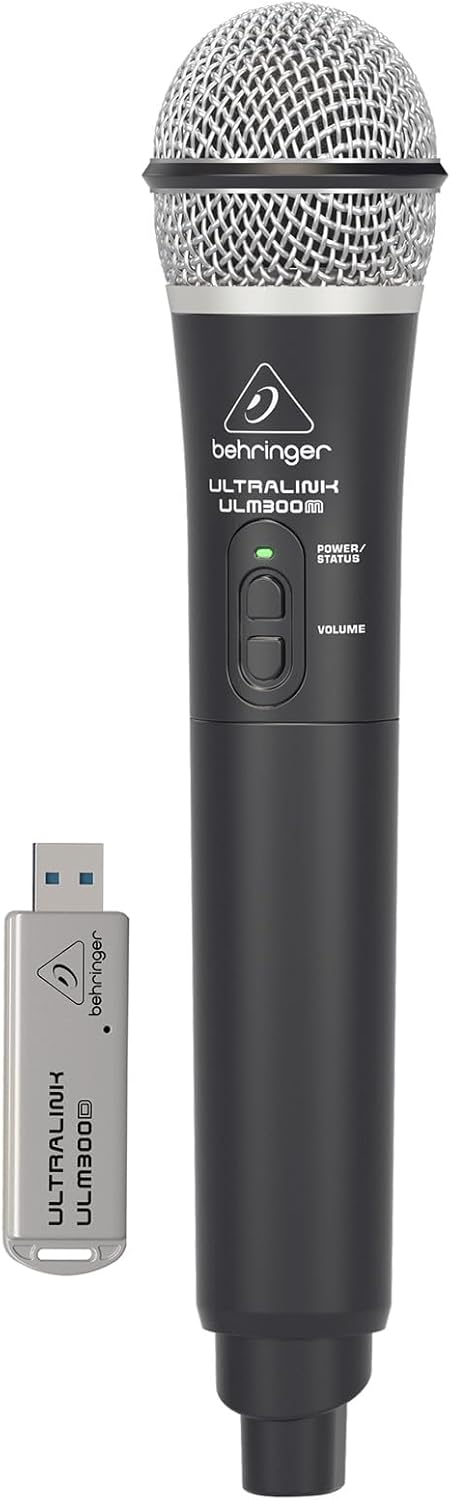
Image: The Behringer ULM300M wireless microphone shown with its USB receiver, the ULM300USB.
- Insert the ULM300USB receiver into the BEZDRÁTOVÝ SYSTÉM USB port on the MPA200BT.
- Ensure the ULM300M wireless microphone has fresh batteries installed.
- Power on the wireless microphone. The status LED on both the microphone and the receiver should indicate a successful connection (usually a solid green light).
- Adjust the microphone's volume using the controls on the microphone itself and the MPA200BT's input gain settings.
Remote Control via Smartphone App

Image: A smartphone screen showing the graphical user interface of the Behringer remote control application, used to manage the PA system settings.
The MPA200BT can be controlled remotely using a dedicated smartphone application. This allows for adjustments to volume, EQ, and effects from a distance.
- Download the official Behringer MPA200BT control app from your device's app store (iOS/Android).
- Ensure your smartphone is connected to the MPA200BT via Bluetooth (as described in the "Bluetooth Audio Streaming" section).
- Open the app. It should automatically detect and connect to your MPA200BT unit.
- Use the app's interface to control various parameters of the PA system.
Provoz na baterie
The MPA200BT features an internal rechargeable battery for portable use.
- The battery charges automatically when the unit is connected to AC power.
- A battery level indicator on the display shows the remaining charge.
- For optimal battery life, fully charge the unit before its first use and periodically when not in use for extended periods.
Údržba
- Čištění: K čištění vnější strany jednotky používejte měkký, suchý hadřík. Nepoužívejte abrazivní čisticí prostředky ani rozpouštědla.
- Skladování: When not in use, store the MPA200BT in a cool, dry place, away from direct sunlight and extreme temperatures.
- Péče o baterie: If storing for extended periods, ensure the battery is partially charged (around 50%) and recharge it every few months to prevent deep discharge.
- Větrání: Ensure that the ventilation openings are not obstructed during operation to prevent overheating.
Odstraňování problémů
| Problém | Možná příčina | Řešení |
|---|---|---|
| Žádná síla | Power cable not connected; unit not switched on; battery depleted. | Check power cable connection; ensure power switch is ON; charge battery. |
| Žádný zvukový výstup | Volume too low; input source not connected or selected; faulty cable; microphone off. | Increase master volume and input gain; check input connections; test cables; ensure microphone is powered on and paired. |
| Párování Bluetooth se nezdařilo | MPA200BT not in pairing mode; device too far; interference. | Press Bluetooth button to enter pairing mode; move device closer; restart both devices. |
| Bezdrátový mikrofon nefunguje | USB receiver not connected; microphone off; depleted batteries in microphone; interference. | Ensure ULM300USB is fully inserted; power on microphone; replace microphone batteries; ensure clear line of sight. |
| Squealing/Feedback | Microphone too close to speaker; microphone gain too high. | Move microphone further from speaker; reduce microphone input gain. |
Specifikace
| Funkce | Detail |
|---|---|
| Model | EUROPORT MPA200BT |
| Výstupní Wattage | 200 wattů |
| Zdroj napájení | Battery Powered / AC Power |
| Technologie připojení | Bluetooth |
| Počet kanálů | 2 |
| Hmotnost položky | 12.1 kg (26.6 lb) |
| Rozměry produktu (D x Š x V) | 11.02 x 10.11 x 16.53 palce |
| Typ montáže | Stolní deska |
| Kompatibilní zařízení | Smartphone |
| Výrobce | Hudební kmen USA |
Záruka a podpora
Podrobné informace o záruce a technickou podporu získáte od oficiálního prodejce Behringer. webnebo kontaktujte jejich zákaznický servis. Uschovejte si účtenku jako doklad o koupi.
Online zdroje: www.behringer.com
Výrobce: Hudební kmen USA
Oficiální videa produktů
No relevant official product videos from the seller were found in the provided data for embedding.


