Zavedení
This manual provides detailed instructions for the setup, operation, maintenance, and troubleshooting of your Jaycar Composite AV to HDMI Converter (Model AC-1722). Please read this manual thoroughly before using the device to ensure proper functionality and to prevent damage.
Klíčové vlastnosti
- Converts Composite Video and Stereo Audio (RCA) to HDMI output.
- Supports HDMI 1080p or 720p output resolutions.
- Compatible with NTSC and PAL video systems.
- Plug and play operation.
Obsah balení
Prosím, ověřte, zda jsou v balení přítomny všechny položky:
- Jaycar Composite AV to HDMI Converter (AC-1722)
- Napájecí adaptér (5V DC)
- Uživatelská příručka (tento dokument)
Konec produktuview
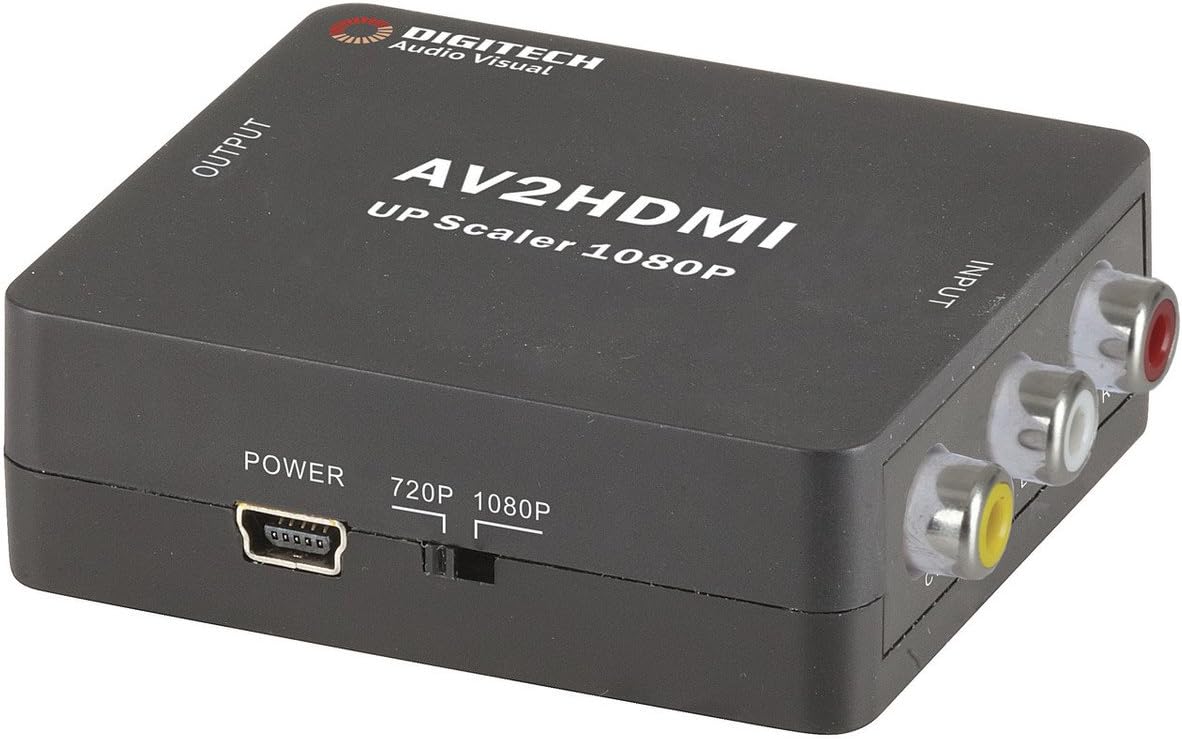
Obrázek 1: Přední view of the Jaycar Composite AV to HDMI Converter. This image displays the top and front of the converter, showing the "AV2HDMI UP Scaler 1080P" label, "OUTPUT" and "INPUT" indicators, the power input, and the 720p/1080p resolution switch. The Composite AV input ports (yellow, white, red) are visible on the right side.

Obrázek 2: Strana view of the converter showing the HDMI output port. This port is labeled "HDMI" and is where the HDMI cable connects to your display device.

Obrázek 3: Strana view of the converter showing the Composite AV input ports. These ports are labeled "CVBS" (yellow for video), "L" (white for left audio), and "R" (red for right audio).

Obrázek 4: Strana view of the converter showing the power input port and the 720p/1080p resolution switch. The power port is a mini-USB type, and the switch allows selection between 720p and 1080p output resolutions.
Pokyny pro nastavení
- Připojit zdrojové zařízení: Connect your Composite AV source device (e.g., DVD player, VCR, game console) to the converter's input ports. Match the yellow RCA cable to the "CVBS" port, the white RCA cable to the "L" (Left Audio) port, and the red RCA cable to the "R" (Right Audio) port.
- Připojení zobrazovacího zařízení: Connect an HDMI cable from the converter's "HDMI" output port to an available HDMI input on your display device (e.g., TV, monitor, projector).
- Select Output Resolution: Use the 720p/1080p switch on the converter to select your desired output resolution. For most modern displays, 1080p is recommended. If you experience issues, try 720p.
- Připojte napájení: Connect the provided 5V DC power adapter to the converter's "POWER" input port, then plug the adapter into a wall outlet. The converter will power on automatically.
- Vyberte vstup na displeji: Turn on your display device and select the corresponding HDMI input channel to view the converted signal.
Návod k obsluze
The Jaycar Composite AV to HDMI Converter is designed for plug-and-play operation. Once all connections are made and power is supplied, the converter will automatically scale the analog AV signal to the selected HDMI output resolution (720p or 1080p).
- Ensure your source device is powered on and outputting a Composite AV signal.
- Verify your display device is set to the correct HDMI input.
- If no image appears, check all cable connections and the power supply.
- Experiment with the 720p/1080p switch if the image is distorted or not displayed correctly.
Údržba
The converter requires minimal maintenance. Follow these guidelines to ensure longevity:
- Keep the device in a dry, well-ventilated area, away from direct sunlight, high temperatures, and humidity.
- Zabraňte pádu zařízení nebo jeho vystavení silným nárazům.
- Vnější povrch čistěte měkkým, suchým hadříkem. Nepoužívejte tekuté čisticí prostředky ani rozpouštědla.
- Ensure all cables are securely connected but do not force them.
Odstraňování problémů
| Problém | Možná příčina | Řešení |
|---|---|---|
| Žádný video ani audio výstup. |
|
|
| Distorted or flickering image. |
|
|
| No audio, but video is present. |
|
|
Specifikace
| Typ vstupu | Composite Video and Audio (3 RCA) |
| Typ výstupu | HDMI typu A |
| Podporovaná rozlišení | 1080p (1920 x 1080), 720p |
| Video systémy | NTSC, PAL |
| Požadavek na napájení | 5V DC (napájecí adaptér je součástí balení) |
| Rozměry produktu (D x Š x V) | 54 mm × 60 mm × 20 mm (přibližně 2.13" × 2.36" × 0.79") |
| Hmotnost produktu | 80 g |
Informace o záruce
This Jaycar product comes with a 1-letá záruka od data nákupu. Tato záruka se vztahuje na vady materiálu a zpracování při běžném používání. Nevztahuje se na škody způsobené nesprávným použitím, nehodou, neoprávněnou úpravou nebo nesprávnou instalací.
For warranty claims, please retain your proof of purchase and contact Jaycar customer support.
Zákaznická podpora
If you require further assistance or have questions not covered in this manual, please contact Jaycar customer support through their official webwebu nebo prodejce, kde jste produkt zakoupili.
For the latest support information, please visit the official Jaycar webmísto: www.jaycar.com.au


