Zavedení
The Powertech MP3087 is a versatile 0-32V DC Dual Output Laboratory Power Supply designed for precision applications. It features automatic constant voltage (CV) or constant current (CC) transfer, ensuring stable power delivery. Its dual outputs can operate independently, or be configured in parallel or series to achieve various voltage and current combinations. Each output is equipped with independent digital voltage and current meters, providing clear, backlit readings for accurate monitoring. Coarse and fine controls allow for precise adjustment of voltage a aktuální limity.
Bezpečnostní pokyny
Please read and understand all safety instructions before operating the power supply. Failure to do so may result in injury or damage to the equipment.
- Vždy připojujte napájecí zdroj do uzemněné zásuvky.
- Nepoužívejte jednotku ve vlhkém neboamp podmínky.
- Zajistěte dostatečné větrání kolem jednotky, abyste zabránili přehřátí. Neblokujte větrací otvory.
- Neotevírejte casing. Uvnitř nejsou žádné součásti, které by mohl uživatel opravit. Veškerý servis svěřte kvalifikovanému personálu.
- Before making any connections or disconnections, ensure the power supply is turned off and unplugged from the AC mains.
- Ověřte svtage and current settings before connecting to any circuit or device.
- Zabraňte delšímu zkratování výstupních svorek.
Konec produktuview
Ovládací prvky a indikátory na předním panelu

Obrázek 1: Přední strana view of the Powertech MP3087 showing dual displays, control knobs, and output terminals.
The front panel of the MP3087 is intuitively designed for ease of use, featuring two identical sets of controls for each independent output, plus central controls for power and output configuration.
- Digitální displeje: Two backlit displays show real-time voltage (V) and current (A) for each output.
- VOL-ADJ Knobs: Coarse and fine adjustment for output voltage.
- CUR-ADJ Knobs: Coarse and fine adjustment for output current limit.
- CC/CV Indicators: LEDs indicating Constant Current (CC) or Constant Voltage (CV) režimu.
- Výstupní terminály: Red (+) and Black (-) binding posts for connecting loads. A green (GND) terminal is also provided.
- Vypínač: Hlavní vypínač ZAP/VYP pro jednotku.
- PARALLEL Button: Configures both outputs in parallel for increased current output.
- SERIES Button: Configures both outputs in series for increased voltage výstup.
Vlastnosti zadního panelu
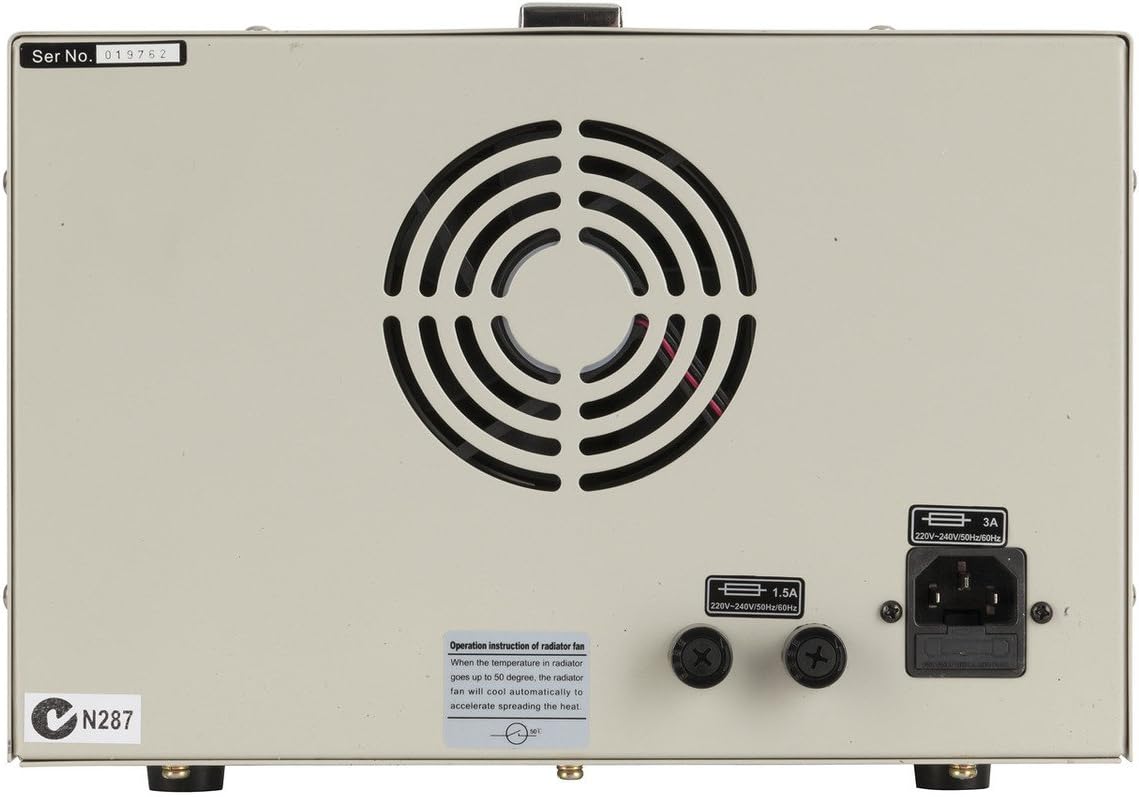
Obrázek 2: Zadní view of the Powertech MP3087 showing the power input, fuse holder, and cooling fan.
The rear panel houses essential connections and cooling components.
- Vstup střídavého proudu: IEC C14 inlet for connecting the AC power cord.
- Držák pojistky: Contains the main protective fuse.
- Chladicí ventilátor: Automaticky se aktivuje pro odvod tepla a udržení optimální provozní teploty.
Nastavení
- Rozbalení: Carefully remove the power supply from its packaging. Inspect for any signs of damage during transit.
- Umístění: Place the unit on a stable, level surface with adequate ventilation space around it (at least 10 cm on all sides, especially the rear). Avoid placing it near heat sources or in direct sunlight.
- Připojení napájení: Ensure the POWER switch on the front panel is in the OFF position. Connect the supplied AC power cord to the AC Power Input on the rear panel and then to a grounded wall outlet.
- Počáteční kontrola: Turn the POWER switch ON. The digital displays should illuminate, showing default voltage a aktuální hodnoty.
Návod k obsluze
The Powertech MP3087 offers flexible operation modes to suit various laboratory and testing requirements.
1. Nezávislý provoz
In this mode, each output functions as a separate, isolated power supply.
- Ensure both PARALLEL and SERIES buttons are disengaged (not pressed in).
- Zapněte napájení.
- For each output, adjust the VOL-ADJ (coarse and fine) knobs to set the desired output voltage.
- Adjust the CUR-ADJ (coarse and fine) knobs to set the desired current limit. It is recommended to set the current limit slightly above the expected operating current of your load to prevent unintended current limiting.
- Connect your load to the respective output terminals (Red for positive, Black for negative).
- Monitor the displays for actual voltage and current draw. The CC/CV indicator will show the operating mode.
2. Series Operation (Increased Voltage)
To combine the voltage of both outputs, use the series mode. The total output voltage will be the sum of the individual output voltages, while the current limit will be determined by the lower of the two set current limits.
- Ujistěte se, že je napájení VYPNUTÉ.
- Press the SERIES button on the front panel.
- Connect the positive (+) terminal of Output 1 to the negative (-) terminal of Output 2 using a short, heavy-gauge wire.
- The combined output will be available from the negative (-) terminal of Output 1 and the positive (+) terminal of Output 2.
- Zapněte napájení.
- Adjust the VOL-ADJ and CUR-ADJ knobs for both outputs to achieve the desired total voltage and current limit. Note that the current limit will be the lowest setting of the two outputs.
- Connect your load to the combined output terminals.
3. Parallel Operation (Increased Current)
To combine the current capacity of both outputs, use the parallel mode. The total output current will be the sum of the individual output currents, while the voltage will be determined by the lower of the two set voltages.
- Ujistěte se, že je napájení VYPNUTÉ.
- Press the PARALLEL button on the front panel.
- Connect the positive (+) terminal of Output 1 to the positive (+) terminal of Output 2 using a short, heavy-gauge wire.
- Connect the negative (-) terminal of Output 1 to the negative (-) terminal of Output 2 using a short, heavy-gauge wire.
- The combined output will be available from either set of connected terminals.
- Zapněte napájení.
- Adjust the VOL-ADJ and CUR-ADJ knobs for both outputs to achieve the desired total current and voltage. Všimněte si, že objemtage will be the lowest setting of the two outputs.
- Connect your load to the combined output terminals.
Údržba
Správná údržba zajistí dlouhou životnost a spolehlivý provoz vašeho zdroje napájení.
- Čištění: Disconnect the power supply from the AC mains before cleaning. Use a soft, dry cloth to wipe down the exterior. Do not use abrasive cleaners or solvents.
- Větrání: Regularly check that the ventilation openings on the rear and sides are free from dust and obstructions. A soft brush or compressed air can be used to gently clear dust.
- Skladování: When not in use for extended periods, store the power supply in a cool, dry place, away from direct sunlight and excessive humidity.
- Výměna pojistky: If the unit fails to power on, check the fuse located on the rear panel. Replace only with a fuse of the same type and rating (refer to specifications). Always disconnect from AC mains before replacing the fuse.
Odstraňování problémů
| Problém | Možná příčina | Řešení |
|---|---|---|
| Jednotka se nezapne. | Žádné napájení střídavým proudem; Spálená pojistka; Vypínač napájení vypnutý. | Check AC power cord connection and wall outlet. Check and replace fuse if necessary. Ensure power switch is ON. |
| Žádný výstupní objemtage/aktuální. | Output terminals not connected; Current limit set too low; Overload protection activated. | Ensure load is properly connected. Increase current limit. Reduce load or check for short circuit in load. |
| Výstupní objemtage/current fluctuates. | Unstable AC input; Loose connections; Faulty load. | Check AC power source stability. Secure all connections. Test with a different load. |
| Jednotka se přehřívá. | Zablokované větrání; Nadměrné zatížení. | Ensure ventilation openings are clear. Reduce load or operate within specified limits. |
Specifikace
| Funkce | Detail |
|---|---|
| Model | MP3087 |
| Výstupní objemtage | 0-32V DC (per channel) |
| Výstupní proud | 0-3A (per channel) |
| Typ výstupu | Dual, Independent, Series, Parallel |
| Zobrazit | Digital Voltage and Current Meters (Backlit) |
| Provozní režimy | Konstantní svtage (CV), konstantní proud (CC) |
| Vstupní objemtage | 220-240V AC, 50/60Hz (as per rear panel image) |
| Jištění | 1.5A (as per rear panel image) |
| Rozměry | Approx. 40 x 26 x 18.5 cm (from product title) |
| Hmotnost | Přibl. 9.97 kg |
| Materiál | Polykarbonát (PC) |
Záruka a podpora
This Powertech product is covered by a standard manufacturer's warranty. For specific warranty terms, duration, and conditions, please refer to the documentation provided with your purchase or contact Jaycar customer support.
For technical assistance, troubleshooting beyond this manual, or service inquiries, please contact your retailer or the manufacturer's authorized service center. Keep your purchase receipt as proof of purchase for warranty claims.


