1. Úvod
The Cooler Master MasterAir MA620P is a processor cooler designed for efficient heat dissipation in desktop computer systems. It features a twin-tower heatsink design, which enhances cooling capacity. The cooler incorporates six heatpipes and Continuous Direct Contact Technology 2.0 (CDC 2.0) for direct heat transfer from the CPU. Two MasterFan MF120R RGB fans are included, providing airflow and customizable lighting. This manual provides instructions for the proper installation, operation, and maintenance of your MasterAir MA620P cooler.

Obrázek 1: Přední strana view of the Cooler Master MasterAir MA620P CPU cooler, showcasing its twin-tower heatsink design and a fan illuminated with purple RGB lighting.
2. Bezpečnostní informace
- Před instalací nebo demontáží jakýchkoli součástí vždy odpojte napájení počítače.
- Handle components with care to avoid damage. Sharp edges may be present on heatsink fins.
- Noste antistatický náramek nebo se často dotýkejte uzemněného kovového předmětu, abyste zabránili poškození součástí elektrostatickým výbojem (ESD).
- Uchovávejte mimo dosah dětí.
- Do not attempt to modify the cooler or its components.
3. Obsah balení
Ověřte, zda jsou v balení přítomny všechny položky:
- MasterAir MA620P CPU Cooler (Heatsink with pre-installed fans)
- Mounting Brackets for Intel Sockets (LGA 2066, 2011-v3, 2011, 1151, 1150, 1155, 1156)
- Mounting Brackets for AMD Sockets (AM4, AM3+, AM3, AM2+, AM2, FM2+, FM2, FM1)
- Zadní deska
- Screws and Spacers
- Termální pasta
- RGB Controller (if included with your specific model)
- Uživatelská příručka (tento dokument)
4. Nastavení a instalace
Follow these general steps for installing the MasterAir MA620P. Refer to the detailed installation guide provided with your cooler for socket-specific instructions.
- Příprava základní desky: Install the appropriate backplate for your CPU socket type (Intel or AMD) onto the rear of the motherboard.
- Instalace montážních držáků: Secure the correct mounting brackets to the front of the motherboard around the CPU socket.
- Naneste termální pastu: Clean the CPU surface and apply a small amount of thermal paste to the center of the CPU's integrated heat spreader (IHS).
- Mount the Cooler: Carefully place the MasterAir MA620P heatsink onto the CPU, aligning the mounting holes on the cooler with the brackets. Secure the cooler using the provided screws, tightening them in an alternating pattern until snug.
- Připojení fanoušků: Connect the 4-pin PWM fan cables from the MasterFan MF120R RGB fans to the CPU_FAN headers on your motherboard.
- Connect RGB Lighting: Connect the RGB cables from the fans to the included RGB controller or directly to a compatible 4-pin RGB header on your motherboard.

Figure 2: Bottom-up angled view of the Cooler Master MasterAir MA620P, revealing the copper heatpipes extending from the base and passing through the aluminum fin stacks.
5. Návod k obsluze
Once installed, the MasterAir MA620P operates automatically based on your motherboard's fan control settings and the CPU temperature.
- Ovládání rychlosti ventilátoru: The MasterFan MF120R RGB fans are PWM (Pulse Width Modulation) controlled. You can adjust their speed profiles through your motherboard's BIOS/UEFI settings or dedicated fan control software.
- Ovládání RGB osvětlení: If connected to an RGB controller, use the controller's buttons to cycle through lighting modes and colors. If connected to a motherboard's RGB header, use the motherboard manufacturer's RGB software to customize lighting effects.

Obrázek 3: Úhlové view of the Cooler Master MasterAir MA620P CPU cooler, featuring a fan with vibrant red RGB illumination and visible copper heatpipes.
6. Údržba
Regular maintenance ensures optimal performance and longevity of your CPU cooler.
- Odstranění prachu: Periodically clean dust from the heatsink fins and fan blades using compressed air or a soft brush. Ensure the fans are not spinning during cleaning.
- Kontrola ventilátoru: Check fan blades for any obstructions or signs of wear. Ensure fans spin freely.
- Teplovodní pasta: The thermal paste typically lasts for several years. If you notice a significant increase in CPU temperatures, consider reapplying fresh thermal paste after carefully cleaning the old paste from the CPU and cooler base.
7. Řešení problémů
If you encounter issues with your MasterAir MA620P, consider the following:
- Vysoké teploty procesoru:
- Ensure the cooler is securely mounted and making proper contact with the CPU.
- Verify that thermal paste was applied correctly and evenly.
- Check if fans are spinning at appropriate speeds. Adjust fan curves in BIOS/UEFI if necessary.
- Vyčistěte chladič a ventilátory od nahromaděného prachu.
- Ventilátory se netočí:
- Confirm fan cables are securely connected to the motherboard's CPU_FAN headers.
- Check BIOS/UEFI settings to ensure fan control is enabled and not set to 0 RPM at low temperatures.
- Nefunkční RGB osvětlení:
- Ensure RGB cables are correctly connected to the RGB controller or motherboard header.
- If using a motherboard header, verify that the correct RGB software is installed and configured.
- Zkontrolujte uvolněné spoje.
8. Specifikace
| Rozměry produktu | 5.36 cm D x 4.8 cm Š x 6.5 cm V |
| Značka | Cooler Master |
| Typ napájecího konektoru | 4-pin |
| svtage | 12 voltů |
| Wattage | 3.6 wattů |
| Způsob chlazení | Vzduch |
| Kompatibilní zařízení | Desktop |
| Úroveň hluku | 25 decibelů |
| Materiál | Copper, Aluminium, Plastic |
| Maximální rychlost otáčení | 1500 ot./min |
| Výrobce | Cooler Master Europe BV |
| Hmotnost položky | 2.2 libry |
| Číslo modelu položky | MAP-D6PN-218PC-R1 |
| Datum první dostupnosti | 19. dubna 2018 |
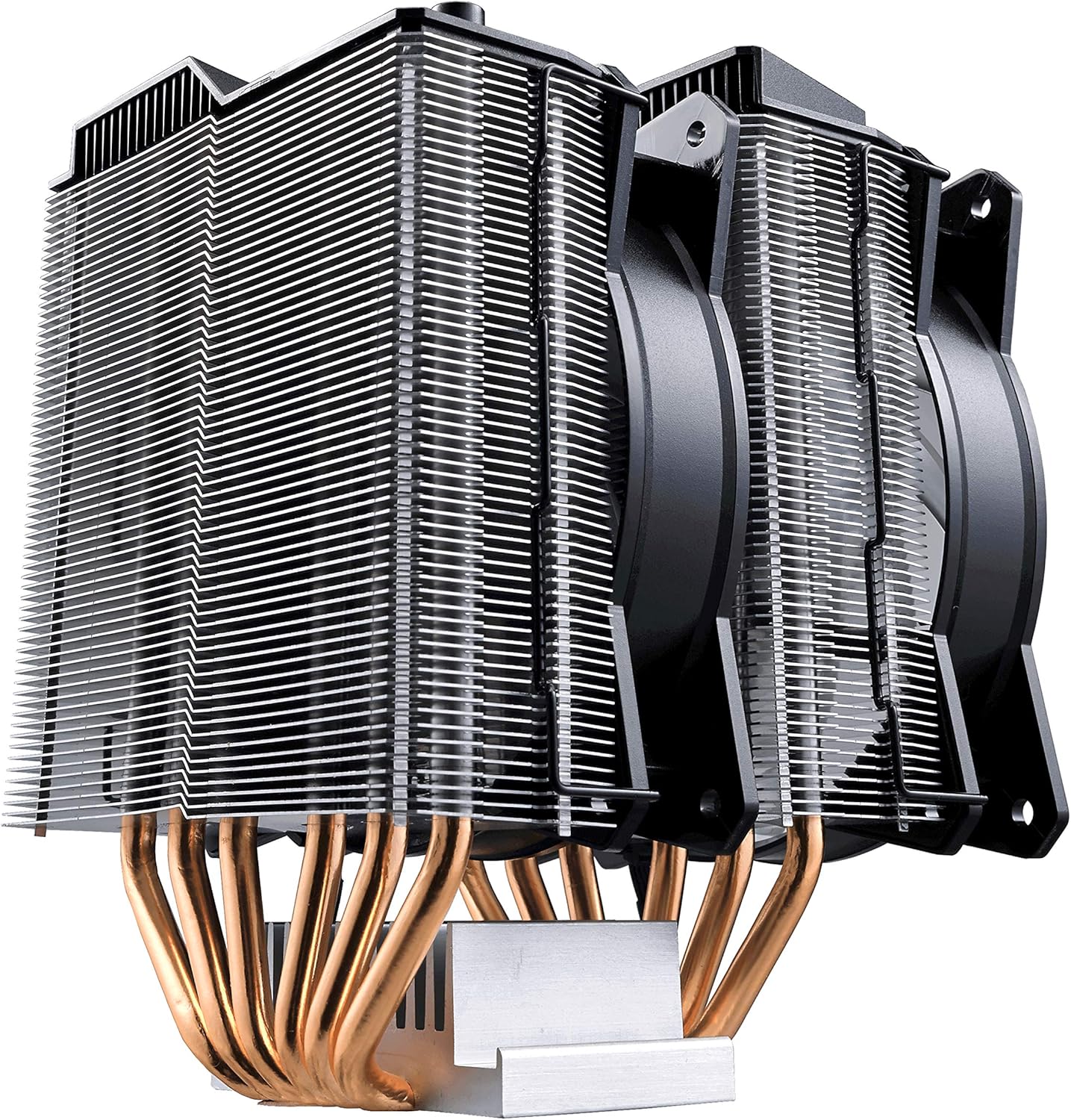
Obrázek 4: Boční profíkfile of the Cooler Master MasterAir MA620P, showing the dual heatsink towers and the two cooling fans positioned between and on one side of the towers.
9. Záruka a podpora
For warranty information and technical support, please visit the official Cooler Master webnebo se obraťte na jejich zákaznický servis. Uschovejte si doklad o koupi pro případ reklamace.


