1. Úvod a konecview
The LG HU80KA projector delivers a thrilling home cinema experience with vivid 4K Ultra HD resolution (3840 x 2160). As LG's brightest projector, it is designed for versatility, allowing users to enjoy a large 150-inch image with four times the resolution of Full HD. Featuring HDR10 compatibility, it ensures precise colors and peak brightness for lifelike high dynamic range content. The projector is also LG Smart TV enabled, providing easy access to popular streaming services, and includes full HDCP 2.2 compliance for seamless connectivity. Please note that required bandwidth for streaming videos may vary by content provider, and smart service support is subject to change.

Figure 1.1: The LG HU80KA projector with its top mirror open, showcasing the projection lens.
2. Co je v krabici
Upon unboxing your LG HU80KA projector, please ensure all the following components are present:
- Projector (LG HU80KA unit)
- Dálkové ovládání
- Uživatelská příručka
- Napájecí kabel
3. Vlastnosti produktu
- Rozlišení 4K Ultra HD: Delivers 3840 x 2160 pixels for crisp, detailed images.
- Vysoký jas: Up to 2500 ANSI lumens for clear viewIng.
- Velká velikost obrazovky: Projects images up to 150 inches diagonally.
- Kompatibilní s HDR10: Supports High Dynamic Range content for enhanced color and contrast.
- LG Smart TV Enabled: Access streaming apps and online content directly.
- Bluetooth Sound Out: Connects wirelessly to Bluetooth speakers or headphones.
- Flexible Projection Distance: Achieves a 150-inch image at 14.1 feet, 100 inches at 9.5 feet, and 40 inches at 3.6 feet.
- Vestavěné stereo reproduktory: Nabízí integrovaný zvukový výstup.
- Napájecí kabel: Operates via standard power supply (100V – 240V at 50~60 Hz).
4. Průvodce nastavením
4.1 Umístění
The LG HU80KA projector offers flexible placement options. It can be moved from room to room or installed overhead. For optimal image quality, position the projector to achieve the desired screen size based on the projection distance guidelines:
- 150-inch screen: Approximately 14.1 feet from the screen/wall.
- 100-inch screen: Approximately 9.5 feet from the screen/wall.
- 40-inch screen: Approximately 3.6 feet from the screen/wall.
Ensure the projection surface is smooth and light-colored for the best visual experience.
4.2 Připojení napájení
Connect the provided power cord to the projector's power input and then to a suitable electrical outlet. The projector operates on 100V – 240V at 50~60 Hz.
4.3 Počáteční zapnutí
Press the power button on the projector or the remote control to turn on the device. Follow any on-screen prompts for initial setup, including language selection and network connection.

Obrázek 4.1: Strana view of the LG HU80KA projector, highlighting the handle for portability and ventilation grilles.
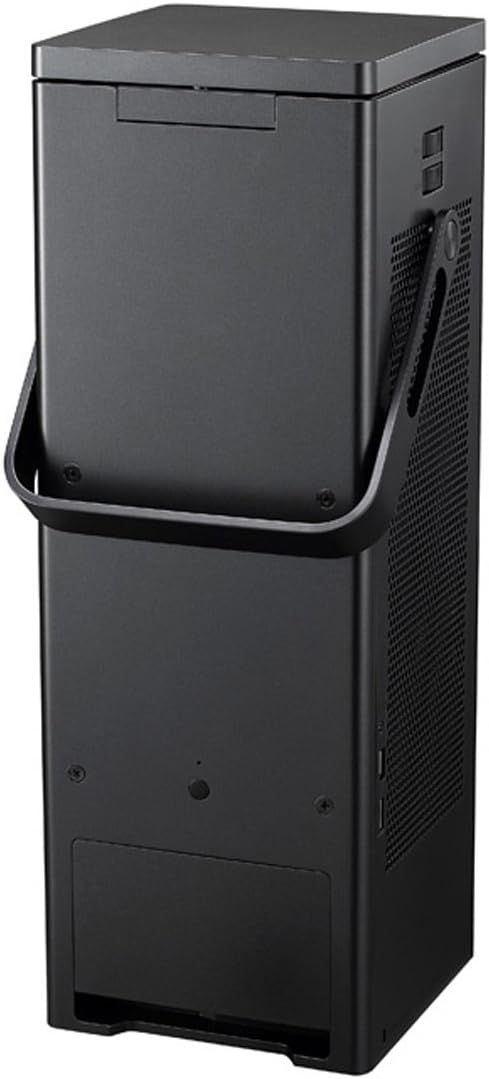
Obrázek 4.2: Zadní view of the LG HU80KA projector, displaying the input/output ports for connectivity.
5. Návod k obsluze
5.1 Funkce chytré televize
The LG HU80KA is equipped with LG Smart TV functionality. Use the remote control to navigate the on-screen interface and access pre-installed streaming applications. Ensure the projector is connected to a stable internet connection via Wi-Fi for optimal performance.
5.2 Konektivita
Projektor nabízí několik možností připojení:
- HDMI: Connect external devices such as Blu-ray players, gaming consoles, or computers using an HDMI cable.
- USB: Přehrát média files přímo z paměťového zařízení USB.
- Bluetooth Sound Out: Pair Bluetooth-enabled audio devices (e.g., soundbars, headphones) for wireless audio output.
5.3 Úprava obrazu
Adjust the image focus using the focus knob located near the lens. The projector may also feature automatic keystone correction for squaring the image if projected at an angle. Refer to the on-screen menu for advanced image settings, including aspect ratio (16:9/Original/4:3/Vertical Zoom/All-Direction Zoom) and HDR settings.
Video 5.1: Official LG video showcasing the HU80KA 4K UHD Laser Smart Home Theater CineBeam Projector and its features.
Video 5.2: Merchant video detailing the LG HU80KA 4K UHD Laser Smart TV Home Theater CineBeam Projector's capabilities and design.
6. Údržba
To ensure the longevity and optimal performance of your LG HU80KA projector, regular maintenance is recommended:
- Čištění objektivu: Gently clean the projector lens with a soft, lint-free cloth specifically designed for optical surfaces. Avoid abrasive materials or harsh chemicals.
- Větrání: Ensure the projector's ventilation grilles are clear of dust and obstructions to prevent overheating. Do not block air inlets or outlets.
- Skladování: Pokud projektor delší dobu nepoužíváte, skladujte jej na chladném a suchém místě, chráněném před prachem a přímým slunečním zářením.
7. Řešení problémů
If you encounter issues with your LG HU80KA projector, refer to the following common troubleshooting tips:
- Bez napájení: Ensure the power cord is securely connected to both the projector and the electrical outlet. Verify the outlet is functional.
- Bez obrázku: Check the input source selection to ensure it matches the connected device. Verify HDMI or USB cables are properly connected.
- Rozmazaný obrázek: Adjust the focus knob until the image is sharp. Ensure the projection surface is flat and the projector is stable.
- Image is Crooked/Trapezoidal: Utilize the keystone correction feature in the projector's settings menu to square the image.
- Žádný zvuk: Check the volume level on both the projector and any connected audio devices. If using Bluetooth, ensure proper pairing. If using HDMI, verify the audio output settings.
- Aplikace pro chytré televizory nefungují: Verify the internet connection is active and stable. Try restarting the projector.
8. Specifikace
| Funkce | Specifikace |
|---|---|
| Značka | LG |
| Číslo modelu | HU80KA |
| Rozlišení displeje | 4K UHD (3840 x 2160) |
| Jas | Up to 2500 ANSI Lumen |
| Velikost obrazovky | Až 150 palce |
| Podpora HDR | Kompatibilní s HDR10 |
| Chytré funkce | LG Smart TV enabled |
| Zvukový výstup | Bluetooth Sound Out, Built-In Stereo Speakers |
| Konektivita | HDMI, USB, Bluetooth |
| Hmotnost položky | 14.8 libry |
| Rozměry produktu | 6.5 x 6.5 x 18.5 palce |
| Napájení | 100V – 240V at 50~60 Hz (PSU Built-in) |
| Dálkové baterie | Jsou vyžadovány 2 baterie AAA |
9. Podpora
For further assistance, technical support, or warranty information, please refer to the official LG Electronics website or contact LG customer service directly. The included User Manual contains detailed contact information and troubleshooting steps.