1. Úvod
This manual provides detailed instructions for the installation, operation, and maintenance of your GIGABYTE B360 HD3 motherboard. Designed to support 8th Generation Intel Core processors with an LGA1151 socket, this ATX form factor motherboard offers robust performance and essential features for a reliable computing experience. It includes support for Dual Channel Non-ECC Unbuffered DDR4 memory, multiple USB 3.1 Gen 2 ports, ultra-fast M.2 storage with PCIe Gen3 x4 and SATA interface, high-quality audio, and Intel Gigabit Ethernet.
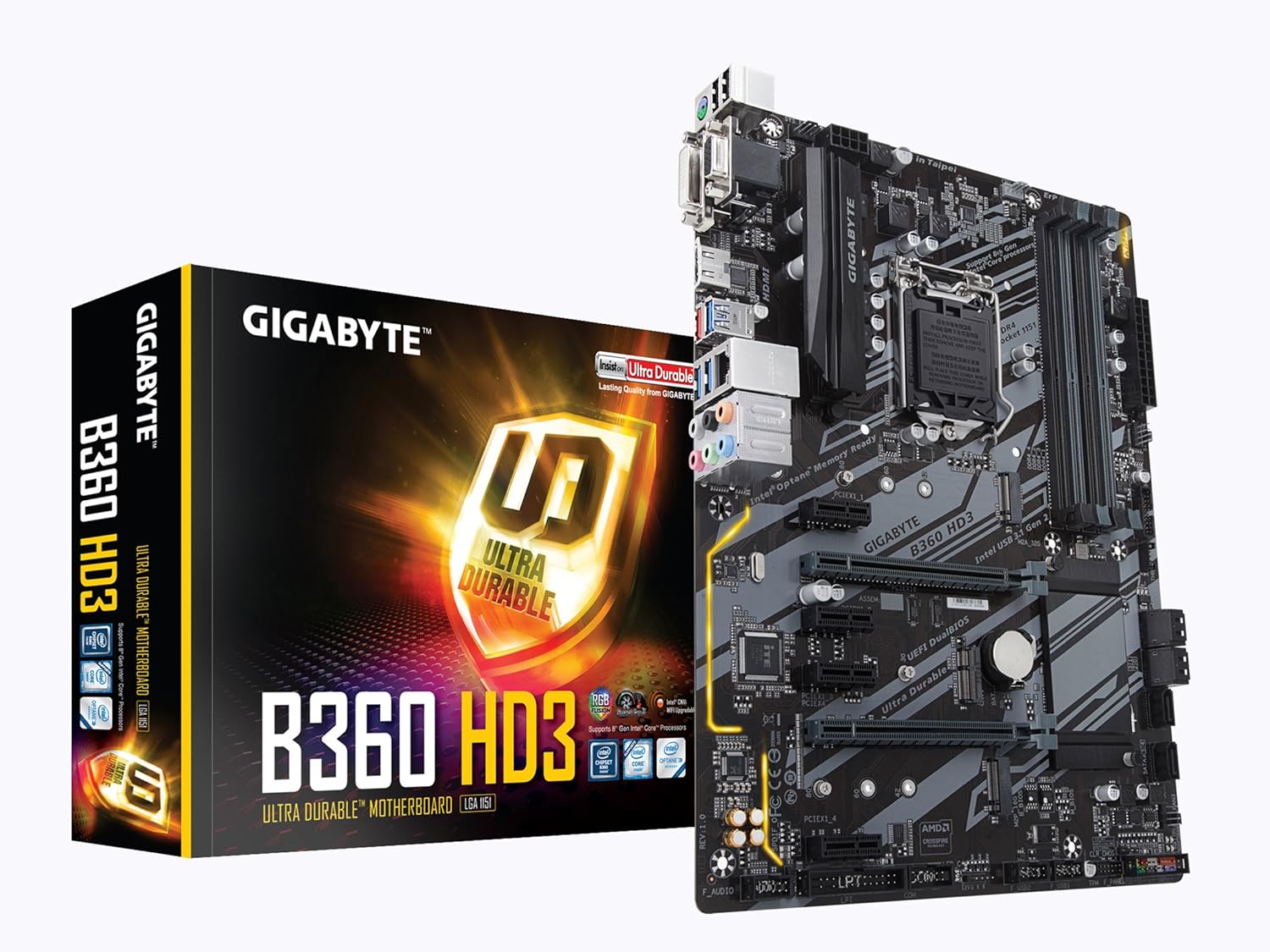
Figure 1: GIGABYTE B360 HD3 Motherboard and Retail Packaging
2. Vlastnosti
- Podpora procesoru: LGA1151 socket for 8th Generation Intel Core processors.
- Paměť: Dual Channel DDR4, 4 DIMMs, supporting up to 128GB of Non-ECC Unbuffered memory.
- Skladování: Ultra-fast M.2 slot with PCIe Gen3 x4 & SATA interface, alongside multiple SATA 6Gb/s ports.
- USB připojení: Multiple USB 3.1 Gen 2 (USB3.1) Type-A ports for high-speed data transfer.
- Podpora grafiky: 2-Way Crossfire Multi-Graphics Support for enhanced visual performance.
- Zvuk: High Quality Audio Capacitors with Realtek ALC892 codec for 7.1-channel high definition audio.
- Networking: Intel Gigabit Ethernet (GbE) LAN with Internet Accelerator Software for optimized network performance.
- BIOS: GIGABYTE UEFI Dual BIOS for system stability and easy management.
- Form Factor: ATX Form Factor (305mm x 224mm) for broad case compatibility.
- Operační systém: Support for Windows 10 64-bit.
3. Obsah balení
Ověřte, zda jsou v balení základní desky přítomny všechny níže uvedené položky. Pokud některá položka chybí nebo je poškozena, obraťte se na prodejce.
- GIGABYTE B360 HD3 Motherboard
- Uživatelská příručka / Průvodce rychlou instalací
- I / O štít
- Kabely SATA 6Gb/s
- Šrouby a distanční sloupky M.2
- CD/DVD s ovladači (nebo pokyny ke stažení)
4. Nastavení
4.1. Instalace procesoru
- Najděte patici LGA1151 na základní desce.
- Zvedněte páčku zátěže a otevřete kryt patice procesoru.
- Carefully align your 8th Generation Intel Core processor with the socket, ensuring the golden triangle on the CPU matches the triangle on the socket.
- Opatrně vložte procesor do patice, aniž byste na něj tlačili.
- Zavřete kryt zásuvky a zatlačte páku nabíjení dolů, dokud nezapadne na místo.

Obrázek 2: Shora dolů view of the GIGABYTE B360 HD3 Motherboard, highlighting the CPU socket area.
4.2. Instalace RAM
- The motherboard features 4 DDR4 DIMM slots. For optimal performance, install memory modules in pairs for dual-channel mode. Refer to the motherboard's Qualified Vendor List (QVL) on the GIGABYTE webstránky s kompatibilními paměťmi.
- Otevřete klipy na obou koncích slotu DIMM.
- Zarovnejte zářez na paměťovém modulu DDR4 s výstupkem ve slotu DIMM.
- Pevně zatlačte na oba konce paměťového modulu, dokud klipsy nezacvaknou na místo.
4.3. Instalace úložiště
- M.2 SSD: Locate the M.2 slot. Insert your M.2 SSD at an angle and secure it with the provided screw and standoff.
- SATA disky: Connect your SATA hard drives or SSDs to the SATA 6Gb/s ports using SATA data cables. Ensure power cables from your power supply are also connected to the drives.
4.4. Instalace grafické karty
- Locate the primary PCIe x16 slot (often reinforced with Ultra Durable stainless steel).
- Align your graphics card with the slot and press down firmly until it clicks into place. Ensure the retention clip is engaged.
- Připevněte grafickou kartu k šasi pomocí šroubů.
- Připojte všechny potřebné napájecí kabely PCIe od zdroje napájení ke grafické kartě.
4.5. Připojení napájení
- Připojte 24pinový hlavní napájecí konektor ATX ze zdroje k základní desce.
- Connect the 8-pin ATX 12V power connector to the motherboard.
4.6. Front Panel & Rear I/O Connections
- Connect your chassis' front panel connectors (power button, reset button, HDD LED, power LED) to the corresponding pins on the motherboard. Refer to the motherboard diagram in the full manual for exact pin locations.
- Connect front panel USB 2.0 and USB 3.1 Gen 2 (Type-A) headers.
- Install the I/O shield into your chassis before mounting the motherboard.
- Connect peripherals (monitor, keyboard, mouse, speakers, Ethernet cable) to the rear I/O panel.

Figure 3: Rear I/O Panel of the GIGABYTE B360 HD3 Motherboard, showing various connectivity options.
5. Provoz
5.1. Nastavení BIOSu/UEFI
The GIGABYTE B360 HD3 features UEFI Dual BIOS, providing a user-friendly graphical interface for system configuration. To enter BIOS Setup, press the Vymazat key during the Power-On Self-Test (POST). Here you can configure boot options, system clock, memory settings, and other hardware parameters.
5.2. Software a ovladače
After installing your operating system, install the necessary drivers from the provided driver CD/DVD or download the latest versions from the GIGABYTE official website. Utilize the GIGABYTE APP Center, which includes the Cloud Station Utility, to manage and optimize your system's performance and features.
6. Údržba
- Udržujte v čistotě: Regularly clean dust from your computer case and motherboard components using compressed air. Ensure proper airflow to prevent overheating.
- Zkontrolujte připojení: Periodically verify that all cables (power, data, peripherals) are securely connected.
- Aktualizace softwaru: Keep your operating system, drivers, and BIOS/UEFI firmware updated to ensure optimal performance, stability, and security.
- Baterie BIOSu: The motherboard uses a CR2032 lithium-ion battery for the CMOS. If system time or BIOS settings are frequently lost, the battery may need replacement.
7. Řešení problémů
- Bez napájení: Ensure all power cables (24-pin ATX, 8-pin ATX 12V) are firmly connected. Check power supply functionality.
- Bez displeje: Verify that the monitor is connected to the graphics card (or integrated graphics port) and powered on. Reseat the graphics card and RAM modules.
- Nestabilita/pády systému: Check RAM modules for proper installation and compatibility (refer to QVL). Ensure CPU cooler is correctly installed and making good contact. Update drivers and BIOS.
- Problémy se spouštěním: Check boot order in BIOS. Ensure storage drives are detected and contain a valid operating system.
- Periferní zařízení nebylo detekováno: Try connecting the peripheral to a different USB port. Ensure drivers are installed.
- For more detailed troubleshooting, consult the comprehensive user manual available on the GIGABYTE support webmísto.
8. Specifikace
| Značka | GIGABYTE |
| Název modelu | B360 HD3 |
| Zásuvka CPU | LGA 1151 |
| Kompatibilní procesory | Intel Core sedmé generace |
| Typ čipové sady | Intel B360 |
| Technologie paměti RAM | DDR4 |
| Rychlost paměti | 2133 MHz (up to 4733 MHz OC) |
| Maximální kapacita RAM | 128 GB (4 DIMMs) |
| Porty USB 2.0 | 2 (interní záhlaví) |
| USB 3.1 Gen 2 (Type A) | 3 |
| Rozhraní úložiště | M.2 (PCIe Gen3 x4 & SATA), SATA 6Gb/s |
| LAN | Intel GbE LAN |
| Zvuk | Realtek ALC892 (7.1-channel HD Audio) |
| Form Factor | ATX (305 mm x 224 mm) |
| Operační systém | Podpora pro Windows 10 64-bit |
| Hmotnost položky | 2.18 libry |
| Rozměry produktu | 12.01 x 8.86 x 0.79 palce |
9. Záruka a podpora
Podrobné informace o záruce a technické podpoře naleznete na oficiálních stránkách GIGABYTE. webnebo se obraťte na jejich zákaznický servis. Uschovejte si doklad o koupi pro případ reklamace.


