Zavedení
The Amazfit Cor is a durable, water-resistant activity and sleep tracker designed to monitor your heart rate and daily activities. It features a bright IPS LCD color touchscreen, protected by 2.5D Corning Gorilla Glass within a marine-grade stainless steel housing. The device provides comprehensive information including messages, app notifications, and offers sports tracking for various activities. It also includes a 7-day weather forecast, alarms, timer, and stopwatch functions, with a battery life of up to 12 days on a single charge.
1. Nastavení
1.1 Vybalení a počáteční platba
Po otevření balení se ujistěte, že jsou přítomny všechny součásti:
- Amazfit Cor Smartwatch
- Nabíjecí základna
- Uživatelská příručka (tento dokument)
Before first use, fully charge your Amazfit Cor. Connect the charging base to a USB power source and place the smartwatch onto the base, ensuring the charging pins align. The screen will indicate charging status.

Obrázek 1.1: Přední strana view of the Amazfit Cor smartwatch. The device features a rectangular display and a black silicone band.
1.2 Instalace a párování aplikace
To utilize all features, download the official Amazfit app (Mi Fit app) from your smartphone's app store. Install the app and follow the on-screen instructions to create an account or log in. Enable Bluetooth on your smartphone and within the app, search for your Amazfit Cor (Model A1702) to initiate the pairing process. Confirm the pairing request on both your phone and the device screen.
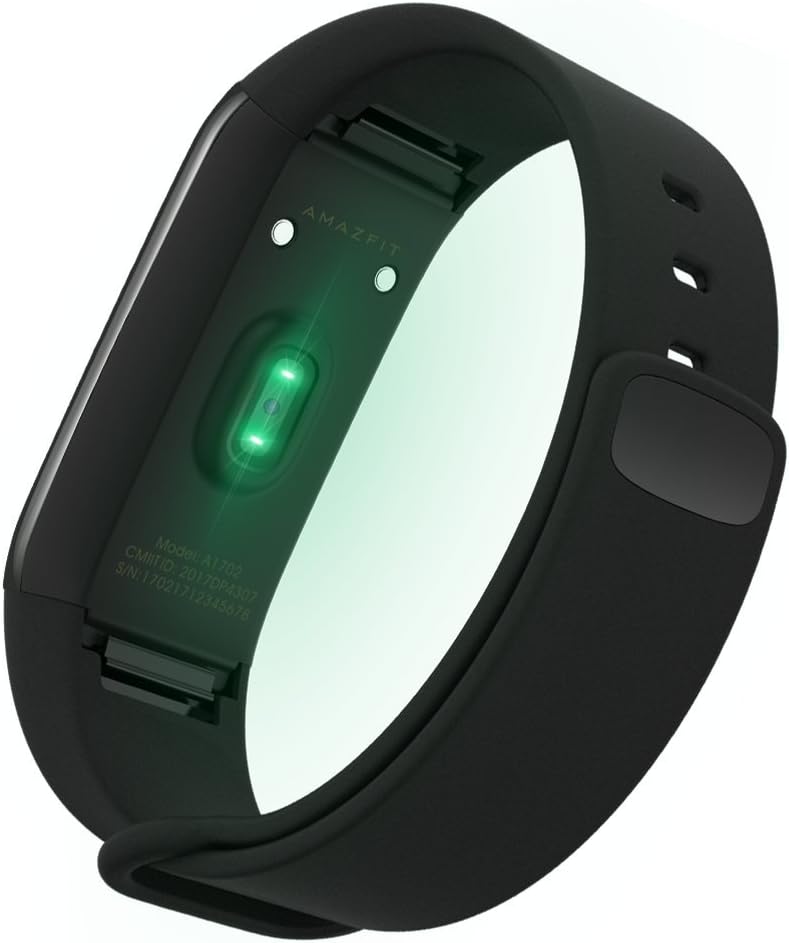
Obrázek 1.2: Zadní strana view of the Amazfit Cor smartwatch, showing the optical heart rate sensor and charging contacts.
2. Návod k obsluze
2.1 Základní navigace
The Amazfit Cor features a 1.23-inch color touchscreen. Swipe up, down, left, or right to navigate through menus and functions. Tap to select an option or confirm an action. Swipe right from the main watch face to return to the previous screen.
2.2 Sledování aktivity
The device automatically tracks your daily steps, distance traveled, and calories burned. This data is synchronized with the Amazfit app for detailed analysis and historical trends.
2.3 Monitorování srdeční frekvence
The Amazfit Cor continuously monitors your heart rate. You can view your current heart rate on the device or access detailed graphs and historical data within the app. Ensure the device is worn snugly on your wrist for accurate readings.
2.4 Sledování spánku
Wear the Amazfit Cor to bed for automatic sleep tracking. It records sleep duration, deep sleep, light sleep, and awake times. This information helps you understand your sleep patterns and improve sleep quality.
2.5 Oznámení
Receive notifications for incoming calls, text messages, emails, and other app alerts directly on your wrist. Configure which app notifications you wish to receive through the Amazfit app settings.
2.6 Sledování sportu
The Amazfit Cor supports tracking for various sports activities including running, biking, walking, and swimming. Select the desired activity from the device's menu to start tracking. The device is 5 ATM certified for water resistance, making it suitable for swimming.
2.7 Další funkce
Access features such as a 7-day weather forecast, alarms, timer, and stopwatch directly from the device's menu. Customize alarm settings and view weather updates after syncing with your smartphone.

Image 2.1: The Amazfit Cor display showing current time, date, and step count. The screen is bright and easy to read.
3. Údržba
3.1 Čištění
Regularly clean your Amazfit Cor and its band to prevent skin irritation and maintain device functionality. Use a soft, damp cloth to wipe the screen and band. Avoid using harsh chemicals or abrasive materials. Ensure the device is dry before charging.
3.2 Voděodolnost
The Amazfit Cor is 5 ATM water-resistant, suitable for swimming and showering. However, it is not recommended for diving or high-pressure water activities. After exposure to saltwater, rinse the device with fresh water and dry thoroughly.
3.3 Osvědčené postupy pro nabíjení
To prolong battery life, avoid fully discharging the device frequently. Charge the device using the provided charging base and a certified USB power adapter. Do not expose the device or charging base to extreme temperatures.
4. Řešení problémů
| Problém | Možné řešení |
|---|---|
| Device not turning on or charging | Ensure the charging pins on the device and base are clean and properly aligned. Try a different USB power source. Allow the device to charge for at least 30 minutes before attempting to turn it on. |
| Nelze spárovat se smartphonem | Ensure Bluetooth is enabled on your phone and the Amazfit Cor is within range. Restart both your phone and the device. If previously paired, unpair the device from your phone's Bluetooth settings and the Amazfit app before attempting to re-pair. |
| Nepřesné údaje o tepové frekvenci nebo aktivitě | Ensure the device is worn snugly on your wrist, about one finger-width above your wrist bone. Clean the heart rate sensor on the back of the device. Ensure your personal information (height, weight) is accurate in the Amazfit app. |
| Oznámení se nezobrazují | Check notification settings within the Amazfit app and your phone's system settings to ensure permissions are granted. Ensure the device is connected via Bluetooth. |
| Obrazovka nereaguje nebo zamrzá | Attempt to restart the device by pressing and holding the side button (if applicable) or by connecting it to the charger. If the screen is wet, dry it thoroughly before attempting to use the touchscreen. |
For further assistance, refer to the FAQ section within the Amazfit app or visit the official Amazfit support webmísto.
5. Specifikace
| Funkce | Detail |
|---|---|
| Číslo modelu | A1702 |
| Rozměry produktu | 9.17 x 0.88 x 0.43 palce |
| Hmotnost položky | 1.12 unce (cca 31.75 gramů) |
| Technologie displeje | IPS LCD Color Touchscreen |
| Velikost obrazovky | 1.23 palce |
| Voděodolnost | 5 bankomatů (do 50 metrů) |
| Typ baterie | Lithium-iontové (vyžadují 1, jsou součástí balení) |
| Konektivita | Bluetooth |
| Senzory | Heart Rate Sensor, Activity Tracker |
| Materiál bydlení | Marine-grade Stainless Steel |
| Ochrana displeje | 2.5D Corning Gorilla Glass |
| Barva | Uhlově černá |
6. Informace o záruce
Amazfit products typically come with a limited manufacturer's warranty. For specific details regarding the warranty period, coverage, and terms and conditions for your Amazfit Cor (Model A1702), please refer to the warranty card included in your product packaging or visit the official Amazfit webUschovejte si doklad o koupi pro případ reklamace.
7. Podpora
If you encounter any issues not covered in this manual or require further assistance, please contact Amazfit customer support. You can typically find contact information, FAQs, and additional resources on the official Amazfit webmísto:
Oficiální Webmísto: www.amazfit.com
Additionally, the Amazfit app (Mi Fit app) often contains a comprehensive FAQ section and direct support options.


