1. Konec produktuview
The ORIA WA50 Wireless Digital Refrigerator Thermometer is designed to monitor temperatures in refrigerators, freezers, and ambient environments. It includes a main display unit and two wireless remote sensors, providing accurate temperature readings and an audible alarm for temperature deviations. This device helps ensure food safety and optimal storage conditions.

Image 1.1: The main display unit and two wireless remote sensors.
2. Obsah balení
- 1 x Hlavní zobrazovací jednotka
- 2 x bezdrátové dálkové senzory
- 1 x Uživatelská příručka
3. Vlastnosti produktu
- Accurate Temperature Recording: Displays temperatures with one decimal point precision.
- Široký teplotní rozsah: Indoor range: -10 °C to 60 °C (14 °F to 140 °F); Outdoor/Sensor range: -40 °C to 60 °C (-40 °F to 140 °F).
- Dlouhý rozsah přenosu: Up to 100 meters (328 feet) in open air. Actual range may vary due to environmental interference.
- Min/Max Temperature Record: Automatically records the highest and lowest temperatures detected.
- Ukazatel teplotního trendu: Arrows indicate whether the temperature is rising, falling, or stable.
- Zvukový alarm: Manually set high and low temperature alarm thresholds. An alarm sounds when temperatures exceed or fall below these preset values.
- Dual Wireless Sensors: Simultaneously displays indoor temperature (from main unit) and two remote sensor temperatures.
- Snadné použití: Six function buttons for alarm control, C/F switching, and clearing min/max values.
- Více možností instalace: Main unit features integrated magnets, a hanging hole, and a kickstand. Sensors include clips and hanging holes.
4. Specifikace
| Funkce | Specifikace |
|---|---|
| Rozsah vnitřní teploty | -10 ° C ~ 60 ° C (14 ° F ~ 140 ° F) |
| Outdoor/Sensor Temperature Range | -40 ° C ~ 60 ° C (-40 ° F ~ 140 ° F) |
| Dosah převodovky | Až 100 m (328 stop) ve volném prostoru |
| Temperature Test Rate | 10 sekund |
| Sensor 1 Refresh Rate | 57 sekund |
| Sensor 2 Refresh Rate | 67 sekund |
| Napájení hlavní jednotky | 2 x AAA baterie (nejsou součástí balení) |
| Rozměry hlavní jednotky (D x Š x V) | 9.5 x 8 x 2 cm (3.7 x 3.1 x 0.8 palce) |
| Hmotnost hlavní jednotky | 100 g (3.5 oz) |
| Transmitter Power (each) | 2 x AA baterie (nejsou součástí balení) |
| Rozměry vysílače (D x Š x V) | 10.5 x 3.5 x 1.5 cm (4.1 x 1.4 x 0.6 palce) |
| Transmitter Weight (each) | 38 g (1.3 oz) |
| Typ zobrazení | LCD obrazovka |
| Materiál | Plast |
| Barva | Bílý |
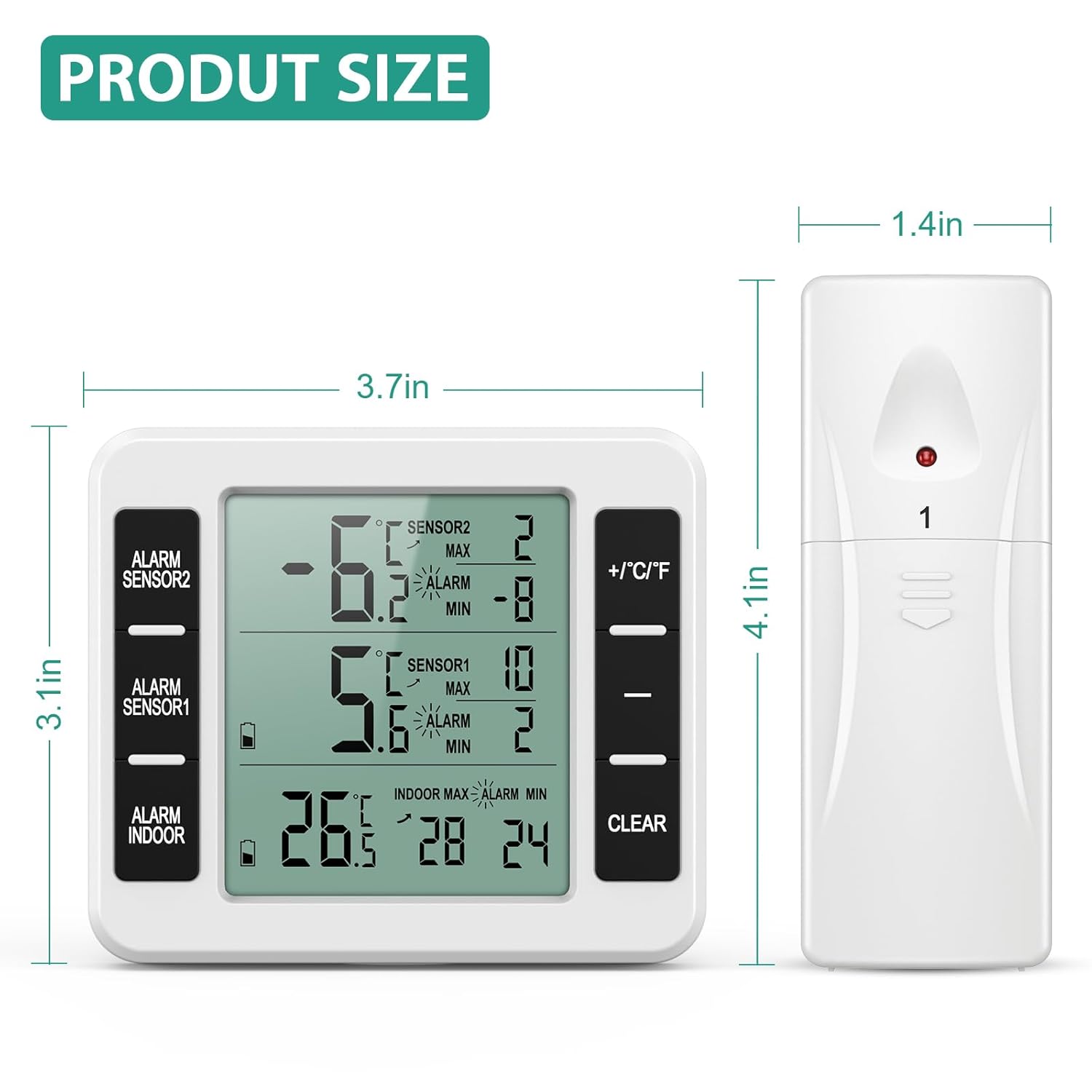
Image 4.1: Product dimensions for the main unit and remote sensor.
5. Bezpečnostní informace a opatření
- If the display indication becomes blurry, replace the batteries promptly.
- Do not place this product in hot, humid, dusty environments, or areas with corrosive gases, as this may damage its electronic components.
- The temperature alarm will not activate immediately upon exceeding a preset value. It will compare the temperature after a 10-minute interval. If the temperature remains outside the set range after this period, the alarm will sound. This delay prevents false alarms from brief door openings.
6. Nastavení
6.1 Instalace baterie
Hlavní jednotka: Open the battery compartment on the back of the main unit. Insert 2 x AAA batteries, ensuring correct polarity (+/-). Close the compartment.
Dálkové senzory: Open the battery compartment on the back of each remote sensor. Insert 2 x AA batteries into each sensor, ensuring correct polarity (+/-). Close the compartment.
6.2 Umístění snímače
Place the remote sensors in your desired monitoring locations, such as inside a refrigerator, freezer, or outdoors. The sensors can be attached using their integrated clips or hanging holes.

Obrázek 6.1: Příkladample placement of remote sensors inside a refrigerator and freezer.
6.3 Umístění hlavní jednotky
Position the main display unit in a convenient location within its transmission range (up to 100m in open air). It can be:
- Stojící: Use the integrated kickstand to place it on a table or countertop.
- Závěsný: Use the hanging hole to mount it on a wall.
- Magnetický: Attach it to a metallic surface, such as a refrigerator door, using the built-in magnets.
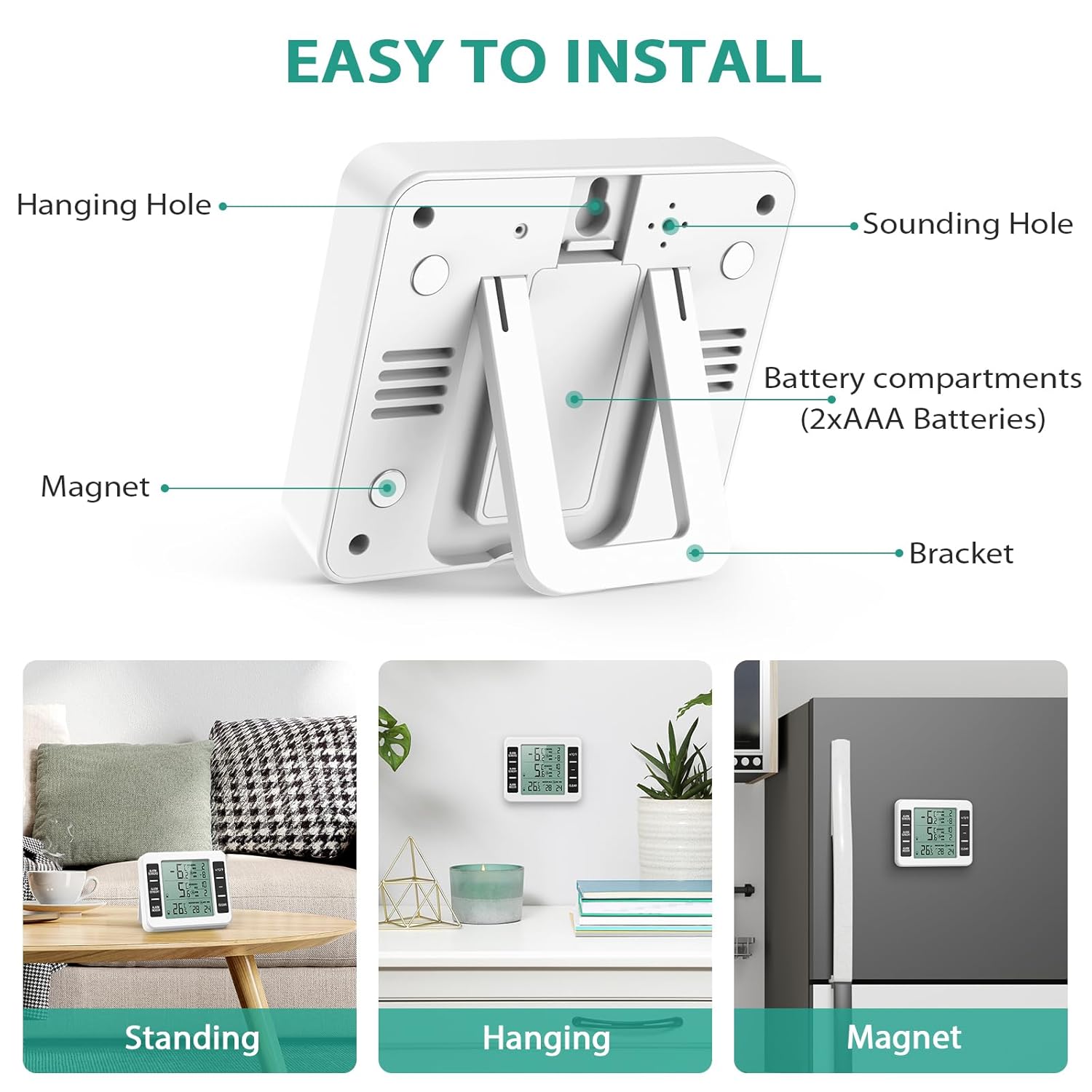
Image 6.2: Installation options for the main display unit.
7. Návod k obsluze
7.1 Zobrazení nadview
The main unit's LCD screen displays indoor temperature, two remote sensor temperatures, min/max records, and alarm indicators.

Obrázek 7.1: Detailní view of the main unit's display and control buttons.
7.2 Základní obsluha
- Výběr jednotky teploty: Press the "+/°C/°F" button to switch between Celsius (°C) and Fahrenheit (°F).
- View Záznamy min./max.: The display automatically cycles through current, maximum (MAX), and minimum (MIN) temperatures for each channel.
- Clear Min/Max Records: Press the "CLEAR" button to reset the recorded maximum and minimum temperatures for all channels.
7.3 Nastavení teplotních alarmů
The device allows you to set high and low temperature alarms for each sensor channel (Sensor 1, Sensor 2, and Indoor).
- Press the corresponding "ALARM SENSOR1", "ALARM SENSOR2", or "ALARM INDOOR" button to select the channel you wish to set an alarm for.
- While the alarm setting is active for a channel, use the "+/°C/°F" and "-" buttons to adjust the desired high and low temperature thresholds.
- Press the alarm button again to confirm the settings and activate the alarm for that channel. The alarm icon will appear on the display.
- To deactivate an alarm, press the corresponding alarm button until the alarm icon disappears.

Image 7.2: Setting maximum and minimum alarm values manually.
8. Údržba
- Čištění: Otřete zařízení a senzory měkkým hadříkemamp tkanina. Nepoužívejte abrazivní čisticí prostředky ani je neponořujte do vody.
- Výměna baterie: Replace batteries when the low battery indicator appears on the display or if the display becomes blurry. Ensure to use the correct battery types (AAA for main unit, AA for sensors).
- Skladování: Pokud zařízení skladujete delší dobu, vyjměte všechny baterie, abyste zabránili jejich vytečení.
9. Řešení problémů
| Problém | Možná příčina | Řešení |
|---|---|---|
| No display or blurry display | Slabé nebo vybité baterie; nesprávná instalace baterií. | Vyměňte baterie za nové, dbejte přitom na správnou polaritu. |
| No temperature reading from a sensor | Sensor out of range; sensor batteries low/dead; interference. | Move sensor closer to the main unit; replace sensor batteries; reduce sources of interference (e.g., large metal objects). |
| Nepřesné údaje o teplotě | Sensor exposed to direct heat/cold; sensor not properly calibrated (unlikely for this type of device). | Ensure sensors are placed in a representative area; compare with another known accurate thermometer. |
| Alarm nezní | Alarm not activated; alarm thresholds set too wide; 10-minute delay not passed. | Ensure alarm is activated for the specific channel; adjust alarm thresholds; wait for the 10-minute delay to pass. |
10. Záruka a podpora
ORIA provides the following warranty and support for this product:
- 45denní záruka vrácení peněz: If you are not satisfied with your purchase, you may return it for a full refund within 45 days.
- 12měsíční záruka na výměnu: Na výrobek se vztahuje 12měsíční záruka na výrobní vady.
- Online zákaznický servis 7 hodin denně: Access to customer support for any inquiries or issues.
- Doživotní záruka: Specific details regarding the lifetime warranty should be obtained from the manufacturer's official support channels.
For further assistance or support, please refer to the contact information provided with your product packaging or visit the official ORIA webmísto.


