1. Úvod
This manual provides comprehensive instructions for the installation, operation, and maintenance of your FSP CMT230 ATX Mid Tower PC Gaming Case. Please read this manual carefully before proceeding with installation to ensure proper setup and optimal performance.
The FSP CMT230 is designed to accommodate ATX, Micro-ATX, and Mini-ITX motherboards, offering a versatile platform for building your computer system. It features a sleek design with a mesh front panel and pre-installed blue LED fans for efficient cooling.

Obrázek 1.1: Přední strana view of the FSP CMT230 PC Gaming Case, showcasing the translucent side window and illuminated blue LED fans.
2. Obsah balení
Ověřte, zda jsou v balení přítomny všechny komponenty:
- FSP CMT230 ATX Mid Tower PC Gaming Case
- Sada příslušenství (šrouby, distanční sloupky, stahovací pásky)
- Uživatelská příručka (tento dokument)
3. Nastavení a instalace komponent
3.1 Příprava případu
- Umístěte pouzdro na stabilní, rovný povrch.
- Odstraňte boční panely odšroubováním šroubů s křídlovou hlavou na zadní straně skříně a posunutím panelů dozadu.

Obrázek 3.1: Shora dolů view of the FSP CMT230 case with the translucent side panel removed, revealing the spacious interior for component installation.
3.2 Instalace základní desky
- Nainstalujte kryt I/O do zadního otvoru skříně.
- Align the motherboard with the pre-installed standoffs. Ensure the correct standoffs are used for your motherboard form factor (ATX, Micro-ATX, Mini-ITX).
- Zajistěte základní desku dodanými šrouby.
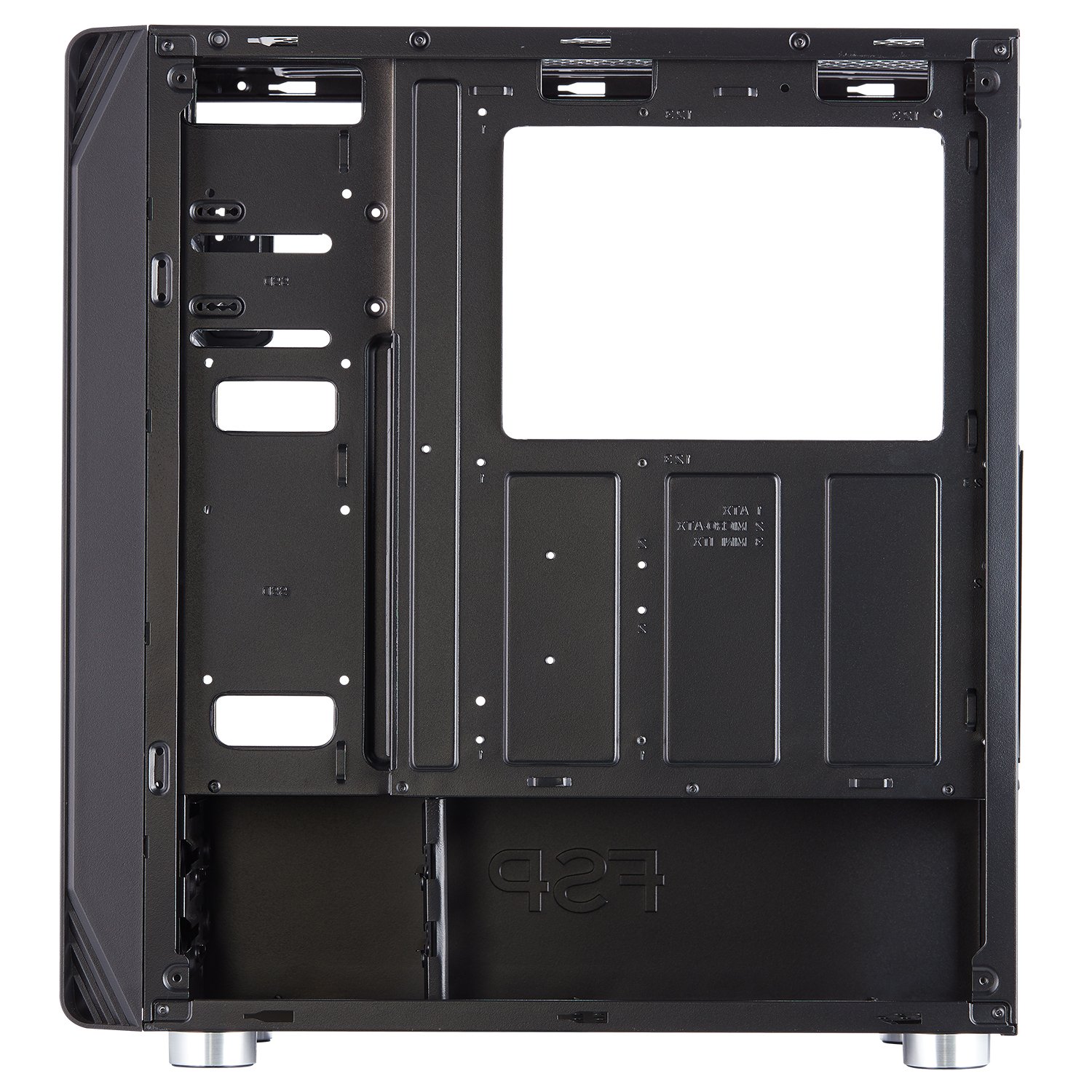
Obrázek 3.2: Vnitřní view of the FSP CMT230, highlighting the motherboard tray with clearly marked mounting points for various motherboard sizes.
3.3 Instalace jednotky napájecího zdroje (PSU)
- Position the PSU in the dedicated compartment at the bottom rear of the case.
- Zajistěte zdroj šrouby ze zadní strany skříně.
3.4 Drive Installation (HDD/SSD)
- 3.5" pevné disky: Install into the drive cages located beneath the PSU shroud or in designated bays.
- 2.5" SSD disky: Mount SSDs to the dedicated SSD trays or mounting points on the motherboard tray or behind it.
3.5 Expansion Card (GPU) Installation
- Odstraňte potřebné kryty slotů PCI-E ze zadní strany skříně.
- Insert the expansion card (e.g., graphics card) into the appropriate PCI-E slot on the motherboard.
- Secure the card with screws.
3.6 Instalace ventilátoru a chladiče
The CMT230 comes with three pre-installed 120mm blue LED fans (two in the front, one in the rear). Additional fan and radiator support is available:
- Přední: Supports up to two 120mm/140mm fans or one 280mm radiator.
- Nahoře: Supports up to two 120mm/140mm fans or one 280mm radiator.
- Zadní: Supports one 120mm fan (one pre-installed).
3.7 Správa kabelů
Utilize the cable routing holes and tie-down points behind the motherboard tray to organize cables. This improves airflow and maintains a clean interior aesthetic.

Image 3.3: Rear internal view of the FSP CMT230, illustrating the space and routing options for effective cable management behind the motherboard tray.
3.8 Přední vstupně/výstupní připojení
Connect the front panel cables (USB 3.0, USB 2.0, Audio, Power, Reset, LED) to the corresponding headers on your motherboard. Refer to your motherboard manual for specific header locations.

Obrázek 3.4: Přední strana view of the FSP CMT230, detailing the front panel with USB 3.0, USB 2.0, audio ports, and power/reset buttons.
4. Návod k obsluze
4.1 Zapnutí/vypnutí
Press the power button located on the top front panel of the case to turn your computer system on or off. A short press typically initiates power-on or sleep mode, while a long press (usually 4-5 seconds) forces a shutdown.
4.2 Používání portů na předním panelu
Přední panel poskytuje pohodlný přístup k:
- Porty USB 3.0 (x2): Pro vysokorychlostní přenos dat s kompatibilními zařízeními.
- Porty USB 2.0 (x2): Pro standardní USB zařízení.
- Audio konektory: Pro připojení sluchátek a mikrofonů.
4.3 LED Fan Operation
The pre-installed blue LED fans illuminate automatically when the system is powered on. The LED color is fixed to blue and cannot be changed or turned off independently.
5. Údržba
5.1 Čištění
- Vnější: Vnější povrchy otřete měkkým, damp tkanina. Vyhněte se abrazivním čisticím prostředkům.
- Prachové filtry: Regularly remove and clean the dust filters (if applicable) to maintain optimal airflow and prevent dust buildup inside the case.
- Interiér: K odstranění prachu z vnitřních součástí a ventilátorů použijte stlačený vzduch. Před čištěním vnitřku se ujistěte, že je systém vypnutý a odpojený od sítě.
5.2 Optimalizace proudění vzduchu
Ensure that the case has adequate clearance around its intake and exhaust vents to facilitate proper airflow and cooling performance.
6. Řešení problémů
If you encounter issues with your FSP CMT230 case, consider the following:
- Systém se nezapíná: Verify all power connections (PSU to motherboard, front panel power switch to motherboard header) are correctly seated.
- Ventilátory se netočí: Check fan power connections to the motherboard or PSU. Ensure pre-installed fans are connected via Molex if applicable.
- Front panel USB/Audio not working: Confirm that the front panel headers are correctly connected to the motherboard.
For persistent issues, consult your motherboard manual or contact FSP support.
7. Specifikace
| Funkce | Specifikace |
|---|---|
| Značka | FSP |
| Model | CMT230 |
| Typ pouzdra | Střední věž |
| Kompatibilita základní desky | ATX, Micro ATX, Mini ITX |
| Rozměry (DxŠxV) | 39 x 21 x 45 cm (přibližně) |
| Hmotnost položky | 4.54 kg |
| Rozšiřující sloty | 7x PCI-E |
| Drive Bays | 2 x ODD, 2 x HDD, 2 x SSD |
| Přední I / O porty | 2 x USB 3.0, 2 x USB 2.0, Audio In/Out |
| Předinstalované ventilátory | 3 x 120mm Blue LED (2 Front, 1 Rear) |
| Maximální délka GPU | 373 mm |
| Maximální výška chladiče CPU | 179 mm |
| Podpora radiátorů | Up to 2 x 280mm (Front/Top) |
| Materiál | Kov |
| Speciální funkce | LED Lighting, Unique Airflow Design |
8. Záruka a podpora
FSP products are manufactured to high-quality standards. For warranty information and technical support, please refer to the official FSP website or contact your local FSP distributor. Keep your proof of purchase for warranty claims.