1. Úvod
The Lutron HT-305 is a precision pocket-sized humidity meter designed for accurate measurement of relative humidity, temperature, and dew point. This device is ideal for various applications requiring environmental monitoring. This manual provides detailed instructions for the proper setup, operation, and maintenance of your HT-305 meter to ensure optimal performance and longevity.

Figure 1: Lutron HT-305 Pocket Humidity Meter and Probe. This image displays the main unit of the HT-305 meter alongside its detachable humidity/temperature probe.
2. Klíčové vlastnosti
- Simultaneous display of Humidity, Temperature, and Dew Point.
- High accuracy and fast response time for humidity measurements.
- 0.1%RH resolution for humidity and 0.1° resolution for temperature.
- Pocket size with a separate humidity and temperature probe for easy operation and remote measurement.
- Data Hold function to freeze the displayed value.
- Records Maximum and Minimum readings with Recall function.
- Vestavěný indikátor slabé baterie.
- Automatic power off to conserve battery life.
- Wide humidity and temperature measuring range.
- Microprocessor circuit ensures maximum possible accuracy.
- Heavy duty and compact housing design.
3. Součásti a ovládací prvky
Familiarize yourself with the main components and controls of your HT-305 meter:

Figure 2: HT-305 Meter and Accessories. This image shows the HT-305 meter, its detachable probe, a carrying case, and the instruction manual.
- Hlavní jednotka: Ruční zařízení s displejem a ovládacími tlačítky.
- Humidity/Temperature Probe: Detachable probe for sensing environmental conditions.
- LCD displej: Shows humidity, temperature, and dew point readings.
- Tlačítko napájení: Zapíná nebo vypíná jednotku.
- Tlačítko HOLD: Zmrazí aktuální údaj na displeji.
- Tlačítko REC: Activates/deactivates Max/Min recording mode.
- Tlačítko FUNKCE: Cycles through display modes or units.
- Probe Input Jack: Connector for the humidity/temperature probe.
- Přihrádka na baterie: Nachází se v zadní části jednotky.

Figure 3: HT-305 Display. The LCD shows humidity (4.9%RH), temperature (-40.3°C), and dew point. The "HOLD" indicator is also visible.
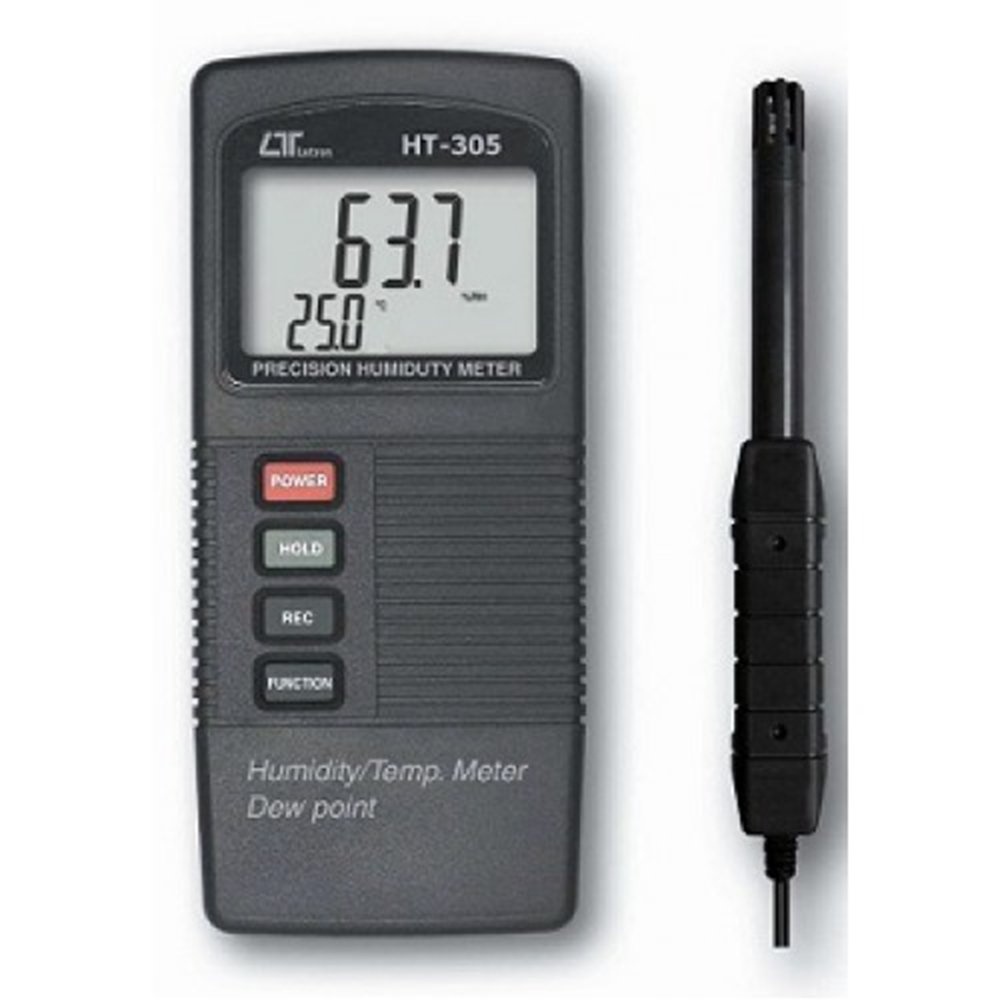
Figure 4: HT-305 Buttons and Probe Input. Close-up of the POWER, HOLD, REC, and FUNCTION buttons, along with the probe input jack.
4. Nastavení a první použití
4.1. Instalace baterie
- Vyhledejte kryt přihrádky na baterie na zadní straně měřiče.
- Slide or unscrew the cover to open.
- Insert a new 9V alkaline battery, observing the correct polarity (+/-).
- Bezpečně nasaďte kryt prostoru pro baterie.
4.2. Připojení sondy
- Align the connector of the humidity/temperature probe with the probe input jack on the top of the main unit.
- Gently push the connector into the jack until it is firmly seated. Do not force the connection.
5. Provoz
5.1. Zapnutí/vypnutí
- To turn the meter ON, stiskněte tlačítko MOC tlačítko.
- To turn the meter VYPNUTO, stiskněte a podržte MOC tlačítko po dobu přibližně 2 sekund, dokud se displej nevypne.
5.2. Měření
- Ensure the probe is connected and the meter is powered on.
- Position the probe in the environment where you wish to take measurements. Allow sufficient time (typically 10-30 seconds) for the readings to stabilize.
- The LCD will simultaneously display the Relative Humidity (%RH), Temperature (°C or °F), and Dew Point (°C or °F).
5.3. Funkce uchování dat
- Stiskněte tlačítko DRŽET button to freeze the current readings on the display. The "HOLD" indicator will appear on the LCD.
- Stiskněte tlačítko DRŽET znovu stiskněte tlačítko pro uvolnění datového blokování a obnovení měření v reálném čase.
5.4. Maximum/Minimum Record
- Stiskněte tlačítko REC button once to enter Maximum/Minimum recording mode. The "REC" indicator will appear.
- Stiskněte tlačítko REC znovu pro zobrazení Maximum recorded values.
- Stiskněte tlačítko REC button a third time to display the Minimální recorded values.
- Stiskněte a podržte REC button for approximately 2 seconds to exit recording mode and clear the recorded values.
5.5. Unit Selection (Temperature)
- Stiskněte tlačítko FUNKCE button to toggle between Celsius (°C) and Fahrenheit (°F) for temperature and dew point readings.
5.6. Automatické vypnutí
The meter features an automatic power-off function to conserve battery life. If no buttons are pressed for approximately 10 minutes, the meter will automatically shut down. This feature can typically be disabled by holding a specific button during power-on (refer to the original manual for specific instructions if this feature needs to be disabled).
6. Údržba
6.1. Výměna baterie
When the low battery indicator appears on the display, replace the 9V battery as described in the "Battery Installation" section (4.1). Prompt battery replacement ensures accurate readings and prevents potential damage from battery leakage.
6.2. Čištění
- Otřete c měřičeasing s měkkým, damp tkanina. Nepoužívejte abrazivní čisticí prostředky nebo rozpouštědla.
- Keep the humidity sensor on the probe clean and free from dust or debris. Avoid touching the sensor directly.
6.3. Skladování
When not in use for extended periods, remove the battery to prevent leakage. Store the meter and probe in a cool, dry place, preferably in its protective carrying case.
7. Řešení problémů
| Problém | Možná příčina | Řešení |
|---|---|---|
| Měřič se nezapne. | Vybitá nebo nesprávně nainstalovaná baterie. | Vyměňte 9V baterii a dbejte na správnou polaritu. |
| Readings are unstable or inaccurate. | Probe not fully connected; sensor dirty; environment not stable. | Ensure probe is securely connected. Clean the sensor carefully. Allow more time for readings to stabilize in the measurement area. |
| "LO BAT" indicator displayed. | Nízký objem baterietage. | Okamžitě vyměňte 9V baterii. |
| No Dew Point reading. | Dew Point calculation requires both humidity and temperature. | Ensure both humidity and temperature sensors are functioning correctly and providing valid data. |
8. Specifikace
Obecné specifikace:
- Obvod: Zakázkový jednočip mikroprocesorového obvodu LSI.
- Zobrazit: LCD size 44 mm x 29 mm, dual function LCD display.
- Měřící jednotka: Humidity: %RH (Relative Humidity), Temperature: °C or °F, Dew Point: °C or °F.
- Doba odezvy: Obvykle 10 až 30 sekund.
- Teplotní kompenzace: Automatic, for humidity function.
- Pozastavení dat: Zmrazte údaj na displeji.
- Vyvolání paměti: Maximální a minimální hodnota.
- Sampling čas: Cca. 0.8 sekunda.
- Vypnout: Automatické vypnutí šetří baterii.
- Provozní teplota: Main instrument: 0 to 50 °C.
- Provozní vlhkost: Probe: 0 to 95% RH. Main instrument: Less than 85% R.H.
- Napájení: 006P DC 9V battery (Alkaline or Heavy duty type).
- Napájecí proud: Cca. DC 6 mA.
- Hmotnost: 264 g / 0.67 LB (Battery is included).
- Rozměry: Main instrument: 135 x 60 x 33 mm (5.3 x 2.4 x 1.3 inch). Humidity Sensor Probe: 197 mm (7.8 inch) in length.
- Příslušenství v ceně: Instruction manual, Humidity probe, Hard carrying case (CA-06), Soft carrying case (CA-05A).
Electrical Specifications (23 ± 5 °C):
| Měření | Rozsah | Rezoluce | Přesnost |
|---|---|---|---|
| Vlhkost | 10% až 95% RH | 0.1% RH | ≤ 70% RH: ± 3% RH. |
| > 70% RH: ± (3% reading + 1% RH). | |||
| Teplota | -20 až 60 °C | 0.1 stupňů | ± 0.8 °C |
| ± 1.5 ° F | |||
| Rosný bod | -25.3 až 48.9 °C | 0.1 °C | |
| -13.5 až 120.1 °F | 0.1 °F |
Remark: Dew Point display value is calculated from the Humidity/Temp. measurement automatically. The Dew Point accuracy is sum accuracy value of Humidity & Temperature measurement.
9. Záruka a podpora
For warranty information and technical support, please refer to the documentation included with your product or contact Lutron customer service directly. Keep your purchase receipt as proof of purchase for warranty claims.


