1. Úvod
This user manual provides comprehensive instructions for the installation, operation, maintenance, and troubleshooting of the IP-COM G3224P 24-Port Managed PoE Switch. Please read this manual thoroughly before using the device to ensure proper and safe operation.
The IP-COM G3224P is a high-performance managed Power over Ethernet (PoE) switch designed for small to medium-sized businesses and enterprise networks. It offers 24 Gigabit Ethernet ports with PoE+ capabilities and additional SFP ports for fiber uplinks, providing flexible and scalable network solutions.
2. Konec produktuview
2.1 Obsah balení
- IP-COM G3224P 24-Port Managed PoE Switch
- Napájecí kabel
- Sada pro montáž do racku (držáky a šrouby)
- Gumové nožičky (pro umístění na stole)
- Průvodce rychlou instalací
2.2 Popis předního panelu
The front panel of the IP-COM G3224P switch features various ports and LED indicators for status monitoring.
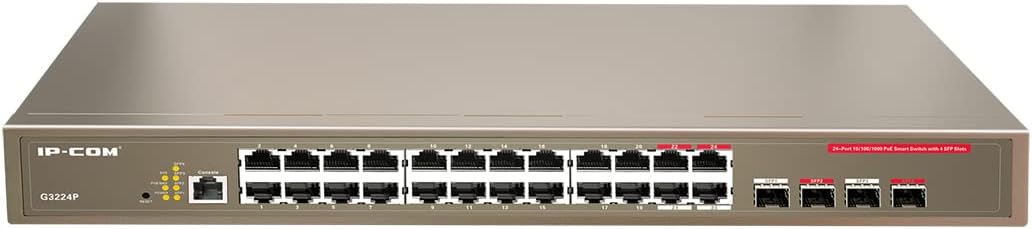
Figure 2.1: IP-COM G3224P Front Panel Layout
This image displays the front panel of the IP-COM G3224P switch. On the left, the IP-COM logo and model number G3224P are visible. To the right, there are LED indicators for SYS, PoE MAX, and individual port status. A console port is also present. The main section features 24 Gigabit Ethernet RJ45 ports, arranged in two rows, with port numbers 1 through 24. On the far right, there are four SFP ports labeled SFP1, SFP2, SFP3, and SFP4, which are used for fiber optic uplinks.
2.3 LED indikátory
| LED indikátor | Postavení | Popis |
|---|---|---|
| SYS | Zelená (plná) | Systém funguje normálně. |
| SYS | Zelená (blikající) | System is booting up or firmware is being upgraded. |
| POE MAX | Červená (plná) | PoE power budget is nearing or exceeding its limit. |
| Link/Act (Per Port) | Zelená (plná) | Port je propojen. |
| Link/Act (Per Port) | Zelená (blikající) | Port is transmitting or receiving data. |
| PoE (na port) | Žlutá (plná) | PoE power is being supplied to the connected device. |
3. Nastavení a instalace
3.1 Bezpečnostní opatření
- Zajistěte napájení objtage matches the switch's requirements (240V as per specifications).
- Nezakrývejte ventilační otvory.
- Chraňte zařízení před vodou, ohněm a vysokými teplotami.
- Nepokoušejte se sami otevřít nebo opravit zařízení.
3.2 Instalace do racku
- Připevněte dodané držáky pro montáž do racku k bokům přepínače pomocí přiložených šroubů.
- Secure the switch into a standard 19-inch equipment rack using appropriate rack screws (not included).
- Ensure adequate airflow around the switch for proper cooling.
3.3 Instalace na plochu
- Připevněte dodané gumové nožky ke spodní části spínače.
- Place the switch on a flat, stable surface with sufficient ventilation.
3.4 Připojení přepínače
- Připojení napájení: Connect the power cord to the power inlet on the rear panel of the switch and then to a grounded power outlet.
- Síťová zařízení: Connect network devices (e.g., computers, servers, IP cameras, VoIP phones) to the RJ45 ports (1-24) on the front panel using standard Ethernet cables.
- PoE zařízení: For PoE-powered devices, simply connect them to any of the RJ45 ports. The switch will automatically detect and provide power if the device is PoE compliant.
- Uplink připojení: Use the SFP ports (SFP1-SFP4) for fiber optic uplinks to other network devices or the core network. Insert compatible SFP transceivers into the SFP slots before connecting fiber optic cables.
- Připojení konzole (volitelné): For initial configuration or advanced management, connect a console cable from your computer to the console port on the switch.
4. Návod k obsluze
4.1 Počáteční zapnutí
After connecting the power cord, the switch will automatically power on. Observe the SYS LED indicator. It will blink during boot-up and turn solid green once the system is ready.
4.2 Basic Network Connectivity
Once powered on, the switch will automatically detect connected devices. The Link/Act LED for each connected port will illuminate solid green, indicating a successful link. It will blink when data is being transmitted or received.
4.3 PoE Operation
When a PoE-compatible device is connected to a port, the switch will negotiate power delivery. The PoE LED for that port will turn yellow, indicating that power is being supplied. Monitor the PoE MAX LED; if it turns red, the total PoE power budget is being approached or exceeded, and you may need to reduce the number of PoE devices or use a higher-capacity power source.
4.4 Přístup pro správu
The IP-COM G3224P is a managed switch, offering various configuration options via a web-based GUI, CLI (Command Line Interface) via the console port, or SNMP. Refer to the detailed management guide (usually available on the manufacturer's website) for advanced configuration, including VLANs, QoS, port mirroring, and security settings.
- Web GUI: Přístup k přepínači web interface by typing its default IP address (check the Quick Installation Guide or manufacturer's documentation) into a web prohlížeč.
- CLI: Connect via the console port using a terminal emulator (e.g., PuTTY) with appropriate serial port settings.
5. Údržba
5.1 Čištění
- Regularly clean the exterior of the switch with a soft, dry cloth.
- Nepoužívejte tekuté nebo aerosolové čisticí prostředky.
- Ujistěte se, že větrací otvory jsou bez prachu a překážek.
5.2 aktualizací firmwaru
Periodically check the IP-COM official webweb s aktualizacemi firmwaru. Udržování firmwaru aktuálního zajišťuje optimální výkon, zabezpečení a přístup k novým funkcím. Pečlivě dodržujte pokyny dodané s balíčkem aktualizace firmwaru.
5.3 Environmentální hlediska
Ensure the switch operates within its specified environmental conditions (temperature, humidity) to prevent damage and ensure longevity.
6. Řešení problémů
| Problém | Možná příčina | Řešení |
|---|---|---|
| No power / SYS LED off | Power cord not connected or power outlet faulty. | Zkontrolujte připojení napájecího kabelu. Zkuste jinou zásuvku. |
| No link on a port (Link/Act LED off) | Cable issue, device off, or incorrect port. | Check Ethernet cable. Ensure connected device is powered on. Try a different port or cable. |
| PoE device not powering on (PoE LED off) | Device not PoE compliant, cable issue, or power budget exceeded. | Verify device is PoE compliant. Check cable. Check PoE MAX LED; if red, reduce PoE load. |
| Network performance issues | Cable quality, network congestion, or incorrect configuration. | Use high-quality Ethernet cables. Check for network loops. Review switch configuration (VLANs, QoS). |
| Nelze získat přístup web rozhraní pro správu | Incorrect IP address, network settings, or firewall. | Verify the switch's IP address. Ensure your computer is on the same subnet. Disable temporary firewalls. |
If problems persist, consult the full product documentation or contact IP-COM technical support.
7. Specifikace
| Funkce | Detail |
|---|---|
| Model | G3224P |
| Porty | 24 x 10/100/1000Base-T (RJ45) with PoE+, 4 x 1000Base-X (SFP) |
| Přepínací kapacita | 56 Gbps |
| Míra zasílání | 41.66 Mpps |
| Standard PoE | IEEE 802.3af / at |
| Vstupní objemtage | 240 voltů |
| Rozměry (D x Š x V) | 29 x 44 x 44 cm |
| Hmotnost | 15 kg |
| Rackmount | Ano |
| Řízení | Managed (Web GUI, CLI, SNMP) |
Poznámka: Specifikace se mohou změnit bez předchozího upozornění.
8. Záruka a technická podpora
8.1 Informace o záruce
IP-COM products typically come with a limited warranty. Please refer to the warranty card included with your product or visit the official IP-COM website for detailed warranty terms and conditions specific to your region and purchase date.
8.2 Technická podpora
For technical assistance, product inquiries, or troubleshooting beyond the scope of this manual, please contact IP-COM technical support. Support contact information can usually be found on the official IP-COM webna místě nebo v obalu produktu.
IP-COM Official Webmísto: www.ip-com.com.cn


