Zavedení
Thank you for choosing the Kienzle Digi Time Digital Alarm Clock. This device is designed to provide accurate timekeeping, alarm functions, and environmental readings (temperature and humidity) in a compact and stylish form. Please read this manual carefully before using the product to ensure proper operation and to maximize its lifespan.
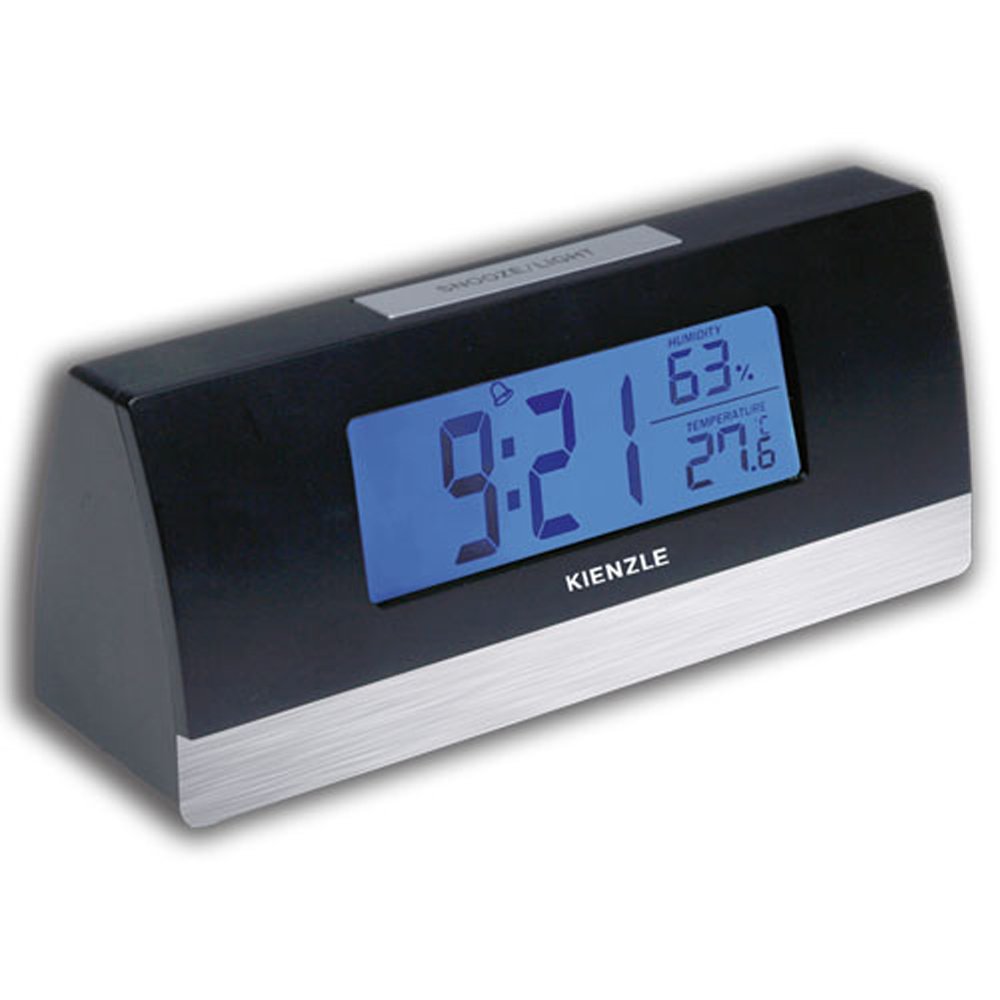
Image: The Kienzle Digi Time Digital Alarm Clock, black with a silver base, displaying the time 9:21, humidity at 63%, and temperature at 27.6 degrees Celsius on its blue backlit screen. The Kienzle logo is visible below the display, and a 'SNOOZE/LIGHT' button is on top.
Nastavení
1. Instalace baterie
The Kienzle Digi Time alarm clock requires three (3) AAA batteries (není součástí balení) pro provoz.
- Locate the battery compartment cover on the back or bottom of the unit.
- Posuňte nebo zvedněte kryt pro otevření přihrádky.
- Insert three AAA batteries, ensuring the correct polarity (+ and -) as indicated inside the compartment.
- Bezpečně nasaďte kryt prostoru pro baterie.
2. Počáteční zapnutí
Once batteries are installed, the display should light up, and the clock will typically show a default time (e.g., 12:00 AM) or begin counting from zero. The temperature and humidity readings will also appear.
3. Nastavení času
Refer to the buttons on the back or side of the clock. Common buttons include MODE, SET, UP/+, DOWN/-.
- Stiskněte tlačítko MODE button repeatedly until the time setting mode is activated (e.g., the hour digits start flashing).
- Použijte NAHORU/+ or DOLŮ/- tlačítka pro nastavení hodiny.
- Stiskněte MODE znovu pro přechod na nastavení minut.
- Použijte NAHORU/+ or DOLŮ/- tlačítka pro nastavení minut.
- Stiskněte MODE one more time to confirm and exit the time setting mode.
4. Nastavení alarmu
The alarm setting process is similar to setting the time.
- Stiskněte tlačítko MODE button until the alarm time is displayed or the alarm setting mode is activated (e.g., an alarm icon flashes).
- Použijte NAHORU/+ or DOLŮ/- tlačítky nastavte požadovanou hodinu buzení.
- Stiskněte MODE again to move to the alarm minute setting.
- Použijte NAHORU/+ or DOLŮ/- tlačítky nastavte požadované minuty budíku.
- Stiskněte MODE to confirm. An alarm icon (e.g., a bell) should appear on the display, indicating the alarm is active.
Návod k obsluze
1. Používání alarmu
When the set alarm time is reached, the alarm will sound. To turn off the alarm, press any button other than the SNOOZE/LIGHT button. The alarm will reset for the next day.
2. Funkce odložení buzení
To temporarily silence the alarm and activate the snooze function, press the SNOOZE / SVĚTLO button located on the top of the clock. The alarm will pause for approximately 5-10 minutes (duration may vary) and then sound again.
3. Blue Backlight
To illuminate the display with a blue backlight for easy viewing in low light conditions, press the SNOOZE / SVĚTLO button. The backlight will typically stay on for a few seconds and then turn off automatically to conserve battery life.
4. Zobrazení teploty a vlhkosti
The clock continuously displays the current air temperature and humidity. No special action is required to view tyto čtení.
Údržba
1. Čištění
To clean the clock, use a soft, dry cloth. For stubborn marks, a slightly damp cloth can be used, but ensure no water enters the device. Do not use abrasive cleaners, solvents, or chemical sprays, as these can damage the surface and internal components.
2. Výměna baterie
When the display dims or the clock functions become erratic, it is time to replace the batteries. Follow the battery installation steps outlined in the Setup section. Always replace all three AAA batteries at the same time with new ones. Dispose of old batteries responsibly according to local regulations.
3. Skladování
If the clock will not be used for an extended period, remove the batteries to prevent leakage and potential damage to the unit.
Odstraňování problémů
| Problém | Možná příčina | Řešení |
|---|---|---|
| Displej je prázdný nebo tmavý. | Slabé nebo vybité baterie; nesprávná polarita baterií. | Vyměňte baterie za nové baterie AAA a dbejte na správnou polaritu. |
| Alarm se nespustí. | Alarm not set or not activated; low batteries. | Ensure alarm is set and the alarm icon is visible on the display. Replace batteries if needed. |
| Čas je nesprávný. | Time not set correctly; batteries removed or low. | Reset the time following the instructions in the Setup section. Replace batteries if they are low. |
| Údaje o teplotě/vlhkosti se zdají být nepřesné. | Clock placed near heat/cold sources or in direct sunlight/drafts. | Relocate the clock to a stable environment away from extreme temperature fluctuations or direct air currents. |
Specifikace
- Název značky: Kienzle
- Výrobce: Kienzle
- Barva: Černý
- Rozměry produktu: 20 x 10 x 10 cm; 100 g (approx. 7.87 x 3.94 x 3.94 inches; 3.53 oz)
- ASIN: B0797SYY1Y
- EAN: 7896733521591
- Rozměry balení: 10 x 10 x 10 centimetrů
- Battery(ies) Required: 3 baterie AAA (nejsou součástí balení)
- Available for purchase since: 23. ledna 2018
- Discontinued by manufacturer: Žádný
- Tvar: Obdélníkový
- Budík: Ano
- Zobrazit: Digital with blue backlight
- Další vlastnosti: Temperature and humidity display, Snooze function
Záruka a podpora
For information regarding warranty coverage, technical support, or service inquiries, please contact Kienzle customer service directly. Details can typically be found on the product packaging or the official Kienzle webstránky. Uschovejte si prosím doklad o koupi jako doklad o koupi pro případné reklamace.


