1. Úvod
Děkuji za nákupasing the Lenco DIR-150 Internet Radio. This manual provides essential information for setting up, operating, and maintaining your device. Please read it thoroughly before use and retain it for future reference.
2. Bezpečnostní informace
- Nevystavujte zařízení dešti ani vlhkosti, abyste předešli požáru nebo úrazu elektrickým proudem.
- Neotevírejte casing. Veškerý servis svěřte kvalifikovanému personálu.
- Zajistěte dostatečné větrání kolem jednotky. Neblokujte větrací otvory.
- Používejte pouze napájecí adaptér dodaný se zařízením.
- Keep the device away from direct sunlight, heat sources, and strong magnetic fields.
- Zařízení čistěte pouze měkkým, suchým hadříkem.
3. Obsah balení
Ověřte, zda jsou v balení přítomny všechny položky:
- Lenco DIR-150 Internet Radio
- Dálkové ovládání
- Napájecí adaptér
- Uživatelská příručka (tento dokument)
4. Konec produktuview
4.1 Přední panel
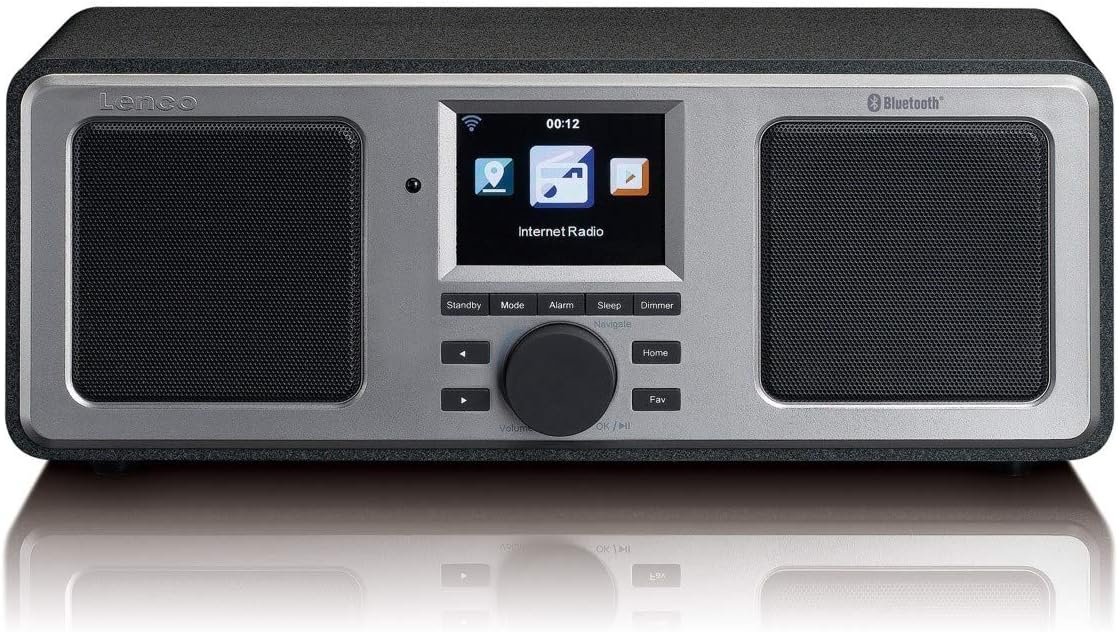
The front panel features a central color display, two integrated speakers, and control buttons. The display shows current mode, station information, time, and menu options. Control buttons include Standby, Mode, Alarm, Sleep, Dimmer, navigation arrows, a rotary knob for volume and selection, Home, and Fav (Favorites).
4.2 Zadní panel

The rear panel includes the power switch, DC IN port, Line Out, AUX In, and a USB port. An extendable telescopic antenna for FM reception is also located on the rear.
5. Nastavení
5.1 Připojení napájení
- Connect the supplied power adapter to the DC IN port on the rear of the DIR-150.
- Zapojte napájecí adaptér do elektrické zásuvky.
- Přepněte vypínač na zadním panelu do polohy „ON“.
5.2 Umístění antény
Pro optimální příjem FM rádia zcela vysuňte teleskopickou anténu umístěnou na zadní straně jednotky. Upravte její polohu pro dosažení nejlepší kvality signálu.
5.3 Initial Network Configuration (Wi-Fi)
Upon first power-on, the device will guide you through the initial setup wizard:
- Select your preferred language using the rotary knob and press to confirm.
- Rádio prohledá dostupné sítě Wi-Fi.
- Vyberte ze seznamu svou domácí Wi-Fi síť.
- Enter your Wi-Fi password using the rotary knob to select characters and navigation buttons to move. Press the knob to confirm each character and then the final password.
- Po připojení se na rádiu zobrazí potvrzovací zpráva.
6. Návod k obsluze
6.1 Základní obsluha
- Zapnutí/vypnutí: Stiskněte tlačítko Pohotovostní button to switch the unit between standby and operational mode.
- Ovládání hlasitosti: Otáčením centrálního knoflíku upravte úroveň hlasitosti.
- Navigace: Use the navigation arrows and the rotary knob to browse menus and select options. Press the rotary knob to confirm a selection.
- režim: Stiskněte tlačítko Režim button to cycle through available modes (Internet Radio, FM, Bluetooth, USB, AUX).
- Domov: Stiskněte tlačítko Domov tlačítko pro návrat do hlavní nabídky.
- Fav (Favorites): Stiskněte tlačítko Fav button to access your saved favorite stations.
6.2 Internetové rádio
Získejte přístup k tisícům internetových rozhlasových stanic po celém světě.
- Select 'Internet Radio' from the main menu.
- Browse stations by location, genre, or search by name.
- Select a station using the rotary knob and press to start playback.
- To save a station as a favorite, navigate to the station and press the Fav tlačítko.
6.3 FM rádio
Listen to local FM broadcasts.
- Stiskněte tlačítko Režim button until 'FM Radio' is selected.
- The radio will automatically scan for available FM stations.
- Use the navigation arrows to manually tune or select a scanned station.
- The display will show RDS information (station name, program type) if available.
6.4 Přehrávání přes Bluetooth
Streamujte zvuk bezdrátově ze zařízení s podporou Bluetooth.
- Stiskněte tlačítko Režim button until 'Bluetooth' is selected. The radio will enter pairing mode.
- On your mobile device, enable Bluetooth and search for 'Lenco DIR-150'.
- Select 'Lenco DIR-150' to pair. Once connected, you can play audio from your device through the radio.
6.5 Přehrávání z USB
Přehrát zvuk filepřímo z USB flash disku.
- Insert a USB flash drive into the USB port on the rear panel.
- Stiskněte tlačítko Režim button until 'USB' is selected.
- Browse your audio files (MP3, WAV, AAC formats supported) and select one to play.
6.6 Vstup AUX
Připojte externí zvuková zařízení pomocí 3.5mm audio kabelu.
- Connect one end of a 3.5mm audio cable to the AUX IN port on the rear of the DIR-150.
- Druhý konec připojte ke konektoru pro sluchátka nebo audio výstupu vašeho externího zařízení.
- Stiskněte tlačítko Režim button until 'AUX' is selected.
- Ovládejte přehrávání a hlasitost z externího zařízení.
6.7 Media Streaming (UPnP)
Stream music from a PC or NAS (Network Attached Storage) device on your home network.
- Ensure your PC or NAS is configured as a UPnP media server and is on the same Wi-Fi network as the DIR-150.
- Navigate to the 'Media Player' or 'UPnP' option in the radio's menu.
- Select your media server from the list and browse your music library.
7. Další funkce
7.1 Budík
Set up to two independent alarms.
- Stiskněte tlačítko Poplach tlačítko.
- Select 'Alarm 1' or 'Alarm 2' and configure the time, alarm source (buzzer or radio), and frequency (daily, once, weekends, weekdays).
- Press the rotary knob to confirm settings.
- To snooze an active alarm, press the Podřimovat button (usually the rotary knob).
7.2 Časovač vypnutí
Set the radio to automatically turn off after a specified period.
- Stiskněte tlačítko Spát tlačítko.
- Select the desired sleep duration (e.g., 15, 30, 60 minutes).
- The radio will count down and enter standby mode when the timer expires.
7.3 Předpověď počasí
View local weather forecasts for the next 5 days.
- Navigate to the 'Weather' option in the main menu.
- Select your location to view předpověď.
8. Údržba
- Čištění: Disconnect the power before cleaning. Use a soft, dry, lint-free cloth to wipe the exterior. Do not use abrasive cleaners or solvents.
- Skladování: If not used for an extended period, unplug the device and store it in a cool, dry place.
9. Řešení problémů
| Problém | Možná příčina | Řešení |
|---|---|---|
| Žádná síla | Power adapter not connected; Power switch off | Ensure adapter is securely connected and power switch is ON. |
| Žádné připojení k internetu | Incorrect Wi-Fi password; Router issue; Out of range | Re-enter Wi-Fi password; Restart router; Move radio closer to router. |
| Špatný příjem FM | Anténa není vysunutá nebo správně umístěná | Zcela vysuňte a nastavte teleskopickou anténu. |
| Párování Bluetooth se nezdařilo | Device not in pairing mode; Other device already connected | Ensure radio is in Bluetooth mode; Disconnect from other devices; Restart both devices. |
| Přehrávání z USB nefunguje | Nepodporováno file format; USB drive not recognized | Zajistit files are MP3, WAV, or AAC; Try a different USB drive. |
10. Specifikace
- Model: DIR-150
- Výstupní výkon: 16 W (efektivní hodnota)
- Zobrazit: 2.8palcový barevný displej
- Konektivita: Wi-Fi, Bluetooth, USB, AUX (3.5mm), Line-Out
- Rozhlasové kapely: Internet Radio, FM (PLL Tuner)
- Podporované zvukové formáty: MP3, WAV, AAC (for USB/Streaming)
- Napájení: AC adaptér (součástí balení)
- Rozměry (Š x H x V): 310 x 126 x 116 mm
- Hmotnost: 1.52 kg
- Vlastnosti: Alarm Clock (2 alarms), Snooze, Sleep Timer, Weather Forecast, UPnP Streaming
11. Záruka a podpora
Lenco products are manufactured to high quality standards. In the unlikely event of a defect, Lenco provides a warranty in accordance with the laws of the country of purchase. For specific warranty terms and conditions, please refer to the warranty card included with your product or visit the official Lenco website. For technical support or service inquiries, please contact your retailer or the Lenco customer service department.


