1. Úvod
The Yale Standard Digital Safe YSS/250/DB2 is designed to provide secure storage for your valuables. This safe features a robust solid steel construction, an easy-to-operate digital keypad with an LCD display, and a programmable combination of 3 to 8 digits. For added security, it includes pre-drilled holes for permanent mounting and an incorrect entry alarm system.
Please read this manual carefully before operating your safe to ensure proper use and to maximize its security features.
2. Nastavení
2.1 Vybalení a kontrola
Carefully remove the safe from its packaging. Inspect the safe for any signs of damage. Ensure all components are present:
- Yale Standard Digital Safe YSS/250/DB2
- 2 Security Override Keys
- Fixing Bolts (for mounting)
- Uživatelská příručka
2.2 Instalace baterie
The safe requires 4 AA size (1.5V) batteries for operation. The battery compartment is located inside the door to prevent tampering.
- Open the safe door using one of the supplied override keys. Insert the key into the keyhole, turn it clockwise, and then turn the handle to open.
- Najděte kryt přihrádky na baterie na vnitřní straně dvířek.
- Sejměte kryt a vložte 4 nové baterie typu AA, dbejte na správnou polaritu (+/-).
- Nasaďte kryt prostoru pro baterie.
- Test the keypad by entering a default code (if any, refer to specific instructions on the safe itself or packaging) or by setting a new code as described in Section 3.3.
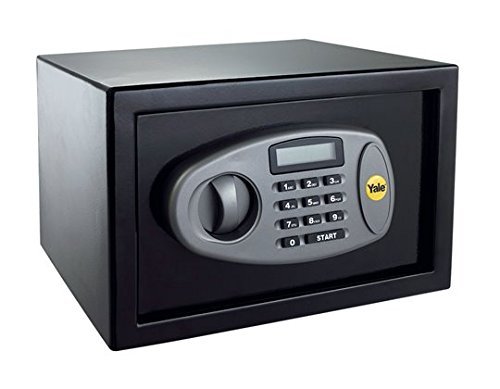
This image displays the Yale Standard Digital Safe YSS/250/DB2 with its door open, showcasing the spacious interior and the electronic keypad on the door. The keypad features a digital display and numeric buttons for code entry.
2.3 Montáž trezoru
For additional security, the safe can be permanently mounted to a floor, wall, or other hard surface using the pre-drilled holes and supplied fixing bolts.
- Choose a suitable location for mounting, ensuring it is a solid surface.
- Open the safe door and locate the pre-drilled holes on the back or bottom of the safe.
- Mark the drilling points on the chosen surface through the holes in the safe.
- Move the safe and drill pilot holes into the marked points on the surface.
- Umístěte zadní stranu trezoru nad vyvrtané otvory.
- Secure the safe using the supplied fixing bolts, tightening them firmly.
3. Návod k obsluze
3.1 Opening the Safe with Digital Code
- Enter your 3 to 8 digit programmable combination on the keypad.
- Press the 'E' (Enter) button.
- If the code is correct, the safe will unlock. Turn the handle clockwise within 5 seconds to open the door.
3.2 Zavření trezoru
Close the safe door and turn the handle counter-clockwise until it is fully engaged. The safe will automatically lock.
3.3 Changing Your Personal Code
It is recommended to change the factory default code immediately after battery installation.
- With the safe door open, press the red reset button located on the inside of the door, near the hinge.
- The yellow indicator light on the keypad will illuminate, and the display will show 'PROG'.
- Enter your new 3 to 8 digit code on the keypad.
- Press the 'E' (Enter) button to confirm.
- The display will show 'GOOD' to confirm the new code has been set.
- With the door still open, test the new code to ensure it works correctly before closing the safe.
3.4 Manual Override Function
In case of battery failure or if you forget your digital code, you can open the safe using the security override keys.
- Locate the keyhole, usually hidden behind a small cover on the keypad panel.
- Insert one of the supplied override keys into the keyhole.
- Turn the key clockwise and simultaneously turn the handle to open the safe door.
Important: Store your override keys in a secure location away from the safe. Never store them inside the safe.
3.5 Incorrect Entry Alarm
If an incorrect code is entered 4 consecutive times, an internal alarm will sound for 3 minutes. During this time, the keypad will be locked out, preventing further code entries. The manual override function can still be used during an alarm.
4. Údržba
4.1 Výměna baterie
When the batteries are low, the LCD display may show a 'LOW BATT' indicator. Replace all 4 AA batteries as described in Section 2.2 to ensure continuous operation and prevent lockout.
4.2 Čištění
Vnější povrch trezoru očistěte měkkým hadříkem.amp cloth. Avoid using abrasive cleaners or solvents, as these can damage the finish or keypad.
4.3 Úložiště klíčů
Always keep the security override keys in a safe and accessible location outside of the safe. This ensures you can access the safe if the batteries fail or you forget your code.
5. Řešení problémů
- Trezor se neotevírá digitálním kódem:
– Ensure batteries are not low. Replace if necessary.
– Re-enter the code carefully. Ensure no buttons are stuck.
– Use the manual override key to open the safe. - Klávesnice nereaguje:
– Batteries may be completely drained. Replace all 4 AA batteries.
– If the keypad is locked out due to incorrect entries, wait for the 3-minute alarm period to end or use the override key. - Alarm se neočekávaně rozezní:
– This indicates 4 consecutive incorrect code entries. Wait for the alarm to stop or use the override key. - Forgotten digital code:
– Use the manual override key to open the safe. Once open, you can reset the code as described in Section 3.3.
6. Specifikace
| Funkce | Specifikace |
|---|---|
| Značka | Yale |
| Číslo modelu | YSS/250/DB2 (Kainya-YSS-250-DB2) |
| Typ zámku | Elektronický |
| Materiál | Solid Steel, Metal |
| Vnější rozměry (V x Š x H) | 250 x 350 x 250 mm |
| Vnitřní rozměry (V x Š x H) | 240 x 340 x 200 mm |
| Kapacita | 16.3 litru |
| Zdroj napájení | 4 x AA (1.5V) baterie |
| Typ montáže | Floor Mount, Wall Mount (Pre-drilled holes) |
| Speciální funkce | Digital Keypad with LCD, Programmable 3-8 Digit Code, Manual Override Keys, Incorrect Entry Alarm, Portable |
| Zahrnuté komponenty | Bolts, Keys |
7. Záruka a podpora
For warranty information and customer support, please refer to the documentation provided with your purchase or visit the official Yale webUschovejte si doklad o koupi pro případ reklamace.
If you encounter any issues not covered in this manual, please contact Yale customer service for assistance.


