1. Konec produktuview
The Zoom H1n Handy Recorder (2018 Model) is a compact and versatile audio recording device designed for musicians, podcasters, filmmakers, and content creators. It features a streamlined body with a matte finish and a newly designed protective mic enclosure, making it ideal for on-the-go recording. With its intuitive controls and high-quality built-in microphones, the H1n provides excellent audio capture for various applications.

Obrázek 1: Přední strana view of the Zoom H1n Handy Recorder, showcasing its compact design and built-in X/Y stereo microphones.
2. Co je v krabici
Upon unboxing your Zoom H1n Handy Recorder, please ensure all the following items are present:
- Zoom H1n Handy Recorder Unit
- 2 x AAA Batteries (for immediate use)
- Uživatelská příručka (PDF k dispozici online)
Note: A microSD card is required for recording and is not included with the unit. Please purchase one separately (up to 32GB capacity recommended).
3. Počáteční nastavení
3.1. Instalace baterií
- Locate the battery compartment on the back of the H1n unit.
- Vysuňte kryt přihrádky na baterie.
- Insert the two AAA batteries, ensuring correct polarity (+/-) as indicated inside the compartment.
- Bezpečně zavřete kryt bateriového prostoru.

Obrázek 2: Zadní view of the Zoom H1n, showing the battery compartment and overall compact size.
3.2. Vložení karty microSD
- Locate the microSD card slot on the side of the H1n.
- Gently insert a formatted microSD card (up to 32GB) into the slot until it clicks into place.
- Chcete-li kartu vyjmout, lehce ji zatlačte, dokud nevyskočí.
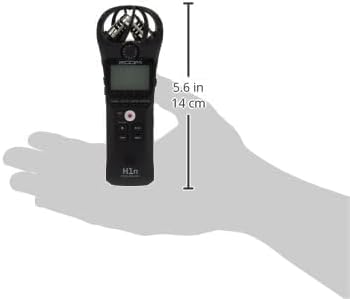
Obrázek 3: Strana view of the Zoom H1n, highlighting the microSD card slot and other side controls.
3.3. Zapnutí/vypnutí
To power on the device, slide the power switch to the ON position. To power off, slide the switch to the OFF position and hold until the display turns off.
4. Základní obsluha
4.1. Záznam zvuku
- Ensure batteries and a microSD card are installed.
- Zapněte H1n.
- Upravte vstupní úroveň pomocí OBJEM dial on the side to prevent clipping (distortion). The display will show input levels.
- Stiskněte velký REC button (red circle) to start recording. The REC indicator will light up.
- Stiskněte tlačítko REC button again to pause recording.
- Stiskněte tlačítko ZASTÁVKA button (square) to stop recording and save the file.

Figure 4: Close-up of the Zoom H1n's display and main control buttons, including REC, STOP, and playback controls.
4.2. Přehrávání
- Stiskněte tlačítko PLAY/PAUSE button (triangle/two vertical bars) to begin playback of the last recorded file.
- Použijte ZPĚT a RYCHLE VPŘED tlačítka pro navigaci mezi files.
- Upravte hlasitost přehrávání pomocí OBJEM vytočit.
- Připojte sluchátka k VYROVNAT jack pro soukromý monitoring.
4.3. Připojení k počítači
The H1n can be connected to a computer via its USB port to transfer recorded files. It functions as a USB microphone or a card reader. Use a standard USB cable (not included) to connect the device to your computer.
5. Klíčové vlastnosti
- Streamlined Body: Features a matte finish and a newly designed protective mic enclosure for durability and portability.
- Vestavěné stereo kondenzátorové mikrofony: Utilizes 90-degree X/Y format for clear, wide-range stereo recording.
- One-touch Button Controls: Simplifies operation for quick recording and playback.
- Localized and Intuitive Menus: Easy navigation through settings for efficient use.
- Ovládání rychlosti přehrávání: Allows adjustment of playback speed without changing pitch.
- Voice Emphasize Filter: Enhances vocal clarity for interviews nebo přednášky.
- Stereo Overdubbing Functions: Enables layering of audio tracks for creative projects.
- Dlouhá výdrž baterie: Approximately 10 hours of continuous recording time using built-in mic (44.1 kHz/16-bit) with alkaline batteries.
6. Technické specifikace
| Atribut | Hodnota |
|---|---|
| Hmotnost položky | 2.4 unce |
| Rozměry produktu | 5.4 x 1.9 x 1.2 palců (1.5"H x 5.5"Š x 1"V) |
| Číslo modelu položky | H1n |
| Jsou vyžadovány baterie | 1 AA baterií (doporučeno alkalické) |
| Název barvy | Černý |
| Kompatibilní zařízení | Přenosný počítač |
| Typ konektoru | USB |
| Hardwarové rozhraní | USB |
| Formát médií | WAV |
| Zdroj napájení | Napájení z baterie |
| Velikost stálé obrazovky | 1.25 palců |
| Tvarový faktor mikrofonu | Vestavěný |
| Jack pro sluchátka | 2.5 milimetru |
| Kapacita paměti | 32 GB (max SDHC) |
| Vstupní impedance | 2 kΩ |
7. Řešení problémů
7.1. Excessive Handling Noise
The H1n's lightweight plastic body can sometimes transmit handling noise to the sensitive built-in microphones. To minimize this:
- Hold the device as still as possible during recording.
- Consider using a shock mount if recording while moving or attaching to a camera.
- For outdoor use, a foam windscreen (not included) is highly recommended to reduce wind noise.
7.2. No Recording or File Not Saved
- Ensure a formatted microSD card is properly inserted.
- Check battery levels. Replace or recharge batteries if low.
- Verify that the device is not in USB mode (if connected to a computer).
7.3. Špatná kvalita zvuku
- Check the input level. If it's too high, audio may be distorted (clipping). Adjust the OBJEM dial down.
- If the level is too low, audio may be noisy. Increase the OBJEM vytočit.
- Ujistěte se, že mikrofony nejsou zakryty.
- Consider the recording environment; excessive background noise will be captured.
8. Péče a údržba
- Čištění: K čištění vnější strany jednotky používejte měkký, suchý hadřík. Nepoužívejte tekuté čisticí prostředky ani rozpouštědla.
- Skladování: Store the H1n in a cool, dry place away from direct sunlight and extreme temperatures.
- Baterie: Pokud nebudete přístroj delší dobu používat, vyjměte baterie, abyste zabránili jejich vytečení.
- Mikrofony: Avoid applying direct pressure or impact to the microphone capsules.
9. Záruka a podpora
For detailed warranty information, technical support, or further assistance, please refer to the official user manual provided with your product or visit the Zoom Official Store on Amazon.
An extended user manual in PDF format is available for download: Stáhnout uživatelskou příručku (PDF).


