Úvod a konecview
The ASUS Q504UA-BI5T26 is a versatile 15.6-inch 2-in-1 touchscreen laptop designed for flexible use. It features a 360-degree flip-and-fold design, allowing it to transition seamlessly between laptop, tablet, tent, and stand modes. Equipped with a 7th Gen Intel Core i5 processor, 12GB DDR4 RAM, and a 1TB HDD, it provides ample performance for daily computing tasks, multimedia, and light productivity. The Full HD 1080p display supports Windows Ink for creative and productive applications, and the device includes a built-in fingerprint reader for enhanced security.

Figure 1: ASUS Q504UA-BI5T26 in traditional laptop configuration, showcasing its 15.6-inch Full HD display and backlit keyboard.
Průvodce nastavením
- Rozbalení: Carefully remove the laptop, AC adapter, and any included documentation from the packaging.
- Počáteční připojení napájení: Connect the AC adapter to the laptop's power input port and then plug it into a wall outlet. It is recommended to fully charge the battery before first use.
- První spuštění: Open the laptop lid. The system should power on automatically. If not, press the power button located on the side or keyboard deck.
- Nastavení Windows 10: Follow the on-screen prompts to complete the Windows 10 initial setup. This includes selecting your region, language, accepting terms, and creating a user account.
- Internetové připojení: During setup, you will be prompted to connect to a Wi-Fi network. Select your network and enter the password.
- Fingerprint Reader Setup: After Windows setup, you can configure the built-in fingerprint reader through Windows Hello settings for secure login. Navigate to Nastavení > Účty > Možnosti přihlášení to set up your fingerprint.
Návod k obsluze
Pochopení režimů 2 v 1
The ASUS Q504UA offers four primary modes of operation due to its 360-degree hinge:
- Režim notebooku: Tradiční konfigurace notebooku pro psaní a produktivitu.
- Režim tabletu: Fold the screen back completely to use as a tablet for touch-based interaction. Windows 10 will automatically switch to tablet mode for an optimized experience.
- Režim stanu: Stand the laptop in an inverted "V" shape, ideal for watching videos or presentations in confined spaces.
- Režim stojanu: Position the keyboard face down and the screen upright, suitable for media consumption or touch applications.

Figure 2: The ASUS Q504UA-BI5T26 transitioning into a more upright position, demonstrating its touchscreen capabilities with the Windows 10 interface.
Touchscreen and Windows Ink
The 15.6-inch Full HD display is a 10-point multitouch screen, allowing for intuitive navigation and interaction with Windows 10. The display is also Windows Ink Capable, enabling you to write notes, draw, and annotate documents directly on the screen using a compatible stylus (stylus not included). Access Windows Ink Workspace by clicking the pen icon on the taskbar or by using a stylus button.

Figure 3: The laptop screen highlighting its "Built for Windows Ink" feature, indicating compatibility with digital pen input for drawing and note-taking.
Klávesnice a touchpad
- Podsvícená klávesnice: The keyboard features backlighting for comfortable typing in low-light conditions. Use the function keys (Fn + F3/F4, or similar, refer to keyboard icons) to adjust the brightness or turn it on/off.
- Touchpad: The precision touchpad supports multi-touch gestures for navigation, scrolling, and zooming. Refer to Windows touchpad settings for customization.
Připojení externích zařízení
The laptop is equipped with various ports for connectivity:
- USB porty: Includes 3 x USB 3.0 ports and 1 x USB 3.1 Type-C port for connecting peripherals like external drives, mice, or keyboards.
- HDMI výstup: Connect to an external monitor or TV using the HDMI port for extended display options.
- Audio jack: A combined microphone/headphone jack for audio input and output.
- Media Reader: Built-in media reader for simple photo and file transfer from compatible memory cards.
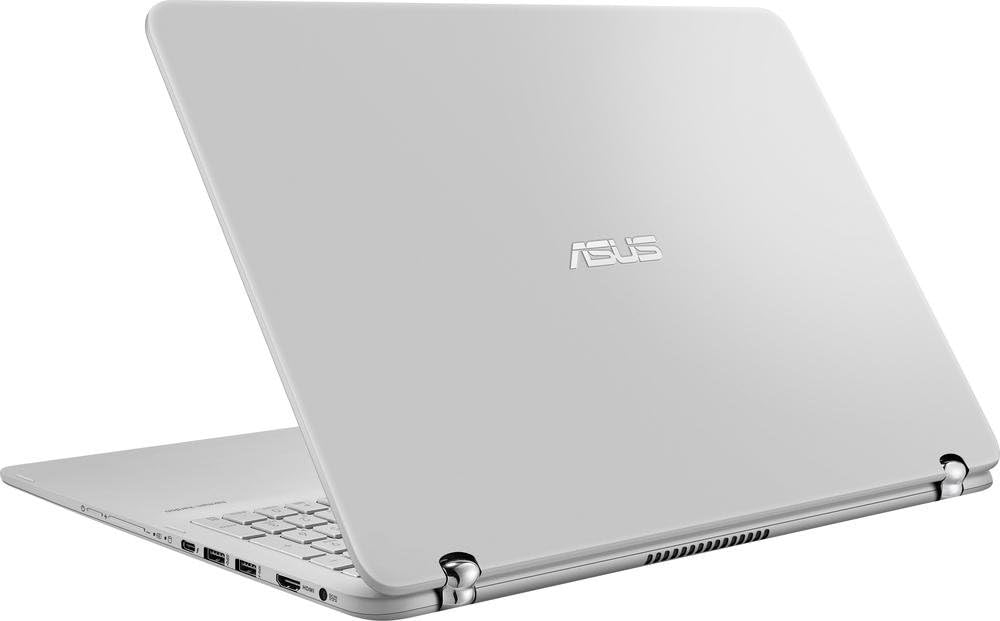
Obrázek 4: A view of the laptop's side, illustrating the arrangement of its connectivity ports, including USB and HDMI.
Správa baterie
The laptop is powered by a 4-cell Lithium-ion battery. To maximize battery life:
- Upravte jas obrazovky na pohodlnou úroveň.
- Zavřete nepoužívané aplikace a karty prohlížeče.
- Enable Windows Battery Saver mode when battery is low.
- Vyhněte se extrémním teplotám.
Údržba
- Čištění: Použijte měkký hadřík, který nepouští vlákna dampened with water or a screen cleaner to clean the display. For the chassis and keyboard, use a soft, dry cloth. Avoid harsh chemicals.
- Aktualizace softwaru: Regularly check for and install Windows updates and ASUS driver updates to ensure optimal performance and security.
- Správa úložiště: Periodically clean up temporary files and unnecessary programs to free up disk space and maintain system speed.
- Péče o baterie: While the laptop can be used while charging, avoid constantly keeping it plugged in at 100% charge for extended periods. Allow the battery to discharge occasionally.
Odstraňování problémů
This section provides solutions to common issues. For more complex problems, refer to the ASUS support webmísto.
- Není napájení/Nelze zapnout:
- Ujistěte se, že je síťový adaptér bezpečně připojen k notebooku i k funkční zásuvce.
- Zkuste jinou zásuvku.
- Pokud je baterie zcela vybitá, může trvat několik minut nabíjení, než se notebook zapne.
- Display Issues (No image, flickering):
- Ujistěte se, že je notebook zapnutý.
- Adjust screen brightness using function keys.
- If connected to an external monitor, try disconnecting it or pressing Fn + F8 (or similar) to cycle display outputs.
- Problémy s připojením Wi-Fi:
- Check if Wi-Fi is enabled in Windows settings (Nastavení > Síť a internet > Wi-Fi).
- Restartujte router a modem.
- Zapomeňte na síť a znovu se připojte.
- Update Wi-Fi drivers through Device Manager.
- Pomalý výkon:
- Zavřete nepotřebné aplikace běžící na pozadí.
- Spusťte čištění disku a odstraňte dočasné files.
- Zkontrolujte, zda neobsahuje malware nebo viry.
- Ujistěte se, že systém Windows a ovladače jsou aktuální.
Specifikace
| Funkce | Detail |
|---|---|
| Model | Q504UA-BI5T26 |
| Zobrazit | 15.6-inch Full HD (1920 x 1080) 10-point Multitouch LED Backlit IPS |
| Procesor | 7th Gen Intel Core i5-7200U (2.5 GHz, up to 3.1 GHz) |
| Grafika | Grafická karta Intel HD 620 (integrovaná) |
| BERAN | 12GB DDR4 SDRAM (2133MHz, expandable to 16GB) |
| Skladování | 1TB 5400rpm Serial ATA Hard Drive |
| Operační systém | Windows 10 Home (64bitový) |
| Bezdrátové připojení | Wi-Fi 802.11ac, Bluetooth |
| Porty | 3 x USB 3.0, 1 x USB 3.1 Type-C, 1 x HDMI, 1 x Microphone/Headphone Combo Jack |
| Další funkce | Built-in Fingerprint Reader, Backlit Keyboard, Built-in Media Reader, Webcam, Harman/kardon stereo speakers |
| Baterie | 4-cell Lithium-ion (Approx. 9 hours average battery life) |
| Rozměry (DxŠxV) | 15 x 10 x 0.9 palce |
| Hmotnost | 5.07 libry (přibližně 2.3 kg) |
| Barva | Sandblasted aluminum silver |
Záruka a podpora
Your ASUS Q504UA-BI5T26 laptop comes with a limited warranty. Please refer to the warranty card included in your product packaging for specific terms and conditions, including warranty period and coverage details. Keep your proof of purchase for warranty claims.
For technical support, driver downloads, FAQs, and service information, please visit the official ASUS support webmísto:
Než budete kontaktovat podporu, mějte prosím připravené sériové číslo vašeho notebooku. Sériové číslo se obvykle nachází na štítku na spodní straně notebooku nebo ho lze nalézt v systémových informacích ve Windows.


