1. Úvod
This manual provides comprehensive instructions for the installation, operation, and maintenance of your BitFenix Spectre Pro RGB LED 140mm Case Fan with Controller. Please read this manual thoroughly before installation and retain it for future reference.
2. Obsah balení
Ověřte, zda jsou v balení přítomny všechny níže uvedené komponenty:
- 1x BitFenix Spectre Pro RGB LED 140mm Case Fan
- 1x RGB LED Controller Box
- 1x RGB Control Button (with magnetic backing)
- 1x Motherboard RGB Sync Cable (for ASUS Aura Sync compatibility)
- 1x Power Cable (Molex to Controller)
- 4x šrouby pro upevnění ventilátoru
- 4x Anti-Vibration Rubber Mounts

Obrázek 2.1: All components included in the BitFenix Spectre Pro RGB LED 140mm Case Fan package. This includes the 140mm fan, the RGB controller box, various connection cables, mounting screws, and rubber anti-vibration mounts.
3. Vlastnosti
The BitFenix Spectre Pro RGB LED Case Fan offers the following key features:
- TriBright LED Technology: Provides vibrant and uniform RGB illumination.
- ASUS Aura Sync Ready: Compatible with ASUS Aura Sync motherboards for synchronized RGB lighting control.
- Reinforced Fan Blades: Designed for durability and optimal airflow, with centered LED lighting for enhanced aesthetics.
- High Pressure/CFM Design: Engineered to deliver significant airflow and static pressure for effective cooling.
- Focused Airflow: Optimized blade design ensures efficient cooling performance.
- Tichý provoz: Designed to minimize noise levels during operation.
- Dlouhá životnost: Constructed for extended operational lifespan.
4. Nastavení a instalace
Follow these steps to properly install your BitFenix Spectre Pro RGB LED Case Fan.
4.1 Bezpečnostní opatření
- Před zahájením instalace se ujistěte, že je počítač vypnutý a odpojený ze zásuvky.
- Před manipulací se součástmi vybijte statickou elektřinu dotykem uzemněného kovového předmětu.
- S komponenty zacházejte opatrně, aby nedošlo k poškození.
4.2 Montáž ventilátoru
- Identify the desired mounting location within your PC case (e.g., front, rear, top, bottom).
- Align the fan with the screw holes in your case.
- Optionally, place the anti-vibration rubber mounts between the fan and the case to reduce noise.
- Secure the fan using the four provided mounting screws. Do not overtighten.
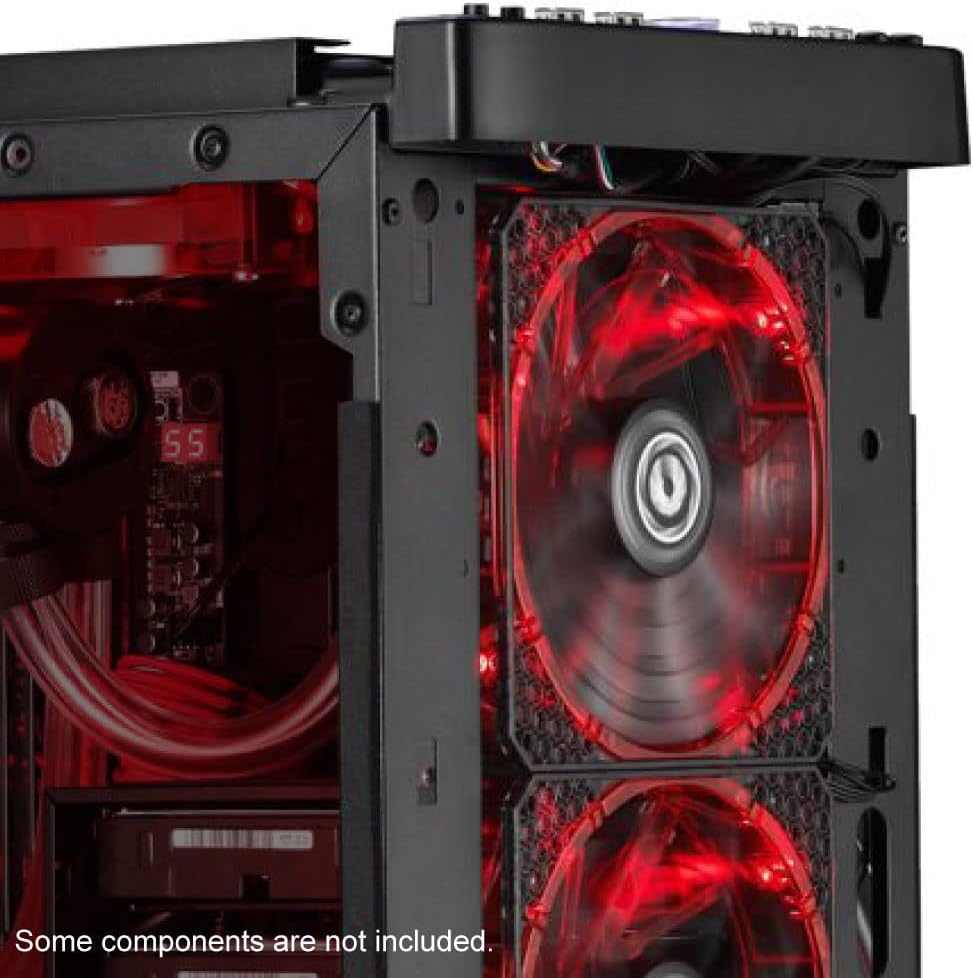
Obrázek 4.1: Bývalýample of the BitFenix Spectre Pro RGB LED fan installed within a PC case, demonstrating its placement and illumination.
4.3 Controller and Cable Connections
The Spectre Pro RGB fan utilizes a dedicated controller for power and RGB effects. Refer to the image below for a visual guide to the fan and controller unit.

Obrázek 4.2: The BitFenix Spectre Pro RGB LED fan and its accompanying RGB controller box, highlighting its compatibility with ASUS Aura Sync.
- Connect Fan to Controller: Plug the 4-pin fan cable from the Spectre Pro RGB fan into an available fan header on the RGB LED Controller Box. The controller supports multiple fans; ensure a secure connection.
- Zapnutí regulátoru: Connect the provided Molex power cable to the RGB LED Controller Box and to an available Molex connector from your power supply unit (PSU).
- RGB Control Options:
- Ruční ovládání: Connect the RGB Control Button to the designated port on the RGB LED Controller Box. This button allows you to cycle through various lighting modes and colors. The button has a magnetic backing for convenient placement inside or outside your case.
- Motherboard Sync (ASUS Aura Sync): If your motherboard supports ASUS Aura Sync, connect the provided Motherboard RGB Sync Cable from the RGB LED Controller Box to your motherboard's 4-pin RGB header. This allows software control of the fan's RGB lighting.
- Správa kabelů: Všechny kabely úhledně veďte, abyste zajistili správné proudění vzduchu a čistou konstrukci.
5. Návod k obsluze
Once installed and connected, power on your computer to begin operation.
5.1 Provoz ventilátoru
The fan will begin spinning once power is supplied to the controller. The fan speed is constant at 1500 RPM.
5.2 Ovládání RGB osvětlení

Obrázek 5.1: The BitFenix Spectre Pro RGB LED fan showcasing its vibrant, multi-color illumination.
- Using the RGB Control Button: Press the connected RGB Control Button to cycle through various pre-programmed lighting effects, colors, and modes.
- Using Motherboard Software (ASUS Aura Sync): If connected to a compatible ASUS motherboard, use the ASUS Aura Sync software to customize and synchronize the fan's RGB lighting with other compatible components in your system. Refer to your motherboard's manual for specific software instructions.
6. Údržba
Pravidelná údržba pomáhá zajistit optimální výkon a dlouhou životnost vašeho ventilátoru.
- Čištění: Periodically clean the fan blades and frame to remove dust buildup. Use a soft brush or compressed air. Ensure the fan is powered off and unplugged before cleaning.
- Inspekce: Check cables for secure connections and signs of wear.
7. Řešení problémů
If you encounter issues with your Spectre Pro RGB fan, refer to the following troubleshooting guide:
| Problém | Možná příčina | Řešení |
|---|---|---|
| Ventilátor se neotáčí | No power to controller; Fan cable loose; Faulty controller/fan | Check Molex power connection to controller; Ensure fan cable is securely plugged into controller; Test with another fan/controller if available. |
| RGB LEDs not lighting up | RGB cable loose; Incorrect RGB header connection; Software conflict; Faulty LEDs | Verify RGB cable connection to controller and motherboard (if applicable); Ensure correct 4-pin RGB header is used; Check motherboard software settings; Try manual control with the button. |
| Fan is excessively noisy | Loose mounting; Obstruction; Bearing issue | Ensure fan is securely mounted; Check for cables or objects interfering with fan blades; If noise persists, contact support. |
8. Specifikace
Detailed technical specifications for the BitFenix Spectre Pro RGB LED 140mm Case Fan:
| Funkce | Specifikace |
|---|---|
| Značka | BITFENIX |
| Číslo modelu | BFF-SRGB-14025C-RP |
| Velikost ventilátoru | 140 mm |
| Typ napájecího konektoru | 4-Pin (Fan), Molex (Controller) |
| svtage | 12 voltů |
| Wattage | 125W (System Power Consumption, not fan specific) |
| Způsob chlazení | Větrák |
| Kompatibilní zařízení | Stolní počítače |
| Úroveň hluku | 22.8 decibelů |
| Materiál | Copper (likely referring to internal motor components, fan blades are plastic) |
| Maximální rychlost otáčení | 1500 ot./min |
| Hmotnost položky | 8.6 unce |
| Rozměry produktu (DxŠxV) | 8 x 1 x 1.5 inches (Note: This dimension seems incorrect for a 140mm fan, typically 140x140x25mm. Please refer to product packaging for exact dimensions.) |
| UPC | 886027015353 |
9. Záruka a podpora
For warranty information and technical support, please refer to the official BitFenix webnebo se obraťte na jejich zákaznický servis. Uschovejte si doklad o koupi pro případ reklamace.
10. Oficiální produktová videa
Do této příručky nejsou k dispozici žádná oficiální produktová videa od prodejce, která by bylo možné vložit.


