1. Úvod
Thank you for choosing the VIVO DESK-V000V 36-inch Height Adjustable Sit-Stand Desk Converter. This manual provides essential information for the safe and efficient use of your new workstation. This converter is designed to provide on-demand standing throughout the day, helping to relieve muscle tension, reduce stress, and increase productivity by allowing quick transitions between sitting and standing positions.
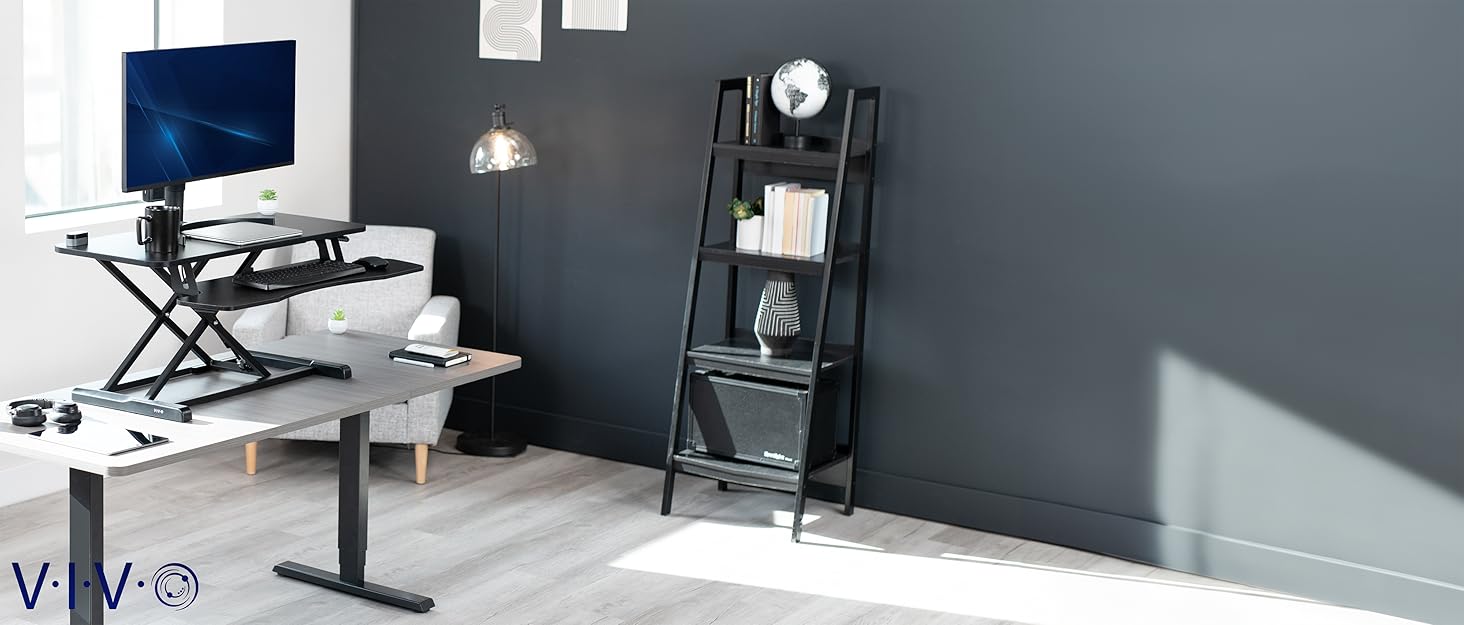
Image: The VIVO DESK-V000V desk converter in a modern office environment, showcasing its sleek design and functionality.
2. Bezpečnostní informace
- Před použitím se ujistěte, že jsou všechny součásti bezpečně upevněny.
- Nepřekračujte maximální nosnost 15 kg (33 liber).
- Během nastavování výšky se nesmí dotýkat pohyblivých částí ani prstů.
- Place the converter on a stable, level surface.
- Distribute weight evenly on the desktop surface.
3. Co je v krabici
The VIVO DESK-V000V package includes all necessary components for assembly and immediate use:
- Desk Converter Unit (pre-assembled main frame)
- Extended Feet (for stability)
- Přihrádka na klávesnici
- Mounting Brackets for Keyboard Tray
- Klip pro správu kabelů
- Hardware (screws, screwdriver)

Image: All parts of the VIVO DESK-V000V desk converter, including the main unit, keyboard tray, and accessories, ready for assembly.
4. Nastavení a montáž
The VIVO DESK-V000V is designed for minimal assembly. Follow these steps to set up your desk converter:
4.1. Attaching the Extended Feet
- Carefully flip the main desktop unit upside down on a soft, clean surface to avoid scratches.
- Align the extended feet with the pre-drilled holes on the underside of the desk converter's base.
- Secure the feet using the provided screws and screwdriver. Ensure they are tightened firmly for stability.
Video: A detailed assembly guide for the VIVO DESK-V000V, demonstrating how to attach the extended feet and keyboard tray.
4.2. Attaching the Keyboard Tray
- Mount the two small brackets to the underside of the keyboard tray using the provided screws.
- Once the brackets are attached, hang the assembled keyboard tray onto the pre-installed knobs located on the main unit's frame.
- Tighten the knobs to secure the keyboard tray in place.

Obrázek: Detailní záběr view of the removable keyboard tray, highlighting its attachment points and ergonomic design.
4.3. Správa kabelů
- Attach the provided cable management clip to the underside of the desktop surface.
- Route your cables through the clip to keep your workspace tidy and prevent snagging during height adjustments.
5. Návod k obsluze
The VIVO DESK-V000V allows for quick and smooth transitions between sitting and standing positions.
5.1. Nastavení výšky
- To raise the desk: Simultaneously press the handles on each side of the desktop and gently lift the surface upwards. The dual pneumatic springs will assist in the lift. Release the handles at your desired height to lock it in place.
- To lower the desk: Simultaneously press the handles on each side and apply gentle downward pressure on the desktop surface. Guide the desk down to your preferred sitting height and release the handles.
The adjustment range is from 17cm to 43cm, offering versatile ergonomic positions.
Video: A demonstration of the VIVO DESK-V000V's height adjustment mechanism, showing smooth transitions between sitting and standing.

Image: A visual comparison illustrating the ergonomic benefits of using the VIVO DESK-V000V in both sitting and standing configurations.
6. Údržba
To ensure the longevity and optimal performance of your VIVO DESK-V000V, follow these simple maintenance guidelines:
- Čištění: Otřete povrchy měkkým, damp tkanina. Vyhněte se agresivním chemikáliím, které mohou poškodit povrch.
- Pravidelné kontroly: Pravidelně kontrolujte všechny šrouby a spoje, zda jsou pevně utažené. V případě potřeby je dotáhněte.
- Péče o mechanismus: Keep the pneumatic spring mechanisms free from dust and debris. Do not apply lubricants unless specifically instructed by VIVO support.
7. Řešení problémů
If you encounter any issues with your VIVO DESK-V000V, please refer to the following common solutions or contact customer support:
- Obtížnost nastavení výšky: Ensure both handles are pressed simultaneously and fully. Check for any obstructions in the lifting mechanism.
- kolísání: Verify that all screws, especially those for the extended feet, are securely tightened. Ensure the desk converter is placed on a flat, stable surface.
- Neobvyklé zvuky: If you hear grinding or squeaking, ensure the mechanism is clean. If the noise persists, contact VIVO customer support.
8. Specifikace
| Funkce | Detail |
|---|---|
| Číslo modelu | DESK-V000V |
| Značka | VIVO |
| Barva | Černý |
| Velikost | 36 palců |
| Materiál | Legovaná ocel |
| Kapacita zatížení | 33 liber (15 kg) |
| Rozměry produktu (D x Š x V) | 22 x 36 x 17 inches (approximate lowest height) |
| Rozsah nastavení výšky | 17cm to 43cm (6.7 to 16.9 inches) |
| Speciální funkce | Adjustable Height, Dual Tier, Keyboard Tray Included, Dual Pneumatic Springs |
| Montáž Vyžadována | Minimální |

Image: Technical drawing showing the key measurements and dimensions of the VIVO DESK-V000V.
9. Záruka a podpora
VIVO stands behind the quality of its products. The DESK-V000V is backed with a 3-letá záruka výrobce.
For any questions, concerns, or technical assistance, please contact VIVO's friendly tech support team. VIVO is a US-based company with a dedicated support team to provide the highest quality assistance.
Image: VIVO's commitment to US-based support and generous product protection.
Můžete navštívit Obchod VIVO na Amazonu for more information and to explore other VIVO products.