1. Úvod
This manual provides detailed instructions for the setup, operation, and maintenance of your ELEPHAS ELE-PRO-S1 Mini Projector. Please read this manual thoroughly before using the projector to ensure proper functionality and to maximize your viewing experience. The ELE-PRO-S1 is a compact and portable DLP projector designed for various entertainment purposes, including home cinema, outdoor movie nights, and gaming.
2. Obsah balení
Po vybalení se prosím ujistěte, že jsou všechny níže uvedené položky přítomny a v dobrém stavu:
- ELEPHAS ELE-PRO-S1 Mini Projector
- Stativ
- Power Adapter (DCM)
- USB kabel
- 3.5mm AV Cable
- HDMI kabel
- Uživatelská příručka (tento dokument)
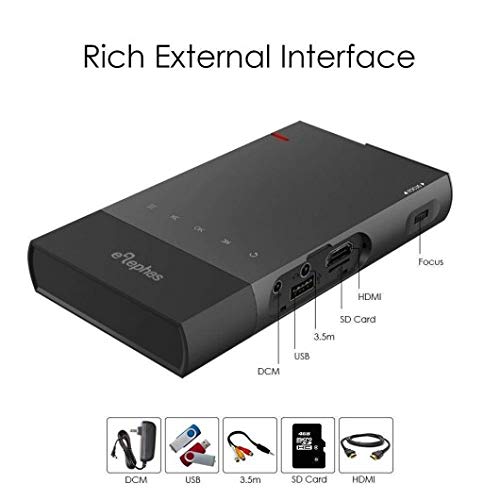
Obrázek 2.1: The ELEPHAS ELE-PRO-S1 Mini Projector shown with its various ports and included accessories such as the power adapter, USB cable, 3.5mm AV cable, SD card, and HDMI cable.
3. Konec produktuview
3.1. Součásti projektoru

Obrázek 3.1: Shora dolů view of the ELEPHAS ELE-PRO-S1 Mini Projector, highlighting its sleek, compact design and control buttons.
The ELEPHAS ELE-PRO-S1 is designed for portability and ease of use. Key components include:
- Projekční čočka: Located at the front, responsible for displaying the image.
- Ovládací panel: Buttons on the top surface for basic navigation and selection.
- Focus Wheel: Typically located on the side, used to adjust image clarity.
- Vstupní porty: HDMI, USB, Micro SD Card slot, and AV input for connecting various devices.
- Napájecí port: Pro připojení napájecího adaptéru.
- Reproduktor: Vestavěný pro audio výstup.
3.2. Porty připojení
Obrázek 3.2: Podrobná strana view of the projector, illustrating the various input ports including HDMI, USB, SD Card slot, 3.5mm audio jack, and the DC power input, along with the focus wheel.
Projektor nabízí několik možností připojení:
- HDMI: For connecting laptops, DVD players, gaming consoles (PS3, PS4, Xbox One), and other HDMI-enabled devices.
- USB: Pro přehrávání médií přímo z USB disků.
- Micro SD karta: For playing media directly from Micro SD cards.
- AV: For connecting older devices using the included 3.5mm AV cable.
4. Nastavení
4.1. Zapnutí/vypnutí
- Nabíjení: Connect the power adapter to the projector's DC input port and then to a power outlet. The projector has a built-in 5200mAh battery, allowing for portable use.
- Zapnutí: Press and hold the power button on the projector's control panel until the indicator light illuminates and the projector starts.
- Vypnout: Press and hold the power button again until the projector shuts down. Disconnect the power adapter if not charging.
4.2. Placement and Focus Adjustment
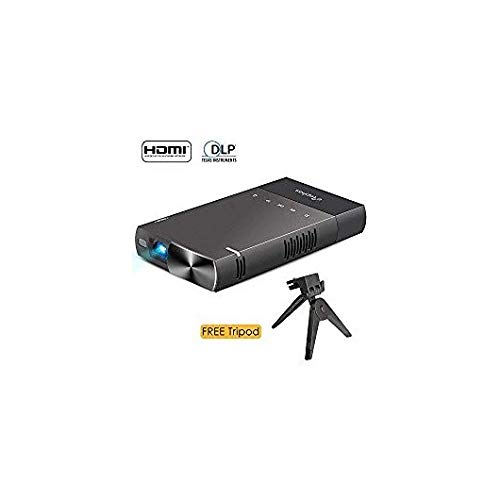
Obrázek 4.1: The ELEPHAS ELE-PRO-S1 Mini Projector positioned on its included tripod, ready for projection. This image also shows the HDMI and DLP logos, indicating supported technologies.
- Umístění: Place the projector on a stable, flat surface or mount it on the included tripod. Ensure the projection path is clear of obstructions. The ideal projection distance ranges from 0.5 to 3 meters (1.6 to 10 feet) for a screen size of 15 to 130 inches. For optimal clarity, a distance of 5 feet is recommended for an 80-inch screen.
- Nastavení zaostření: Turn the focus wheel located on the side of the projector until the projected image appears sharp and clear.
4.3. Připojení zařízení
The ELE-PRO-S1 supports various input sources:
- Připojení HDMI: Connect an HDMI cable from your device (laptop, game console, DVD player) to the projector's HDMI port.
- USB/Micro SD Card: Insert a USB drive or Micro SD card into the respective port. The projector will typically detect the media automatically or allow selection via the input source menu.
- AV připojení: Use the provided 3.5mm AV cable to connect to devices with AV output.
4.4. Screen Mirroring (Smartphones)
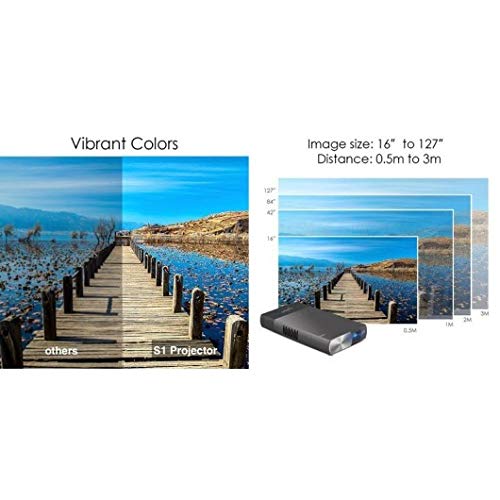
Obrázek 4.2: An illustration demonstrating how to connect a smartphone directly to the projector using a USB cable for screen mirroring, allowing content from the phone to be displayed on a larger screen.
The projector supports AirPlay, DLNA, and Miracast technologies for screen mirroring.
- iOS Devices (iPhone/iPad): Connect directly via a Lightning cable. No additional adapters are required. Supports iOS 9 or above.
- Zařízení Android: An EZcast APP is required. Connect via a USB cable. Supports Android 5.0 or above. Note that not all Android devices are supported.
5. Návod k obsluze
5.1. Základní navigace
Use the control buttons on the projector's top panel to navigate through menus and select options. The buttons typically include directional arrows, an OK/Enter button, and a Back/Menu button.
5.2. Výběr vstupního zdroje
After powering on, access the input source menu to select your desired connection (HDMI, USB, Micro SD, AV, or Screen Mirroring). This is usually done by pressing a dedicated "Source" or "Input" button, or navigating through the main menu.
5.3. Úprava nastavení
The projector's menu allows for various adjustments:
- Nastavení obrazu: Adjust brightness, contrast, color, and aspect ratio (e.g., 16:10).
- Nastavení zvuku: Control volume and audio output options.
- Nastavení systému: Language, time, and other general projector settings.
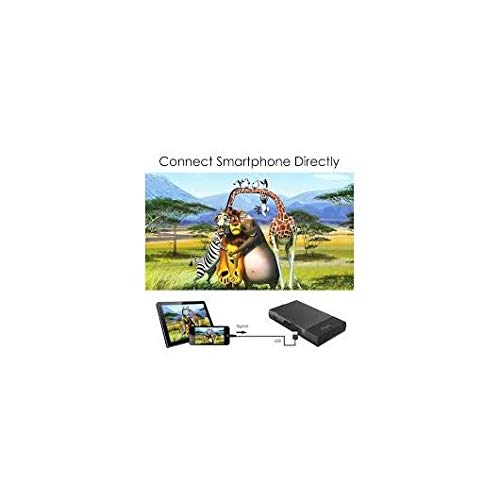
Obrázek 5.1: An image illustrating the vibrant color reproduction of the S1 Projector compared to other projectors, alongside a diagram showing various projection distances (0.5m to 3m) and corresponding image sizes (16" to 127").
6. Údržba
6.1. Čištění
- Čočka: Používejte měkký hadřík bez žmolků, speciálně určený pro optické čočky. Nepoužívejte abrazivní čisticí prostředky ani nadměrnou sílu.
- Casing: Otřete vnější povrch projektoru měkkým, suchým hadříkem. V případě odolných skvrn použijte lehceamp cloth can be used, followed by a dry wipe. Ensure no liquid enters the device.
- Větrání: Udržujte větrací otvory čisté od prachu a nečistot, abyste zabránili přehřátí.
6.2. Skladování
Pokud projektor nepoužíváte, skladujte jej na chladném a suchém místě mimo dosah přímého slunečního záření a extrémních teplot. Používejte originální obal nebo ochranné pouzdro, abyste zabránili hromadění prachu a fyzickému poškození.
7. Řešení problémů
This section addresses common issues you might encounter with your ELEPHAS ELE-PRO-S1 Mini Projector.
| Problém | Možná příčina | Řešení |
|---|---|---|
| Není zobrazen žádný obrázek |
|
|
| Obraz je rozmazaný |
|
|
| Žádný zvuk |
|
|
| Nefunguje zrcadlení obrazovky |
|
|
| Projektor se přehřívá nebo vypíná |
|
|
Pokud problém přetrvává i po vyzkoušení těchto řešení, kontaktujte zákaznickou podporu.
8. Specifikace
| Značka | ELEPHAS |
| Model | ELE-PRO-S1 |
| Zobrazovací technologie | DLP |
| Nativní rozlišení | 800 x 480P (Supports up to 1080P) |
| Jas | 100 ANSI Lumens |
| Projection Size / Distance | 15 ~ 130 inches / 0.5 ~ 3 meters (1.6 ~ 10 ft) |
| Poměr stran | 16:10 |
| Lamp Život | > 20,000 hodin |
| Baterie | 5200mAh Lithium Ion (2 batteries included) |
| Životnost baterie | More than 2 hours of movie playback |
| Vstupy | HDMI, USB, Micro SD Card, AV |
| Kompatibilní zařízení | Laptop, DVD Player, PS3, PS4, Xbox One, Smartphones (iOS 9+, Android 5.0+) |
| Speciální funkce | Lightweight, Portable, Multi-screen sharing (AirPlay, DLNA, Miracast) |
| Rozměry produktu | 14.7 x 8 x 2 cm |
| Hmotnost položky | 269 g (0.6 lb) |
9. Záruka a podpora
9.1. Informace o záruce
The ELEPHAS ELE-PRO-S1 Mini Projector comes with an Záruka 18 měsíců od data nákupu. Tato záruka se vztahuje na výrobní vady a poruchy při běžném používání. Nevztahuje se na škody způsobené nesprávným použitím, nehodami, neoprávněnými úpravami nebo přírodními katastrofami. Uschovejte si doklad o koupi pro případné reklamace.
9.2. Zákaznická podpora
For technical assistance, warranty claims, or any questions regarding your ELEPHAS ELE-PRO-S1 Mini Projector, please contact ELEPHAS customer support. Refer to the product packaging or the official ELEPHAS webstránky s nejaktuálnějšími kontaktními informacemi.


