Zavedení
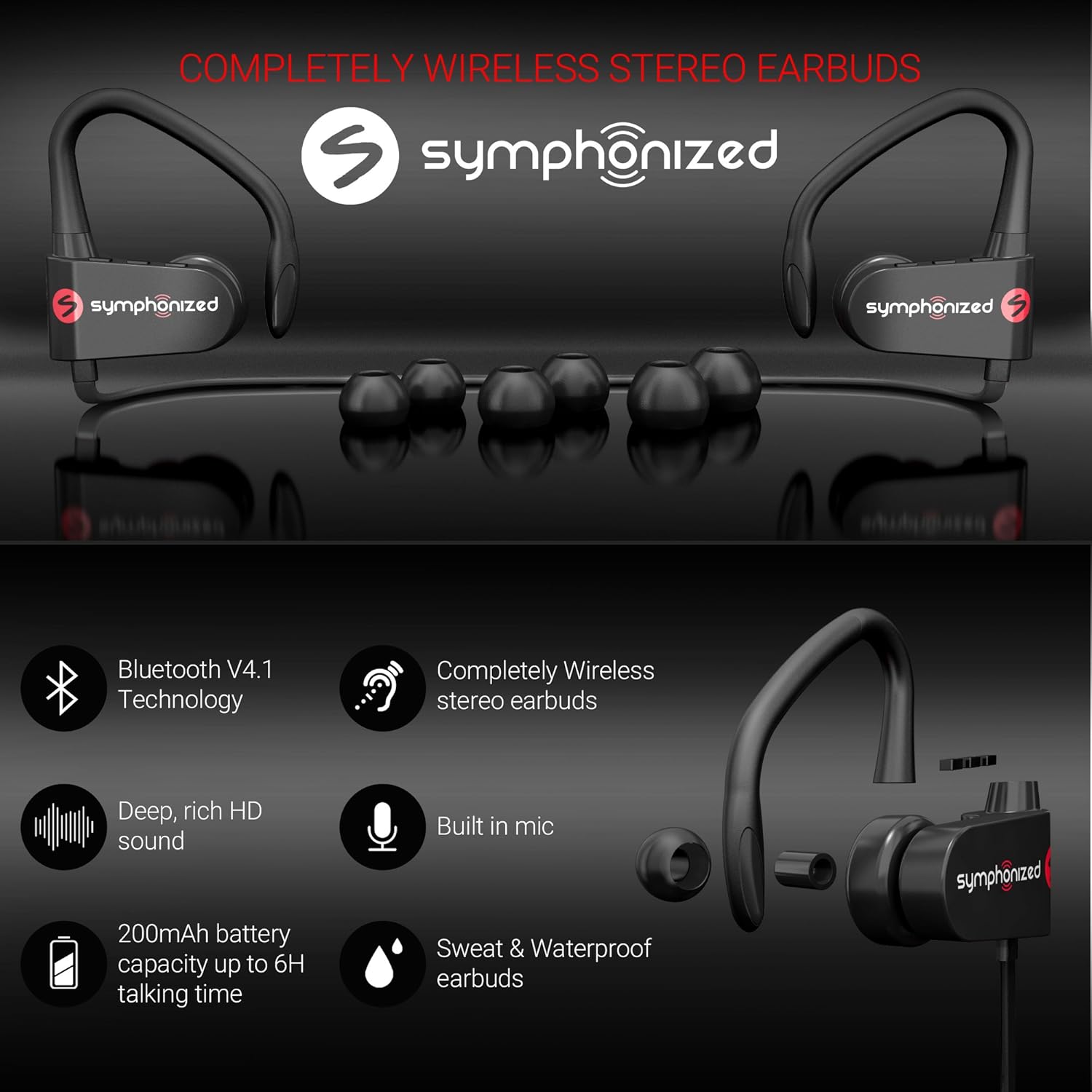
Thank you for choosing Symphonized Wireless Sport Earbuds. These headphones are designed to provide a high-fidelity audio experience with the convenience of wireless connectivity, ideal for sports, exercise, and daily use. This manual will guide you through the setup, operation, maintenance, and troubleshooting of your new earbuds.
Obsah balení
Prosím, ověřte, zda jsou v balení přítomny všechny položky:
- Symphonized Wireless Sport Earbuds
- Additional Ear Tips (S/M/L)
- Nabíjecí kabel (USB)
- Uživatelská příručka
Konec produktuview


Klíčové komponenty:
- Sluchátka: Left and right earpieces with integrated ear hooks.
- Neckband Cable: Connects the two earbuds and houses the battery and main controls.
- Ovládací panel: Located on one of the earbuds, typically includes Power/Multi-function button, Volume Up/Next Track, Volume Down/Previous Track.
- Mikrofon: Vestavěné pro handsfree volání.
- Nabíjecí port: Micro USB port pro nabíjení.
Nastavení
1. Nabíjení sluchátek
Before first use, fully charge your earbuds. Connect the provided USB charging cable to the charging port on the earbuds and the other end to a USB power source (e.g., computer USB port, wall adapter). The charging time is approximately 2 hodin za plné nabití.
An indicator light will typically show red during charging and turn blue or off when fully charged.
2. Párování Bluetooth
Připojení sluchátek k zařízení:
- Ujistěte se, že jsou sluchátka vypnutá.
- Press and hold the Multi-function button (usually the power button) for approximately 5-7 seconds until the indicator light flashes red and blue alternately. This indicates pairing mode.
- Na svém zařízení (chytrý telefon, tablet, notebook) povolte Bluetooth a vyhledejte nová zařízení.
- Select "Symphonized PWR" or a similar name from the list of available devices.
- Once connected, the indicator light on the earbuds will typically flash blue slowly or turn off. You will also hear an audible confirmation.
The earbuds use Bluetooth V4.1 technology and have a wireless range of up to 10 metrů (33 stop) in an open environment.

3. Nošení sluchátek do uší
For optimal sound quality and comfort, choose the correct size ear tips from the included options (S/M/L). The ear hooks are designed to provide a secure fit, especially during physical activity.
- Select the ear tips that create a comfortable seal in your ear canal.
- Place the earbud into your ear, ensuring the ear hook goes over the top of your ear.
- Adjust the earbud and hook until it feels secure and comfortable.

Návod k obsluze
Zapnutí/vypnutí
- Zapnutí: Press and hold the Multi-function button for approximately 3 seconds until the indicator light flashes blue and you hear a power-on prompt.
- Vypnout: Press and hold the Multi-function button for approximately 3-5 seconds until the indicator light flashes red and you hear a power-off prompt.
Přehrávání hudby
- Přehrát/pozastavit: Krátce stiskněte multifunkční tlačítko.
- Zvýšit hlasitost: Krátce stiskněte tlačítko „+“.
- Snížit hlasitost: Krátce stiskněte tlačítko „-“.
- Další skladba: Dlouze stiskněte tlačítko „+“.
- Předchozí skladba: Dlouze stiskněte tlačítko „-“.
Správa hovorů
- Přijmout/ukončit hovor: Krátce stiskněte multifunkční tlačítko.
- Odmítnout hovor: Dlouze stiskněte multifunkční tlačítko.
- Znovu vytočit poslední číslo: Dvakrát stiskněte multifunkční tlačítko.
Hlasový asistent (Siri/Google Assistant)
If supported by your device, a quick triple-press of the Multi-function button may activate your device's voice assistant.
Údržba a péče
- Čištění: Use a soft, dry cloth to clean the earbuds. Do not use harsh chemicals or abrasive materials. Regularly clean ear tips to prevent wax buildup.
- Skladování: Sluchátka skladujte na chladném a suchém místě mimo dosah extrémních teplot a přímého slunečního záření.
- Voděodolnost: Sluchátka jsou Vodě odolný, making them suitable for workouts and light rain. Do not submerge them in water or expose them to heavy downpours. Ensure the charging port cover is securely closed when not charging.
- Péče o baterie: To prolong battery life, avoid fully discharging the battery frequently. Charge the earbuds regularly, even if not in use for extended periods.
Odstraňování problémů
| Problém | Možná příčina | Řešení |
|---|---|---|
| Sluchátka se nezapnou. | Slabá baterie. | Plně nabijte sluchátka. |
| Nelze spárovat se zařízením. | Sluchátka nejsou v režimu párování; Bluetooth na zařízení vypnuté; zařízení je příliš daleko. | Ensure earbuds are in pairing mode (flashing red/blue). Turn on Bluetooth on your device. Move device closer to earbuds (within 10m). Forget previous pairings on your device and try again. |
| Žádný zvuk nebo nízká hlasitost. | Volume too low on earbuds or device; earbuds not connected. | Increase volume on both earbuds and your device. Reconnect the earbuds to your device. |
| Přerušované připojení. | Rušení; zařízení příliš daleko; překážky. | Move closer to your device. Avoid environments with strong Wi-Fi or other Bluetooth signals. Remove obstacles between earbuds and device. |
Specifikace
| Funkce | Detail |
|---|---|
| Název modelu | pwr_black |
| Technologie připojení | Bezdrátové (Bluetooth) |
| Verze Bluetooth | 4.1 |
| Dosah Bluetooth | 10 metrů |
| Životnost baterie | Až 6 hodin (doba přehrávání) |
| Doba nabíjení | 2 hodiny |
| Frekvenční rozsah | 18Hz-22kHz |
| Úroveň odolnosti proti vodě | Vodě odolný |
| Typ ovládání | Ovládání hlasitosti, Dotykové |
| Tvar sluchátka | In-Ear with Ear Hooks |
| Materiál | Kov, silikon |
| Hmotnost položky | 3.2 unce |
| UPC | 700600921889 |
Záruka a podpora
Symphonized products are designed for durability and performance. For information regarding product warranty, please refer to the documentation included with your purchase or visit the official Symphonized website. For customer support, troubleshooting assistance, or to inquire about returns, please contact Symphonized directly through their official channels.
You can visit the Symphonized brand store on Amazon for more information: Symphonized Store
Důležité poznámky
Na základě poskytnutých dat nebyla k dispozici žádná oficiální produktová videa od prodejce k vložení.


