Zavedení
This manual provides comprehensive instructions for the installation, operation, and maintenance of your ONN ONA17TA002 Bundle Pack for iPad Mini 4. This accessory set includes a clear backer case, a glass screen protector, and a touchscreen stylus, designed to enhance the protection and functionality of your iPad Mini 4.
Obsah balení
Zkontrolujte prosím, zda jsou ve vašem balení přítomny všechny níže uvedené položky:
- 1 x Clear Backer Case for iPad Mini 4
- 1 x Glass Screen Protector for iPad Mini 4
- 1 x Touchscreen Stylus
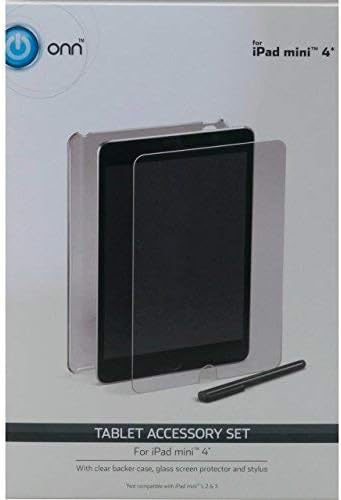
This image displays the retail packaging for the ONN Tablet Accessory Set. It features the clear backer case, the glass screen protector, and the touchscreen stylus, all designed for the iPad Mini 4.
Pokyny pro nastavení
1. Clear Backer Case Installation
- Ensure your iPad Mini 4 is clean and free of dust or debris.
- Align the iPad Mini 4 with the case, ensuring the camera cutout and port openings match.
- Gently press the iPad into the case, starting from one corner and working your way around until it is securely seated.
- Ověřte, zda jsou všechna tlačítka a porty přístupné a funkční.
2. Glass Screen Protector Installation
Důležité: Perform this installation in a dust-free environment. Wash your hands thoroughly before beginning.
- Vyčistěte obrazovku: Use a microfiber cloth to thoroughly clean the iPad Mini 4 screen. Ensure no dust, smudges, or fingerprints remain.
- Zarovnejte chránič: Carefully peel off the protective film from the adhesive side of the glass screen protector. Hold the protector by its edges and align it precisely with the iPad screen, paying attention to the home button and camera cutouts.
- Aplikujte ochranný prostředek: Once aligned, gently lower the screen protector onto the iPad screen. The adhesive will begin to spread automatically.
- Odstranění bublin: If air bubbles appear, use a soft cloth or a plastic card (like a credit card) to gently push them towards the nearest edge of the screen.
- Závěrečná kontrola: Ensure the screen protector is fully adhered and free of major bubbles or misalignments.
3. Touchscreen Stylus Usage
- The stylus is designed for capacitive touchscreens. Simply use it as you would your finger for navigation, drawing, or writing.
- No pairing or charging is required for this passive stylus.
Operating Your Accessories
Once installed, your accessories are ready for use. The clear backer case provides protection against scratches and minor impacts while maintaining the original look of your iPad. The glass screen protector guards against scratches and smudges, preserving screen clarity. The stylus offers a precise and comfortable way to interact with your iPad's touchscreen.
Údržba
Cleaning the Case and Screen Protector
- Použijte měkký, damp cloth to wipe down the clear backer case and glass screen protector.
- For stubborn smudges, a small amount of mild soap or screen cleaner can be applied to the cloth (not directly to the iPad or accessories).
- Avoid abrasive materials or harsh chemicals, as these can scratch or damage the surfaces.
Čištění stylusu
- Wipe the stylus body with a dry or slightly damp tkanina.
- Ensure the stylus tip remains clean for optimal performance.
Odstraňování problémů
Bubliny na ochranu obrazovky
If bubbles appear after installation:
- Small bubbles often disappear within 24-48 hours as the adhesive settles.
- For larger bubbles, try gently lifting the nearest edge of the screen protector and reapplying it, pushing the bubble out with a soft cloth.
- Ensure the screen was thoroughly cleaned before application to prevent dust-induced bubbles.
Problémy s přizpůsobením pouzdra
If the case does not fit correctly:
- Verify that you have an iPad Mini 4 (Model A1538 or A1550). This bundle is specifically designed for this model.
- Ensure the iPad is inserted correctly and fully seated within the case.
Specifikace
| Product Dimensions (Bundle) | 8 x 5.2 x 0.5 palce |
| Hmotnost položky (balíček) | 5.4 unce |
| Kompatibilita | iPad Mini 4 (Models A1538, A1550) |
| Materiál pouzdra | Průhledný polykarbonát |
| Materiál ochranného krytu obrazovky | Tvrzené sklo |
| Typ stylusu | Passive Capacitive |
Informace o záruce
ONN products are manufactured to high-quality standards. This product is covered by a limited warranty against defects in materials and workmanship. Please refer to the product packaging or the ONN official website for specific warranty terms and conditions. Keep your purchase receipt as proof of purchase.
Zákaznická podpora
If you encounter any issues or have questions regarding your ONN ONA17TA002 Bundle Pack, please contact ONN customer support. Contact information can typically be found on the product packaging or the official ONN webmísto.
Online podpora: Visit the official ONN webweb s nejčastějšími dotazy a zdroji podpory.
Telefonická podpora: Refer to your product packaging for the customer service phone number.


