1. Úvod
Děkuji za nákupasing the GPX PDB1077B Portable DVD Player. This device offers versatile entertainment with its 10.1-inch display, DVD/CD playback capabilities, and built-in Bluetooth wireless transmitter for audio streaming to compatible headphones. This manual provides detailed instructions for setup, operation, and maintenance to ensure optimal performance and longevity of your device.
2. Důležité bezpečnostní informace
Please read all safety warnings and instructions carefully before using this product. Retain this manual for future reference.
- Zdroj napájení: Používejte pouze specifikovaný napájecí adaptér. Nesprávná hlasitosttage může poškodit zařízení a zneplatnit záruku.
- Voda a vlhkost: Nevystavujte zařízení dešti, vlhkosti ani jej neponořujte do vody.
- Teplo: Uchovávejte zařízení mimo dosah zdrojů tepla, jako jsou radiátory, topná tělesa, sporáky nebo jiné přístroje (včetně amplifikátory), které produkují teplo.
- Větrání: Zajistěte dostatečné větrání. Neblokujte žádné větrací otvory.
- Čištění: Čistěte pouze suchým hadříkem. Nepoužívejte tekuté čističe nebo aerosolové čističe.
- Servis: Nepokoušejte se tento výrobek opravit sami. Veškerý servis svěřte kvalifikovanému servisnímu personálu.
- Bezpečnost baterie: The device contains a rechargeable battery. Do not expose to excessive heat or direct sunlight. Dispose of batteries properly according to local regulations.
- Ochrana sluchu: Vyhněte se dlouhodobému poslechu při vysoké hlasitosti, abyste předešli poškození sluchu.
3. Obsah balení
Ověřte, zda jsou v balení obsaženy všechny níže uvedené položky:
- GPX PDB1077B Portable DVD Player
- Bezdrátová Bluetooth sluchátka
- Dálkové ovládání
- AC/DC napájecí adaptér
- Napájecí adaptér do auta
- AV kabel
- Uživatelská příručka (tento dokument)
4. Konec produktuview
Familiarize yourself with the components of your GPX PDB1077B Portable DVD Player.
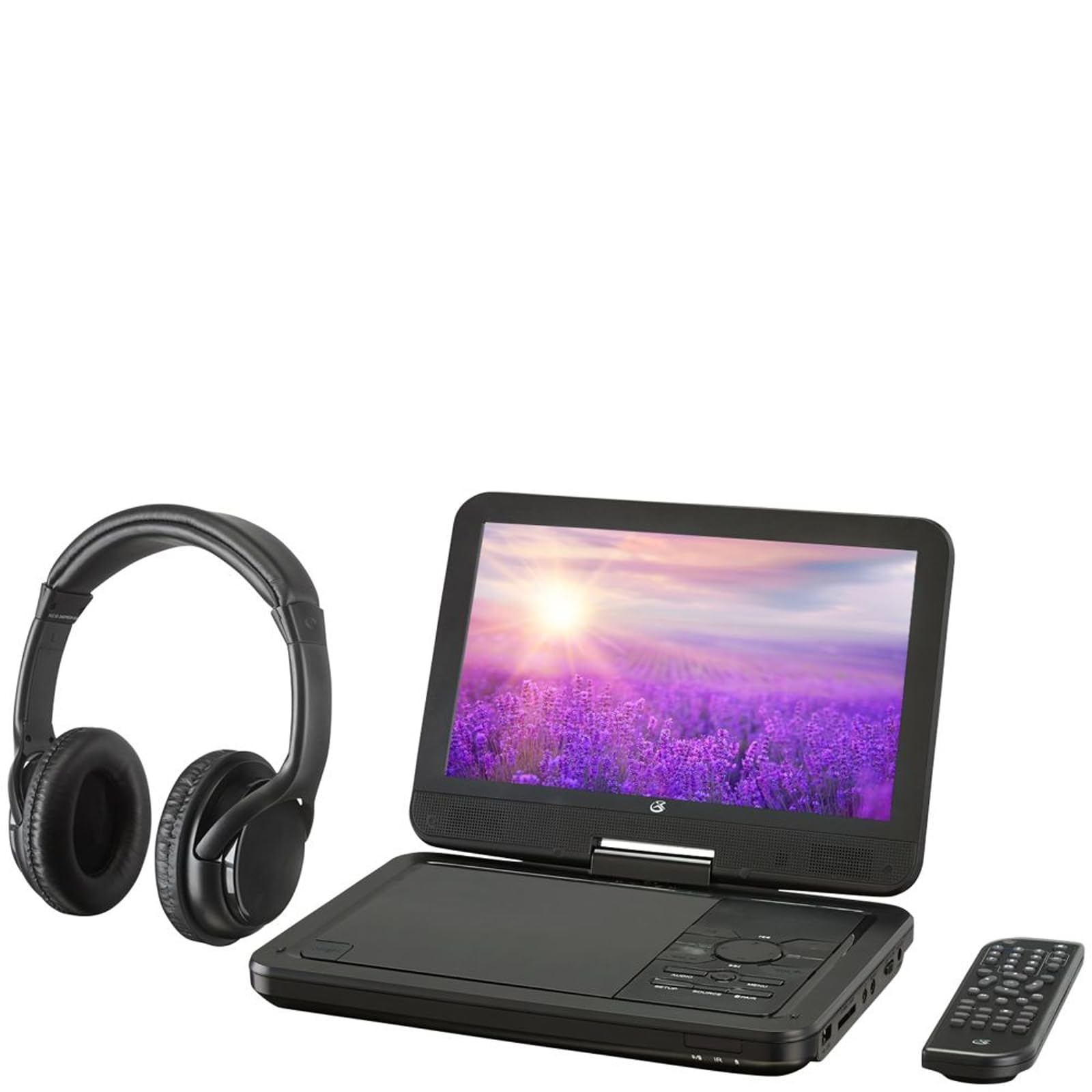
Obrázek 4.1: The GPX PDB1077B Portable DVD Player, showing the 10.1-inch screen, control panel, wireless Bluetooth headphones, and remote control.
4.1 Portable DVD Player Unit
The main unit features a swivel screen, disc tray, and control buttons. Key components include:
- 10.1palcový LCD displej: Pro viewing video content.
- Zásobník disku: Pro vkládání DVD a CD.
- Ovládací panel: Buttons for playback, menu navigation, volume, and source selection.
- Porty: USB, SD card slot, AV out, headphone jack, DC in.
- Řečníci: Integrované stereo reproduktory.
4.2 Wireless Bluetooth Headphones
The included headphones connect wirelessly to the DVD player via Bluetooth for private listening.
Obrázek 4.2: Detailní záběr view of the black wireless Bluetooth headphones, featuring padded earcups and an adjustable headband.
4.3 Dálkové ovládání
Dálkové ovládání umožňuje pohodlný přístup ke všem funkcím na dálku.
Obrázek 4.3: Detailní záběr view of the compact black remote control with various buttons for playback, menu navigation, and volume adjustment.
5. Průvodce nastavením
5.1 Nabíjení zařízení
- Connect the AC/DC power adapter to the DC IN port on the DVD player.
- Připojte adaptér do standardní zásuvky.
- Rozsvítí se kontrolka nabíjení. Plné nabití trvá přibližně 3–4 hodiny.
- For in-car use, connect the car power adapter to the DC IN port and your vehicle's 12V power outlet.
5.2 Zapnutí/vypnutí
- To power on, slide the POWER switch to the ON position. The screen will light up.
- Chcete-li přístroj vypnout, přepněte vypínač POWER do polohy OFF.
5.3 Connecting Bluetooth Headphones
- Ensure the DVD player is powered on.
- Turn on the Bluetooth headphones and put them into pairing mode (refer to headphone manual if needed).
- On the DVD player, navigate to the Bluetooth settings menu.
- Select "Scan for Devices" or similar option.
- Choose your headphones from the list of available devices to pair.
- Once paired, audio will automatically transmit to the headphones.
5.4 Connecting to an External Display (Optional)
Use the included AV cable to connect the DVD player to a TV or monitor.
- Connect one end of the AV cable to the AV OUT port on the DVD player.
- Connect the other end to the AV IN ports (Yellow for Video, White for Left Audio, Red for Right Audio) on your external display.
- Select the correct AV input on your external display.
6. Návod k obsluze
6.1 Přehrávání DVD a CD
- Open the disc tray by gently lifting the screen.
- Vložte DVD nebo CD na vřeteno potištěnou stranou nahoru.
- Gently close the disc tray.
- Přehrávač automaticky detekuje disk a spustí přehrávání nebo zobrazí nabídku disku.
- Use the navigation buttons (Up, Down, Left, Right, Enter) on the control panel or remote to navigate menus.
- Stiskněte tlačítko PLAY/PAUSE tlačítko pro spuštění nebo pozastavení přehrávání.
- Stiskněte tlačítko ZASTÁVKA přehrávání zastavíte.
6.2 Používání médií USB a SD karty
- Vložte USB flash disk do USB portu nebo SD kartu do slotu pro SD kartu.
- Stiskněte tlačítko ZDROJ button on the control panel or remote to select "USB" or "SD".
- Procházejte svým filepomocí ovládacích tlačítek.
- Vyberte a file (e.g., MP3, JPEG) and press ENTER hrát nebo view.
6.3 Úprava nastavení
Access the system settings to customize your viewzážitek z poslechu a poslechu.
- Stiskněte tlačítko NASTAVENÍ button on the remote or control panel.
- Use the navigation buttons to select options such as:
- Nastavení obrazovky: Adjust brightness, contrast, color.
- Nastavení zvuku: Adjust volume, equalizer.
- Nastavení jazyka: Select OSD language, audio language, subtitle language.
- Rodičovská kontrola: Set rating levels for disc playback.
- Stiskněte ENTER pro potvrzení výběrů a NASTAVENÍ znovu k výstupu.
6.4 Používání dálkového ovladače
The remote control provides full functionality. Ensure batteries are correctly inserted (2 x AAA, not included).
| Tlačítko | Funkce |
|---|---|
| MOC | Zapne nebo vypne přehrávač. |
| NASTAVENÍ | Přístup k nabídce nastavení systému. |
| ZDROJ | Switches between DVD, USB, SD, and AV input modes. |
| PLAY/PAUSE | Spustí nebo pozastaví přehrávání. |
| ZASTÁVKA | Zastaví přehrávání. |
| VOL + / VOL- | Nastavuje úroveň hlasitosti. |
| NAVIGATE (Up/Down/Left/Right/ENTER) | Prochází menu a potvrzuje výběr. |
| MENU | Accesses the disc menu during DVD playback. |
7. Údržba
7.1 Čištění zařízení
- Před čištěním se ujistěte, že je zařízení vypnuté a odpojené ze zásuvky.
- K otření vnějších povrchů použijte měkký, suchý hadřík, který nepouští vlákna.
- For the screen, use a screen-specific cleaning solution and a microfiber cloth, applying gentle pressure.
- Nepoužívejte abrazivní čisticí prostředky, vosky ani rozpouštědla.
7.2 Péče o disk
- Disky držte za okraje, abyste zabránili ulpívání otisků prstů.
- Pokud disky nepoužíváte, uchovávejte je v jejich obalech, abyste zabránili poškrábání.
- Znečištěné disky čistěte měkkým hadříkem, který nepouští vlákna, a otírejte je od středu směrem ven.
7.3 Péče o baterii
- To prolong battery life, fully charge the device before first use.
- If storing the device for an extended period, charge it to approximately 50% every few months.
- Nevystavujte zařízení extrémním teplotám.
8. Řešení problémů
If you encounter issues with your GPX PDB1077B, refer to the following common problems and solutions.
| Problém | Možná příčina | Řešení |
|---|---|---|
| Žádná síla | Battery drained; Power adapter not connected properly; Power switch off. | Charge the device; Ensure power adapter is securely connected; Slide power switch to ON. |
| No Disc Playback | Disk je vložen nesprávně; Disk je znečištěný nebo poškrábaný; Formát disku není podporován. | Reinsert disc label-side up; Clean or replace disc; Check supported media types in specifications. |
| Žádný zvuk | Volume too low; Mute function active; Headphones not connected/paired correctly. | Increase volume; Deactivate mute; Reconnect or re-pair headphones. |
| Bluetooth Headphones Not Pairing | Headphones not in pairing mode; Player not in Bluetooth scan mode; Interference. | Ensure headphones are in pairing mode; Activate Bluetooth scan on player; Move closer to player, away from other devices. |
| Dálkové ovládání nefunguje | Batteries are dead or inserted incorrectly; Obstruction between remote and player; Remote sensor blocked. | Replace batteries, check polarity; Remove obstructions; Ensure remote sensor on player is clear. |
9. Specifikace
Technical specifications for the GPX PDB1077B Portable DVD Player.
| Funkce | Detail |
|---|---|
| Model | PDB1077B |
| Velikost displeje | 10.1 palců |
| Typ zobrazení | LCD |
| Nativní rozlišení | 1024 x 600 |
| Podporovaná média | DVD, DVD±R/RW, CD, CD-R/RW, MP3 CD, JPEG CD |
| Konektivita | Bluetooth wireless transmitter, USB port, SD card slot, AV Out, Headphone Jack, DC In |
| Zdroj napájení | Built-in rechargeable battery, AC/DC adapter, Car adapter |
10. Záruka a zákaznická podpora
Produkty GPX jsou navrženy pro spolehlivost a výkon. Konkrétní informace o záruce naleznete v záruční kartě, která byla přiložena k nákupu, nebo navštivte oficiální webové stránky GPX. website. If you require technical assistance or have questions regarding your device, please contact GPX customer support.
GPX Official Webmísto: www.gpx.com
Please note that warranty terms and customer support availability may vary by region.