Zavedení
Thank you for choosing the Capello Extra Large Display Digital Alarm Clock. This manual provides detailed instructions to help you set up, operate, and maintain your new alarm clock. Designed for clarity and ease of use, this clock features a large digital display and a stylish wood-grain finish, making it a perfect addition to any bedroom or living space.
Konec produktuview
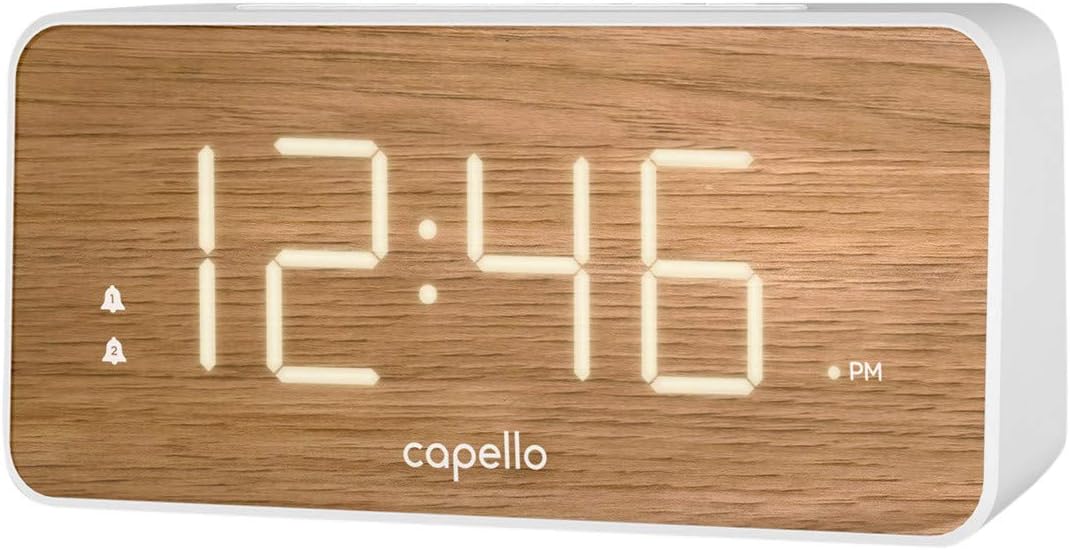
The Capello Digital Alarm Clock (Model: 43213-14795) features an extra-large digital display for easy readability from across the room. Its elegant white and pine D-frame design with a wood-grain finish complements various interior styles. The clock is equipped with intuitive controls for setting time and alarms, ensuring a user-friendly experience.
Nastavení
Připojení napájení
The alarm clock requires a continuous power supply via its included AC adapter for full functionality. Insert the adapter into a standard wall outlet and connect it to the clock's power input port. For backup during power outages, install 2 AAA batteries (not included) into the battery compartment located on the underside of the unit. These batteries will preserve time and alarm settings but will not power the display or alarm functions during an outage.
Nastavení času
- Stiskněte a podržte NASTAVENÍ ČASU button (or similar button, refer to specific button labels on your unit) until the hour digits begin to flash.
- Použijte HODINA tlačítko pro nastavení hodiny. Věnujte pozornost indikátoru AM/PM.
- Stiskněte tlačítko NASTAVENÍ ČASU button again to move to the minute digits.
- Použijte MIN tlačítko pro nastavení minut.
- Stiskněte NASTAVENÍ ČASU ještě jednou pro potvrzení a ukončení režimu nastavení času.
Nastavení alarmu
This clock supports dual alarms.
- Stiskněte a podržte POPLACH 1 tlačítko , dokud nezačnou blikat číslice hodin budíku.
- Použijte HODINA a MIN tlačítky nastavte požadovaný čas budíku pro Budík 1.
- Stiskněte POPLACH 1 again to confirm. The alarm indicator for Alarm 1 will illuminate.
- Opakujte kroky 1–3 pro POPLACH 2 if a second alarm is desired.
- To activate/deactivate an alarm, simply press the corresponding POPLACH 1 or POPLACH 2 button. The alarm indicator will show its status.
Návod k obsluze
Funkce Snooze
Když zazvoní budík, stiskněte velké PODŘIMOVAT button located on the top of the clock. This will temporarily silence the alarm for approximately 9 minutes, allowing for extra rest. The alarm will sound again after the snooze period ends.
Zastavení alarmu
To turn off the alarm completely after it sounds, press the corresponding POPLACH 1 or POPLACH 2 button. The alarm indicator will turn off, signifying that the alarm is deactivated for the next day.
Jas displeje
The display brightness can be adjusted to suit your preference. Locate the SVĚTLO or DIMMER button (often represented by a sun icon) on the top panel. Press this button repeatedly to cycle through different brightness levels (e.g., High, Medium, Low, Off).
Údržba
To ensure the longevity and optimal performance of your Capello Digital Alarm Clock, follow these simple maintenance guidelines:
- Čištění: Povrch hodin otřete měkkým, suchým hadříkem. Nepoužívejte abrazivní čisticí prostředky, vosky ani rozpouštědla, protože by mohly poškodit povrchovou úpravu.
- Umístění: Umístěte hodiny na stabilní, rovný povrch mimo dosah přímého slunečního záření, zdrojů tepla a nadměrné vlhkosti.
- Výměna baterie: Záložní baterie vyměňujte každoročně nebo když displej během výpadku proudu vykazuje známky ztmavování.tage. Při vkládání nových baterií dbejte na správnou polaritu.
Odstraňování problémů
Pokud narazíte na jakékoli problémy s budíkem, podívejte se prosím na následující běžné problémy a jejich řešení:
| Problém | Možné řešení |
|---|---|
| Displej je prázdný nebo tmavý. | Ensure the AC adapter is securely plugged into both the clock and a working wall outlet. Check the display brightness setting using the LIGHT/DIMMER button. |
| Alarm se nespustí. | Verify that the alarm is activated (alarm indicator is lit). Ensure the alarm time is set correctly (AM/PM). Check if the volume is set to an audible level. |
| Čas je nesprávný. | Reset the time following the 'Setting the Time' instructions. If using backup batteries, ensure they are fresh and correctly installed. |
| Tlačítka nereagují. | Unplug the AC adapter, remove backup batteries, wait for 1 minute, then reconnect power. This performs a soft reset. |
Specifikace
- Značka: Capello
- Číslo modelu: 43213-14795
- Barva: Bílý
- Typ displeje: Digitální
- Styl: Moderní
- Speciální funkce: Large Display, Alarm
- Rozměry produktu: 8.74 cm Š x 5.83 cm V
- Zdroj napájení: AC Powered (with battery backup for settings)
- Materiál: Plast
- Hmotnost položky: 1.01 libry
Oficiální videa produktů
Pro tuto položku momentálně nejsou k dispozici žádná oficiální produktová videa od prodejce.
Záruka a podpora
For warranty information and customer support, please refer to the manufacturer's official documentation included with your product or visit the Capello webmísto. Uschovejte si doklad o koupi pro případ záručních reklamací.


