1. Úvod
This manual provides essential information for the installation, operation, and maintenance of your ASUS GeForce GTX 1070 TI Turbo Edition graphics card. This card is powered by NVIDIA Pascal architecture, featuring 8GB GDDR5 memory and 2432 CUDA cores, designed for demanding graphical applications and virtual reality experiences.
Key features include a dual-ball bearing fan design for extended lifespan, Auto-Extreme manufacturing with Super Alloy Power II components for enhanced reliability, and a customizable backlit logo plate.

Figure 1: The ASUS GeForce GTX 1070 TI Turbo Edition graphics card, shown alongside its retail packaging, highlights the product's design and branding.
2. Nastavení
2.1. Kroky instalace
- Příprava: Power off your computer and disconnect all cables. Open the computer case. It is recommended to wear an anti-static wrist strap to prevent electrostatic discharge.
- Vyhledejte slot PCIe: Najděte na základní desce dostupný slot PCI Express x16.
- Vložte grafickou kartu: Opatrně zarovnejte grafickou kartu se slotem PCIe a pevně ji zatlačte dolů, dokud nebude bezpečně usazena. Ujistěte se, že pojistná spona zacvakne na místě.
- Připojte napájení: Connect the required 8-pin PCI Express power connector from your power supply unit (PSU) to the graphics card. A minimum 500-watt PSU is recommended for stable operation.
- Bezpečná karta: Fasten the graphics card to the computer case using the screw provided with your case.
- Zavřít případ: Zavřete skříň počítače a znovu připojte všechny kabely.
- Připojení displeje: Connect your monitor(s) to the graphics card using DisplayPort, HDMI, or DVI-D cables.
- Zapnutí: Zapněte počítač.
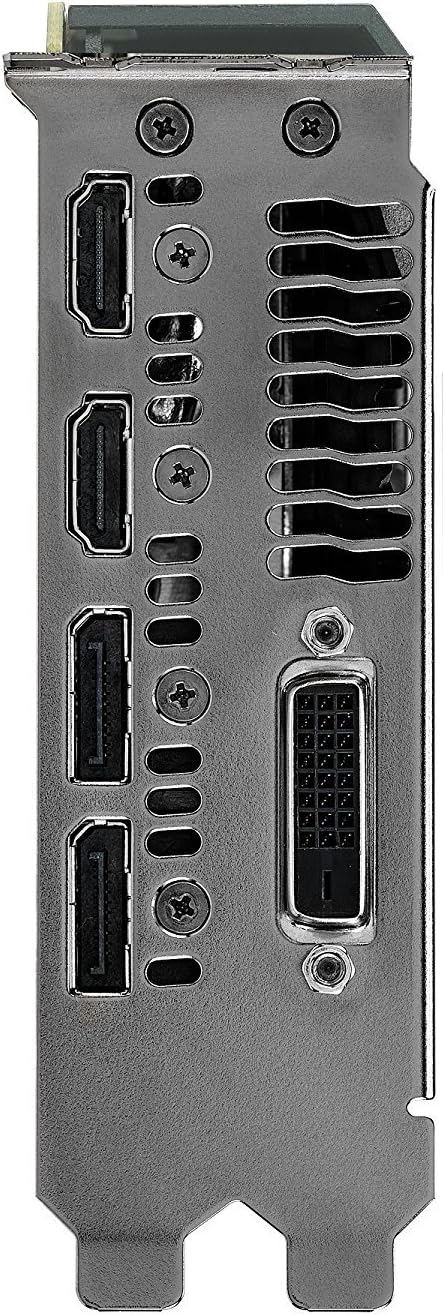
Figure 2: This image displays the available video output ports on the graphics card, including DisplayPort, HDMI, and DVI-D connectors.
2.2. Instalace ovladače
After physical installation, it is crucial to install the latest graphics drivers. You can download these from the official ASUS support webweb nebo NVIDIA webwebu. Dokončete instalaci ovladače podle pokynů na obrazovce.
3. Provoz
3.1. Softwarové nástroje
The ASUS Turbo GTX 1070 Ti is compatible with GPU Tweak II software. This utility allows for monitoring performance, adjusting clock speeds, and optimizing graphics settings. Refer to the GPU Tweak II documentation for detailed usage instructions.
3.2. Konfigurace displeje
The graphics card supports multiple display configurations. Use your operating system's display settings to configure extended desktop, duplicate displays, or other multi-monitor setups.
4. Údržba
4.1. Čištění
Regular cleaning helps maintain optimal performance and extends the lifespan of your graphics card. Use compressed air to gently remove dust from the fans and heatsink fins. Ensure the computer is powered off and unplugged before cleaning.
4.2. Aktualizace ovladačů
Periodically check for and install the latest graphics drivers from the ASUS or NVIDIA websites. Driver updates often include performance enhancements, bug fixes, and compatibility improvements for new games and applications.
5. Řešení problémů
- Žádný výstup na displej: Ensure the graphics card is properly seated in the PCIe slot and the 8-pin power connector is securely attached. Verify that display cables are correctly connected to both the graphics card and the monitor.
- Problémy s výkonem: Update your graphics drivers to the latest version. Check for overheating by monitoring GPU temperatures using software like GPU Tweak II. Ensure your power supply meets the recommended wattage.
- Nestabilita/pády systému: Reseat the graphics card in its PCIe slot. Check for adequate power delivery from your PSU. Ensure your system's cooling is sufficient to prevent overheating.
6. Specifikace
| Funkce | Specifikace |
|---|---|
| Grafický koprocesor | NVIDIA GeForce GTX 1070 TI |
| Značka | ASUS |
| Velikost grafické paměti RAM | 8 GB GDDR5 |
| Video výstupní rozhraní | DisplayPort, HDMI, DVI-D |
| Výrobce grafických procesorů | NVIDIA |
| Číslo modelu položky | TURBO-GTX1070TI-8G |
| Rozměry produktu | 10.5 x 1.5 x 4.38 palce |
| Hmotnost položky | 2.5 libry |
| Maximální spotřeba energie | 180 watts (requires 8-pin PCI Express power connector) |
| Doporučený PSU | 500 wattů |

Figure 3: This image details the graphics card's internal components, emphasizing the Auto-Extreme manufacturing process and Super Alloy Power II for enhanced reliability.
7. Záruka a podpora
7.1. Informace o záruce
Your ASUS GeForce GTX 1070 TI Turbo Edition graphics card comes with a limited manufacturer's warranty. Please refer to the warranty card included in your product packaging or visit the official ASUS webstránky pro podrobné podmínky.
7.2. Technická podpora
Pro technickou pomoc, stažení ovladačů nebo další informace o produktu navštivte oficiální stránky podpory ASUS. webmísto na www.asus.com/support/.


