1. Konec produktuview
The VENTION USB C to 3.5mm Audio Aux Cable is designed to connect USB-C enabled devices to audio equipment featuring a 3.5mm auxiliary input. This cable facilitates audio transmission for various applications, including listening to music, vehicle navigation, and voice calls.

Obrázek 1: VENTION USB C to 3.5mm Audio Aux Cable. This image displays the cable with its USB-C connector on one end and the 3.5mm audio jack on the other, both featuring gold-plated contacts and VENTION branding.
2. Klíčové vlastnosti
- Přenos zvuku: Enables audio output from USB-C devices to 3.5mm audio inputs, supporting music, navigation, and voice calls.
- Univerzální kompatibilita zařízení: Compatible with a wide range of USB-C devices, including iPhone 15 series, iPad Pro, Samsung Galaxy S series (S23, S22, S21, S20), Google Pixel, and OnePlus devices.
- Spring Cable Design: Features a flexible, telescopic spring design for ease of use and extended reach when needed.
- Premium Material Quality: Constructed with an enamelled copper conductor, gold-plated connectors, an aluminum alloy shell, and a PVC spring jacket for reliable signal transmission and durability.
- Built-in Audio Decoder Chip: Integrates a JieLi Audio Decoder Chip to ensure high-quality sound and broad compatibility.
3. Kompatibilita
This cable is designed for broad compatibility with devices featuring a USB Type-C port for audio output and audio systems with a 3.5mm auxiliary input.
3.1 Compatible Devices (USB-C Source)
- chytré telefony: iPhone 15/15 Pro/15 Plus/15 Pro Max, Samsung Galaxy S23/S23+/S23 Ultra/S22/S22+/S22 Ultra/S21/S21+/S21 Ultra/S20 Ultra/S20 Z Flip/S20+/S10/S9/S8 Plus, Note 20/10/10+/9/8, Google Pixel 4/3/2/XL, OnePlus 6T/7/7Pro, and other USB-C enabled phones.
- Tablety: iPad Pro, iPad Air, iPad mini 6.
- Notebooky: MacBooks and other laptops with USB-C audio output.
3.2 Compatible Audio Systems (3.5mm Input)
- Car stereos
- Home audio speakers
- Sluchátka
- Other devices with a standard 3.5mm auxiliary input.
4. Pokyny k nastavení
Connecting the VENTION USB C to 3.5mm Audio Aux Cable is a straightforward process. Ensure both your source device and audio system are powered on before connecting.
- Identifikace portů: Locate the USB-C port on your source device (e.g., smartphone, tablet) and the 3.5mm auxiliary input port on your audio system (e.g., car stereo, speaker).
- Connect USB-C End: Insert the USB-C connector of the VENTION cable firmly into the USB-C port of your source device.
- Connect 3.5mm End: Insert the 3.5mm audio jack of the VENTION cable firmly into the 3.5mm auxiliary input port of your audio system.
- Vyberte vstup: On your audio system, select the auxiliary input source. This is often labeled "AUX" or represented by an icon.
- Přehrát zvuk: Begin playing audio from your source device. The sound should now be transmitted through your connected audio system.

Obrázek 2: Example of a phone connected to a car stereo using the VENTION USB C to 3.5mm Audio Aux Cable. This illustrates the cable in use within a vehicle environment.

Obrázek 3: Example of a tablet connected to an external speaker using the VENTION USB C to 3.5mm Audio Aux Cable. This demonstrates connecting a portable device to a speaker for enhanced audio.
5. Návod k obsluze
Once connected, the cable operates automatically to transmit audio. No additional software or drivers are typically required.
- Ovládání hlasitosti: Adjust the volume directly on your source device and/or your audio system.
- Přehrávání zvuku: Control audio playback (play, pause, skip tracks) using your source device's controls.
- Telescopic Feature: The spring cable design allows for flexible length adjustment. Gently extend the coiled section as needed, and it will retract when tension is released.

Obrázek 4: Detailní view of the spring cable design, highlighting its telescopic feature for flexible use.
6. Údržba
Proper care and maintenance will extend the lifespan of your VENTION USB C to 3.5mm Audio Aux Cable.
- Skladování: Kabel skladujte na chladném a suchém místě mimo dosah přímého slunečního záření a extrémních teplot. Zabraňte silnému svíjení nebo ohýbání kabelu v ostrých úhlech, zejména v blízkosti konektorů.
- Čištění: Kabel a konektory jemně otřete měkkým, suchým hadříkem. Nepoužívejte agresivní chemikálie ani abrazivní materiály.
- Zacházení: Always grasp the connector housing when plugging or unplugging the cable, rather than pulling on the cable itself, to prevent damage to the internal wiring.
7. Řešení problémů
If you encounter issues with your audio cable, refer to the following common troubleshooting steps:
- Žádný zvuk:
- Ujistěte se, že oba konce kabelu jsou bezpečně připojeny k příslušným portům.
- Verify that the correct audio input source is selected on your audio system.
- Check the volume levels on both your source device and the audio system.
- Test the cable with another compatible device or audio system to rule out device-specific issues.
- Static or Poor Audio Quality:
- Ujistěte se, že konektory jsou čisté a bez nečistot.
- Try adjusting the volume on both devices; sometimes very high or very low levels can introduce distortion.
- Ensure the cable is not near strong electromagnetic interference sources.
- Test with another cable if available to determine if the issue is with the cable or the devices.
- Přerušované připojení:
- Zkontrolujte, zda kabel nebo konektory nejsou viditelně poškozené.
- Ensure the cable is not being excessively bent or strained during use.
- Oba konektory pevně usaďte.
8. Specifikace
| Funkce | Detail |
|---|---|
| Značka | VENTION |
| Název modelu | USB C to 3.5mm Audio Aux Jack Cable (BGA) |
| Typ rozhraní | USB Type-C Male, 3.5mm Male |
| Interface Process | Pozlaceno |
| Materiál vodiče | Enamelled Copper |
| Délka kabelu | 3ft (1m) / 5ft (1.5m) (This manual refers to the 3ft/1m version) |
| Kabel OD | 3.0 mm |
| AWG | 29AWG |
| Vnější materiál | Polyvinylchlorid (PVC) |
| Speciální funkce | Built-in Audio Decoder Chip, High Speed |
| Rozměry produktu | 39.37 x 0.39 x 0.2 inches (for 3ft/1m version) |
| Hmotnost položky | 0.634 unce |
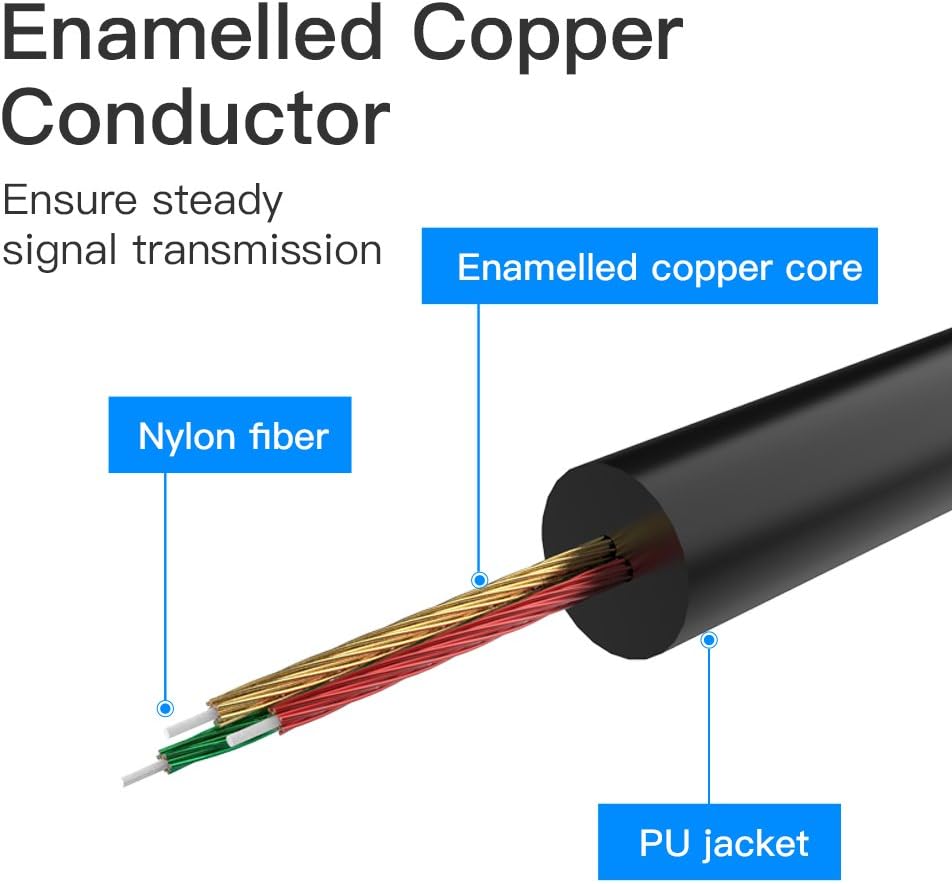
Obrázek 5: Cross-section diagram illustrating the enamelled copper conductor and other internal components of the cable, ensuring steady signal transmission.

Obrázek 6: Detailní záběr view of the USB-C connector, highlighting the integrated JieLi Audio Decoder Chip designed for improved sound quality and compatibility.

Obrázek 7: Ukázka obrázkůasing the 24K gold-plated process on both the USB-C and 3.5mm connectors, which helps ensure a sensitive and stable connection while resisting oxidation and rust.
9. Záruka a podpora
The VENTION USB C to 3.5mm Audio Aux Cable comes with a 12měsíční záruční doba.
For any questions or support needs regarding your product, please contact VENTION customer service or refer to the retailer's support channels.
10. Produktové video
1 video: VENTION USB-C Audio Cable Overview. This video provides a visual demonstration of the cable's features, compatibility, and design elements, including its universal device compatibility, premium build quality, and advanced signal protection.


