Uživatelská příručka k projektoru Artlii Stone 1 Full HD
Model: Artlii Stone 1 | Brand: Artlii
1. Úvod
This manual provides comprehensive instructions for the safe and efficient operation of your Artlii Stone 1 Full HD Projector. Please read this manual thoroughly before using the projector and retain it for future reference. The Artlii Stone 1 is designed to deliver a high-quality visual experience with its native 1080P resolution and advanced features.
2. Bezpečnostní informace
Observe the following safety precautions to prevent fire, electric shock, or injury, and to prolong the life of your projector:
- Napájení: Use only the power adapter supplied with the projector. Ensure the power outlet voltage odpovídá požadavkům projektoru.
- Větrání: Neblokujte větrací otvory. Zajistěte dostatečný prostor kolem projektoru pro správné proudění vzduchu, abyste zabránili přehřátí.
- Teplo: Projektor lamp and internal components generate heat. Avoid touching the projector's surface immediately after use.
- Tekutina a vlhkost: Do not expose the projector to rain, moisture, or any liquids. If liquid enters the projector, disconnect the power immediately and contact customer support.
- Čištění: Před čištěním odpojte napájecí kabel. Použijte měkký, suchý hadřík. Nepoužívejte tekuté ani aerosolové čisticí prostředky.
- Umístění: Place the projector on a stable, level surface. Avoid placing it in direct sunlight, near heat sources, or in environments with excessive dust or humidity.
- Ochrana očí: Nedívejte se přímo do objektivu projektoru, když je zapnutýamp svítí. Jasné světlo může způsobit poškození očí.
- Servis: Nepokoušejte se projektor opravovat sami. Veškerý servis svěřte kvalifikovanému servisnímu personálu.
3. Obsah balení
Ověřte, zda jsou v balení přítomny všechny položky:
- Artlii Stone 1 Full HD Projector
- Napájecí kabel
- Dálkové ovládání (baterie nejsou součástí balení)
- AV kabel
- HDMI kabel
- Uživatelská příručka
4. Konec produktuview
Familiarize yourself with the components of your Artlii Stone 1 projector.
4.1 Přední View

Obrázek: Přední strana view of the Artlii Stone 1 projector, showing the lens, focus ring, and keystone correction dial.
- Projekční čočka: Vysílá obraz na obrazovku.
- Zaostřovací kroužek: Upravuje jasnost promítaného obrazu.
- Korekce lichoběžníkového zkreslení: Opravuje lichoběžníkové zkreslení obrazu.
4.2 Zadní a boční Views (porty)

Obrázek: Boční view of the Artlii Stone 1 projector highlighting the various input and output ports, including HDMI, USB, VGA, and audio out.
- HDMI porty (x2): Connect to HDMI-enabled devices such as laptops, gaming consoles (PS4, Xbox, Switch), TV sticks, and Blu-ray players.
- USB port: Připojte USB disky pro přehrávání médií.
- VGA port: Připojení k počítačům s VGA výstupem.
- Slot pro SD kartu: Vložte SD karty pro přehrávání médií.
- 3.5mm audio výstup: Připojte externí reproduktory nebo sluchátka.
- Příkon: Připojte napájecí kabel.
5. Nastavení
5.1 Umístění a velikost obrazovky
Optimal projection distance and screen size are crucial for the best viewing experience. The Artlii Stone 1 supports screen sizes up to 300 inches.
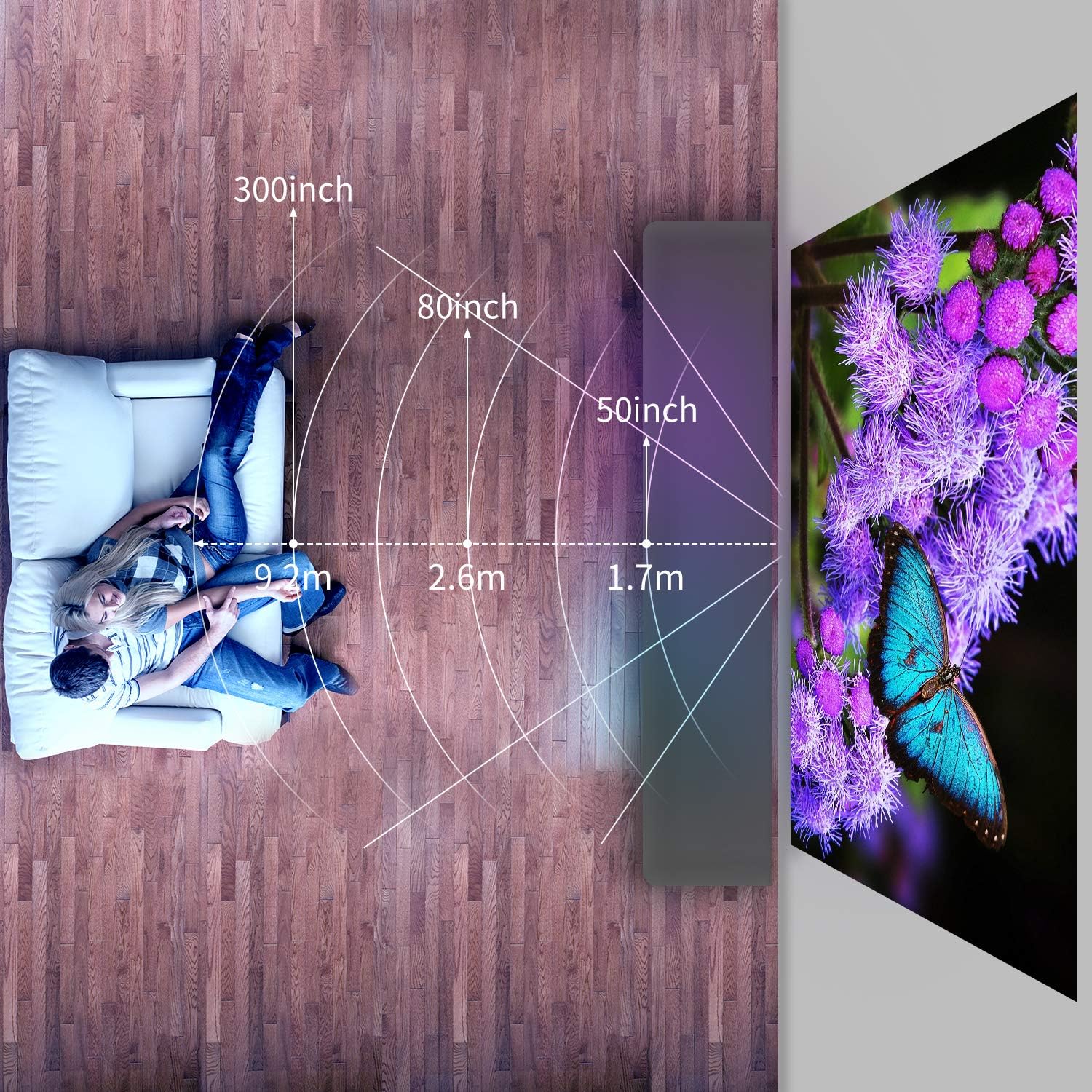
Image: Diagram illustrating recommended projection distances for various screen sizes, showing distances for 50-inch, 80-inch, and 300-inch projections.
Refer to the diagram for recommended distances. Adjust the projector's position to achieve your desired screen size.
5.2 Připojení napájení
- Připojte napájecí kabel ke vstupnímu portu projektoru.
- Zapojte druhý konec napájecího kabelu do elektrické zásuvky.
- Kontrolka napájení na projektoru se rozsvítí.
5.3 Počáteční úpravy
- Nastavení zaostření: Rotate the focus ring on the lens until the projected image appears sharp and clear.
- Korekce lichoběžníkového zkreslení: If the image appears trapezoidal (wider at the top or bottom), rotate the keystone correction dial to square the image.
6. Návod k obsluze
6.1 Zapnutí/vypnutí
- Zapnutí: Stiskněte tlačítko napájení na projektoru nebo na dálkovém ovladači. Projektor se spustí a zobrazí se hlavní rozhraní.
- Vypnutí: Press the power button again. Confirm shutdown if prompted. Allow the fan to run briefly to cool down the lamp před odpojením napájení.
6.2 Připojení zařízení
The Artlii Stone 1 offers multiple connectivity options:
- HDMI: Connect your device (e.g., laptop, game console, TV stick) to one of the HDMI ports using the provided HDMI cable.
- USB: Insert a USB flash drive into the USB port. The projector will typically detect the drive automatically.
- VGA: Connect your computer to the VGA port using a VGA cable.
- SD karta: Vložte SD kartu do slotu pro SD kartu.
- AV: Pro připojení starších zařízení s AV výstupem použijte dodaný AV kabel.
6.3 Výběr vstupního zdroje
After connecting a device, you may need to manually select the input source:
- Press the "Source" or "Input" button on the remote control or the projector's control panel.
- Navigate through the options (HDMI1, HDMI2, USB, VGA, AV, SD) using the arrow keys and press "OK" to confirm your selection.
6.4 Navigace v nabídce
Use the remote control to navigate the projector's on-screen menu:
- Press the "Menu" button to access settings.
- Use the arrow keys to move between options (Picture, Sound, Time, Option).
- Press "OK" to enter a sub-menu or confirm a setting.
- Press "Exit" or "Return" to go back to the previous menu or exit the menu.
6.5 Funkce zoom
The Artlii Stone 1 features a digital zoom function, allowing you to adjust the screen size from 75% to 100% without moving the projector.
Image: Screenshot of the projector's on-screen display showing the zoom adjustment from 100% down to 75%, demonstrating the digital zoom feature.
Access the zoom setting through the projector's menu (usually under "Picture" or "Option" settings) and adjust the percentage podle potřeby.
6.6 Audio výstup
The projector has built-in speakers. For enhanced audio, connect external speakers or headphones to the 3.5mm audio out port.
7. Údržba
Pravidelná údržba zajišťuje optimální výkon a prodlužuje životnost vašeho projektoru.
- Čištění objektivu: K jemnému otření čočky projektoru použijte měkký hadřík bez žmolků, speciálně určený pro optické čočky. Nepoužívejte abrazivní čisticí prostředky ani nadměrnou sílu.
- Odstranění prachu: Periodically clean the projector's exterior with a soft, dry cloth. The Artlii Stone 1 features an accessible design for internal dust cleaning, which can be performed by opening a designated trap door. For persistent dust spots on the projection, professional cleaning may be required.
- Lamp Život: LED lamp in the Artlii Stone 1 has an estimated lifespan of over 50,000 hours under normal usage conditions. No lamp replacement is typically needed during the product's lifetime.
8. Řešení problémů
Pokud se s projektorem setkáte s problémy, podívejte se na následující běžné problémy a jejich řešení:
| Problém | Možná příčina | Řešení |
|---|---|---|
| Žádný promítaný obraz | Napájení není připojeno; Nesprávný vstupní zdroj; Zařízení není správně připojeno. | Ensure power cable is securely connected. Select the correct input source (HDMI, USB, etc.). Check all cable connections. |
| Obraz je rozmazaný | Není nastavené zaostření; Projektor je příliš blízko/daleko od promítací plochy. | Adjust the focus ring on the lens. Reposition the projector for optimal distance. |
| Obrázek je lichoběžníkový | Keystone nebyl opraven. | Adjust the keystone correction dial until the image is rectangular. |
| Žádný zvuk | Volume too low; Audio cable not connected; Muted. | Increase volume. Ensure audio cables are connected correctly. Unmute the projector or source device. |
| Hluk ventilátoru je hlasitý | Normal operation; Blocked ventilation. | A certain level of fan noise is normal for cooling. Ensure ventilation openings are not blocked. |
| Dust spots on projection | Dust accumulated inside the optical path. | Clean the lens. If spots persist, refer to the maintenance section regarding internal dust cleaning or contact support. |
9. Specifikace
Key technical specifications for the Artlii Stone 1 Full HD Projector:
| Funkce | Detail |
|---|---|
| Model | Artlii Stone 1 |
| Nativní rozlišení | 1920 x 1080p (Full HD) |
| Jas | 330 ANSI Lumens |
| Kontrastní poměr | 7000:1 |
| Lamp Život | 100 000 hodin (LED) |
| Velikost projekce | 50 - 300 palce |
| Poměr stran | 4:3 / 16:9 |
| Konektivita | 2x HDMI, 1x USB, 1x VGA, 1x SD Card, 1x 3.5mm Audio Out |
| Korekce lichoběžníkového zkreslení | Manuál |
| Funkce zvětšení | 75 % – 100 % (digitální) |
| Rozměry (D x Š x V) | 23.1 x 30.7 x 10.4 cm |
| Hmotnost | 2.6 kg |
Poznámka: Specifikace se mohou změnit bez předchozího upozornění.
10. Záruka a podpora
Artlii products come with a standard manufacturer's warranty. For detailed warranty information, product support, or technical assistance, please refer to the warranty card included in your package or visit the official Artlii website. You can also contact Artlii customer service through the platform where you purchased the product.
Další pomoc naleznete na adrese: Artlii Official Store


