1. Úvod
The Zoom LiveTrak L-12 is a versatile digital console designed for mixing, recording, and monitoring live performances. It integrates the functionalities of a mixer, a multi-track recorder, and a USB audio interface into a single unit. The L-12 allows for the mixing of live audio, simultaneous recording of up to 14 tracks, and provides five independent custom headphone mixes for performers.
This manual provides essential information for setting up, operating, maintaining, and troubleshooting your LiveTrak L-12. Please read it thoroughly to ensure proper and safe use of the device.
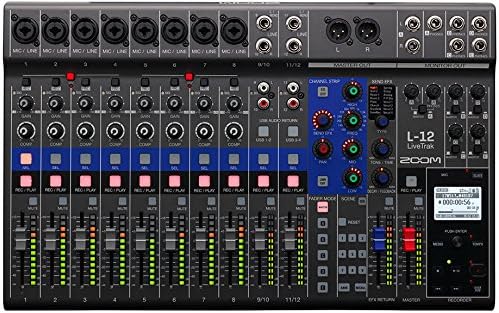
Obrázek 1.1: Nahoře view of the Zoom LiveTrak L-12 digital mixer, highlighting its compact design and comprehensive control surface.
2. Nastavení
2.1 Vybalení a kontrola
Carefully remove the LiveTrak L-12 from its packaging. Inspect the unit for any signs of damage that may have occurred during transit. Retain the packaging materials for future transport or storage.
2.2 Připojení napájení
Connect the supplied AC adapter to the DC IN jack on the rear panel of the L-12. Plug the AC adapter into a standard electrical outlet. Ensure the power switch is in the OFF position before connecting the power.
2.3 Vstupní a výstupní připojení
The LiveTrak L-12 features 12 discrete channels: eight mono channels and two stereo channels. Each mono channel is equipped with an XLR/TRS combo jack, while stereo channels use TRS phone/RCA pin jacks.
- Mikrofonní/linkové vstupy (kanály 1-8): Use XLR cables for microphones or TRS cables for line-level instruments/devices. These channels also feature a dedicated compressor.
- Stereo linkové vstupy (kanály 9/10, 11/12): Use TRS or RCA cables for stereo line-level sources.
- Hlavní výstup: Connect your main PA system or recording device to the MASTER OUT XLR jacks.
- Výstupy monitoru: Connect headphones or personal monitors to the five MONITOR OUT jacks. Each output can have a unique mix.
2.4 Připojení audio rozhraní USB
The L-12 functions as a 14-in/4-out USB audio interface. Connect the L-12 to your computer using a USB cable. For iOS device compatibility, ensure the L-12 is in class compliant mode.

Figure 2.1: Rear panel connections of the LiveTrak L-12, including power input, USB ports, and various audio connections.
3. Návod k obsluze
3.1 Ovládání kanálů
Each channel on the LiveTrak L-12 provides comprehensive controls for shaping your sound:
- Knoflík zisku: Adjusts the input level for each channel. Use the PAD switch for high-level signals.
- Kompresor (kanály 1-8): Engages a built-in compressor to control dynamics.
- 3-Band Mid-Parametric EQ: Allows precise tonal shaping with adjustable frequency, gain, and Q for the mid-range.
- Send Effects: Access 16 built-in delay and reverb effects. Adjust parameters to suit your needs.
- Knoflík pánve: Positions the channel's sound in the stereo field.
- Tlačítko ztlumení: Silences the channel output.
- Fader: Controls the overall volume level of the channel.
3.2 Monitorování
The L-12 offers five independent monitor outputs, allowing each performer to create and save a personalized mix. Use the dedicated monitor controls to adjust levels for each output.
3.3 Nahrávání a přehrávání
The LiveTrak L-12 can record up to 14 tracks simultaneously to an SD card. Use the REC/PLAY buttons on each channel to arm tracks for recording. The dedicated transport controls (Play, Stop, Record, Fast Forward, Rewind) manage recording and playback operations. The L-12 also supports 12-track playback.
3.4 Scene Memory
The L-12 allows you to save and recall up to nine scenes, which store all mixer settings. This feature is useful for quickly switching between different setups for various songs or performances.

Obrázek 3.1: Úhlové view of the LiveTrak L-12, illustrating the layout of channel faders, EQ, and effects controls.
4. Údržba
4.1 Čištění
To clean the LiveTrak L-12, use a soft, dry cloth. Do not use abrasive cleaners, waxes, or solvents, as these can damage the finish and internal components. Ensure the unit is powered off and disconnected from the power source before cleaning.
4.2 Environmentální hlediska
Avoid exposing the unit to extreme temperatures, high humidity, dust, or direct sunlight. Operate the L-12 in a well-ventilated area to prevent overheating. Do not block ventilation openings.
4.3 aktualizací firmwaru
Pravidelně kontrolujte oficiální Zoom website for firmware updates. Firmware updates can improve performance, add new features, or resolve known issues. Follow the instructions provided by Zoom carefully when performing any firmware update.
5. Řešení problémů
If you encounter issues with your LiveTrak L-12, refer to the following common problems and solutions:
- Žádný zvukový výstup:
- Check all cable connections (inputs, master out, monitor outs).
- Ujistěte se, že jsou fadery kanálů a hlavní fader zvednuté.
- Ověřte, zda kanály nejsou ztlumené.
- Check input gain levels for each channel.
- Zkreslený zvuk:
- Reduce input gain if the signal is clipping (indicated by red peak LEDs).
- Check for proper impedance matching with connected devices.
- Ensure cables are not damaged.
- Jednotka se nezapne:
- Verify the AC adapter is securely connected to both the L-12 and a working power outlet.
- Ujistěte se, že je vypínač v poloze ON.
- Zvukové rozhraní USB nebylo rozpoznáno:
- Ensure the USB cable is properly connected to both the L-12 and your computer.
- Check your computer's sound settings to ensure the L-12 is selected as the input/output device.
- Install any necessary drivers if prompted by your operating system (though the L-12 supports class compliant mode).
If the problem persists after trying these steps, please contact Zoom customer support.
6. Specifikace

Obrázek 6.1: Boční úhel view of the LiveTrak L-12, showcasing je to profíkfile and robust build.
| Funkce | Popis |
|---|---|
| Počet vstupních kanálů | 8 Mono (MIC/LINE), 2 Stereo (LINE) |
| Počet výstupních kanálů | 1 Master Out, 5 Monitor Outs |
| Mono Input Type | XLR/TRS combo jacks (XLR: 2 HOT, TRS: TIP HOT) |
| Stereo Input Type | TRS phone/RCA pin (unbalanced) jacks |
| Fantomová síla | +48 V |
| Rozhraní USB Audio | 14-in / 4-out |
| Záznam stop | 14-track simultaneous recording |
| Playback Tracks | 12-track playback |
| Integrované efekty | 16 (Delay and Reverb) |
| Hmotnost položky | 12.23 libry (přibližně 5.55 kg) |
| Rozměry balení | 24.1 x 14.4 x 8.4 palců (přibližně 61.2 x 36.6 x 21.3 cm) |
| Zdroj napájení | Elektrický kabel |
| Technologie připojení | USB |
| Číslo modelu | AUS-L12-COMBO-STD |
7. Záruka a podpora
For detailed warranty information, please refer to the warranty card included with your product or visit the official Zoom webZáruční podmínky se mohou lišit v závislosti na regionu.
If you require technical assistance, have questions about product operation, or need to report a defect, please contact Zoom customer support through their official website or the contact information provided in your product documentation. When contacting support, please have your product model number (AUS-L12-COMBO-STD) and serial number ready.
Oficiální web Zoomu Webmísto: www.zoom.co.jp


