1. Úvod
This manual provides instructions for the FINTIE Type Cover Wireless Bluetooth Keyboard, designed to enhance your Microsoft Surface Pro experience. Please read this manual thoroughly before using the product to ensure proper operation and longevity.
Kompatibilita
This Bluetooth Keyboard is specifically designed for the following Microsoft Surface Pro models:
- Microsoft Surface Pro 7 Plus (2021)
- Microsoft Surface Pro 7 (2019)
- Microsoft Surface Pro 6 (2018)
- Microsoft Surface Pro 5th Gen (2017)
- Microsoft Surface Pro 4
- Microsoft Surface Pro 3 (12.3 inch tablet)
Poznámka: This keyboard is ne compatible with Microsoft Surface Pro 9, Pro 8, Pro X, Surface Go, or any other tablet models not listed above.
2. Obsah balení
Ověřte, zda jsou v balení přítomny všechny položky:
- 1 x FINTIE Wireless Bluetooth Keyboard
- 1 x USB nabíjecí kabel
- 1 x Uživatelská příručka (tento dokument)
3. Pokyny k nastavení
3.1 Počáteční nabíjení
The keyboard features a built-in 750mAh rechargeable lithium battery. For optimal performance and battery longevity, a full charge is required before the first use. Connect the provided USB charging cable to the keyboard's charging port and a compatible USB power source.
A full charge provides approximately 200 hours of effective usage time and up to 90 days of standby time.
3.2 Zapnutí/vypnutí
- Zapnutí: Stiskněte tlačítko napájení na 1.5 sekundy.
- Vypnutí: Stiskněte tlačítko napájení na 3 sekundy.
3.3 Párování Bluetooth
- Ujistěte se, že je klávesnice zapnutá.
- Stiskněte tlačítko Fn + Esc (Bluetooth icon) keys simultaneously to activate Bluetooth pairing mode. The Bluetooth indicator light on the keyboard will begin to flash.
- On your Microsoft Surface Pro, navigate to the "SETTINGS" screen.
- Activate the Bluetooth function on your Surface Pro.
- Hledat available Bluetooth devices. The keyboard should appear as an option.
- Select the keyboard device to complete the pairing process.
Once paired, the keyboard will automatically connect to your Surface Pro when both devices have Bluetooth enabled and are within range.

Image: Bluetooth Wireless Connection. The keyboard can be used attached or detached from the Surface Pro, offering flexible usage within a 33ft/10m range.
3.4 Magnetické uchycení
The keyboard features a magnetic strip that allows it to securely attach to your Microsoft Surface Pro. Simply align the top edge of the keyboard with the magnetic connector on the bottom edge of your Surface Pro until it snaps into place.
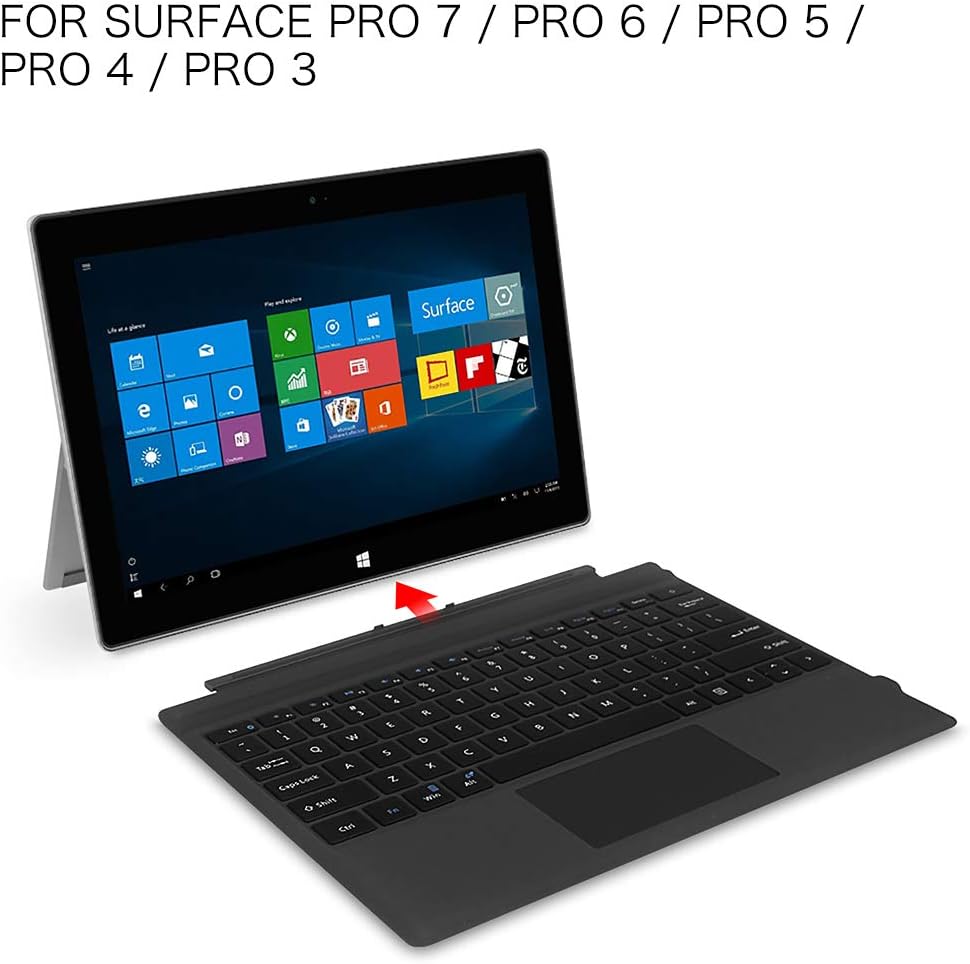
Image: Magnetic Attachment. The keyboard easily connects to the Surface Pro.
4. Návod k obsluze
4.1 Zkušenosti s psaním
The keyboard is designed with slightly spread-out keys and scissor switches to provide a comfortable, quiet, and efficient typing experience, similar to a traditional laptop. Each key is built to sustain up to 3 million keypresses.
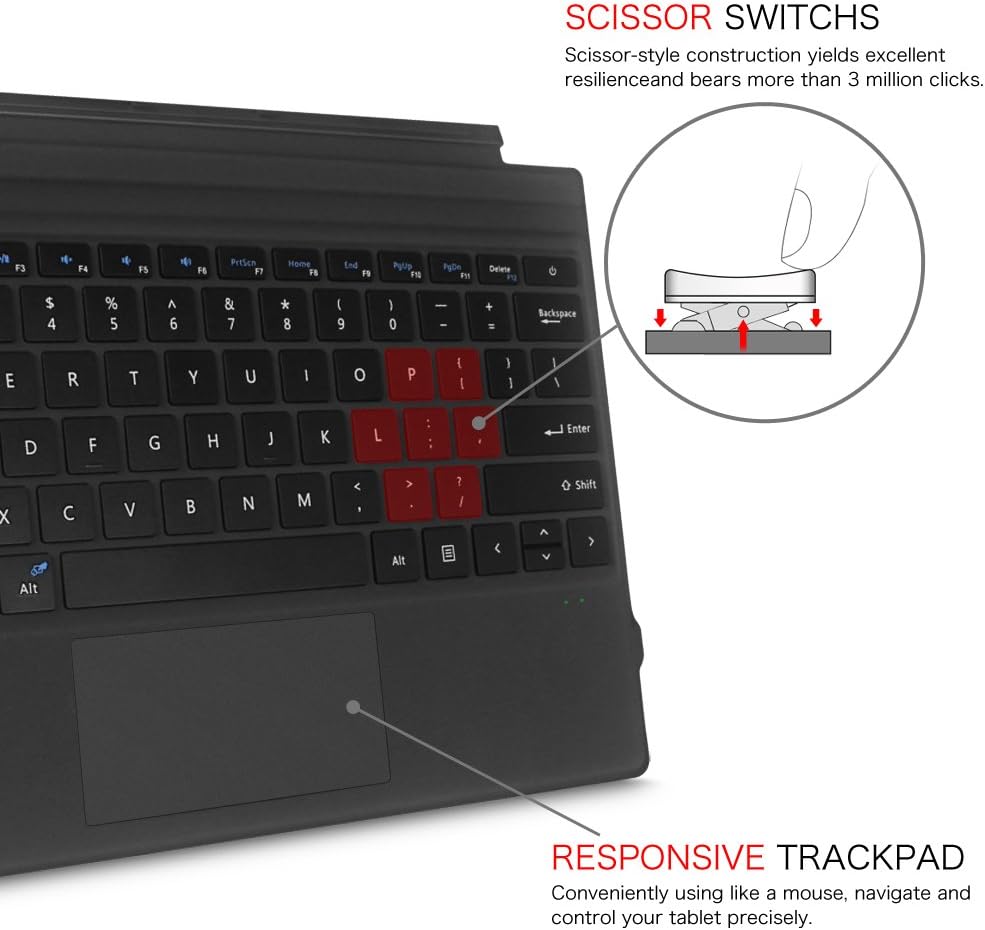
Image: Scissor Switches and Responsive Trackpad. The keyboard features durable scissor-style switches for comfortable typing.
4.2 Trackpad Usage
The keyboard includes a built-in two-button trackpad, allowing for precise navigation and control without needing to touch the screen. The trackpad functions similarly to a mouse.
Poznámka: The trackpad may not function optimally if the keyboard is placed on an uneven surface.
4.3 Dual-Angle Adjustment
When attached, the keyboard can be adjusted to two different typing angles. The powerful magnetic attachment strip allows you to tilt the keyboard slightly upwards for a more ergonomic typing position, or lay it flat against the surface for a traditional laptop feel. This flexibility helps meet various user preferences and comfort needs.

Image: Dual-Angle Adjustment. The keyboard can be positioned flat or at an incline for ergonomic typing.
4.4 Sleep/Wake Function
When the keyboard cover is closed over the Surface Pro screen, the device will automatically enter sleep mode. Opening the cover will wake the device, providing a seamless user experience and conserving battery life.
5. Údržba a péče
- Čištění: Použijte měkký, damp cloth to clean the surface of the keyboard. Avoid using harsh chemicals or abrasive materials.
- Skladování: When not in use, keep the keyboard attached to your Surface Pro to protect the screen and keys. Store in a cool, dry place away from direct sunlight and extreme temperatures.
- Péče o baterie: To prolong battery life, avoid fully discharging the keyboard frequently. Recharge when the battery indicator suggests low power.
- Ochrana: The keyboard acts as a protective cover for your Surface Pro screen when closed, safeguarding it from scratches and minor impacts during transport.

Image: FINTIE Type Cover Keyboard. The keyboard provides protection for the Surface Pro screen when closed.
6. Řešení problémů
6.1 Klávesnice se nepřipojuje přes Bluetooth
- Ujistěte se, že je klávesnice zapnutá a plně nabitá.
- Verify that Bluetooth is enabled on your Surface Pro.
- Opakujte kroky párování Bluetooth (kapitola 3.3).
- Move the keyboard closer to your Surface Pro to ensure it is within the 33ft/10m range.
- Restart both the keyboard and your Surface Pro.
6.2 Trackpad nereaguje
- Ensure the keyboard is placed on a flat, stable surface.
- Check if the keyboard is properly connected to the Surface Pro.
- Restart the keyboard and Surface Pro.
6.3 Klávesy nereagují
- Ensure the keyboard is powered on and connected via Bluetooth.
- Zkontrolujte stav baterie a v případě potřeby ji dobijte.
- Clean around the unresponsive keys to remove any debris.
7. Specifikace
| Číslo modelu | AKB0019-2US |
| Rozměry produktu | 29.49 x 21.59 x 0.79 cm (D x Š x V) |
| Hmotnost položky | 1.06 libry (0.48 kg) |
| Technologie připojení | Bluetooth 5.1 |
| Baterie | 750mAh Rechargeable Lithium Battery (included) |
| Effective Usage Time | Approx. 200 hours per full charge |
| Pohotovostní doba | Up to 90 days per full charge |
| Bezdrátové Dosah | Až 33 stop / 10 m |
| Typ přepínače kláves | Scissor Switches |
| Keypress Lifespan | Up to 3 million times |
| Barva | Černý |

Image: Product Dimensions. Detailed measurements of the keyboard.
8. Záruka a podpora
For warranty information or technical support, please refer to the contact details provided with your purchase documentation or visit the official FINTIE webUschovejte si účtenku jako doklad o koupi pro případné reklamace.


