Zavedení
Děkuji za nákupasing the Sony WH-H900N Wireless Noise Cancelling Headphones. This manual provides essential information for the safe and effective use of your headphones. Please read it thoroughly before use and retain it for future reference.

Obrázek: Přední strana view of the Sony WH-H900N Wireless Noise Cancelling Headphones.
Co je v krabici
Ověřte, zda jsou v balení přítomny všechny položky:
- Sony WH-H900N Wireless Noise Cancelling Headphones
- Pouzdro na přenášení
- Connection Cable (audio cable)
- USB kabel (pro nabíjení)
- Záruční list
- Návod k obsluze (tento návod)
- Referenční příručka

Image: The Sony WH-H900N headphones, carrying pouch, audio cable, and USB charging cable.
Ovládací prvky a indikátory
Familiarize yourself with the physical controls and indicators on your headphones.
Left Earcup Controls
- NC/AMBIENT Button: Toggles between Noise Cancelling and Ambient Sound modes.
- Vypínač: Powers the headphones on/off.
- USB port: Pro nabíjení sluchátek.
- Vstupní audio konektor: For wired connection using the supplied audio cable.
Right Earcup Touch Panel
- Přejetí nahoru/dolů: Upravte hlasitost.
- Swipe Forward/Backward: Přeskakování skladeb.
- Dvojí poklepání: Přehrávání/pozastavení hudby, přijímání/ukončování hovorů.
- Cover with Hand: Activate Quick Attention Mode (temporarily lowers music volume and lets in ambient sound).
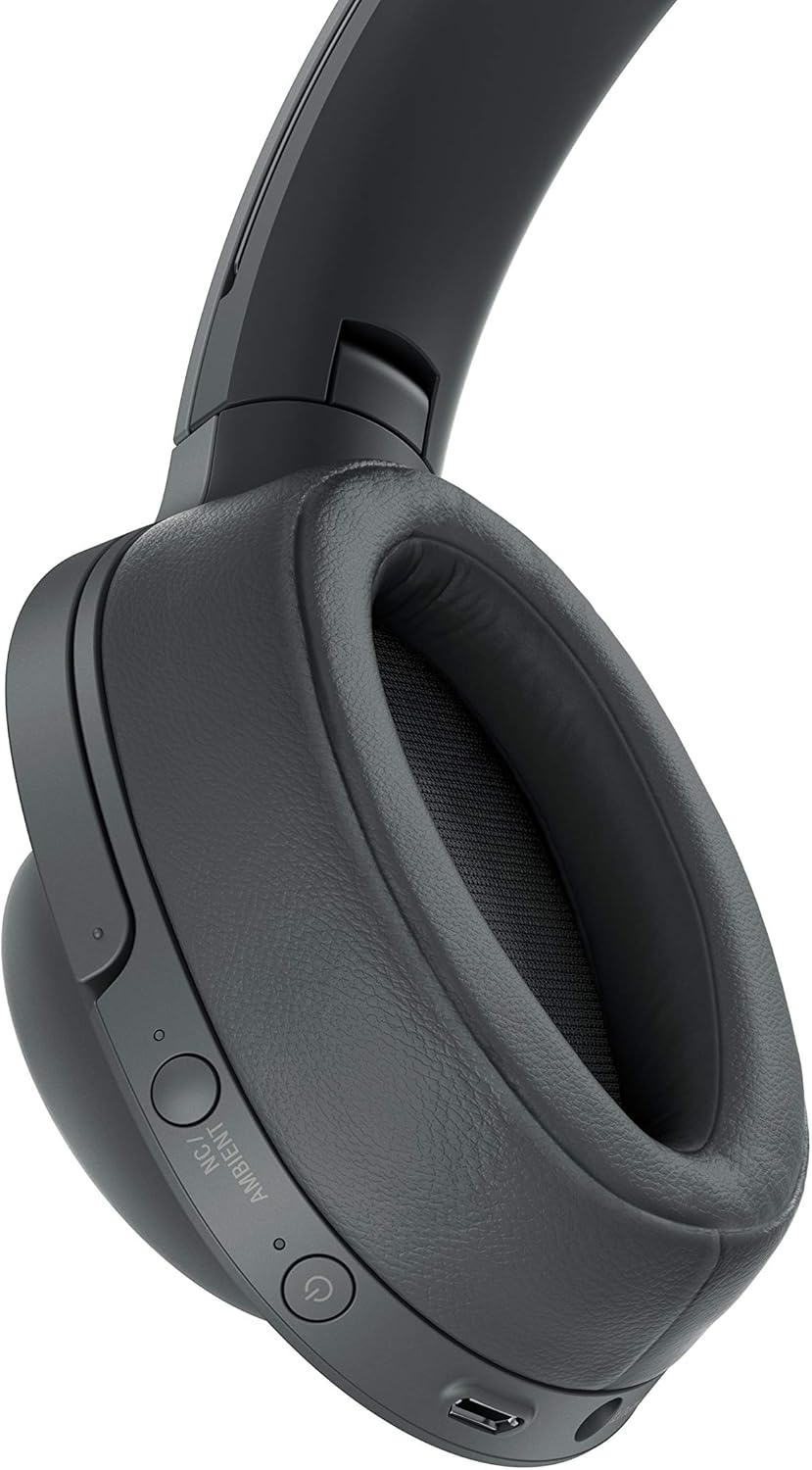
Obrázek: Podrobný view of the left earcup controls.

Image: User interacting with the touch sensor control panel on the right earcup.
Nastavení
Nabíjení sluchátek
Before initial use, fully charge the headphones. A full charge provides up to 28 hours of wireless playback with Noise Cancelling enabled. A 10-minute quick charge provides approximately 65 minutes of playback.
- Connect the supplied USB cable to the USB port on the left earcup.
- Connect the other end of the USB cable to a powered USB AC adapter (not supplied) or a computer.
- The indicator light will illuminate red during charging and turn off when charging is complete.
Párování pomocí Bluetooth
Pair your headphones with your Bluetooth device (smartphone, tablet, etc.) to enjoy wireless audio.
- Ujistěte se, že jsou sluchátka vypnutá.
- Press and hold the Power button for approximately 7 seconds until the indicator flashes blue rapidly. This indicates pairing mode.
- On your Bluetooth device, go to Bluetooth settings and enable Bluetooth.
- Select "WH-H900N" from the list of available devices.
- Po připojení bude indikátor pomalu modře blikat.
NFC One-touch Connection
For NFC-compatible devices, you can establish a connection with a single touch.
- Ujistěte se, že máte na svém smartphonu povoleno NFC.
- Touch your smartphone to the N-Mark on the left earcup of the headphones.
- Follow the on-screen prompts on your smartphone to complete the connection.
Obsluha sluchátek
Zapnutí/vypnutí
- Zapnutí: Press and hold the Power button for about 2 seconds until the blue indicator flashes.
- Vypnutí: Press and hold the Power button for about 2 seconds until the red indicator flashes, then turns off.
Potlačení hluku a režim okolního zvuku
Stiskněte tlačítko NC/AMBIENT button on the left earcup to cycle through the following modes:
- Potlačení hluku: Snižuje okolní hluk pro pohlcující poslechový zážitek.
- Režim okolního zvuku: Allows you to hear surrounding sounds while listening to music, enhancing awareness.
- Vypnuto: Disables both Noise Cancelling and Ambient Sound modes.
Music Playback (Touch Controls)
Use the touch sensor panel on the right earcup for music control:
- Přehrát/pozastavit: Double-tap the center of the touch panel.
- Zvýšit hlasitost: Swipe up on the touch panel.
- Snížit hlasitost: Swipe down on the touch panel.
- Další skladba: Swipe forward (right) on the touch panel.
- Předchozí skladba: Swipe backward (left) on the touch panel.
Uskutečňování a přijímání hovorů
Při připojení k chytrému telefonu přes Bluetooth:
- Přijmout hovor: Double-tap the center of the touch panel.
- Ukončení hovoru: Double-tap the center of the touch panel during a call.
- Odmítnout hovor: Press and hold the center of the touch panel for about 2 seconds.
Using the Sony | Headphones Connect App
Download the free Sony | Headphones Connect app from your device's app store to customize sound settings, adjust Noise Cancelling levels, and access other advanced features. The app allows you to fine-tune your listening experience.
Video: Overview of the Sony WH-H900N Wireless Noise Cancelling Headphones, highlighting key features and design.
Údržba
Správná údržba zajistí dlouhou životnost a výkon vašich sluchátek.
- Čištění: Wipe the headphones with a soft, dry cloth. Do not use alcohol, benzene, thinner, or other chemical cleaners.
- Náušníky: The ear pads are designed for comfort and sound isolation. If they become worn or damaged, contact Sony customer support for replacements.
- Skladování: When not in use, store the headphones in the supplied carrying pouch to protect them from dust and scratches. Avoid storing in direct sunlight or high temperatures.
- Voděodolnost: Tato sluchátka nejsou vodotěsná. Zabraňte vystavení vodě nebo nadměrné vlhkosti.
Odstraňování problémů
If you encounter issues with your headphones, refer to the table below for common problems and solutions.
| Problém | Řešení |
|---|---|
| Žádná síla | Nabijte sluchátka pomocí dodaného USB kabelu. |
| Nelze spárovat přes Bluetooth | Ensure headphones are in pairing mode (rapid blue flashing). Check Bluetooth settings on your device. Move headphones closer to the device. |
| Žádný zvuk nebo nízká hlasitost | Check volume levels on both headphones and connected device. Ensure headphones are properly connected via Bluetooth or wired. |
| Potlačení hluku není účinné | Ensure Noise Cancelling mode is active. Adjust the headphones for a snug fit over your ears. |
| Dotykové ovládání nereaguje | Ensure your fingers are clean and dry. Restart the headphones and try again. |
Specifikace
Key technical specifications for the Sony WH-H900N headphones:
| Funkce | Detail |
|---|---|
| Název modelu | WH-H900N |
| Technologie připojení | Bluetooth, Wired, NFC |
| Technologie bezdrátové komunikace | Bluetooth 4.1 |
| Funkce pro potlačení hluku | Aktivní potlačení hluku |
| Typ ovládání | Dotykové ovládání |
| Životnost baterie | Up to 28 Hours (wireless playback with NC) |
| Typ zvukového ovladače | Dynamický ovladač |
| Podporované zvukové formáty | SBC, AAC, aptX, aptX HD, LDAC |
| Ochrana obsahu | SCMS-T |
| Hmotnost položky | 12 unce (přibližně 340 g) |
| Rozměry produktu | 1.3 x 3.5 x 2.9 palce |
| Materiál | Hliník, Plast |
Záruka a podpora
Your Sony WH-H900N headphones come with a manufacturer's warranty. Please refer to the included Warranty Card for detailed terms and conditions, including coverage period and service procedures.
For technical support, product registration, or further inquiries, please visit the official Sony support webnebo se obraťte na zákaznický servis společnosti Sony ve vašem regionu. Uschovejte si doklad o koupi pro případ reklamace.


