1. Úvod
This manual provides essential information for the safe and effective operation, maintenance, and troubleshooting of your Crown CT21056LBMC 18V Cordless Drill Driver. Please read these instructions carefully before using the tool and keep them for future reference. This drill driver is designed for drilling into wood, metal, and plastics, and for driving screws.
2. Bezpečnostní pokyny
Při práci s elektrickým nářadím vždy dodržujte základní bezpečnostní opatření, abyste snížili riziko požáru, úrazu elektrickým proudem a zranění osob.
- Bezpečnost pracovního prostoru: Udržujte své pracovní místo čisté a dobře osvětlené. Nepořádek nebo tmavé prostory vedou k nehodám. Nepoužívejte elektrické nářadí ve výbušném prostředí, například v přítomnosti hořlavých kapalin, plynů nebo prachu.
- Elektrická bezpečnost: Zabraňte kontaktu těla s uzemněnými povrchy, jako jsou potrubí, radiátory, sporáky a ledničky. Nevystavujte elektrické nářadí dešti ani vlhku.
- Osobní bezpečnost: Vždy používejte ochranu očí. Při delší práci používejte ochranu sluchu. Oblečte se vhodně; vyhněte se volnému oblečení nebo šperkům. Zajistěte si dlouhé vlasy.
- Použití a péče o nářadí: Netlačte na elektrické nářadí silou. Používejte správné elektrické nářadí pro danou aplikaci. Před prováděním jakýchkoli úprav, výměnou příslušenství nebo skladováním elektrického nářadí odpojte baterii od elektrického nářadí.
- Bezpečnost baterie: Nabíjejte pouze nabíječkou určenou výrobcem. Nespalujte baterii, ani když je vážně poškozená.
3. Obsah balení
Carefully unpack all items and check against the list below. If any parts are missing or damaged, contact your retailer.
- 1 x Crown CT21056LBMC Cordless Drill Driver
- 2 x 18V lithium-iontové baterie (1.5 Ah)
- 1 x Nabíječka baterií
- 1 x Návod k obsluze (tento dokument)
- 1 x Přepravní pouzdro

Image 1: The complete Crown CT21056LBMC kit, showing the drill driver, two batteries, charger, and the durable carrying case.
4. Konec produktuview
Familiarize yourself with the components of your drill driver before operation.
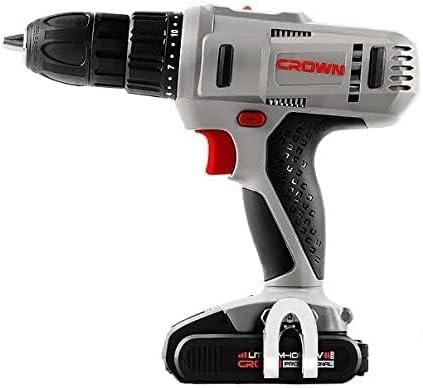
Obrázek 2: Boční strana view of the drill driver, illustrating key components such as the chuck, torque adjustment collar, speed selector switch, and trigger.
- Bezklíčové sklíčidlo: Pro rychlou a snadnou výměnu bitů.
- Objímka pro nastavení točivého momentu: Selects the desired torque setting for driving screws or drill mode.
- Přepínač rychlosti: Allows selection between two mechanical speed ranges.
- Přepínač vpřed/vzad: Mění směr otáčení sklíčidla.
- Spouštěcí spínač: Aktivuje vrtačku a ovládá rychlost.
- LED pracovní světlo: Osvětluje pracovní prostor.
- Balíček baterií: Zajišťuje napájení nástroje.
- Tlačítko pro uvolnění baterie: For removing the battery pack.
5. Nastavení
5.1. Nabíjení baterie
The battery pack is not fully charged at the time of purchase. It must be fully charged before first use.
- Připojte nabíječku do standardní elektrické zásuvky.
- Slide the battery pack onto the charger base. Ensure it clicks into place.
- The charging indicator light on the charger will show the charging status. A full charge takes approximately 45 minutes for a 1.5 Ah battery.
- Po plném nabití odpojte baterii od nabíječky a vytáhněte nabíječku ze zásuvky.
5.2. Instalace a vyjmutí bateriového bloku
- Instalace: Zarovnejte bateriový blok se základnou vrtačky a zasuňte jej, dokud bezpečně nezacvakne na místo.
- Odebrání: Press the battery release button and slide the battery pack out from the tool.

Image 3: The drill driver with a fully installed battery pack, ready for use.
5.3. Installing and Removing Drill Bits/Driver Bits
- Otáčejte rychloupínacím sklíčidlem proti směru hodinových ručiček, abyste otevřeli čelisti.
- Insert the drill bit or driver bit into the chuck, ensuring it is centered.
- Rotate the keyless chuck clockwise to tighten the jaws firmly around the bit. Do not overtighten.
- Pro vyjmutí otáčejte sklíčidlem proti směru hodinových ručiček, dokud nebude možné bit vytáhnout.
6. Návod k obsluze
6.1. Výběr rychlosti
The drill driver features two mechanical speed settings:
- Rychlost 1 (nízká rychlost, 0–350 ot./min): Ideal for driving screws, larger drilling diameters, or applications requiring higher torque.
- Rychlost 2 (vysoká rychlost, 0–1 700 ot./min): Suitable for smaller drilling diameters and faster drilling.
To change speed, slide the speed selector switch located on top of the drill. Ensure the tool is stopped before changing speeds.
6.2. Nastavení točivého momentu
The torque adjustment collar has 18 torque settings plus a drill mode (indicated by a drill bit symbol).
- Nastavení točivého momentu (1-18): Use these settings for driving screws. Lower numbers are for smaller screws or softer materials, higher numbers for larger screws or harder materials. The clutch will disengage when the set torque is reached, preventing overtightening or stripping.
- Režim vrtání (symbol vrtáku): Provides maximum torque for drilling applications without the clutch disengaging.
Rotate the torque adjustment collar to select the desired setting.
6.3. Otáčení vpřed/vzad
The forward/reverse switch is located above the trigger. Push it to the left for forward rotation (for drilling and driving screws) and to the right for reverse rotation (for removing screws or freeing jammed bits). Position the switch in the center to lock the trigger and prevent accidental starting.
6.4. Operating the Trigger Switch and LED Light
Squeeze the trigger switch to start the drill. The speed is variable depending on how far the trigger is pressed. The integrated LED work light will illuminate when the trigger is pressed, providing visibility in dimly lit areas.
7. Údržba
Pravidelná údržba zajišťuje optimální výkon a prodlužuje životnost vašeho nástroje.
- Čištění: Keep the ventilation openings clear and free of dust. Use a soft, damp hadřík k čištění nástroje casing. Nepoužívejte rozpouštědla ani abrazivní čisticí prostředky.
- Péče o baterie: Store batteries in a cool, dry place away from direct sunlight. Do not store fully discharged batteries for extended periods. Charge them periodically if not in use.
- Skladování: Store the drill driver, batteries, and charger in the provided carrying case in a dry, secure location out of reach of children.
- Inspekce: Regularly inspect the power tool for any signs of damage, loose screws, or worn parts. If damage is found, have it repaired by a qualified service technician.
8. Řešení problémů
Before attempting any repairs, ensure the battery is removed from the tool.
| Problém | Možná příčina | Řešení |
|---|---|---|
| Vrtačka se nespustí | Battery not charged or improperly installed. Forward/Reverse switch in center (locked) position. | Charge battery fully and ensure it is securely installed. Move Forward/Reverse switch to either forward or reverse position. |
| Baterie se nenabíjí | Charger not plugged in. Battery or charger is faulty. | Check power connection. If problem persists, contact customer support for replacement. |
| Ztráta napájení během provozu | Baterie je slabá. Aktivována je ochrana proti přetížení. | Recharge the battery. Reduce pressure on the tool or use a lower speed setting. |
| Bit prokluzuje v sklíčidle | Sklíčidlo není dostatečně utažené. Upínací dřík je znečištěný nebo poškozený. | Pevně utáhněte sklíčidlo. Vyčistěte nebo vyměňte bit. |
9. Specifikace
| Funkce | Specifikace |
|---|---|
| Číslo modelu | CT21056LBMC |
| svtage | 18 voltů |
| Typ baterie | Lithium-Ion |
| Kapacita baterie | 1.5 Ah |
| Kapacita sklíčidla | 1.5 - 13 mm |
| Otáčky bez zátěže (rychlost 1) | 0 - 350 ot./min |
| Otáčky bez zátěže (rychlost 2) | 0 - 1350 ot./min |
| Maximální točivý moment | 4 Newton-Meter (Nm) |
| Polohy spojky | 18 + 1 (režim vrtání) |
| Doba nabíjení | Přibl. 45 minut |
| Rozměry produktu | 20.5 x 5 x 20 cm |
| Hmotnost produktu | 1.54 kg |
| Speciální funkce | Integrované LED pracovní světlo |
10. Záruka a podpora
For warranty information, service, or technical support, please refer to the warranty card included with your product or contact your point of purchase. Keep your purchase receipt as proof of purchase for any warranty claims.


