Konec produktuview
The ASUS RT-AC86U is a high-performance dual-band Gigabit wireless internet router designed for optimal network performance, especially for gaming and 4K UHD streaming. It incorporates advanced technologies such as 802.11AC MU-MIMO, WTFast game accelerator, Adaptive QoS, and built-in network security powered by Trend Micro.

Obrázek 1: Přední strana view of the ASUS RT-AC86U router, showcasing its sleek black design with red accents and three external antennas.
This router is equipped with a 1.8GHz dual-core processor, 256 MB Flash, and 512 MB RAM, ensuring efficient handling of network traffic. It supports dual-band operation (2.4 GHz and 5 GHz) for data transfer speeds up to 2900 Mbps, making it suitable for demanding online activities.
Obsah balení
Než začnete, ujistěte se, že máte v balení všechny položky:
- ASUS RT-AC86U Networking Router
- RJ-45 kabel
- Napájecí adaptér
- Rychlý průvodce
Pokyny pro nastavení
Follow these steps to set up your ASUS RT-AC86U router for the first time.
1. Hardwarové připojení
- Připojení antén: Attach the three external detachable antennas to the designated ports on the rear of the router. Ensure they are securely tightened.
- Připojení k modemu: Connect one end of the provided RJ-45 cable to the WAN port (blue) on the back of the RT-AC86U router and the other end to your modem's Ethernet port.
- Připojení k počítači: Connect another RJ-45 cable from any of the LAN ports (yellow) on the router to your computer's Ethernet port.
- Zapnutí: Plug the power adapter into the router's DC-in port and then into a power outlet. The power LED indicator on the front of the router should illuminate.
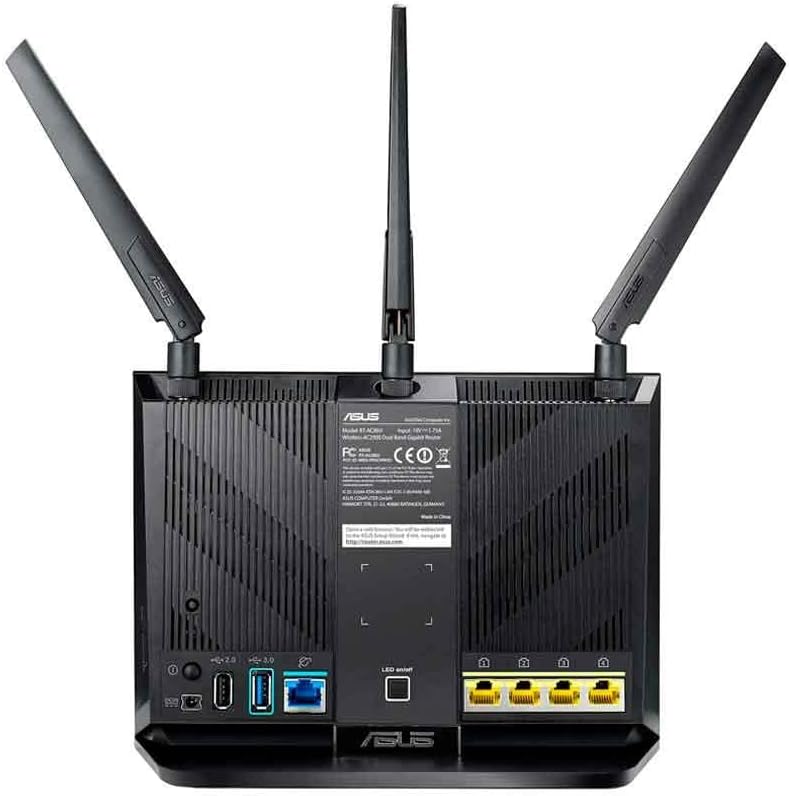
Figure 2: Rear panel of the ASUS RT-AC86U router, highlighting the WAN port (blue), four Gigabit LAN ports (yellow), USB 3.1 Gen1 port (blue), and USB 2.0 port (black).
Ensure all necessary LED indicators on the front of the router are lit, including LAN, Internet, Wi-Fi (2.4GHz and 5GHz), and Power, indicating proper connection and operation.
2. Počáteční konfigurace (Web Rozhraní)
- Přístupový router: Otevřete a web browser on your connected computer and type
router.asus.comdo adresního řádku. - Přihlášení: Enter your router's login name and password. The default credentials are often "admin" for both username and password. If you have changed them, use your custom credentials.
- Quick Internet Setup: Follow the on-screen instructions of the Quick Internet Setup wizard to configure your internet connection. This typically involves selecting your connection type (e.g., DHCP, Static IP, PPPoE) and entering any required ISP details.
- Nastavení Wi-Fi: Set up your Wi-Fi network name (SSID) and password for both 2.4 GHz and 5 GHz bands. It is recommended to use strong, unique passwords.
- Kompletní nastavení: Once the wizard is complete, your router should be connected to the internet, and your Wi-Fi networks will be active.
Ovládání routeru
The ASUS RT-AC86U offers various features to enhance your network experience.
Klíčové vlastnosti:
- Dual-Band AC2900 Wi-Fi: Provides high-speed wireless connectivity across 2.4 GHz and 5 GHz bands, ideal for multiple devices.
- WTFast Game Accelerator: Optimizes gaming connections for reduced lag and improved online gaming experience.
- Adaptivní QoS (kvalita služby): Prioritizes network traffic for specific applications like gaming or streaming, ensuring smooth performance.
- AiProtection (Trend Micro): Offers built-in network security to protect against external threats and malicious webstránky.
- Kompatibilita s AiMesh: Allows you to create a whole-home Wi-Fi system by connecting multiple AiMesh-compatible ASUS routers.
- USB 3.1 Gen1 & Gigabit LAN Ports: Provides high-speed wired connections for devices and external storage.
Používání aplikace ASUS Router:
Manage your network conveniently from your smartphone or tablet using the ASUS Router App. The app allows you to:
- Set up your network.
- Monitor network usage.
- Nakonfigurujte rodičovskou kontrolu.
- Receive instant notifications about network events.

Figure 3: The ASUS RT-AC86U router integrated into a gaming and streaming environment, demonstrating its capability to support high-bandwidth activities.
Údržba
Pravidelná údržba zajišťuje optimální výkon a zabezpečení vašeho routeru.
Aktualizace firmwaru:
Keeping your router's firmware up-to-date is crucial for security, stability, and new features. ASUS provides regular firmware updates.
Video 1: This video demonstrates how to update the firmware of your ASUS WiFi Router to the latest version, covering both live and manual update methods.
You can update the firmware via the router's web interface (Administration > Firmware Upgrade) or by downloading the latest firmware from the ASUS support website and manually uploading it. Always ensure a stable power connection during firmware updates to prevent data corruption.
Běžný restart:
Periodically rebooting your router (e.g., once a month) can help clear its memory, resolve minor network issues, and improve overall performance.
Odstraňování problémů
Zde jsou některé běžné problémy a jejich řešení:
| Problém | Možné řešení |
|---|---|
| Žádné připojení k internetu |
|
| Pomalá rychlost Wi-Fi |
|
| Cannot connect to 5 GHz Network |
|
| Směrovač Web Rozhraní nepřístupné |
|
Pro podrobnější informace o řešení problémů se obraťte na oficiální podporu ASUS. webwebu nebo kontaktujte zákaznickou podporu.
Specifikace
| Funkce | Detail |
|---|---|
| Název modelu | RT-AC86U |
| Značka | ASUS |
| Bezdrátové Standardní | 802.11ac (Wi-Fi 5) |
| Třída frekvenčního pásma | Dvoupásmové (2.4 GHz a 5 GHz) |
| Rychlost přenosu dat | Až 2900 Mb/s (750 Mb/s na 2.4 GHz, 2167 Mb/s na 5 GHz) |
| Procesor | 1.8GHz 32-bit Dual-Core |
| Paměť | 256 MB Flash, 512 MB RAM |
| Antény | 3 External Detachable Antennas, 1 Internal Antenna |
| Porty | 1x WAN (Gigabit), 4x LAN (Gigabit), 1x USB 3.1 Gen1, 1x USB 2.0 |
| Rozměry produktu | 6.2 x 3.3 x 8.66 palce |
| Hmotnost položky | 2 libry |
| Vstup napájení | AC Input: 110V~240V (50~60Hz) |
| Výkon | DC Output: 19 V with max. 1.75 A current |
Informace o záruce
The ASUS RT-AC86U WiFi Gaming Router typically comes with a 3letá omezená záruka from the date of purchase. This warranty covers defects in materials and workmanship under normal use. Additionally, the product includes lifetime internet security powered by Trend Micro.
For specific warranty terms and conditions, please refer to the warranty card included in your product packaging or visit the official ASUS support webmísto.
Podpora
Pro další pomoc, technickou podporu nebo stažení nejnovějších ovladačů a firmwaru navštivte oficiální stránky podpory ASUS. webmísto:
Další zdroje a často kladené otázky naleznete také na portálu podpory ASUS.


