Radioddity Raddy RF23 AM FM Portable Pocket Radio MP3 Player User Manual
Model: RF23
Zavedení
This manual provides detailed instructions for the Radioddity Raddy RF23, a compact and versatile portable radio and MP3 player. It features AM/FM radio reception, MP3 playback from Micro TF cards and USB disks, and an integrated flashlight. Please read this manual thoroughly before using the device to ensure proper operation and longevity.
Obsah balení
- 1 x Radioddity Raddy RF23 AM/FM Radio
- 1 x USB nabíjecí kabel
- 1 x Rechargeable Lithium-Ion Battery (BL-5C type)
- 1 x řemínek na zápěstí
Konec produktuview
Familiarize yourself with the various parts and controls of your Raddy RF23 radio.

Obrázek 1: Přední strana View of Raddy RF23 - Displays the speaker grille, digital display, and numeric keypad with function buttons.

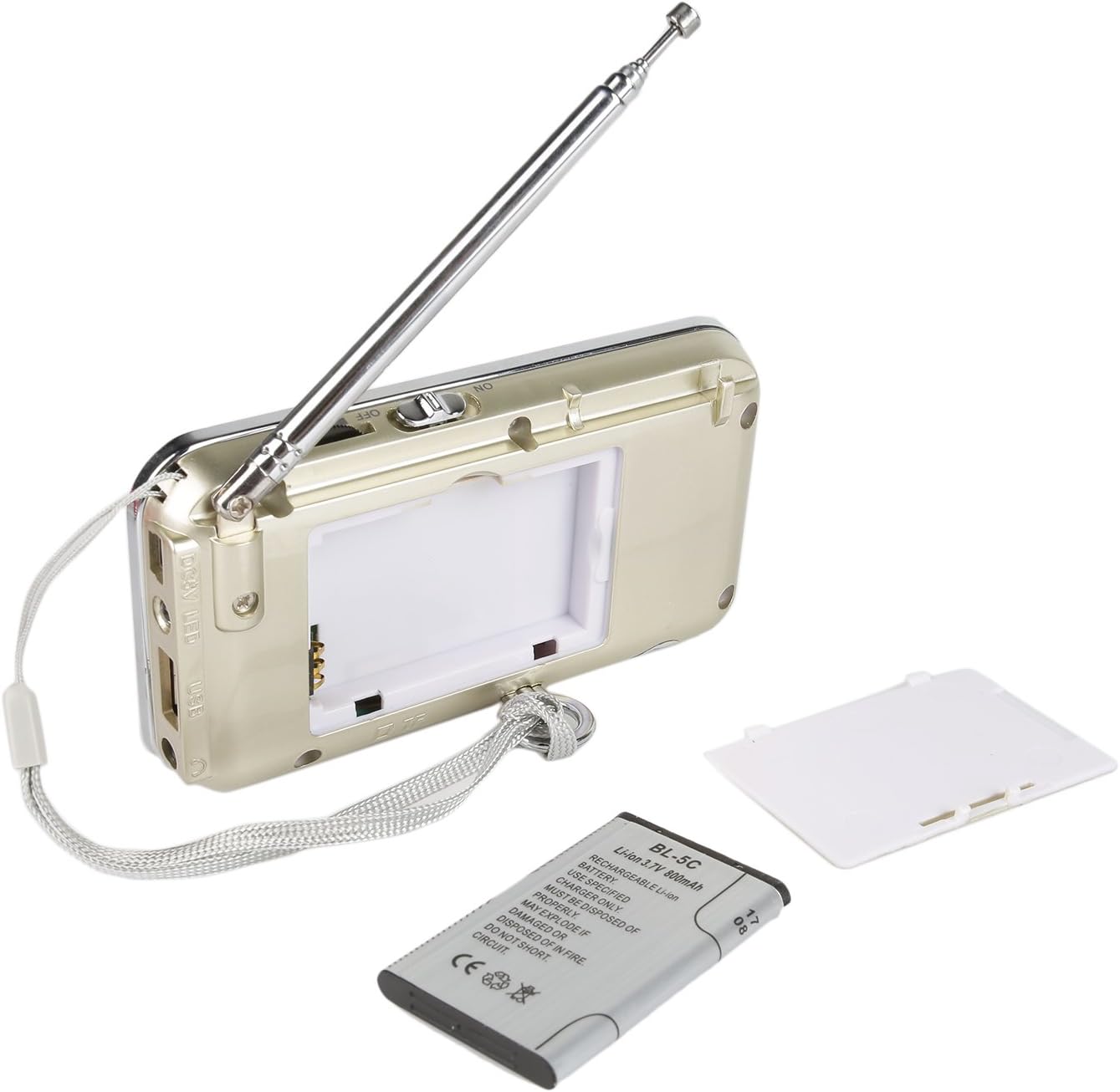
Obrázek 2: Zpět View of Raddy RF23 - Shows the battery cover, USB port, DC 5V charging port, and the wrist strap with its stand attachment.
Ovládací prvky a porty
- Vypínač: Slide switch on the side to turn the device ON or OFF.
- Anténa: Výsuvná teleskopická anténa pro lepší příjem rádia.
- Digitální displej: Zobrazuje frekvenci, režim a informace o skladbě.
- Reproduktor: Integrovaný reproduktor pro audio výstup.
- Numerická klávesnice (0-9): Used for direct frequency input or track selection.
- Tlačítko MODE: Switches between AM, FM, and MP3 playback modes.
- Tlačítko Přehrát/Pozastavit (▶⏸): Plays or pauses MP3 tracks.
- Previous/Rewind Button (◀◀): Skips to the previous track or rewinds during MP3 playback. In radio mode, short press for previous station, long press for auto-scan down.
- Next/Fast Forward Button (▶▶): Skips to the next track or fast forwards during MP3 playback. In radio mode, short press for next station, long press for auto-scan up.
- Tlačítko LED: Activates or deactivates the built-in flashlight.
- Vstup DC 5V: Micro USB port pro nabíjení zařízení.
- USB port: Pro připojení USB flash disku pro přehrávání MP3.
- Slot na kartu TF: For inserting a Micro TF (Micro SD) card for MP3 playback.
- Jack pro sluchátka (3.5 mm): Pro připojení sluchátek pro soukromý poslech.
Nastavení
1. Instalace baterie
- Najděte kryt přihrádky na baterie na zadní straně rádia.
- Posunutím otevřete kryt.
- Insert the provided BL-5C Lithium-Ion battery, ensuring the contacts align correctly.
- Bezpečně zavřete kryt bateriového prostoru.

Obrázek 3: Instalace baterie - Open the battery compartment and insert the BL-5C battery.
2. Nabíjení baterie
- Connect the small end of the included USB charging cable to the DC 5V input port on the side of the radio.
- Připojte větší konec kabelu USB k napájecímu adaptéru USB (není součástí balení) nebo k portu USB počítače.
- The charging indicator light will illuminate. The light typically turns off or changes color when charging is complete.
- Plné nabití trvá přibližně 2-3 hodiny.
Obrázek 4: Nabíjení přes USB - Connect the radio to a USB power source using the provided cable.
3. Inserting a Micro TF Card or USB Disk (for MP3 Playback)
- Ujistěte se, že je rádio vypnuté.
- For a Micro TF card: Gently insert the card into the TF card slot until it clicks into place.
- For a USB disk: Insert the USB disk into the USB port.
- The radio will automatically detect the storage device when powered on and switched to MP3 mode.

Obrázek 5: Vložení TF karty - Insert a Micro TF card into the designated slot.
Návod k obsluze
1. Zapnutí/vypnutí
Slide the power switch located on the side of the radio to the "ON" position to power on. Slide it to "OFF" to power off.
2. Výběr režimu
Stiskněte tlačítko MODE button repeatedly to cycle through the available modes: FM Radio, AM Radio, and MP3 Player (if a TF card or USB disk is inserted).
3. Provoz rádia FM/AM
- Vyberte režim rádia: Stiskněte tlačítko MODE button until "FM" or "AM" appears on the display.
- Prodloužit anténu: Pro optimální příjem plně vysuňte teleskopickou anténu.
- Automatické vyhledávání stanic: Dlouze stiskněte Previous (◀◀) or Next (▶▶) button to automatically scan for and stop at the next available station.
- Ruční ladění: Use the numeric keypad to directly enter a frequency (e.g., for 106.7 FM, press 1-0-6-7).
- Nastavení hlasitosti: Adjust the volume using the dedicated volume controls, typically located on the side of the device or integrated with other function buttons.
4. MP3 Playback Operation
- Vyberte režim MP3: Stiskněte tlačítko MODE button until "MP3" or a track number appears on the display.
- Přehrát/pozastavit: Stiskněte tlačítko Přehrát/Pozastavit (▶⏸) tlačítko pro spuštění nebo pozastavení přehrávání.
- Další / předchozí skladba: Stiskněte tlačítko Next (▶▶) tlačítko pro přeskočení na další skladbu. zmáčkni Previous (◀◀) button to go to the beginning of the current track, or press it again to go to the previous track.
- Nastavení hlasitosti: Adjust the volume using the dedicated volume controls, typically located on the side of the device or integrated with other function buttons.
- Direct Track Selection: Use the numeric keypad to enter the track number directly.
5. Funkce svítilny
Stiskněte tlačítko LED button to turn the built-in flashlight ON. Press it again to turn the flashlight OFF.
Údržba
- Čištění: Wipe the radio with a soft, dry cloth. Do not use liquid cleaners or solvents.
- Skladování: Pokud rádio delší dobu nepoužíváte, skladujte ho na chladném a suchém místě.
- Péče o baterie: If the radio will not be used for a long time, remove the battery to prevent leakage. Recharge the battery periodically to maintain its lifespan.
- Péče o anténu: S teleskopickou anténou zacházejte opatrně, abyste ji neohnuli nebo nezlomili.
Odstraňování problémů
| Problém | Možná příčina | Řešení |
|---|---|---|
| Rádio se nezapne. | Baterie je vybitá nebo není správně nainstalována. | Charge the battery or ensure it is inserted with correct polarity. |
| Špatný příjem rádia. | Anténa není vysunutá, signál je slabý nebo je rušená. | Fully extend the antenna. Try repositioning the radio. Move away from electronic devices that may cause interference. |
| No sound from MP3 player. | Volume too low, incorrect mode, or no valid media. | Increase volume. Ensure MP3 mode is selected. Verify TF card/USB disk contains MP3 filea je správně vložen. |
| Flashlight does not work. | Battery low or flashlight not activated. | Charge the battery. Press the LED button to turn on the flashlight. |
| Zařízení se neočekávaně vypne. | Slabá baterie. | Plně nabijte baterii. |
Specifikace
- Značka: Radioddity
- Model: RF23
- Rozměry produktu: 4.61 x 0.79 x 2.5 palce
- Hmotnost položky: 6.7 unce
- Zdroj napájení: Napájení z baterie (vyžaduje 1 lithium-iontovou baterii)
- Typ baterie: BL-5C (Rechargeable)
- Technologie připojení: USB
- Technologie tuneru: AM, FM
- Podporovaná rádiová pásma: AM, FM
- Frekvenční rozsah: FM (87.5–108 MHz), AM (520–1710 kHz)
- Speciální funkce: Built-In Flashlight, Portable
- Kompatibilní zařízení: Earphone, Micro TF Card, USB Disk
- Výrobce: Radioddity
Záruka a podpora
For warranty information or technical support, please refer to the documentation provided with your purchase or visit the official Radioddity webUschovejte si účtenku jako doklad o koupi pro případ reklamace.
Radioddity Official Webmísto: www.radioddity.com