1. Úvod
The Tascam US-1x2 is a compact 1-in/2-out USB Audio/MIDI Interface designed for high-quality audio recording and playback. It features a high-quality Ultra-HDDA microphone preamp, a 1/4" line input switchable to instrument level, and stereo line outputs. This manual provides essential information for setting up, operating, and maintaining your US-1x2 interface.
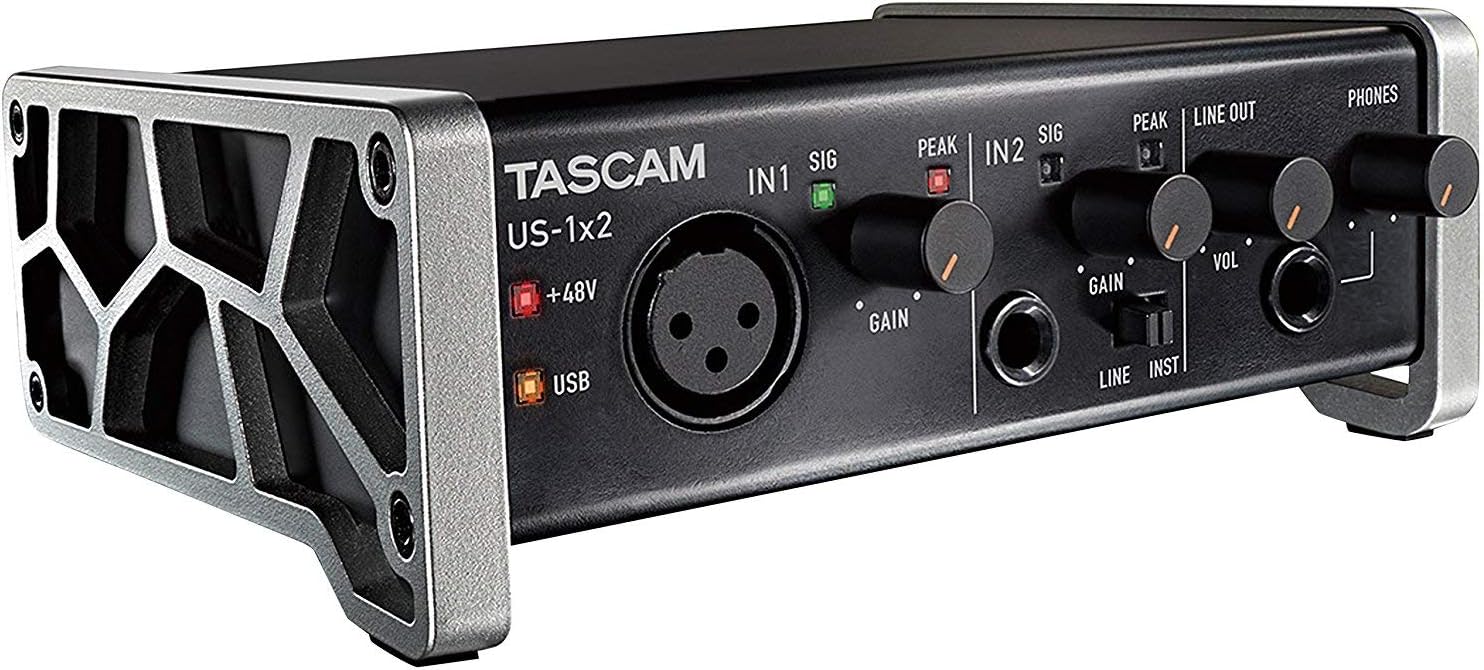
Figure 1: Tascam US-1x2 USB Audio/MIDI Interface, showing its compact design with input and output controls.
2. Důležité bezpečnostní informace
Před použitím tohoto výrobku si prosím přečtěte a pochopte všechny bezpečnostní pokyny. Uschovejte si tento návod pro budoucí použití.
- Nevystavujte toto zařízení dešti nebo vlhkosti.
- Neblokujte žádné ventilační otvory.
- Používejte pouze nástavce/příslušenství specifikované výrobcem.
- Veškeré opravy svěřte kvalifikovanému servisnímu personálu.
- Ensure proper power supply as specified for the device.
3. Obsah balení
Ověřte, zda jsou v balení obsaženy všechny níže uvedené položky:
- Tascam US-1x2 USB Audio/MIDI Interface
- USB kabel
- Software License Information (for Steinberg Cubase LE and Cubasis LE)
- Uživatelská příručka (tento dokument)
4. Konec produktuview
4.1 Přední panel

Obrázek 2: Přední strana view of the Tascam US-1x2, highlighting input controls and headphone jack.
- IN 1 (XLR/TRS Combo Jack): For connecting microphones (XLR) or line-level/instrument-level devices (TRS). Supports +48V phantom power.
- GAIN 1 Knob: Adjusts the input level for IN 1.
- PEAK/SIG 1 Indicator: Lights green for signal presence, red for clipping.
- IN 2 (TRS Jack): For connecting line-level or instrument-level devices.
- GAIN 2 Knob: Adjusts the input level for IN 2.
- PEAK/SIG 2 Indicator: Lights green for signal presence, red for clipping.
- LINE/INST Switch: Toggles IN 2 between line level and instrument level.
- LINE OUT Knob (VOL): Adjusts the overall output volume for the main line outputs.
- TELEFONY Jack: Stereofonní výstup pro sluchátka.
- Knoflík TELEFONŮ: Upravuje hlasitost výstupu sluchátek.
- Indikátor +48V: Lights when phantom power is active for IN 1.
- Indikátor USB: Lights when the unit is connected via USB.
4.2 Zadní panel

Obrázek 3: Zadní view of the Tascam US-1x2, showing USB, line inputs/outputs, and control switches.
- USB port: Connects to your computer for power and data transfer.
- DC IN 5V Port: For external power supply when using with tablets (e.g., iOS devices).
- DIRECT MONITOR Switch: Enables direct monitoring of input signals to reduce latency.
- INPUT SELECT Switch: Selects between front panel inputs (IN 1/IN 2) or rear panel LINE IN.
- LINE IN (L/R) Jacks: Stereo RCA inputs for line-level devices.
- LINE OUT (L/R) Jacks: Stereo RCA outputs for connecting to monitors or ampzáchranáři.
- +48V (IN1) Switch: Activates phantom power for the XLR input on IN 1.
5. Nastavení
5.1 Instalace ovladače
For optimal performance, it is recommended to install the dedicated drivers for your operating system (Windows or macOS). The US-1x2 also supports class-compliant operation for basic functionality without drivers on compatible systems, including iOS.
- Visit the official Tascam website and navigate to the support page for the US-1x2.
- Download the latest drivers compatible with your operating system.
- Postupujte podle pokynů na obrazovce a dokončete instalaci ovladače. V případě potřeby restartujte počítač.
5.2 Připojení k počítači
Use the supplied USB cable to connect the US-1x2 to an available USB port on your computer. The USB indicator on the front panel will illuminate when a connection is established.

Figure 4: The Tascam US-1x2 connected to a laptop, ready for recording.
5.3 Instalace softwaru
The US-1x2 includes licenses for Steinberg Cubase LE (for desktop) and Cubasis LE (for iOS). These digital audio workstations (DAWs) allow you to record, edit, and mix your audio.
- Locate the software license information included with your US-1x2.
- Follow the instructions to download and activate Cubase LE or Cubasis LE.
- Configure your chosen DAW to use the Tascam US-1x2 as its audio input and output device.
6. Operating the US-1x2
6.1 Připojení mikrofonů
Connect a microphone to the XLR input of IN 1. If using a condenser microphone that requires phantom power, ensure the +48V switch on the rear panel is set to ON. The +48V indicator on the front panel will light up.

Figure 5: An XLR cable connected to the IN 1 input of the Tascam US-1x2.
6.2 Connecting Instruments and Line-Level Devices
For guitars, basses, or other instruments, connect them to the 1/4" TRS input of IN 2. Set the LINE/INST switch to INST. For line-level devices like keyboards or drum machines, connect to IN 2 with the LINE/INST switch set to LINE, or use the stereo RCA LINE IN jacks on the rear panel.

Figure 6: The Tascam US-1x2 being used to record a guitar.
6.3 Adjusting Input Levels (GAIN)
Turn the GAIN knob for the respective input (IN 1 or IN 2) clockwise until the SIG indicator lights green consistently during the loudest parts of your performance. If the PEAK indicator lights red, the signal is clipping; reduce the GAIN until it no longer lights red.
6.4 Přímé monitorování
To hear your input signal directly through the headphones or line outputs without latency from your computer, set the DIRECT MONITOR switch on the rear panel to ON. This is useful for real-time performance monitoring.
6.5 Output Volume Control
Use the LINE OUT (VOL) knob to adjust the volume of the main line outputs connected to your studio monitors or speakers. Use the PHONES knob to adjust the volume of your headphones.
7. Údržba
To ensure the longevity and optimal performance of your Tascam US-1x2, follow these maintenance guidelines:
- Čištění: K otření vnější strany jednotky použijte měkký, suchý hadřík. Nepoužívejte tekuté čisticí prostředky ani abrazivní chemikálie.
- Skladování: Přístroj skladujte na chladném a suchém místě mimo dosah přímého slunečního záření a extrémních teplot.
- Zacházení: Zabraňte pádu jednotky na zem nebo jejímu vystavení silným nárazům.
- Větrání: Ujistěte se, že ventilační otvory nejsou zablokovány, aby nedošlo k přehřátí.
8. Řešení problémů
| Problém | Možná příčina | Řešení |
|---|---|---|
| No sound from outputs/headphones. | Output volume too low; incorrect output device selected in software; cables not connected properly. | Increase LINE OUT (VOL) and PHONES knobs. Check audio settings in your computer/DAW. Verify all cables are securely connected. |
| No input signal (SIG/PEAK indicators off). | GAIN knob too low; incorrect input selected; phantom power not enabled for condenser mic; faulty cable/microphone. | Increase GAIN knob. Ensure INPUT SELECT switch is correct. Activate +48V for condenser mics. Test with a different cable/mic. |
| Distorted sound (PEAK indicator lights red). | Vstupní signál je příliš horký. | Reduce the GAIN knob for the affected input until the PEAK indicator no longer lights red. |
| Interface not recognized by computer. | Drivers not installed or corrupted; faulty USB cable/port. | Reinstall drivers. Try a different USB port or cable. Restart computer. |
| Static or noise in audio. | Ground loop; interference; faulty cable. | Ensure all equipment is on the same power circuit. Use balanced cables where possible. Try different cables. |
9. Specifikace
- Model: US-1x2
- Hmotnost položky: 2 libry
- Rozměry produktu: 8 x 3 x 7 palce
- Hardwarové rozhraní: USB
- Počet kanálů: 1-In/2-Out (Audio), 1-In/1-Out (MIDI)
- Maximální rozlišení: 96 kHz/24 bitů
- Mikrofon Preamp: Ultra-HDDA
- Fantomová síla: +48V (switchable for IN 1)
- Kompatibilní zařízení: Osobní počítač
- Kompatibilita operačního systému: Windows, macOS, iOS, Linux, Android
- Podporovaný software: Steinberg Cubase LE, Cubasis LE
- Technologie připojení: USB, XLR
- svtage: 240 Volts (Note: USB bus powered for most uses, DC 5V for tablet use)
- První dostupné datum: 11. srpna 2017
10. Záruka a podpora
For warranty information, technical support, or service inquiries, please visit the official Tascam webwebové stránky nebo se obraťte přímo na jejich zákaznickou podporu. Uschovejte si doklad o koupi pro případ reklamace.
Oficiální Tascam Webmísto: www.tascam.com
Uživatelská příručka (PDF): Stáhnout PDF


