
Zavedení
This manual provides detailed instructions for the safe and efficient operation of your Axess SPBL1049 Vidrio Vibe LED Wireless Bluetooth Speaker. Please read this manual thoroughly before using the device and retain it for future reference.
Bezpečnostní informace
- Nevystavujte reproduktor extrémním teplotám, přímému slunečnímu záření ani vysoké vlhkosti.
- Vyvarujte se pádu reproduktoru nebo jej nevystavujte silným nárazům.
- Nerozebírejte ani se nepokoušejte o opravu reproduktoru sami. Ztratíte tak záruku.
- Chraňte reproduktor před vodou nebo jinými kapalinami.
- Používejte pouze dodaný nabíjecí kabel nebo jeho certifikovaný ekvivalent.
- Reproduktor čistěte měkkým, suchým hadříkem. Nepoužívejte abrazivní čisticí prostředky.
Obsah balení
- Axess SPBL1049 Vidrio Vibe LED Wireless Bluetooth Speaker
- USB nabíjecí kabel
- Uživatelská příručka (tento dokument)
Vlastnosti produktu
- Bezdrátové připojení Bluetooth pro streamování audia.
- Integrated color-changing LED lights.
- Vestavěný mikrofon pro hands-free volání.
- Supports USB and TF card playback.
- 3.5mm AUX line-in for wired audio connection.
- Rechargeable 1650 mAh Lithium-Ion battery.
- 7W speaker output for clear sound.
Ovládací prvky a porty

Obrázek: Přední strana view of the Axess SPBL1049 speaker showing control buttons and ports at the base.
- Vypínač: Stisknutím a podržením zapnete/vypnete reproduktor.
- Tlačítko Přehrát/Pozastavit: Press to play or pause music. During a call, press to answer/end a call.
- Tlačítko pro snížení hlasitosti / Předchozí skladba (-): Stisknutím snížíte hlasitost. Stisknutím a podržením přejdete na předchozí skladbu.
- Tlačítko pro zvýšení hlasitosti / další skladbu (+): Stisknutím zvýšíte hlasitost. Stisknutím a podržením přejdete na další skladbu.
- Tlačítko režimu (M): Press to switch between Bluetooth, USB, TF Card, and AUX modes.
- Nabíjecí port micro USB: Pro nabíjení reproduktoru.
- USB port: Pro přehrávání z USB flash disku.
- Slot na kartu TF: Pro přehrávání z TF (microSD) karet.
- Vstupní port AUX: Pro připojení externích audio zařízení pomocí 3.5mm audio kabelu.
Nastavení
1. Nabíjení reproduktoru
Before first use, fully charge the speaker. Connect the small end of the included USB charging cable to the Micro USB Charging Port on the speaker and the larger end to a USB power adapter (not included) or a computer's USB port.
- Během nabíjení se rozsvítí LED indikátor.
- The indicator will turn off or change color once charging is complete.
- Plné nabití obvykle trvá 2-3 hodiny.
2. Zapnutí/vypnutí
- Pro zapnutí stiskněte a podržte Tlačítko napájení until the LED lights illuminate and you hear an audible prompt.
- Chcete-li vypnout, stiskněte a podržte tlačítko Tlačítko napájení again until the LED lights turn off and you hear an audible prompt.
Návod k obsluze
1. Párování Bluetooth
- Ensure the speaker is powered ON and in Bluetooth mode. If not, press the Tlačítko režimu (M) until you hear the Bluetooth pairing prompt. The LED lights will flash, indicating it's ready to pair.
- Povolte Bluetooth na svém smartphonu, tabletu nebo jiném zařízení s podporou Bluetooth.
- Hledat available Bluetooth devices. Select "SPBL1049" from the list.
- Once paired, you will hear a confirmation sound, and the LED lights will stop flashing.
- Nyní můžete přehrávat hudbu ze zařízení přes reproduktor.
Poznámka: Reproduktor se po zapnutí automaticky pokusí znovu připojit k poslednímu spárovanému zařízení.
2. Přehrávání z USB a TF karet
- Insert a USB flash drive or a TF (microSD) card with MP3 audio filedo příslušného portu.
- The speaker will automatically switch to USB/TF card mode and begin playing music. If not, press the Tlačítko režimu (M) pro výběr správného režimu.
- Použijte Přehrát/Pozastavit, Zvýšení hlasitosti (+)a Snížit hlasitost (-) tlačítka pro ovládání přehrávání.
3. Vstup AUX
- Connect one end of a 3.5mm audio cable (not included) to the AUX-in Port on the speaker.
- Druhý konec připojte k výstupnímu audio konektoru vašeho externího zařízení (např. MP3 přehrávače, počítače).
- Stiskněte tlačítko Tlačítko režimu (M) until you hear the AUX mode prompt.
- Ovládejte přehrávání a hlasitost primárně z externího zařízení.
4. Hands-free volání
- Pokud je připojeno přes Bluetooth a přijde hovor, hudba se pozastaví.
- Stiskněte tlačítko Tlačítko Přehrát/Pozastavit jednou pro přijetí hovoru.
- Stiskněte tlačítko Tlačítko Přehrát/Pozastavit hovor ukončíte znovu.
- Stiskněte a podržte Tlačítko Přehrát/Pozastavit odmítnout příchozí hovor.
- Speak clearly towards the speaker's built-in microphone.
5. Režimy LED osvětlení
The speaker features dynamic LED lights that change color. The lights are typically active when the speaker is on. There is no specific button mentioned to change light modes, so it's assumed they cycle automatically or are tied to music playback.

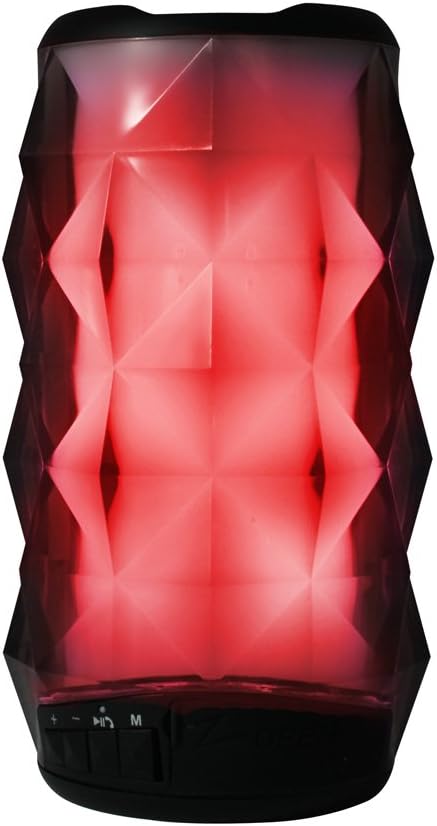
Images: Axess SPBL1049 speaker displaying green and red LED light patterns.
Údržba
- Čištění: K čištění vnější strany reproduktoru používejte měkký, suchý hadřík, který nepouští vlákna. Nepoužívejte tekuté čisticí prostředky, aerosoly ani rozpouštědla.
- Skladování: Pokud reproduktor delší dobu nepoužíváte, skladujte jej na chladném a suchém místě, mimo dosah přímého slunečního záření a extrémních teplot.
- Péče o baterie: Chcete-li prodloužit životnost baterie, vyvarujte se častého úplného vybíjení. Reproduktor pravidelně nabíjejte, i když jej nepoužíváte, aby se baterie udržela v dobrém stavu.
Odstraňování problémů
| Problém | Možné řešení |
|---|---|
| Reproduktor se nezapne. | Ujistěte se, že je baterie nabitá. Připojte reproduktor ke zdroji napájení pomocí nabíjecího kabelu USB. |
| Nelze spárovat přes Bluetooth. |
|
| Z reproduktoru není slyšet žádný zvuk. |
|
| Špatná kvalita zvuku. |
|
Specifikace
| Název modelu | SPBL1049 |
| Značka | AXESS |
| Technologie připojení | Bluetooth, USB, Auxiliary |
| Typ reproduktoru | Subwoofer |
| Výstupní výkon reproduktoru | 7 wattů |
| Impedance | 4 ohmů |
| Průměr subwooferu | 4 palce |
| Baterie | 1650 mAh Lithium-Ion (Rechargeable) |
| Zdroj napájení | Baterie |
| Rozměry produktu | 7.62 x 15.24 x 7.62 cm (3 x 6 x 3 palce) |
| Hmotnost produktu | 385.55 g (0.85 lb) |
Informace o záruce
Specific warranty details for the Axess SPBL1049 speaker are typically provided with the product packaging or available on the manufacturer's official website. Please refer to the documentation included with your purchase for precise warranty terms and conditions. Generally, Axess products come with a limited manufacturer's warranty covering defects in materials and workmanship for a specified period from the date of purchase.
Uschovejte si doklad o koupi pro záruční reklamaci.
Zákaznická podpora
For technical assistance, troubleshooting not covered in this manual, or warranty inquiries, please contact Axess customer support. Contact information can usually be found on the official Axess webmístě nebo na obalu produktu.
Webmísto: www.axessproducts.com
Please have your model number (SPBL1049) and purchase date ready when contacting support.


