Zavedení
This manual provides comprehensive instructions for the CHERRY MX Keyboard 1.0 TKL. This wired keyboard features a compact design, allowing for more desk space. It includes nonslip mounting feet for adjustable height and a comfortable typing experience. Dimmable illumination ensures convenient visibility in dark settings. The abrasion-resistant, laser-etched key caps are designed to prevent fading through extended use, and anti-ghosting technology helps eliminate input errors for reliable performance.
Nastavení
To set up your CHERRY MX Keyboard 1.0 TKL, follow these steps:
- Rozbalte klávesnici: Opatrně vyjměte klávesnici z obalu.
- Připojení k počítači: Locate the USB-A connector on the keyboard's cable. Insert the USB-A connector into an available USB port on your computer. The keyboard is plug-and-play and should be recognized automatically by most operating systems.
- Nastavení výšky klávesnice: The keyboard features adjustable non-slip mounting feet. Gently flip out the feet located on the underside of the keyboard to raise its angle for a more comfortable typing position. Ensure both feet are extended evenly.

Figure 1: The CHERRY MX Keyboard 1.0 TKL with its USB cable, ready for connection.

Figure 2: Illustration of the adjustable non-slip feet on the underside of the keyboard, allowing for ergonomic height adjustment.
Návod k obsluze
Basic Typing and Functionality
The CHERRY MX Keyboard 1.0 TKL operates as a standard QWERTY keyboard. Its tenkeyless (TKL) design provides a compact footprint while retaining all essential alphanumeric and function keys.
Stmívatelné osvětlení
The keyboard features dimmable white backlighting for enhanced visibility in various lighting conditions. You can adjust the brightness and lighting modes using the function keys in combination with the FN klíč.
- FN+F5: Snižte jas podsvícení.
- FN+F6: Zvyšte jas podsvícení.
- FN+F7: Cycle through backlight modes (e.g., static, breathing).
- FN+F8: Adjust backlight effect speed.
- FN+F9: Klávesa pro zamknutí/odemknutí systému Windows.

Figure 3: Comparison showing the keyboard with its backlight off (left) and with the white backlight illuminated (right).

Figure 4: Diagram illustrating the multi-function keys and their combinations with the FN key for controlling multimedia, backlight, and Windows key lock.
Technologie Anti-Ghosting
The CHERRY MX Keyboard 1.0 TKL features full N-key rollover (NKRO) anti-ghosting technology. This ensures that every key press is registered accurately, even when multiple keys are pressed simultaneously, which is beneficial for fast typing and gaming.

Figure 5: Visual representation of the full key anti-ghosting feature, highlighting the keyboard's ability to register multiple simultaneous key presses accurately.
Údržba
Proper maintenance will extend the lifespan of your CHERRY MX Keyboard 1.0 TKL.
- Čištění:
- Před čištěním odpojte klávesnici od počítače.
- Použijte měkký hadřík, který nepouští vlákna dampKlávesy a povrch klávesnice otřete vodou nebo jemným čisticím roztokem.
- Pro odstranění prachu a nečistot mezi klávesami použijte stlačený vzduch.
- Avoid using harsh chemicals, abrasive cleaners, or excessive moisture, as these can damage the keyboard's finish and internal components.
- Péče o klávesy: The keycaps are abrasion-resistant and laser-etched to prevent fading. Avoid scratching or picking at the key legends.
- Skladování: Pokud klávesnici delší dobu nepoužíváte, skladujte ji v čistém a suchém prostředí mimo dosah přímého slunečního záření a extrémních teplot.

Obrázek 6: Detailní záběr view of the keyboard's keycaps, highlighting their texture and laser-etched legends.
Odstraňování problémů
If you encounter issues with your CHERRY MX Keyboard 1.0 TKL, please refer to the following common troubleshooting steps:
- Klávesnice nereaguje:
- Ujistěte se, že je kabel USB bezpečně připojen ke klávesnici i k počítači. Zkuste jiný port USB.
- Restartujte počítač.
- Check your computer's device manager to see if the keyboard is recognized and if there are any driver issues.
- Backlight Not Working or Dim:
- Použijte FN + F5 a FN + F6 key combinations to adjust brightness.
- Ensure the backlight is not turned off via FN + F7 or FN + F8.
- Keys Not Registering or "Ghosting":
- While the keyboard has anti-ghosting, ensure no debris is lodged under the keycap preventing proper actuation.
- Otestujte klávesnici na jiném počítači, abyste vyloučili problémy specifické pro systém.
- Modifier Keys (Shift, Ctrl, Alt) Intermittent:
- Ensure no software conflicts are interfering with key inputs.
- Check for physical obstructions or damage to the key switch.
Specifikace
| Funkce | Detail |
|---|---|
| Značka | Třešeň |
| Název modelu | MX Keyboard 1.0 TKL |
| Číslo modelu položky | G803811LYAE2 |
| Technologie připojení | Wired, USB-A |
| Popis klávesnice | Tenkeyless (TKL) |
| Barva | Černý |
| Hmotnost položky | 1.43 libry |
| Rozměry produktu (DxŠxV) | 14.92 x 5.83 x 1.18 palce |
| Speciální funkce | Osvětlení |
| Kompatibilní zařízení | PC |
| Zahrnuté komponenty | Keyboard wired |
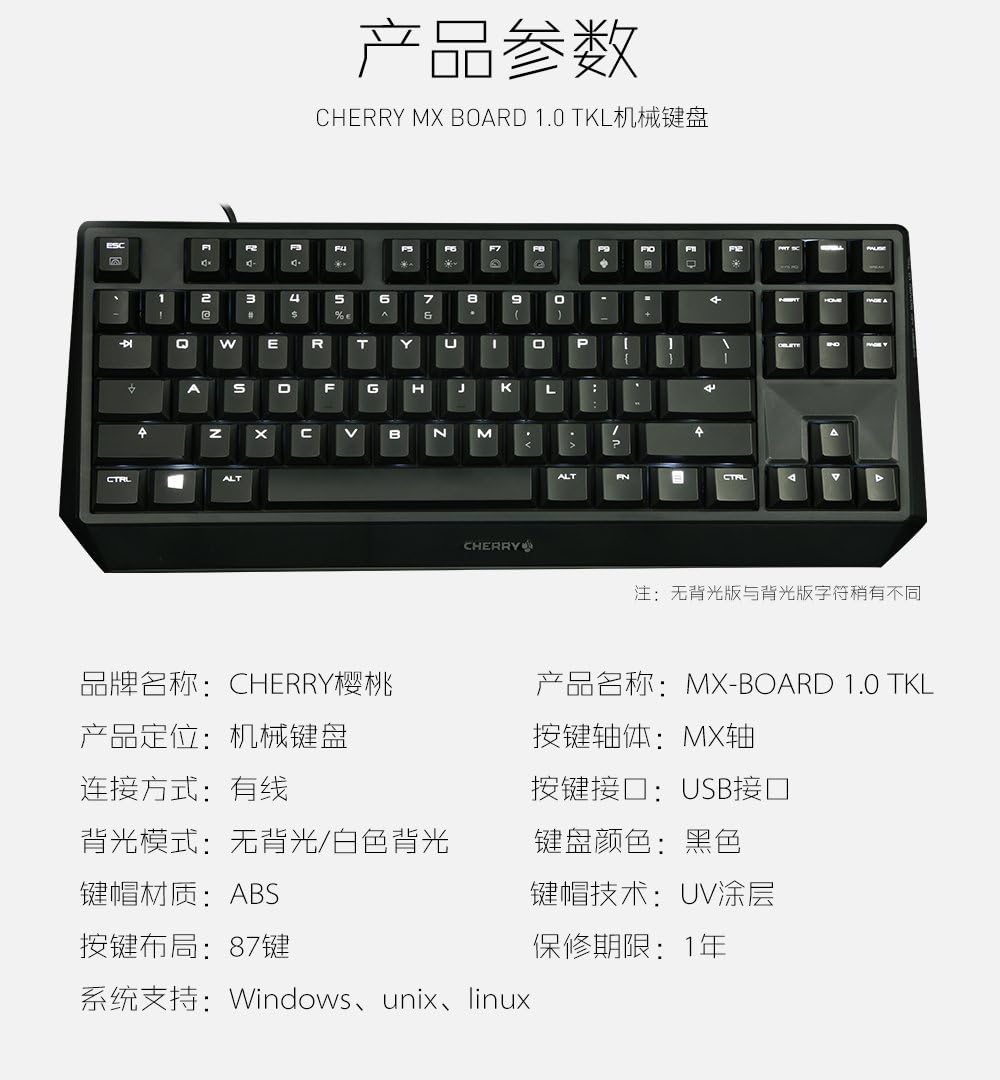
Figure 7: A detailed table outlining the technical specifications and parameters of the CHERRY MX Keyboard 1.0 TKL.
Záruka a podpora
Informace o záruce
The CHERRY MX Keyboard 1.0 TKL typically comes with a 1letá omezená záruka od data nákupu. Tato záruka se vztahuje na výrobní vady vzniklé běžným používáním. Pro případné reklamace si prosím uschovejte doklad o koupi.
For specific warranty terms and conditions, please refer to the documentation included with your product or visit the official Cherry webmísto.
Zákaznická podpora
If you require technical assistance, have questions about your product, or need to initiate a warranty claim, please contact Cherry customer support. Contact information can usually be found on the official Cherry webmístě nebo na obalu produktu.
For more information, visit the official Cherry store: Cherry Store on Amazon.


