1. Konec produktuview
The Teltonika RUT240 is an industrial 4G LTE Wi-Fi router designed for reliable cellular communication in various environments. This manual provides essential information for its proper installation, configuration, and use.
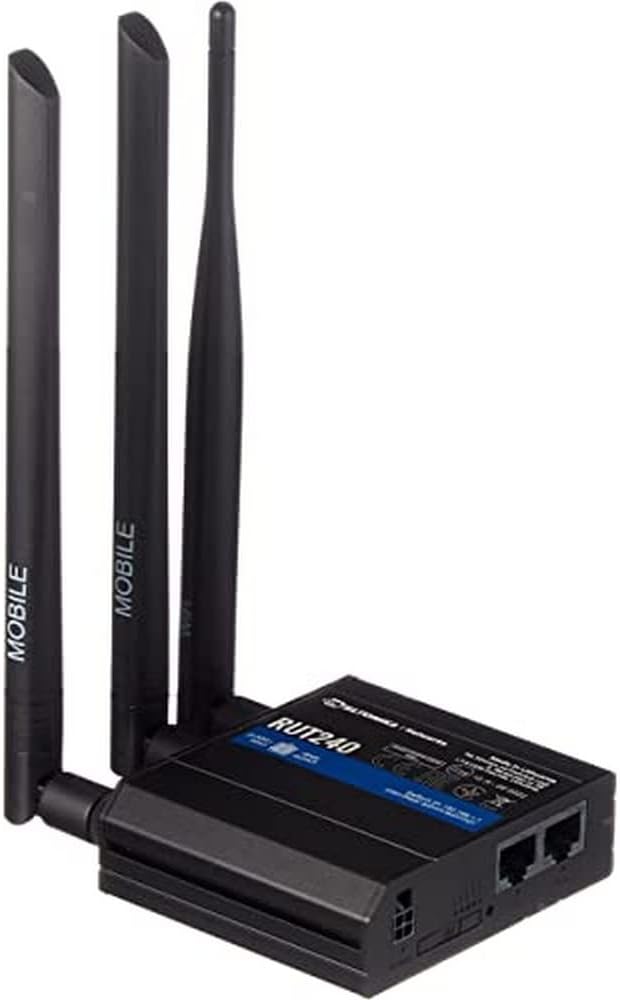
Obrázek 1: Přední view of the Teltonika RUT240 LTE Router with its three attached antennas, illustrating its compact design.
2. Obsah balení
Before proceeding with installation, verify that all items are present in the package:
- LTE router Teltonika RUT240
- Napájecí adaptér
- Ethernetový kabel
- Two LTE Antennas (magnetic mount, SMA male)
- One Wi-Fi Antenna (magnetic mount, RP-SMA male)
- Rychlý průvodce

Obrázek 2: The Teltonika RUT240 router displayed with its standard accessories, including the power adapter and an Ethernet cable.
3. Nastavení
3.1 Instalace hardwaru
- Vložte SIM kartu: Locate the SIM card slot on the side of the router. Insert your activated Mini-SIM card into the slot until it clicks into place. Ensure the SIM card is correctly oriented as indicated on the device.
- Připojit antény: Screw the two LTE antennas onto the SMA connectors labeled "MOBILE" and the Wi-Fi antenna onto the RP-SMA connector labeled "WLAN" on the router. Ensure they are securely tightened.
- Připojte napájení: Connect the power adapter to the power socket on the router and then plug the adapter into a power outlet. The router will begin to power on.
- Optional: Ethernet Connection: For initial configuration or wired network access, connect one end of the Ethernet cable to the LAN port on the router and the other end to your computer's Ethernet port.

Obrázek 3: Strana view of the Teltonika RUT240, highlighting the SIM card slot and the antenna connection points for mobile and Wi-Fi signals.

Obrázek 4: Zadní view of the Teltonika RUT240, showing the power input, SIM card slot, and the LAN/WAN Ethernet ports.
3.2 Počáteční konfigurace
- Přístup Web Rozhraní: Otevřete a web browser on your connected computer and navigate to http://192.168.1.1.
- Přihlášení: Enter the default username "admin" and the password found on the device label or packaging. You will be prompted to change the password for security.
- Průvodce rychlým nastavením: Follow the on-screen Quick Setup Wizard to configure basic settings such as mobile data connection (APN settings), Wi-Fi network name (SSID), and password.
4. Návod k obsluze
4.1 LED indikátory
The RUT240 features several LED indicators to provide status information:
- LED napájení: Indikuje stav napájení. Svítí zeleně, když je zařízení zapnuté.
- Mobile Signal Strength LEDs: Multiple LEDs indicate the strength of the cellular signal. More illuminated LEDs mean stronger signal.
- Network Type LEDs: Indicate the active cellular network type (e.g., 2G, 3G, 4G/LTE).
- Wi-Fi LED: Indikuje stav Wi-Fi modulu.
- LED diody LAN/WAN: Indikuje aktivitu na příslušných ethernetových portech.
4.2 Připojení k Wi-Fi
- Na svém zařízení (chytrý telefon, notebook) vyhledejte dostupné sítě Wi-Fi.
- Select the network name (SSID) configured during the initial setup.
- Enter the Wi-Fi password (WPA2 key) when prompted.
- Once connected, your device should have internet access via the RUT240.
4.3 Pokročilá konfigurace
Router je web interface (RutOS) offers extensive configuration options for advanced users, including VPN, firewall rules, SMS utilities, and more. Refer to the official Teltonika documentation for detailed guides on advanced features.
5. Údržba
- Aktualizace firmwaru: Regularly check for and install firmware updates from the official Teltonika webwebu, aby byl zajištěn optimální výkon, zabezpečení a přístup k novým funkcím. To lze obvykle provést prostřednictvím routeru web rozhraní.
- Čištění: Keep the router clean and free from dust. Use a soft, dry cloth. Do not use liquid cleaners.
- Podmínky prostředí: Ensure the router is operated within its specified temperature and humidity ranges to prevent damage. Avoid direct sunlight and excessive heat.
- Bezpečná hesla: Periodically change your router's login password and Wi-Fi password to maintain network security.
6. Řešení problémů
| Problém | Možná příčina | Řešení |
|---|---|---|
| Žádný přístup k internetu |
|
|
| Nelze přistupovat Web Rozhraní |
|
|
| Wi-Fi Not Visible or Connectable |
|
|
6.1 Obnovení továrního nastavení
If you encounter persistent issues, a factory reset may resolve them. To perform a factory reset:
- Ujistěte se, že je router zapnutý.
- Locate the reset button (often recessed) on the router.
- Use a thin object (e.g., a paperclip) to press and hold the reset button for approximately 10 seconds.
- Release the button when the LEDs indicate a reset (e.g., all LEDs flash). The router will reboot with factory default settings.
7. Specifikace
| Funkce | Detail |
|---|---|
| Název modelu | Teltonika RUT240 |
| Číslo modelu položky | RUT24006B000 |
| Rozměry produktu | 2.91 x 3.27 x 0.98 palce |
| Hmotnost položky | 4 miligram |
| Operační systém | RutOS |
| Technologie připojení | LAN, Wi-Fi |
| Standard bezdrátové komunikace | 802.11 XNUMX n |
| Třída frekvenčního pásma | Čtyřpásmový |
| Speciální funkce | WPS |
| Kompatibilní zařízení | Osobní počítač |
| Doporučená použití | Sledování |
| Výrobce | JSC Teltonika |
8. Záruka a podpora
For detailed warranty information, please refer to the official Teltonika website or the warranty card included with your product. Technical support is available through Teltonika's official support channels, including their website and dedicated support portal.
Online zdroje:
- Teltonika RUT240 Wiki (for comprehensive documentation and guides)
- Teltonika Networks Support


